
让我们一起学习如何使用AIDL,它其实并不难(Android)
前言
该篇文件讲述的是AIDL最基本的使用(创建、调用),关于对于AIDL更深的认识,在后续的随笔中,会持续与大家分享并探讨。
正文
- AIDL的定义(什么是AIDL?)
- AIDL的应用场景(AIDL可以做什么?)
- 如何写一个AIDL的应用?(代码)
AIDL概述(定义)
- AIDL:Android Interface Definition Language,即Android接口定义语言。也就是说:AIDL也是一种语言。
- 设计AIDL语言的目的:为了实现进程间通信。
本篇文章主要介绍的是AIDL的代码实现。关于进程间通信的分析,小伙伴们可以参考:浅谈应用进程间的通信(AIDL和IPC)
AIDL应用场景
- 如:某个应用调用支付宝的支付功能、微信的支付功能
写一个AIDL的应用 AIDL模板代码
*与你一步步掌握AIDL的应用*
需求
- 应用A:模拟一个商城应用(如:拼XX)
- 应用B:模拟一个支付应用(如:支付宝),应用中有一个支付服务在运行,服务中定义了一个带返回值的支付方法。
- 要求:在应用A中,调用应用B支付服务中的支付方法,传一个参数并获取返回值。
代码实现
应用B:被调用方
- 创建一个service:AliPayService,并在清单文件中配置信息
AndroidManifest.xml
        <!--调用远程服务,需要通过bind方式启动服务,调用服务方法-->

        <service android:name=".service.pay.AliPayService">

            <intent-filter>

                <action android:name="com.zero.notes.service.pay.xxx"/>

            </intent-filter>

        </service>
- AliPayService
import android.app.Service;

import android.content.Intent;

import android.os.Handler;

import android.os.IBinder;

import android.os.Message;

import android.util.Log;

import android.widget.Toast;

/**

 * 模拟:阿里支付服务

 */

public class AliPayService extends Service {

    @Override

    public IBinder onBind(Intent intent) {

        return new MyBinder();

    }

    //模拟支付方法

    public boolean aliPay(int money) {

        Log.e("AIDL", "服务线程:" + Thread.currentThread().getName());

        if (money > 100) {

            handler.sendEmptyMessage(1);

            return true;

        } else {

            handler.sendEmptyMessage(0);

            return false;

        }

    }

//    class MyBinder extends Binder implements IPayservice {

//        @Override

//        public boolean callAliPay(int money) throws RemoteException {

//            return aliPay(money);

//        }

//        @Override

//        public IBinder asBinder() {

//            return null;

//        }

//    }

    /**

     * 创建中间人对象(中间帮助类)

     */

    class MyBinder extends IPayservice.Stub {

        @Override

        public boolean callAliPay(int money) {

            return aliPay(money);

        }

    }

    private Handler handler = new Handler() {

        @Override

        public void handleMessage(Message msg) {

            super.handleMessage(msg);

            if (msg.what == 1) {

                Toast.makeText(getApplicationContext(), "土豪,购买成功...", Toast.LENGTH_SHORT).show();

            } else {

                Toast.makeText(getApplicationContext(), "钱太少啦,购买失败...", Toast.LENGTH_SHORT).show();

            }

        }

    };

}
- IPayservice.aidl
此处需要注意:创建的 IPayservice.aidl 文件是一个接口文件。Android Studio上可以直接创建一个AIDL文件。创建完成后,切记:把整个项目clean一下,让代码编辑器生成一些必要的文件信息。(Android Studio项目clean方式:Build -> Clean Project)
// IPayservice.aidl

package com.zero.notes.service.pay;

// Declare any non-default types here with import statements

interface IPayservice {

  boolean callAliPay(int money);

}
- MainActivity
应用B启动该服务(代码书写:kotlin语言)
class MainActivity : BaseActivity() {

    override fun onCreate(savedInstanceState: Bundle?) {

        super.onCreate(savedInstanceState)

        setContentView(R.layout.activity_main)

        initData()

    }

    private fun initData() {

        val intent = Intent(this,AliPayService::class.java)

        startService(intent)

    }

}
应用A:调用方(书写代码:Kotlin语言)
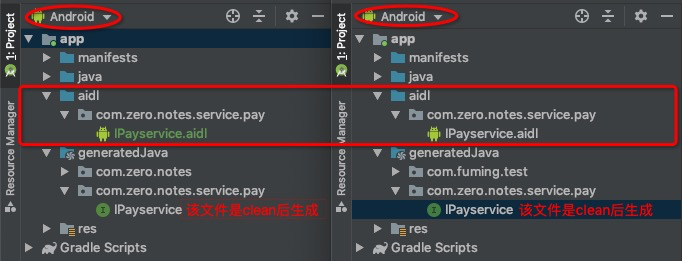
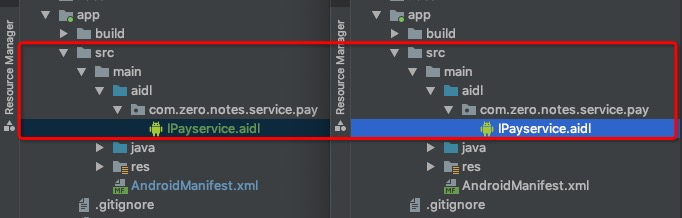
- 拷贝:把应用B 中的 IPayservice.aidl 文件拷贝到应用A内
切记::拷贝的时候,IPayservice.aidl 的路径位置必须与应用B中保持完全一致,包名、路径名要完全一致!
如图所示:图1️⃣是以Android方式查看;图2️⃣是以Project方式查看。
- 创建服务连接对象
//创建一个服务连接对象

class MyServiceConnection : ServiceConnection {

    private lateinit var iPayService: IPayservice

    override fun onServiceDisconnected(name: ComponentName?) {

    }

    override fun onServiceConnected(name: ComponentName?, service: IBinder?) {

        //2. 获取中间人对象(服务绑定成功后会返回一个中间人对象)

        iPayService = IPayservice.Stub.asInterface(service)

    }

    //获取中间人对象

    fun getIPayService():IPayservice{

        return iPayService

    }

}
- 在应用A 的 Activity 中调用服务方法
class MainActivity : AppCompatActivity() {

    private var connection: MyServiceConnection? = null

    override fun onCreate(savedInstanceState: Bundle?) {

        super.onCreate(savedInstanceState)

        setContentView(R.layout.activity_main)

        val intent = Intent()

        intent.action = "com.zero.notes.service.pay.xxx"

        intent.setPackage("com.zero.notes")

        connection = MyServiceConnection()

        bindService(intent, connection, Context.BIND_AUTO_CREATE)

        tvJump.setOnClickListener {

            val iPayService = connection?.getIPayService()

            val pay = iPayService?.callAliPay(1000)!!

            if (pay) {

                //购买成功

            } else {

                //购买失败

            }

        }

    }

    override fun onDestroy() {

        super.onDestroy()

        if (connection != null) {

            unbindService(connection)

            connection = null

        }

    }

}
- 应用A:Activity的xml文件
<?xml version="1.0" encoding="utf-8"?>

<LinearLayout

        xmlns:android="http://schemas.android.com/apk/res/android"

        android:layout_width="match_parent"

        android:gravity="center_horizontal"

        android:layout_height="match_parent"

        android:orientation="vertical">

    <TextView

            android:id="@+id/tvJump"

            android:layout_width="wrap_content"

            android:layout_marginTop="30dp"

            android:text="AIDL调用方法"

            android:textColor="#FF212121"

            android:textSize="20sp"

            android:padding="16dp"

            android:background="#66000000"

            android:textStyle="bold"

            android:layout_height="wrap_content"/>

</LinearLayout>
让我们一起学习如何使用AIDL,它其实并不难(Android)的更多相关文章
- Linux学习心得之 Linux下命令行Android开发环境的搭建
作者:枫雪庭 出处:http://www.cnblogs.com/FengXueTing-px/ 欢迎转载 Linux学习心得之 Linux下命令行Android开发环境的搭建 1. 前言2. Jav ...
- Android开发学习总结(一)——搭建最新版本的Android开发环境
Android开发学习总结(一)——搭建最新版本的Android开发环境(转) 最近由于工作中要负责开发一款Android的App,之前都是做JavaWeb的开发,Android开发虽然有所了解,但是 ...
- Flutter学习(9)——Flutter插件实现(Flutter调用Android原生
原文地址: Flutter学习(9)--Flutter插件实现(Flutter调用Android原生) | Stars-One的杂货小窝 最近需要给一个Flutter项目加个apk完整性检测,需要去拿 ...
- 【转】Android开发学习总结(一)——搭建最新版本的Android开发环境
最近由于工作中要负责开发一款Android的App,之前都是做JavaWeb的开发,Android开发虽然有所了解,但是一直没有搭建开发环境去学习,Android的更新速度比较快了,Android1. ...
- 【转】Pro Android学习笔记(四):了解Android资源(下)
处理任意的XML文件 自定义的xml文件放置在res/xml/下,可以通过R.xml.file_name来获取一个XMLResourceParser对象.下面是xml文件的例子: <rootna ...
- 【转】Pro Android学习笔记(三):了解Android资源(上)
在Android开发中,资源包括文件或者值,它们和执行应用捆绑,无需在源代码中写死,因此我们可以改变或替换他们,而无需对应用重新编译. 了解资源构成 参考阅读Android学习笔记(三八):资源res ...
- Cocos2d-x 3.1.1 学习日志12--一Cocos2dx3.1.1移植到Android平台的方法(最实用最有效的!!)
须要用到工具(依照顺序): 1.JDK 2.NDK 3.ANT 4.Adt-bundle-windows 将JDK文件夹下的bin文件夹路径加入到系统环境变量中. 解压NDK 解压Adt-bundle ...
- Android学习总结(1)——好的 Android 开发习惯
Android编码规范 java代码中不出现中文,最多注释中可以出现中文: 局部变量命名.静态成员变量命名:只能包含字母,单词首字母出第一个都为大写,其他字母都为小写: 常量命名:只能包含字母和 ,字 ...
- Android开发学习---使用Intelij idea 13.1 进行android 开发
1.为什么放弃eclipse?太卡!! 实在受不了eclipse的卡了,运行WEB项目还好,但android开发实在太慢,太慢!经常卡死,CPU经常被占满! 看网上很多人都说比Intelij idea ...
随机推荐
- 关于 .Net Core runtimeconfig 文件说明
在项目的bin\debug\netcoreapp${Version}下面能够找到这个${AppName}.runtimeconfig.json文件,简单来说,它就是用来定义用用程序所用的共享框架(.N ...
- VSCode 远程开发(带免密)
VSCode 远程开发(带免密) 简介 Visual Studio Code(以下简称 VS Code)从1.35.0版本正式提供可以在本地编辑远程开发环境的文件的功能,具体实现如下图 安装完成Rem ...
- 番茄日志发布1.0.3版本-增加Kafka支持
番茄日志(TomatoLog)能做什么 可能你是第一次听说TomatoLog,没关系,我可以从头告诉你,通过了解番茄日志,希望能帮助有需要的朋友,番茄日志处理将大大降低你采集.分析.处理日志的过程. ...
- idea快速生成实体类
1.打开idea的视图,选择Database 2.选择对应的数据库[这里是mysql为例] 3.输入自己对应的内容,输入完成可点击Test Connection进行测试,成功SUCCESS 4.点击确 ...
- 【JVM从小白学成大佬】3.深入解析强引用、软引用、弱引用、幻象引用
关于强引用.软引用.弱引用.幻象引用的区别,在很多公司的面试题中经常出现,可能有些小伙伴觉得这个知识点比较冷门,但其实大家在开发中经常用到,如new一个对象的时候就是强引用的应用. 在java语言中, ...
- $('div','li') 和 $('div , li') 和 $('div li') 区别
$('div','li')是$(子,父),是从父节点里找子,而不是找li外面的div $('div , li')才是找所有的div和li,之间不存在父子关系 $('div li') 是找div里面所有 ...
- node.js的Promise对象的使用
Promise对象是干嘛用的? 将异步操作以同步操作的流程表达出来 一.Promise对象的定义 let flag = true; const hello = new Promise(function ...
- Unity进阶:用AssetBundle和Json做了一个玩家登陆界面
版权申明: 本文原创首发于以下网站: 博客园『优梦创客』的空间:https://www.cnblogs.com/raymondking123 优梦创客的官方博客:https://91make.top ...
- 体验SpringCloud Gateway
Spring Cloud Gateway是Spring Cloud技术栈中的网关服务,本文实战构建一个SpringCloud环境,并开发一个SpringCloud Gateway应用,快速体验网关服务 ...
- list 分组
Map<Long, List<LogDataVo>> corpIdMap = list.stream().collect(Collectors.groupingBy(LogDa ...