
基于hap的文件上传和下载
序言
现在,绝大部分的应用程序在很多的情况下都需要使用到文件上传与下载的功能,在本文中结合hap利用spirng mvc实现文件的上传和下载,包括上传下载图片、上传下载文档。前端所使用的技术不限,本文重点在于后端代码的实现。希望可以跟随我的一步步实践,最终轻松掌握在hap中的文件上传和下载的具体实现。
案例
1. 数据库设计
表结构
SET FOREIGN_KEY_CHECKS=0;
-- ----------------------------
-- Table structure for tb_fruit
-- ----------------------------
DROP TABLE IF EXISTS `tb_fruit`;
CREATE TABLE `tb_fruit` (
`id` int(11) NOT NULL AUTO_INCREMENT,
`fruitName` varchar(255) DEFAULT NULL,
`picturePath` varchar(255) DEFAULT NULL,
`filePath` varchar(255) DEFAULT NULL,
PRIMARY KEY (`id`)
) ENGINE=InnoDB AUTO_INCREMENT=6 DEFAULT CHARSET=utf8;
字段描述
Id 主键自增
fruitName 水果名称
picturePath 图片路径
filePath 附件2. 先使用代码生成工具根据表结构生成对应的测试
dto层:
 package hbi.core.test.dto;

 /**Auto Generated By Hap Code Generator**/

 import com.hand.hap.mybatis.annotation.ExtensionAttribute;

 import org.hibernate.validator.constraints.Length;

 import javax.persistence.GeneratedValue;

 import javax.persistence.Id;

 import javax.persistence.Table;

 @Table(name = "tb_fruit")

 public class Fruit{

      public static final String FIELD_ID = "id";

      public static final String FIELD_FRUITNAME = "fruitname";

      public static final String FIELD_PICTUREPATH = "picturepath";

      public static final String FIELD_FILEPATH = "filepath";

      @Id

      @GeneratedValue

      private Long id;

      @Length(max = 255)

      private String fruitname;

      @Length(max = 255)

      private String picturepath;

     @Length(max = 255)

 private String filepath;

 //省略get/set方法...

 }

controller层:

 package hbi.core.test.controllers;

 import com.hand.hap.attachment.exception.FileReadIOException;

 import com.hand.hap.core.IRequest;

 import com.hand.hap.core.exception.TokenException;

 import com.hand.hap.system.controllers.BaseController;

 import com.hand.hap.system.dto.ResponseData;

 import hbi.core.test.dto.Fruit;

 import hbi.core.test.service.IFruitService;

 import net.sf.json.JSONObject;

 import org.apache.commons.lang.StringUtils;

 import org.springframework.beans.factory.annotation.Autowired;

 import org.springframework.stereotype.Controller;

 import org.springframework.validation.BindingResult;

 import org.springframework.web.bind.annotation.*;

 import org.springframework.web.multipart.MultipartFile;

 import javax.servlet.http.HttpServletRequest;

 import javax.servlet.http.HttpServletResponse;

 import java.io.*;

 import java.net.URLEncoder;

 import java.text.SimpleDateFormat;

 import java.util.*;

 @Controller

 public class FruitController extends BaseController {

     @Autowired

     private IFruitService service;

     /**

      * word文件路径

      */

     private String wordFilePath="/u01/document/userfile";

     /**

      * 图片文件路径

      */

     private String userPhotoPath = "/u01/document/userphoto";

     /**

      * 文件最大 5M

      */

     public static final Long FILE_MAX_SIZE = 5*1024*1024L;

     /**

      * 允许上传的图片格式

      */

     public static final List<String> IMG_TYPE = Arrays.asList("jpg", "jpeg", "png", "bmp");

     /**

      * 允许上传的文档格式

      */

     public static final List<String> DOC_TYPE = Arrays.asList("pdf", "doc", "docx");

     /**

      * ContentType

      */

     public static final Map<String, String> EXT_MAPS = new HashMap<>();

     static {

         // image

         EXT_MAPS.put("jpg", "image/jpeg");

         EXT_MAPS.put("jpeg", "image/jpeg");

         EXT_MAPS.put("png", "image/png");

         EXT_MAPS.put("bmp", "image/bmp");

         // doc

         EXT_MAPS.put("pdf", "application/pdf");

         EXT_MAPS.put("ppt", "application/vnd.ms-powerpoint");

         EXT_MAPS.put("doc", "application/msword");

         EXT_MAPS.put("doc", "application/wps-office.doc");

         EXT_MAPS.put("docx", "application/vnd.openxmlformats-officedocument.wordprocessingml.document");

     }

     /**

      * @author jiaqing.xu@hand-china.com

      * @date 2017/9/4 17:23

      * @param wordFile  photoFile fruitName

      * @return List<Fruit>

      * @description 保存水果信息

      */

     @RequestMapping(value = {"/api/public/upload/fruit/submit"}, method = RequestMethod.POST)

     @ResponseBody

     public List<Fruit> fruitSubmit(@RequestParam(value = "wordFile", required = true) MultipartFile wordFile,@RequestParam(value = "photoFile", required = true) MultipartFile photoFile, @RequestParam(value="fruitName",required = true) String fruitName,HttpServletRequest request){

         IRequest requestContext = createRequestContext(request);

         //上传word文件到磁盘

         Map<String,Object> result1 = uploadFile(wordFile,wordFilePath,DOC_TYPE,null);

         //上传图片文件到磁盘

         Map<String, Object> result2 = uploadFile(photoFile,userPhotoPath, IMG_TYPE, 200);

         List<Fruit> list = new ArrayList<>();

         //如果创建成功则保存相应路径到数据库

         if((boolean)result1.get("success")&&(boolean)result2.get("success")){

             Fruit fruit = new Fruit();

             fruit.setFruitname(fruitName);

             //设置图片路径

             fruit.setPicturepath((String) result2.get("path"));

             //设置附件路径

             fruit.setFilepath((String) result1.get("path"));

             //插入

             fruit = service.insertSelective(requestContext,fruit);

             list.add(fruit);

         }

         return list;

     }

     /**

      * @author jiaqing.xu@hand-china.com

      * @date 2017/9/4 16:18

      * @param

      * @return

      * @description  【通用】 上传文件到磁盘的某一个目录

      */

     public Map<String, Object> uploadFile(MultipartFile file, String path, List<String> fileTypes, Integer ratio){

         Map<String, Object> results = new HashMap<>();

         results.put("success", false);

         if(file == null || file.getSize() < 0 || StringUtils.isBlank(file.getOriginalFilename())){

             results.put("message", "文件为空");

             return results;

         }

         if(file.getSize() > FILE_MAX_SIZE){

             results.put("message", "文件最大不超过" + FILE_MAX_SIZE/1024/1024 + "M");

             return results;

         }

         String originalFilename = file.getOriginalFilename();

         if(!fileTypes.contains(originalFilename.substring(originalFilename.lastIndexOf(".")+1))){

             results.put("message", "文件格式不正确");

             return results;

         }

         SimpleDateFormat formatter = new SimpleDateFormat("yyyyMMddHHmmssSSS");

         String datetime = formatter.format(new Date());

         String yearmonth = datetime.substring(0, 6);

         // 在基础路径上加上年月路径

         String fileDir = path + "/" + yearmonth;

         // 文件名以 [_时间戳_随机数#原文件名]的形式 随机数防止重复文件名

         String randomNumber = String.valueOf((Math.random() * 90000) + 10000).substring(0, 5);

         String fileName = "_" + datetime + randomNumber + "=" + originalFilename;

         // 文件路径

         String filePath = fileDir + "/" + fileName;

         try {

             // 创建目录

             File dir = new File(fileDir);

             if(!dir.exists() && !dir.isDirectory()){

                 dir.mkdirs();

             }

             // 文件输入流

             InputStream is = file.getInputStream();

             // 输出流

             OutputStream os = new FileOutputStream(filePath);

             // 输出文件到磁盘

             int len = 0;

             byte[] buffer = new byte[2048];

             while((len = is.read(buffer, 0, 2048)) != -1){

                 os.write(buffer, 0, len);

             }

             os.flush();

             os.close();

             is.close();

             //向结果中保存状态消息和存储路径

             results.put("success", true);

             results.put("message", "SUCCESS");

             results.put("path", filePath);

             // 压缩图片

             if(ratio != null){

                 //ImgExif.ExifInfoToRotate(filePath);

                 ImgCompress imgCompress = new ImgCompress(filePath);

                 imgCompress.setFileName(filePath);

                 imgCompress.resizeByWidth(ratio);

             }

         } catch (Exception e) {

             e.printStackTrace();

             results.put("message", "ERROR");

             return results;

         }

         return results;

     }

     /**

      * @author jiaqing.xu@hand-china.com

      * @date 2017/9/4 17:23

      * @param

      * @return

      * @description  【通用】 读取上传的文件  将文件以流的形式输出

      */

     @RequestMapping(value = "/api/public/read/file")

     public void readFile(@RequestParam String path, HttpServletResponse response) throws FileReadIOException, TokenException {

         Map<String, Object> results = new HashMap<>();

         try {

             File file = new File(path);

             if(!file.exists()){

                 results.put("success", false);

                 results.put("message", "文件不存在");

                 JSONObject jsonObject = JSONObject.fromObject(results);

                 response.getWriter().write(jsonObject.toString());

                 return;

             }

             // 类型

             String contentType = EXT_MAPS.get(path.substring(path.lastIndexOf(".") + 1));

             // 设置头

             response.addHeader("Content-Disposition", "attachment;filename=\"" + URLEncoder.encode(path.substring(path.indexOf("=") + 1), "UTF-8") + "\"");

             response.setContentType(contentType + ";charset=UTF-8");

             response.setHeader("Accept-Ranges", "bytes");

             // 输出文件

             InputStream is = new FileInputStream(file);

             OutputStream os = response.getOutputStream();

             int len = 0;

             byte[] buffer = new byte[2048];

             while ((len =  is.read(buffer, 0, 2048)) != -1){

                 os.write(buffer, 0, len);

             }

             os.flush();

             os.close();

             is.close();

         } catch (IOException e) {

             e.printStackTrace();

         }

     }

 }
说明:
(1)文件保存路径wordFilePath、 水果照片保存路径userPhotoPath可以通过配置文件进行配置。
(2)其中保存的文件的路径在项目的根路径下,比如我的项目在D盘的某一个文件夹下,则生成的word文件的位置为D盘/u01/document/userfile路径下.
3. postman测试

注意点:在使用postman测试时,使用post请求,参数中body为form-data,依次将需要的参数填写到对应的位置。
返回后的数据为插入数据库中的记录。
4. 运行结果
数据库中插入的新的记录:

磁盘中的word文件:

磁盘中的图片:

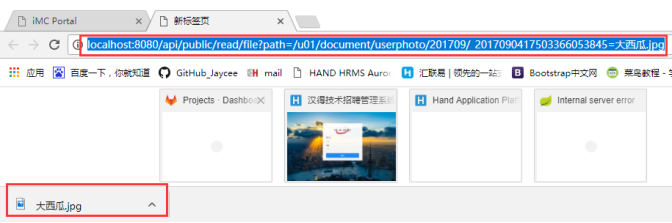
浏览器进行下载测试:

基于hap的文件上传和下载的更多相关文章
- 基于jsp的文件上传和下载
参考: 一.JavaWeb学习总结(五十)--文件上传和下载 此文极好,不过有几点要注意: 1.直接按照作者的代码极有可能listfile.jsp文件中 <%@taglib prefix=&qu ...
- koa2基于stream(流)进行文件上传和下载
阅读目录 一:上传文件(包括单个文件或多个文件上传) 二:下载文件 回到顶部 一:上传文件(包括单个文件或多个文件上传) 在之前一篇文章,我们了解到nodejs中的流的概念,也了解到了使用流的优点,具 ...
- java web学习总结(二十四) -------------------Servlet文件上传和下载的实现
在Web应用系统开发中,文件上传和下载功能是非常常用的功能,今天来讲一下JavaWeb中的文件上传和下载功能的实现. 对于文件上传,浏览器在上传的过程中是将文件以流的形式提交到服务器端的,如果直接使用 ...
- (转载)JavaWeb学习总结(五十)——文件上传和下载
源地址:http://www.cnblogs.com/xdp-gacl/p/4200090.html 在Web应用系统开发中,文件上传和下载功能是非常常用的功能,今天来讲一下JavaWeb中的文件上传 ...
- JavaWeb学习总结,文件上传和下载
在Web应用系统开发中,文件上传和下载功能是非常常用的功能,今天来讲一下JavaWeb中的文件上传和下载功能的实现. 对于文件上传,浏览器在上传的过程中是将文件以流的形式提交到服务器端的,如果直接使用 ...
- java文件上传和下载
简介 文件上传和下载是java web中常见的操作,文件上传主要是将文件通过IO流传放到服务器的某一个特定的文件夹下,而文件下载则是与文件上传相反,将文件从服务器的特定的文件夹下的文件通过IO流下载到 ...
- JavaWeb学习总结(五十)——文件上传和下载
在Web应用系统开发中,文件上传和下载功能是非常常用的功能,今天来讲一下JavaWeb中的文件上传和下载功能的实现. 对于文件上传,浏览器在上传的过程中是将文件以流的形式提交到服务器端的,如果直接使用 ...
- JavaWeb——文件上传和下载
在Web应用系统开发中,文件上传和下载功能是非常常用的功能,今天来讲一下JavaWeb中的文件上传和下载功能的实现. 对于文件上传,浏览器在上传的过程中是将文件以流的形式提交到服务器端的,如果直接使用 ...
- JavaWeb学习 (二十八)————文件上传和下载
在Web应用系统开发中,文件上传和下载功能是非常常用的功能,今天来讲一下JavaWeb中的文件上传和下载功能的实现. 对于文件上传,浏览器在上传的过程中是将文件以流的形式提交到服务器端的,如果直接使用 ...
随机推荐
- Linux之Shell编程(14)
变量: 定义变量的规则: 1)变量名可以由字母.数字和下划线组成,但不能以数字开头 2)等号两侧不能有空格 3)变量名一般习惯大写 将命令的返回值赋值给变量: 1)使用``将命令括起来 2)使用$() ...
- 定时器Timer的运用
1.Timer调度任务的方法
- 牛客小白月赛6 水题 求n!在m进制下末尾0的个数 数论
链接:https://www.nowcoder.com/acm/contest/135/C来源:牛客网 题目描述 其中,f(1)=1;f(2)=1;Z皇后的方案数:即在Z×Z的棋盘上放置Z个皇后,使其 ...
- CF989C A Mist of Florescence 构造 思维好题 第八题
A Mist of Florescence time limit per test 1 second memory limit per test 256 megabytes input standar ...
- odoo12从零开始:一、安装odoo运行环境(windows10)
前言 鉴于好多朋友说没有mac电脑,windows开发其实也差不了多远,只是个人习惯问题,而且吧,windows的电脑其实配环境也挺快的其实,我在这里再稍微补一个比较简单的windows环境部署,希望 ...
- Excel如何动态获取列名
遇到一个动态列,N行数据的求和,但是求和时需要Excel列名(A,B,C...)当时觉得这太非常难了.后来仔细研究了下Excel列名,都是从A到Z,然后AA再到AZ,以此类推. 如此的话就好弄了.通过 ...
- Winform中使用FastReport实现简单的自定义PDF导出
场景 FastReport安装包下载.安装.去除使用限制以及工具箱中添加控件: https://blog.csdn.net/BADAO_LIUMANG_QIZHI/article/details/10 ...
- Winform中实现读取xml配置文件并动态配置ZedGraph的RadioGroup的选项
场景 Winform中对ZedGraph的RadioGroup进行数据源绑定,即通过代码添加选项: https://blog.csdn.net/BADAO_LIUMANG_QIZHI/article/ ...
- 前端黑魔法:webworker动态化,无需JS文件创建worker
前言 前几天,我和一位知乎网友讨论这个问题的时候,觉得这非常有意思,所以写了这篇文章作为记录 本文的思路和项目代码来源于知友 @simon3000,我加以修饰以更符合理解的需求. 本文所用代码已经 ...
- Ubuntu18.04安装测试TensorFlow-GPU
1 安装Ubuntu18.04.03 lts spt@spt-ts:~$ lsb_release -a No LSB modules are available. Distributor ID: Ub ...