
API gateway 之 kong 安装 (二)
一、系统环境
[root@kong ~]# service iptables status

iptables: Firewall is not running.

[root@kong ~]# getenforce

Disabled

[root@kong ~]# cat /etc/system-release

CentOS release 6.7 (Final)

[root@kong ~]# uname -a

Linux kong 2.6.-.el6.x86_64 # SMP Thu Jul  :: UTC  x86_64 x86_64 x86_64 GNU/Linux
二、kong的安装
根据kong的官网文档进行安装 官网:https://konghq.com/install/
1、yum源配置
[root@kong ~]# cat /etc/yum.repos.d/bintray-kong-kong-community-edition-rpm.repo

[bintraybintray-kong-kong-community-edition-rpm]

name=bintray-kong-kong-community-edition-rpm

baseurl=https://kong.bintray.com/kong-community-edition-rpm/centos/6

gpgcheck=

repo_gpgcheck=

enabled=
2、安装kong 默认安装的 kong-0.10.4-1.noarch,官网已经更新到了0.13.x了,也可以手动下载最新版的rpm包安装
[root@kong ~]# yum install -y kong
如果安装是报如下错误,就在/etc/yum.conf 配置文件 sslverify=false后,重新执行上面命令
https://kong.bintray.com/kong-community-edition-rpm/centos/6/kong-community-edition-0.10.4.el6.noarch.rpm: [Errno 14] Peer cert cannot be verified or peer cert invalid
3、安装 kong 需要的数据库,默认选择的是postgreSQL,kong支持2种数据库存储(postgreSQL 和 Cassandra)
postgreSQL官网:https://www.postgresql.org/download/
Cassandra官网:http://cassandra.apache.org/download/
这里我们以postgreSQL为例进行安装
a、配置yum源
https://www.postgresql.org/download/linux/redhat/
yum install https://download.postgresql.org/pub/repos/yum/10/redhat/rhel-6-x86_64/pgdg-centos10-10-2.noarch.rpm

yum install postgresql10

yum install postgresql10-server

service postgresql- initdb

chkconfig postgresql- on
b、修改postgreSQL配置文件
/var/lib/pgsql/10/data/postgresql.conf
listen_addresses = 'localhost'

替换成如下:

listen_addresses = '*'
/var/lib/pgsql/10/data/pg_hba.conf
host    all             all             127.0.0.1/            ident

换成如下:

host    all             all             127.0.0.1/            trust
c、启动postgreSQL
service postgresql- start
d、创建kong需要的库、授权 并 把相关的数据写入库
[root@base ~]# su - postgres

-bash-4.1$ psql

psql (8.4., server 10.3)

WARNING: psql version 8.4, server version 10.0.

         Some psql features might not work.

Type "help" for help.

postgres=# CREATE USER kong; CREATE DATABASE kong OWNER kong;

CREATE ROLE

CREATE DATABASE

postgres=# quit

postgres-# \q

-bash-4.1$ exit

logout

[root@base ~]# kong migrations up

...................

response-ratelimiting migrated up to: ---321512_response-rate-limiting_policies

migrating acl for database kong

acl migrated up to: ---841841_init_acl

 migrations ran
e、修改普通用户描述符,至少4096
ulimit -HSn 65535
echo "ulimit -HSn 65535" >> /etc/rc.local
4、启动 kong
[root@base ~]# kong start

Kong started

[root@base ~]# netstat -lntp|grep nginx

tcp               0.0.0.0:                0.0.0.0:*                   LISTEN      /nginx

tcp               0.0.0.0:                0.0.0.0:*                   LISTEN      /nginx

tcp               0.0.0.0:                0.0.0.0:*                   LISTEN      /nginx

tcp               0.0.0.0:                0.0.0.0:*                   LISTEN      /nginx

[root@base ~]# curl -i -X GET http://localhost:8001/

HTTP/1.1  OK

Date: Thu,  Apr  :: GMT

Content-Type: application/json; charset=utf-

Transfer-Encoding: chunked

Connection: keep-alive

Access-Control-Allow-Origin: *

Server: kong/0.10.

{"timers":{"running":,"pending":},"configuration":{"admin_error_log":"logs\/error.log","cassandra_lb_policy":"RoundRobin","admin_access_log":"logs\/admin_access.log","ca ..................

..............................
三、Kong UI管理工具
安装说明:https://github.com/PGBI/kong-dashboard
1、安装kong管理工具的环境依赖 nodejs 及 npm
nodejs 及 npm安装教程:https://nodejs.org/en/download/package-manager/#enterprise-linux-and-fedora
curl --silent --location https://rpm.nodesource.com/setup_9.x | sudo bash -

yum -y install nodejs
2、使用 npm 安装 kong-dashboard
npm install -g kong-dashboard

nohup kong-dashboard start --kong-url http://192.168.1.128:8001 &

也可以基于basic 认证,在登录是要求输入密码

nohup kong-dashboard start --kong-url http://192.168.1.128:8001 --basic-auth admin=123456 &
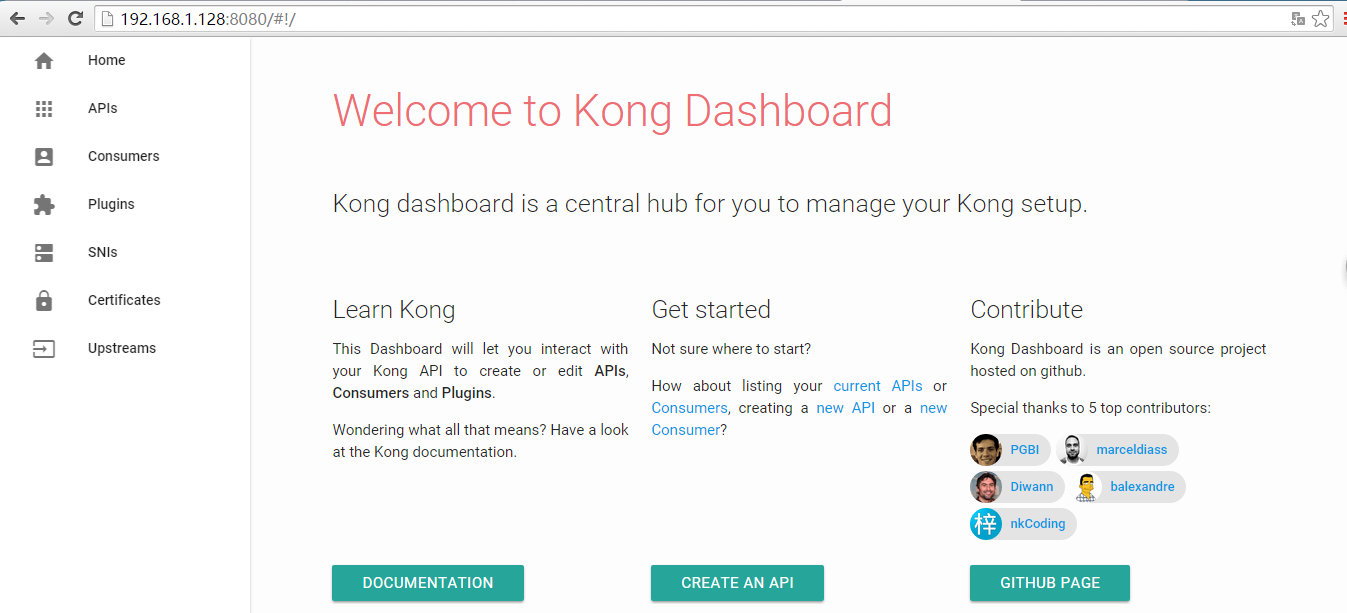
3、访问 kong-dashboard http://192.168.1.128:8080 (输入刚刚配置的账号密码)
四、Kong 桌面管理工具
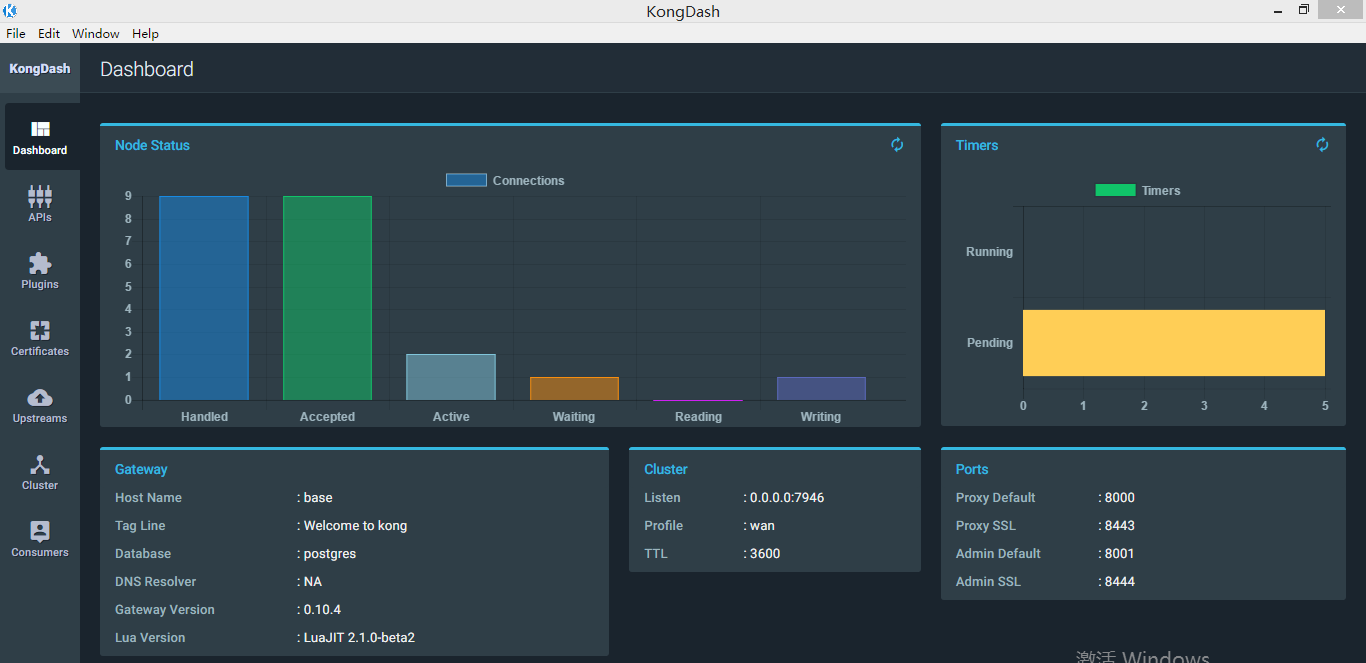
Kong 桌面管理工具:https://github.com/ajaysreedhar/kongdash 有linux版本,windows版本,mac版本。
下载地址:https://github.com/ajaysreedhar/kongdash/releases/download/v0.3.0/kongdash-0.3.0-ia32.exe
访问地址:http://192.168.1.128:8001/
API gateway 之 kong 安装 (二)的更多相关文章
- API gateway 之 kong 安装
kong安装: https://getkong.org/install/centos/ 下载指定版本rpm: wget https://bintray.com/kong/kong-community- ...
- API gateway 之 kong 基本操作 (三)
一.演示环境准备 1.nginx配置 [root@nginx conf.d]# pwd /etc/nginx/conf.d [root@nginx conf.d]# ls conf_bak kong_ ...
- API gateway 之 kong 基本介绍 (一)
一.API网关概念介绍 API 网关,即API Gateway,是大型分布式系统中,为了保护内部服务而设计的一道屏障,可以提供高性能.高可用的 API托管服务,从而帮助服务的开发者便捷地对外提供服务, ...
- API Gateway - KONG 安装与配置
简介 Kong,是由Mashape公司开源的,基于Nginx的API gateway 特点 可扩展,支持分布式 模块化 功能:授权.日志.ip限制.限流.api 统计分析(存在商业插件Galileo等 ...
- Docker安装Kong API Gateway并使用
我最新最全的文章都在南瓜慢说 www.pkslow.com,文章更新也只在官网,欢迎大家来喝茶~~ 1 简介 Kong不是一个简单的产品,本文讲的Kong主要指的是Kong API Gateway,即 ...
- kong API gateway
参考:https://www.cnblogs.com/chenjinxi/p/8724564.html 一.简介 Kong,是由Mashape公司开源的,基于Nginx的API gateway. 二. ...
- 关于kong | API Gateway
目录 为什么需要 API 网关(more) kong的概念 为什么使用Kong Kong 的管理方式 高可扩展性的背后-插件机制 [前言]: Kong是一个云原生,高效,可扩展的分布式 API 网关. ...
- 微服务实战(二):使用API Gateway
微服务实战(一):微服务架构的优势与不足 微服务实战(二):使用API Gateway 微服务实战(三):深入微服务架构的进程间通信 微服务实战(四):服务发现的可行方案以及实践案例 微服务实践(五) ...
- API Gateway : Kong
what problems 多个服务要写自己的log,auth,对于比较耗时的,有时还要高流量限制. solution intro 单点部署的情况: why not just haproxy log ...
随机推荐
- uC/OS-III 时间管理(二)
时间管理就是一种建立在时钟节拍上,对操作系统任务的运行实现时间上管理的一种系统内核机制. 常用以下五个函数: OSTimeDly() OSTimeDlyHMSM() OSTimeDlyResume() ...
- 利用CSS制作图形效果
前言 关于如何使用CSS来制作图形,比如说圆形,半圆形,三角形等的相关教程还是挺多的,今天我主要想解释一下里面一些demo的实现原理,话不多说,开始吧 以下所有内容只使用一个HTML元素.任何类型 ...
- MongoDB 学习笔记之 检测存储引擎
检测存储引擎: db.serverStatus().storageEngine db.serverStatus().wiredTiger (转)WiredTiger测试结果 单纯写的测试结果 结论:W ...
- Vue三步完成跨域请求
三步完成跨域请求 ①main.js中: Vue.prototype.HOME = '/api'; ② config/index.js中: module.exports = { dev: { // Pa ...
- 【SpingBoot】spring静态工具类注入问题
package cn.zwqh.action; import javax.annotation.PostConstruct; import javax.annotation.Resource; imp ...
- mysql中间件分享(Mysql-prxoy,Atlas,DBProxy,Amoeba,cobar,TDDL)
hello 各位小伙伴大家好,我是小栈君,这期我们分享关于mysql中间件的研究,也就是数据层的读写分离和负载均衡,希望能够在实际的应用中能够帮助到各位小伙伴. 下期我们将继续分享go语言的系列讲解, ...
- 【CJOJ】为了博多
Description 做了个噩梦,梦见我的 n 把刀到60级会二次变身,变成一个 对推6图有xi点贡献,刷大阪城有yi点贡献 的刀,于是要把刀分成两队一队刷大阪城另一队推6图 . 但是有m对兄弟刀在 ...
- 浅谈json web token及应用
Json Web Token (JWT),是一个非常轻巧的规范,这个规范允许在网络应用环境间客户端和服务器间较安全的传递信息.该token被设计为紧凑且安全的,特别适用于分布式站点的单点登录(SSO) ...
- Spring Boot2 系列教程(十三)Spring Boot 中的全局异常处理
在 Spring Boot 项目中 ,异常统一处理,可以使用 Spring 中 @ControllerAdvice 来统一处理,也可以自己来定义异常处理方案.Spring Boot 中,对异常的处理有 ...
- java并发基础及原理
java并发基础知识导图 一 java线程用法 1.1 线程使用方式 1.1.1 继承Thread类 继承Thread类的方式,无返回值,且由于java不支持多继承,继承Thread类后,无法再继 ...