
Android layout属性之gravity和layout_gravity
1. gravity用来描述当前view的内容在view中的位置。
gravity是控制其内容或者包含的views在该view(或view group)中的位置
2. layout_gravity是表示该view在其父容器view group中的位置。
gravity的中文意思就是”重心“,就是表示view横向和纵向的停靠位置
android:gravity:是对view控件本身来说的,是用来设置view本身的内容应该显示在view的什么位置,默认值是左侧。
android:layout_gravity:是相对于包含改元素的父元素来说的,设置该元素在父元素的什么位置
比如TextView: android:layout_gravity表示TextView在界面上的位置,android:gravity表示TextView文本在TextView的什么位置,默认值是左侧.
基本选项值:
| Value | Description |
| top | Put the object at the top of its container, not changing its size. 将对象放在其容器的顶部,不改变其大小. |
| bottom | Put the object at the bottom of its container, not changing its size. 将对象放在其容器的底部,不改变其大小. |
| left | Put the object at the left edge of its container, not changing its size. 将对象放在其容器的左侧,不改变其大小. |
| right | Put the object at the right edge of its container, not changing its size. 将对象放在其容器的右侧,不改变其大小. |
| center_vertical | Place object in the vertical center of its container, not changing its size. 将对象纵向居中,不改变其大小. 垂直对齐方式:垂直方向上居中对齐。 |
| fill_vertical | Grow the vertical size of the object if needed so it completely fills its container. 必要的时候增加对象的纵向大小,以完全充满其容器. 垂直方向填充 |
| center_horizontal | Place object in the horizontal center of its container, not changing its size. 将对象横向居中,不改变其大小. 水平对齐方式:水平方向上居中对齐 |
| fill_horizontal | Grow the horizontal size of the object if needed so it completely fills its container. 必要的时候增加对象的横向大小,以完全充满其容器. 水平方向填充 |
| center | Place the object in the center of its container in both the vertical and horizontal axis, not changing its size. 将对象横纵居中,不改变其大小. |
| fill | Grow the horizontal and vertical size of the object if needed so it completely fills its container. This is the default. 必要的时候增加对象的横纵向大小,以完全充满其容器. |
| clip_vertical | Additional option that can be set to have the top and/or bottom edges of the child clipped to its container's bounds. The clip is based on the vertical gravity: a top gravity clips the bottom edge, a bottom gravity clips the top edge, and neither clips both edges.
附加选项,用于按照容器的边来剪切对象的顶部和/或底部的内容. 剪切基于其纵向对齐设置:顶部对齐时,剪切底部;底部对齐时剪切顶部;除此之外剪切顶部和底部. 垂直方向裁剪 |
| clip_horizontal | Additional option that can be set to have the left and/or right edges of the child clipped to its container's bounds. The clip is based on the horizontal gravity: a left gravity clips the right edge, a right gravity clips the left edge, and neither clips both edges.
附加选项,用于按照容器的边来剪切对象的左侧和/或右侧的内容. 剪切基于其横向对齐设置:左侧对齐时,剪切右侧;右侧对齐时剪切左侧;除此之外剪切左侧和右侧. 水平方向裁剪 |
如下例子
- <?xmlversion="1.0"encoding="utf-8"?>
- <LinearLayoutxmlns:android="http://schemas.android.com/apk/res/android"
- android:orientation="vertical"
- android:layout_width="fill_parent"
- android:layout_height="fill_parent"
- >
- <TextView
- android:layout_width="100dip"
- android:layout_height="100dip"
- android:layout_gravity="bottom|center_horizontal"
- android:gravity="center|bottom"
- android:background="#00FF00"
- android:text="@string/textview"
- />
- <Button
- android:layout_width="100dip"
- android:layout_height="100dip"
- android:layout_gravity="bottom|left"
- android:gravity="left|top"
- android:background="#FF0000"
- android:text="@string/button"
- />
- </LinearLayout>
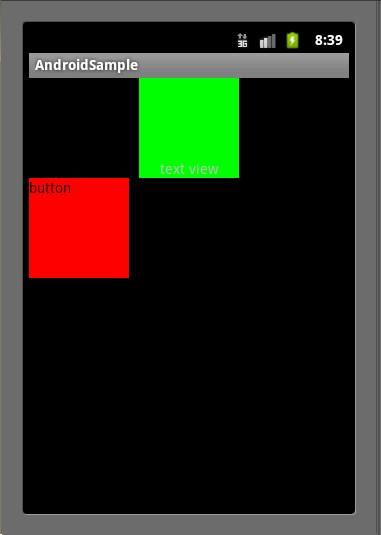
注意,TextView并没有按照我们设置的android:layout_gravity属性那样显示在界面的下方正中央,Button也没有显示在界面的左下方。这是因为我们设置了 LinearLayout的android:orientation属性为"vertical"。对于LinearLayout如果设置 android:orientation="vertical",那么android:layout_gravity的设置只在水平方向生效,如上图 TextView显示在屏幕的水平正中央,而Button显示在水平方向的最左边;如果设置 android:orientation="horizontal",那么android:layout_gravity属性只在垂直方向生效
Android layout属性之gravity和layout_gravity的更多相关文章
- Android Layout属性
通用属性 android:layout_height android:layout_width 值 含义 fill_parent/match_parent 高度或者宽度对齐到父控件 wrap_cont ...
- Android layout属性大全
第一类:属性值 true或者 false android:layout_centerHrizontal 水平居中 android:layout_centerVertical 垂直居中 ...
- android layout 属性大全
第一类:属性值为true可false android:layout_centerHrizontal 水平居中 android:layout_centerVertical 垂直居中 android:la ...
- Android Layout属性笔记
android:id 为控件指定相应的ID android:text 指定控件当中显示的文字,需要注意的是,这里尽量使用strings.xml文件当中的字符串 android:gravity 指定Vi ...
- Android:layout属性大全
Android layout属性大全 第一类:属性值 true或者 false android:layout_centerHrizontal 水平居中android:layout_centerVert ...
- Xamarin Layout属性(转)
第一类:属性值 true或者 false android:layout_centerHrizontal 水平居中 android:layout_centerVertical 垂直居中 android: ...
- Android开发UI之android:gravity / android:layout_Gravity,android:padding / android:layout_margin属性区分
android:gravity / android:layout_Gravity区别: android:gravity 是设置该view里面的内容相对于该view的位置,例如设置button里面的te ...
- Android布局(一)layout_gravity 属性和 gravity属性的区别
安卓中的 layout_gravity 属性和 gravity属性 有啥区别? LinearLayout有两个非常相似的属性: android:gravity与android:layout_gravi ...
- 【Android UI】Android Layout XML属性
Layout对于迅速的搭建界面和提高界面在不同分辨率的屏幕上的适应性具有很大的作用.这里简要介绍Android的Layout和研究一下它的实现. Android有Layout:FrameLayout, ...
随机推荐
- List转换成JSON对象报错(四)
List转换成JSON对象 1.具体错误如下 Exception in thread "main" java.lang.NoClassDefFoundError: org/apac ...
- HighCharts基本折线图
1.设计源码 <!DOCTYPE html> <!-- To change this license header, choose License Headers in Projec ...
- live555编译环境
Ⅰ live555简介 Live555 是一个为流媒体提供解决方案的跨平台的C++开源项目,它实现了对标准流媒体传输协议如RTP/RTCP.RTSP.SIP等的支持.Live555实现了对多种音视频编 ...
- Flex报错之二
1.错误描述 SecurityError: Error #2148: SWF 文件 file:///D:/Adobe Flash Builder 4 Installer/demo1/bin-debug ...
- 获取对固定列不重复的新DataTable
获取对固定列不重复的新DataTable ///<summary> /// 获取对固定列不重复的新DataTable /// </summary> ///<param ...
- OpenStack_I版 7.Cinder部署
Cinder提供块存储 Cinder安装 创建相关的目录 创建数据库 修改Cinder配置文件 同步数据库 keystone相关配置 ...
- BFS POJ2251 Dungeon Master
B - Dungeon Master Time Limit:1000MS Memory Limit:65536KB 64bit IO Format:%I64d & %I64u ...
- 异常-----Template user.ftl not found
freemarker 1.错误描述 java.io.FileNotFoundException: Template user.ftl not found. at freemarker.template ...
- 【转】Java中hashCode的作用
以下是关于HashCode的官方文档定义: hashcode方法返回该对象的哈希码值.支持该方法是为哈希表提供一些优点,例如,java.util.Hashtable 提供的哈希表. hashCode ...
- 内置函数:filter函数
功能: filter函数用于过滤序列,将满足条件的元素取出来构成新的序列. 用法: filter(function, iterable) 接受两个参数,第一个函数为过滤函数(返回True后者False ...