
Python之Suds库调用WCF时复杂参数序列化
今年主要做自动化测技术支持工作,最近一直在做接口自动化这块,前些天在研究将web页面模拟http进行接口自动化,这周杭州那边想测试WCF服务,所以这两天一直在探索。遇到的第一个问题就是服务参数传参序列化的问题,怎么让python这边创建的对象能被WCF识别到。正好在大学的时候也学了WCF,不过一直都没用过,这次算是重温一下,用的都是一些WCF基础。
一、WCF服务准备
1.定义契约Contract
这里IServiceDemo.cs定义了服务契约IServiceDemo,并定义了几个操作契约OperationContract,5个操作契约传的参数不同,用来做测试,同时自定义了两个数据契约DataContract.并在ServiceDemo.svc中实现了上面操作契约。
using System;

using System.Collections.Generic;

using System.Linq;

using System.Runtime.Serialization;

using System.ServiceModel;

using System.ServiceModel.Web;

using System.Text;

namespace WcfServiceDemo

{

    // 注意: 使用“重构”菜单上的“重命名”命令,可以同时更改代码和配置文件中的接口名“IService1”。

    [ServiceContract]

    public interface IServiceDemo

    {

        [OperationContract]

        string GetSimpleData(string value);

        [OperationContract]

        List<Item> GetListData(List<Item> items);

        [OperationContract]

        Item GetModelData(Item item);

        [OperationContract]

        Dictionary<string,string> GetDicData(Dictionary<string,string> dic);

        [OperationContract]

        Dictionary<string, Dictionary<string,int>[]> GetDicDicData(Dictionary<string, Dictionary<string, int>[]> dic);

    }

    [DataContract]

    public class ItemMenu

    {

        [DataMember]

        public string Name { get; set; }

        [DataMember]

        public string Value { get; set; }

    }

    [DataContract]

    public class Item

    {

        [DataMember]

        public List<ItemMenu> ItemMenus { get; set; }

    }

}
using System;

using System.Collections.Generic;

using System.Linq;

using System.Runtime.Serialization;

using System.ServiceModel;

using System.ServiceModel.Web;

using System.Text;

namespace WcfServiceDemo

{

    // 注意: 使用“重构”菜单上的“重命名”命令,可以同时更改代码、svc 和配置文件中的类名“Service1”。

    // 注意: 为了启动 WCF 测试客户端以测试此服务,请在解决方案资源管理器中选择 Service1.svc 或 Service1.svc.cs,然后开始调试。

    public class ServiceDemo : IServiceDemo

    {

        public string GetSimpleData(string value)

        {

            return value;

        }

        public List<Item> GetListData(List<Item> items)

        {

            return items;

        }

        public Item GetModelData(Item item)

        {

            return item;

        }

        public Dictionary<string, string> GetDicData(Dictionary<string, string> dic)

        {

            return dic;

        }

        public Dictionary<string, Dictionary<string, int>[]> GetDicDicData(Dictionary<string, Dictionary<string, int>[]> dic)

        {

            return dic;

        }

    }

}
2.定义宿主
WCF宿主可以有多种方式,这里用了控制台应用程序来作为宿主,主要是想着做demo,可以发给测试,用控制台不用像iis那样部署了。在控制台应用程序的App.config中配置wcf服务。
<?xml version="1.0" encoding="utf-8" ?>

<configuration>

  <system.serviceModel>

    <services>

      <service name="WcfServiceDemo.ServiceDemo" behaviorConfiguration="ServiceDemoBehavior" >

        <endpoint address="" contract="WcfServiceDemo.IServiceDemo" binding="basicHttpBinding"></endpoint>

        <host>

          <baseAddresses>

            <add baseAddress="http://localhost:8001/ServiceDemo/"></add>

          </baseAddresses>

        </host>

      </service>

    </services>

    <behaviors>

      <serviceBehaviors>

        <behavior name="ServiceDemoBehavior">

          <!-- 为避免泄漏元数据信息,请在部署前将以下值设置为 false -->

          <serviceMetadata httpGetEnabled="true" httpsGetEnabled="true"/>

          <!-- 要接收故障异常详细信息以进行调试,请将以下值设置为 true。在部署前设置为 false 以避免泄漏异常信息 -->

          <serviceDebug includeExceptionDetailInFaults="false"/>

        </behavior>

      </serviceBehaviors>

    </behaviors>

    <protocolMapping>

      <add binding="basicHttpsBinding" scheme="https" />

    </protocolMapping>

    <serviceHostingEnvironment aspNetCompatibilityEnabled="true" multipleSiteBindingsEnabled="true" />

  </system.serviceModel>

    <startup>

        <supportedRuntime version="v4.0" sku=".NETFramework,Version=v4.5.2" />

    </startup>

</configuration>
3.启动服务
        static void Main(string[] args)

        {

            using (ServiceHost host = new ServiceHost(typeof(WcfServiceDemo.ServiceDemo)))

            {

                host.Open();

                Console.WriteLine("服务已开启");

                Console.Read();

            }

        }
4.出现的问题
在启动服务的时候,报了:HTTP 无法注册 URL http://+:8001/ServiceDemo/。进程不具有此命名空间的访问权限的错误。解决方法是VS2015用管理员打开就好了。

二.suds.client的使用
1.了解WCF
要调用WCF,首先得知道服务中有哪些参数,每个参数具体是什么类型。可以使用sud.client实例化client,然后打印出来看服务里面的内容。
# -*- coding: utf-8 -*-

import sys

reload(sys)

sys.setdefaultencoding('utf-8')

from suds.client import Client

if __name__ == '__main__':

    client=Client('http://localhost:8001/ServiceDemo/?singleWsdl')

    print client

    # -----------------简单类型---------------------------

    result= client.service.GetSimpleData('')

    print result
Service ( ServiceDemo ) tns="http://tempuri.org/"

   Prefixes (4)

      ns0 = "http://schemas.datacontract.org/2004/07/WcfServiceDemo"

      ns1 = "http://schemas.microsoft.com/2003/10/Serialization/"

      ns2 = "http://schemas.microsoft.com/2003/10/Serialization/Arrays"

      ns3 = "http://tempuri.org/"

   Ports (1):

      (BasicHttpBinding_IServiceDemo)

         Methods (5):

            GetDicData(ns2:ArrayOfKeyValueOfstringstring dic, )

            GetDicDicData(ns2:ArrayOfKeyValueOfstringArrayOfArrayOfKeyValueOfstringintty7Ep6D1 dic, )

            GetListData(ns0:ArrayOfItem items, )

            GetModelData(ns0:Item item, )

            GetSimpleData(xs:string value, )

         Types (11):

            ns2:ArrayOfArrayOfKeyValueOfstringint

            ns0:ArrayOfItem

            ns0:ArrayOfItemMenu

            ns2:ArrayOfKeyValueOfstringArrayOfArrayOfKeyValueOfstringintty7Ep6D1

            ns2:ArrayOfKeyValueOfstringint

            ns2:ArrayOfKeyValueOfstringstring

            ns0:Item

            ns0:ItemMenu

            ns1:char

            ns1:duration

            ns1:guid
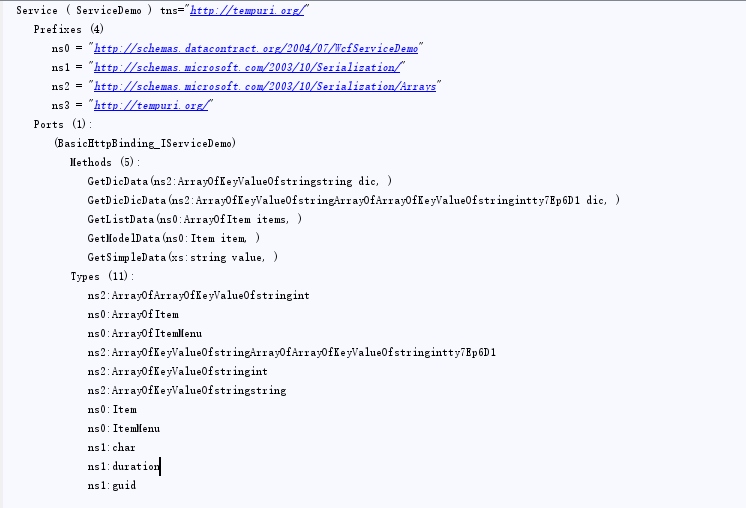
2.参数序列化
对于基础类型的参数可以直接传参,但复杂类型参数就比较麻烦了,怎么样在python定义的参数能在wcf服务端识别出来,也就是序列化反序列化的问题,例如GetDicDicData方法中要传递ns2:ArrayOfKeyValueOfstringArrayOfArrayOfKeyValueOfstringintty7Ep6D1类型的参数,在python中怎么定义呢,这个类型里面包含哪些属性,怎么实例化这个参数,可以使用client.factory.create('参数类型名')来创建,有时类型下面还有子类,所以在传参数时要弄清楚对象里面子类的数据类型,从根到叶子,而在实例化参数时需要从叶子到根来组装成对象。还有获取结果后获取解析的问题,这个把结果打印出来后可以一层一层的获取值。也可以调用last_received()方法,返回的是xml,然后用xpath解析。
    print client.factory.create('ns2:ArrayOfKeyValueOfstringArrayOfArrayOfKeyValueOfstringintty7Ep6D1')

    print client.factory.create('ns2:KeyValueOfstringArrayOfArrayOfKeyValueOfstringintty7Ep6D1')

    print client.factory.create('ns2:ArrayOfArrayOfKeyValueOfstringint')

    print client.factory.create('ns2:ArrayOfKeyValueOfstringint')

    print client.factory.create('ns2:KeyValueOfstringint')

    KeyValueOfstringint=client.factory.create('ns2:KeyValueOfstringint')

    KeyValueOfstringint.Key='cyw'

    KeyValueOfstringint.Value = 1

    ArrayOfKeyValueOfstringint=client.factory.create('ns2:ArrayOfKeyValueOfstringint')

    ArrayOfKeyValueOfstringint.KeyValueOfstringint=[KeyValueOfstringint]

    ArrayOfArrayOfKeyValueOfstringint=client.factory.create('ns2:ArrayOfArrayOfKeyValueOfstringint')

    ArrayOfArrayOfKeyValueOfstringint.ArrayOfKeyValueOfstringint=[ArrayOfKeyValueOfstringint]

    KeyValueOfstringArrayOfArrayOfKeyValueOfstringintty7Ep6D1 = client.factory.create('ns2:KeyValueOfstringArrayOfArrayOfKeyValueOfstringintty7Ep6D1')

    KeyValueOfstringArrayOfArrayOfKeyValueOfstringintty7Ep6D1.Key = 'cuiyw'

    KeyValueOfstringArrayOfArrayOfKeyValueOfstringintty7Ep6D1.Value = ArrayOfArrayOfKeyValueOfstringint

    ArrayOfKeyValueOfstringArrayOfArrayOfKeyValueOfstringintty7Ep6D1 = client.factory.create('ns2:ArrayOfKeyValueOfstringArrayOfArrayOfKeyValueOfstringintty7Ep6D1')

    ArrayOfKeyValueOfstringArrayOfArrayOfKeyValueOfstringintty7Ep6D1.KeyValueOfstringArrayOfArrayOfKeyValueOfstringintty7Ep6D1 = KeyValueOfstringArrayOfArrayOfKeyValueOfstringintty7Ep6D1
具体实现
# -*- coding: utf-8 -*-

import sys

reload(sys)

sys.setdefaultencoding('utf-8')

from suds.client import Client

if __name__ == '__main__':

    client=Client('http://localhost:8001/ServiceDemo/?singleWsdl')

    print client

    # -----------------简单类型---------------------------

    result= client.service.GetSimpleData('')

    print result

    # -----------------自定义类---------------------------

    print client.factory.create('ns0:Item')

    print client.factory.create('ns0:ArrayOfItemMenu')

    print client.factory.create('ns0:ItemMenu')

    ItemMenu=client.factory.create('ns0:ItemMenu')

    ItemMenu.Name='Cyw'

    ItemMenu.Value = 'Cuiyw'

    ArrayOfItemMenu= client.factory.create('ns0:ArrayOfItemMenu')

    ArrayOfItemMenu.ItemMenu=[ItemMenu,ItemMenu]

    Item=client.factory.create('ns0:Item')

    Item.ItemMenus=ArrayOfItemMenu

    result= client.service.GetModelData(Item)

    print result

    print result.ItemMenus.ItemMenu[0].Name

    print result.ItemMenus.ItemMenu[0].Value

    # -----------------自定义类列表---------------------------

    print client.factory.create('ns0:ArrayOfItem')

    ArrayOfItem =client.factory.create('ns0:ArrayOfItem')

    ArrayOfItem.Item=[Item,Item]

    result= client.service.GetListData(ArrayOfItem)

    print result

    print result.Item[0].ItemMenus.ItemMenu[0].Name

    # -----------------字典类型---------------------------

    print client.factory.create('ns2:ArrayOfKeyValueOfstringstring')

    print client.factory.create('ns2:KeyValueOfstringstring')

    KeyValueOfstringstring= client.factory.create('ns2:KeyValueOfstringstring')

    KeyValueOfstringstring.Key=''

    KeyValueOfstringstring.Value = 'cyw'

    ArrayOfKeyValueOfstringstring=client.factory.create('ns2:ArrayOfKeyValueOfstringstring')

    ArrayOfKeyValueOfstringstring.KeyValueOfstringstring=[KeyValueOfstringstring]

    result= client.service.GetDicData(ArrayOfKeyValueOfstringstring)

    print result.KeyValueOfstringstring[0].Key

    print result.KeyValueOfstringstring[0].Value

    # print client.last_received()

    # -----------------字典嵌套---------------------------

    print client.factory.create('ns2:ArrayOfKeyValueOfstringArrayOfArrayOfKeyValueOfstringintty7Ep6D1')

    print client.factory.create('ns2:KeyValueOfstringArrayOfArrayOfKeyValueOfstringintty7Ep6D1')

    print client.factory.create('ns2:ArrayOfArrayOfKeyValueOfstringint')

    print client.factory.create('ns2:ArrayOfKeyValueOfstringint')

    print client.factory.create('ns2:KeyValueOfstringint')

    KeyValueOfstringint=client.factory.create('ns2:KeyValueOfstringint')

    KeyValueOfstringint.Key='cyw'

    KeyValueOfstringint.Value = 1

    ArrayOfKeyValueOfstringint=client.factory.create('ns2:ArrayOfKeyValueOfstringint')

    ArrayOfKeyValueOfstringint.KeyValueOfstringint=[KeyValueOfstringint]

    ArrayOfArrayOfKeyValueOfstringint=client.factory.create('ns2:ArrayOfArrayOfKeyValueOfstringint')

    ArrayOfArrayOfKeyValueOfstringint.ArrayOfKeyValueOfstringint=[ArrayOfKeyValueOfstringint]

    KeyValueOfstringArrayOfArrayOfKeyValueOfstringintty7Ep6D1 = client.factory.create('ns2:KeyValueOfstringArrayOfArrayOfKeyValueOfstringintty7Ep6D1')

    KeyValueOfstringArrayOfArrayOfKeyValueOfstringintty7Ep6D1.Key = 'cuiyw'

    KeyValueOfstringArrayOfArrayOfKeyValueOfstringintty7Ep6D1.Value = ArrayOfArrayOfKeyValueOfstringint

    ArrayOfKeyValueOfstringArrayOfArrayOfKeyValueOfstringintty7Ep6D1 = client.factory.create('ns2:ArrayOfKeyValueOfstringArrayOfArrayOfKeyValueOfstringintty7Ep6D1')

    ArrayOfKeyValueOfstringArrayOfArrayOfKeyValueOfstringintty7Ep6D1.KeyValueOfstringArrayOfArrayOfKeyValueOfstringintty7Ep6D1 = KeyValueOfstringArrayOfArrayOfKeyValueOfstringintty7Ep6D1

    result= client.service.GetDicDicData(ArrayOfKeyValueOfstringArrayOfArrayOfKeyValueOfstringintty7Ep6D1)

    print result.KeyValueOfstringArrayOfArrayOfKeyValueOfstringintty7Ep6D1[0].Key

    print result.KeyValueOfstringArrayOfArrayOfKeyValueOfstringintty7Ep6D1[0].Value
三、遇到的问题
在上面配置WCF服务时我把终结点配置的绑定配置成wsHttpBinding,导致在python调用时出现下面的错误。当启动新实例启动服务时是可以的,但使用宿主就不行,昨天没找到解决方法,今天把昨天写的在自己电脑上重现了下还是出现这个问题,找了半天没想到还真解决了。
<endpoint address="" contract="WcfServiceDemo.IServiceDemo" binding="wsHttpBinding"></endpoint>
Exception: (415, u"Cannot process the message because the content type 'text/xml; charset=utf-8' was not the expected type 'application/soap+xml; charset=utf-8'.")
Python之Suds库调用WCF时复杂参数序列化的更多相关文章
- Python之Suds库调用WCF实现复杂参数序列化
今年主要做自动化测技术支持工作,最近一直在做接口自动化这块,前些天在研究将web页面模拟http进行接口自动化,这周杭州那边想测试WCF服务,所以这两天一直在探索.遇到的第一个问题就是服务参数传参序列 ...
- python使用suds来调用webservice
对于python仅作为客户端调用webservice的情况,推荐使用suds库来完成,比起zsi,soapy之类,它可以说是相当轻量级,使用非常方便. 安装suds建议使用easy_insall来做. ...
- 调用WCF时,调用已超过传入消息(65536)的最大消息大小配额。若要增加配额,请使用相应绑定。
解决方案: 其实只要在客户端配置文件中加上如下紫色粗体属性( maxReceivedMessageSize): <?xml version="1.0" encoding=&q ...
- 解决一个通过 WebReference 调用 WCF 时自定义 DataContract 类参数提交的问题
先看一下VS2013自动创建默认的IService1.vb,注意自定义的数据契约 CompositeType ' 注意: 使用上下文菜单上的“重命名”命令可以同时更改代码和配置文件中的接口名“ISer ...
- python中调用函数时,参数顺序与参数赋值问题
设置类和函数如下:class MM(): def ff(self,url(1),method(2),data=None(3),cookie=None(4)): if method.lower()==& ...
- python不同包之间调用时提示文件模块不存在的问题
python对于跨包调用函数时,经常会提示模块不存在的问题,主要是python程序执行时,搜索路径导致的,python程序执行的路径依次是: (1)程序根目录(2)环境变量(3)标准库目标(D:\Py ...
- Python使用suds调用webservice报错解决方法:AttributeError: 'Document' object has no attribute 'set'
使用python的suds包调用webservice服务接口,报错:AttributeError: 'Document' object has no attribute 'set' 调用服务接口代码: ...
- 使用Python的Mock库进行PySpark单元测试
测试是软件开发中的基础工作,它经常被数据开发者忽视,但是它很重要.在本文中会展示如何使用Python的uniittest.mock库对一段PySpark代码进行测试.笔者会从数据科学家的视角来进行描述 ...
- 实现jquery.ajax及原生的XMLHttpRequest跨域调用WCF服务的方法
关于ajax跨域调用WCF服务的方法很多,经过我反复的代码测试,认为如下方法是最为简便的,当然也不能说别人的方法是错误的,下面就来上代码,WCF服务定义还是延用上次的,如: namespace Wcf ...
随机推荐
- hdu_1006 Tick and Tick(暴力模拟)
hdu1006 标签(空格分隔): 暴力枚举 好久没有打题了,退队了有好几个月了,从心底不依赖那个人了,原来以为的爱情戏原来都只是我的独角戏.之前的我有时候好希望有个人出现,告诉自己去哪里,做什么,哪 ...
- ubuntu配置服务器apache
在配置apache之前我们需要先配置好ubuntu中的网络,如果不太懂的话可以看看这我的这篇文章:配置ubuntu网络,里面详细的介绍了怎么配置ubuntu的网络. 1.安装apache服务器 sud ...
- Spring框架学习笔记(7)——代理对象实现AOP
AOP(面向切面编程) AOP(Aspect-Oriented Programming, 面向切面编程): 是一种新的方法论, 是对传统 OOP(Object-Oriented Programming ...
- maven学习3,如何创建一个web项目
Maven学习 (三) 使用m2eclipse创建web项目 1.首先确认你的eclipse已经安装好m2eclipse的环境,可以参照上两篇Maven学习内容 2.新建一个maven的项目 ...
- oracle存储过程的创建和使用
创建存储过程: 格式:create or replace procedure procedure_name(参数 参数类型) Is/as 变量1 变量1的类型: begin ----------业务逻 ...
- POJ 3790 最短路径问题(Dijkstra变形——最短路径双重最小权值)
题目链接: http://acm.hdu.edu.cn/showproblem.php?pid=3790 Problem Description 给你n个点,m条无向边,每条边都有长度d和花费p,给你 ...
- Effective Java 第三版——25. 将源文件限制为单个顶级类
Tips <Effective Java, Third Edition>一书英文版已经出版,这本书的第二版想必很多人都读过,号称Java四大名著之一,不过第二版2009年出版,到现在已经将 ...
- Cannot declare class app\home\controller\Cases because the name is already in use
Cannot declare class app\home\controller\Cases because the name is already in use 命名空间冲突了 use 模型类的时候 ...
- removeClass()
定义和用法 removeClass() 方法从被选元素移除一个或多个类. 注释:如果没有规定参数,则该方法将从被选元素中删除所有类. 语法 $(selector).removeClass(class) ...
- js解析jsonArray嵌套
{ "data": { "BTC": [ 14781.51, 14888.9, 14900.04, 15098.88, 15308, 14880.01, 149 ...