
码海拾遗:基于MySQL Connector/C++的MySQL操作(连接池)
1、MySQL安装及简单设置
(1)安装:在OSX系统下,可以使用万能的“brew install”命令来进行安装:brew isntall mysql(默认安装最新版的MySQL)
(2)启动:brew services start mysql
(3)修改密码:update user set authentication_string = password('password'), password_expired = 'N', password_last_changed = now() where user = 'root';
-->flush privileges;(让修改后的密码生效)
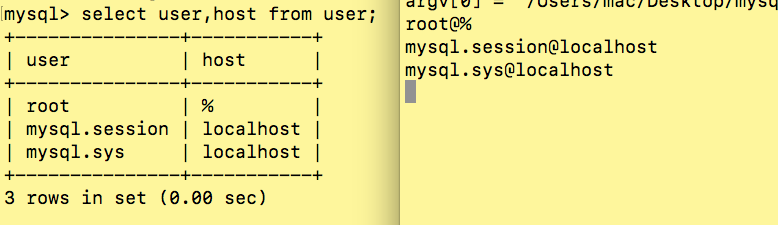
(4)允许远程访问:update mysql.user set host = '%' where user = 'root';
2、MySQL Connector/C++安装
(1)下载:MySQL Connector/C++源码可以从这里下载
(2)安装:解压后将“include”目录下的文件复制到“/usr/local/include”目录下,“lib”目录下的文件复制到“/usr/local/lib”目录下即可
3、示例代码(基于单例模式的懒汉模型)
CConnPool.h
/*

 * CConnPool.h

 *

 *  Created on: Mar 15, 2018

 *      Author: root

 */

#ifndef SRC_CCONNPOOL_H_

#define SRC_CCONNPOOL_H_

#include <list>

#include <string>

#include <pthread.h>

#include <mysql_connection.h>

#include <mysql_driver.h>

#include <cppconn/exception.h>

#include <cppconn/driver.h>

#include <cppconn/connection.h>

#include <cppconn/resultset.h>

#include <cppconn/prepared_statement.h>

#include <cppconn/statement.h>

using namespace sql;

using namespace std;

class CConnPool {

public:

	~CConnPool();

	void InitConnpool(string url, string user, string password, int maxSize);

	Connection* GetConnection();

	void ReleaseConnection(Connection* conn);

	static CConnPool *GetInstance();

private:

	CConnPool();

	Connection*CreateConnection(); //创建一个连接

	void InitConnection(int iInitialSize); //初始化数据库连接池

	void DestoryConnection(Connection *conn); //销毁数据库连接对象

	void DestoryConnPool(); //销毁数据库连接池

	CConnPool(string url, string user, string password, int maxSize); //构造方法

private:

	int curSize; //当前已建立的数据库连接数量

	int maxSize; //连接池中定义的最大数据库连接数

	string user;

	string password;

	string url;

	list<Connection*> connList; //连接池的容器队列  STL list 双向链表

	pthread_mutex_t lock; //线程锁

	static CConnPool *connPool;

	Driver*driver;

};

#endif /* SRC_CCONNPOOL_H_ */
CConnPool.cpp
/*

 * CConnPool.cpp

 *

 *  Created on: Mar 15, 2018

 *      Author: root

 */

#include <stdexcept>

#include <exception>

#include <cstdio>

#include "CConnPool.h"

CConnPool *CConnPool::connPool = NULL;

//CConnPool* CConnPool::connPool = new CConnPool();

CConnPool::CConnPool()

{

	// TODO Auto-generated constructor stub

}

void CConnPool::InitConnpool(string url, string user, string password,

							 int maxSize)

{

	this->maxSize = maxSize;

	this->curSize = 0;

	this->user = user;

	this->password = password;

	this->url = url;

	try

	{

		this->driver = sql::mysql::get_driver_instance();

	}

	catch (sql::SQLException &e)

	{

		perror("驱动连接出错;\n");

	}

	catch (std::runtime_error &e)

	{

		perror("运行出错了\n");

	}

	this->InitConnection(maxSize / 2);

	pthread_mutex_init(&lock, NULL);

}

CConnPool::CConnPool(string url, string user, string password, int maxSize)

{

	this->maxSize = maxSize;

	this->curSize = 0;

	this->user = user;

	this->password = password;

	this->url = url;

	try

	{

		this->driver = sql::mysql::get_driver_instance();

	}

	catch (sql::SQLException &e)

	{

		perror("驱动连接出错;\n");

	}

	catch (std::runtime_error &e)

	{

		perror("运行出错了\n");

	}

	this->InitConnection(maxSize / 2);

	pthread_mutex_init(&lock, NULL);

}

CConnPool *CConnPool::GetInstance()

{

	if (connPool == NULL)

		connPool = new CConnPool("tcp://127.0.0.1:3306", "root", "123456",

								 10);

	return connPool;

}

void CConnPool::InitConnection(int num)

{

	Connection *conn;

	pthread_mutex_lock(&lock);

	for (int i = 0; i < num; ++i)

	{

		conn = CreateConnection();

		if (conn)

		{

			connList.push_back(conn);

			++curSize;

		}

		else

		{

			perror("创建CONNECTION出错");

		}

	}

	pthread_mutex_unlock(&lock);

}

Connection *CConnPool::CreateConnection()

{

	Connection *conn;

	try

	{

		conn = driver->connect(url, user, password); //建立连接

		return conn;

	}

	catch (sql::SQLException &e)

	{

		perror(e.what());

		return NULL;

	}

	catch (std::runtime_error &e)

	{

		perror(e.what());

		return NULL;

	}

}

Connection *CConnPool::GetConnection()

{

	Connection *conn;

	pthread_mutex_lock(&lock);

	if (connList.size() > 0)

	{

		conn = connList.front();

		connList.pop_front();

		if (conn->isClosed())

		{

			delete conn;

			conn = CreateConnection();

		}

		if (conn == NULL)

			--curSize;

		pthread_mutex_unlock(&lock);

		return conn;

	}

	else

	{

		if (curSize < maxSize)

		{

			conn = CreateConnection();

			if (conn)

			{

				++curSize;

				pthread_mutex_unlock(&lock);

				return conn;

			}

			else

			{

				pthread_mutex_unlock(&lock);

				return NULL;

			}

		}

		else

		{

			pthread_mutex_unlock(&lock);

			return NULL;

		}

	}

}

void CConnPool::ReleaseConnection(Connection *conn)

{

	if (conn)

	{

		pthread_mutex_lock(&lock);

		connList.push_back(conn);

		pthread_mutex_unlock(&lock);

	}

}

CConnPool::~CConnPool()

{

	this->DestoryConnPool();

}

void CConnPool::DestoryConnPool()

{

	list<Connection *>::iterator iter;

	pthread_mutex_lock(&lock);

	for (iter = connList.begin(); iter != connList.end(); ++iter)

		this->DestoryConnection(*iter);

	curSize = 0;

	connList.clear();

	pthread_mutex_unlock(&lock);

}

void CConnPool::DestoryConnection(Connection *conn)

{

	if (conn)

	{

		try

		{

			conn->close();

		}

		catch (sql::SQLException &e)

		{

			perror(e.what());

		}

		catch (std::exception &e)

		{

			perror(e.what());

		}

		delete conn;

	}

}
main.cpp
#include <iostream>

#include <string>

#include "CConnPool.h"

using std::cout;

using std::endl;

using std::string;

CConnPool *connpool = CConnPool::GetInstance();

int main(int argc, char *argv[])

{

    Connection *conn;

    Statement *state;

    ResultSet *result;

    conn = connpool->GetConnection();

    state = conn->createStatement();

    state->execute("use mysql");

    result = state->executeQuery("select host,user from user");

    while (result->next())

    {

        try

        {

            string user = result->getString("user");

            string host = result->getString("host");

            cout << user << "@" << host << endl;

        }

        catch (sql::SQLException &e)

        {

            cout << e.what() << endl;

        }

    }

    delete result;

    delete state;

    connpool->ReleaseConnection(conn);

    getchar();

    return 0;

}
码海拾遗:基于MySQL Connector/C++的MySQL操作(连接池)的更多相关文章
- 基于Python3实现的各类数据库连接和连接池
基于Python3的各类数据库连接和连接池, 支持数据库有: Mysql(MariaDB), Oracle, PostgreSQL(GreenPlum), Vertica, Redis, MongoD ...
- MySql 8小时解决方案:proxool连接池
最近做的项目用的mysql数据库,前天挂在服务器上,昨天早晨上班一来,同事就说API数据接口访问不了了,我马上mstsc登陆服务器看,报错了.马上重启tomcat,结果还能正常运行,当时没管,今天过来 ...
- 【Mysql】SpringBoot阿里Druid数据源连接池配置
一.pom.xml添加 <!-- 配置数据库连接池 --> <dependency> <groupId>com.alibaba</groupId> &l ...
- 码海拾遗:strcpy()、strncpy()和strcpy_s()区别
1.strcpy() 原型:char *strcpy(char *dst,const char *src) 功能:将以src为首地址的字符串复制到以dst为首地址的字符串,包括'\0'结束符,返回ds ...
- 码海拾遗:Linux常用命令(一)
一.Linux系统安装 系统安装可以分两类:实体机安装Linux,虚拟机(常用虚拟机软件有两种:VMware和VirtualBox)安装Linux. 安装过程网上有很多教程,这里就不赘述了. 二.常用 ...
- 码海拾遗:简单Socket(TCP)类实现
最近刚开始啃Unix网络编程(卷1:套接字联网API),为加深TCP连接的建立和终止的理解与记忆,记下本文,方便以后翻看. 同时留下的还有简单的Socket(TCP)类: mySocket.h #pr ...
- 码海拾遗:Linux多线程mutex锁
多线程计数,每个线程累加10个数. 实现: #include <stdio.h> #include <stdlib.h> #include <string.h> # ...
- 码海拾遗:简述C++(一)
C++是Bjarne Stroustrup博士于1982年,在C语言的基础上引入并扩充了面向对象的概念后发明的一种新的程序语言.就与C语言的渊源而言,C++可以说是C语言的超集,它兼容C的一切(可能是 ...
- 码海拾遗:strstr()、strcmp()和strcpy()实现
1.strstr()实现 原型:char * strstr(const char * str1, const char * str2) 说明:判断str2是否为str1的子串,如果是则返回str2第一 ...
随机推荐
- 自己做的板子,电脑识别不出下载口(micro-usb),程序无法烧入
前几天画了一块cortex-A5的底板,出现一个问题,就是通过micro-usb与电脑连接之后,电脑无法识别出来,这就导致程序无法通过micro-usb烧入进去,经过仔细检查硬件,发现第一,元器件都没 ...
- [HNOI2019]白兔之舞(矩阵快速幂+单位根反演)
非常抱歉,这篇文章鸽了.真的没时间写了. #include<bits/stdc++.h> using namespace std; typedef long long ll; #defin ...
- ORBSLAM2的资源
ORBSLAM2代码总结 https://blog.csdn.net/hzwwpgmwy/article/details/82462988 ORBSLAM2局部地图更新实现 https://blog. ...
- LeetCode——71.简化路径
以 Unix 风格给出一个文件的绝对路径,你需要简化它.或者换句话说,将其转换为规范路径. 在 Unix 风格的文件系统中,一个点(.)表示当前目录本身:此外,两个点 (..) 表示将目录切换到上一级 ...
- linux_nano命令
nano是一个字符终端的文本编辑器,有点像DOS下的editor程序.它比vi/vim要简单得多,比较适合Linux初学者使用.某些Linux发行版的默认编辑器就是nano. nano命令可以打开指定 ...
- 吴裕雄--天生自然python Google深度学习框架:人工智能、深度学习与机器学习相互关系介绍
- NAIPC 2019 A - Piece of Cake(凸包计算)
学习:https://blog.csdn.net/qq_21334057/article/details/99550805 题意:从nn个点中选择kk个点构成多边形,问期望面积. 题解:如果能够确定两 ...
- 洛谷-P3919-可持久化数组
题目传送门 sol:在洛谷上看到一种dfs + 离线的方法,可以解决大部分可持久化问题.把依赖关系看成边,然后建树.这样本来要解决的多个版本只要在一个版本上进行修改就好了. 离线 + dfs #inc ...
- IDEA Maven项目中添加tomcat没有无artifact选项
IntelliJ使用 ##使用IntelliJ IDEA配置web项目时,选择Edit Configration部署Tomcat的Deployment可能会出现以下情况: 导致新手部署过程中摸不着头脑 ...
- spring创建bean异常
org.springframework.beans.factory.BeanCreationException: Error creating bean with name 'requestMappi ...