
Hadoop基准测试(二)
Hadoop Examples
除了《Hadoop基准测试(一)》提到的测试,Hadoop还自带了一些例子,比如WordCount和TeraSort,这些例子在hadoop-examples-2.6.0-mr1-cdh5.16.1.jar和hadoop-examples.jar中。执行以下命令:
hadoop jar hadoop-examples--mr1-cdh5.16.1.jar
会列出所有的示例程序:
bash--mr1-cdh5.16.1.jar
An example program must be given as the first argument.
Valid program names are:
  aggregatewordcount: An Aggregate based map/reduce program that counts the words in the input files.
  aggregatewordhist: An Aggregate based map/reduce program that computes the histogram of the words in the input files.
  bbp: A map/reduce program that uses Bailey-Borwein-Plouffe to compute exact digits of Pi.
  dbcount: An example job that count the pageview counts from a database.
  distbbp: A map/reduce program that uses a BBP-type formula to compute exact bits of Pi.
  grep: A map/reduce program that counts the matches of a regex in the input.
  join: A job that effects a join over sorted, equally partitioned datasets
  multifilewc: A job that counts words from several files.
  pentomino: A map/reduce tile laying program to find solutions to pentomino problems.
  pi: A map/reduce program that estimates Pi using a quasi-Monte Carlo method.
  randomtextwriter: A map/reduce program that writes 10GB of random textual data per node.
  randomwriter: A map/reduce program that writes 10GB of random data per node.
  secondarysort: An example defining a secondary sort to the reduce.
  sort: A map/reduce program that sorts the data written by the random writer.
  sudoku: A sudoku solver.
  teragen: Generate data for the terasort
  terasort: Run the terasort
  teravalidate: Checking results of terasort
  wordcount: A map/reduce program that counts the words in the input files.
  wordmean: A map/reduce program that counts the average length of the words in the input files.
  wordmedian: A map/reduce program that counts the median length of the words in the input files.
  wordstandarddeviation: A map/reduce program that counts the standard deviation of the length of the words in the input files.
单词统计测试
进入角色hdfs创建的文件夹**,执行命令:vim words.txt,输入内容如下:
hello hadoop hbase mytest
hadoop-node1
hadoop-master
hadoop-node2
this is my test
执行命令:
../bin/hadoop fs -put words.txt /tmp/
将文件上传到HDFS中,如下:
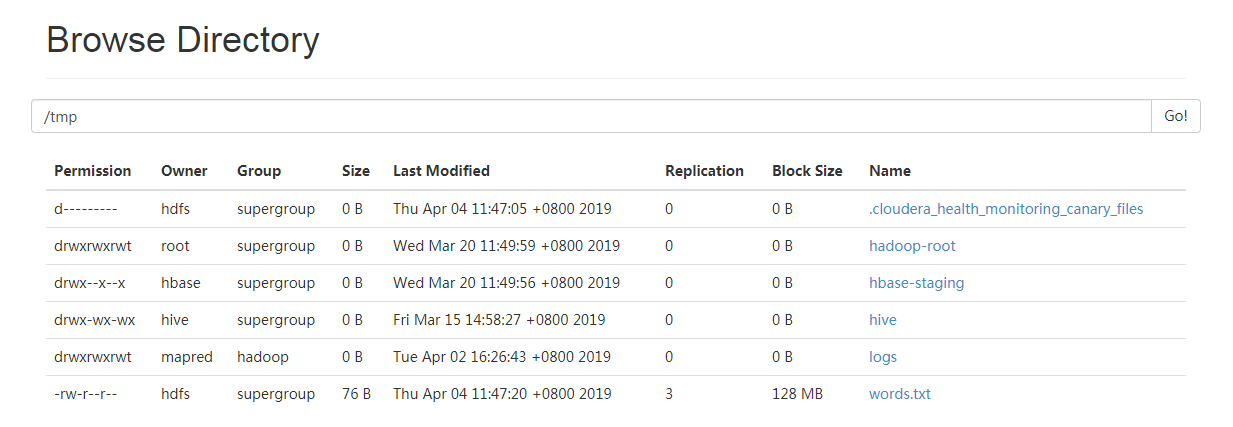
执行以下命令,使用mapreduce统计指定文件单词个数,并将结果输入到指定文件:
hadoop jar ../jars/hadoop-examples--mr1-cdh5.16.1.jar wordcount /tmp/words.txt /tmp/words_result.txt
返回如下信息:
bash--mr1-cdh5.16.1.jar wordcount /tmp/words.txt /tmp/words_result.txt
// :: INFO client.RMProxy: Connecting to ResourceManager at node1/
// :: INFO input.FileInputFormat: Total input paths to process :
// :: INFO mapreduce.JobSubmitter: number of splits:
// :: INFO mapreduce.JobSubmitter: Submitting tokens for job: job_1552358721447_0060
// :: INFO impl.YarnClientImpl: Submitted application application_1552358721447_0060
// :: INFO mapreduce.Job: The url to track the job: http://node1:8088/proxy/application_1552358721447_0060/
// :: INFO mapreduce.Job: Running job: job_1552358721447_0060
// :: INFO mapreduce.Job: Job job_1552358721447_0060 running in uber mode : false
// :: INFO mapreduce.Job:  map % reduce %
// :: INFO mapreduce.Job:  map % reduce %
// :: INFO mapreduce.Job:  map % reduce %
// :: INFO mapreduce.Job:  map % reduce %
// :: INFO mapreduce.Job: Job job_1552358721447_0060 completed successfully
// :: INFO mapreduce.Job: Counters:
        File System Counters
                FILE: Number of bytes read=
                FILE: Number of bytes written=
                FILE: Number of read operations=
                FILE: Number of large read operations=
                FILE: Number of
                HDFS: Number of bytes read=
                HDFS: Number of bytes written=
                HDFS: Number of read operations=
                HDFS: Number of large read operations=
                HDFS: Number of
        Job Counters
                Launched map tasks=
                Launched reduce tasks=
                Data-local map tasks=
                Total
                Total
                Total
                Total
                Total vcore-milliseconds taken by all map tasks=
                Total vcore-milliseconds taken by all reduce tasks=
                Total megabyte-milliseconds taken by all map tasks=
                Total megabyte-milliseconds taken by all reduce tasks=
        Map-Reduce Framework
                Map input records=
                Map output records=
                Map output bytes=
                Map output materialized bytes=
                Input
                Combine input records=
                Combine output records=
                Reduce input
                Reduce shuffle bytes=
                Reduce input records=
                Reduce output records=
                Spilled Records=
                Shuffled Maps =
                Failed Shuffles=
                Merged Map outputs=
                GC
                CPU
                Physical memory (bytes) snapshot=
                Virtual memory (bytes) snapshot=
                Total committed heap usage (bytes)=
        Shuffle Errors
                BAD_ID=
                CONNECTION=
                IO_ERROR=
                WRONG_LENGTH=
                WRONG_MAP=
                WRONG_REDUCE=
        File Input Format Counters
                Bytes Read=
        File Output Format Counters
                Bytes Written=
在hdfs目录下保存了任务的结果文件:
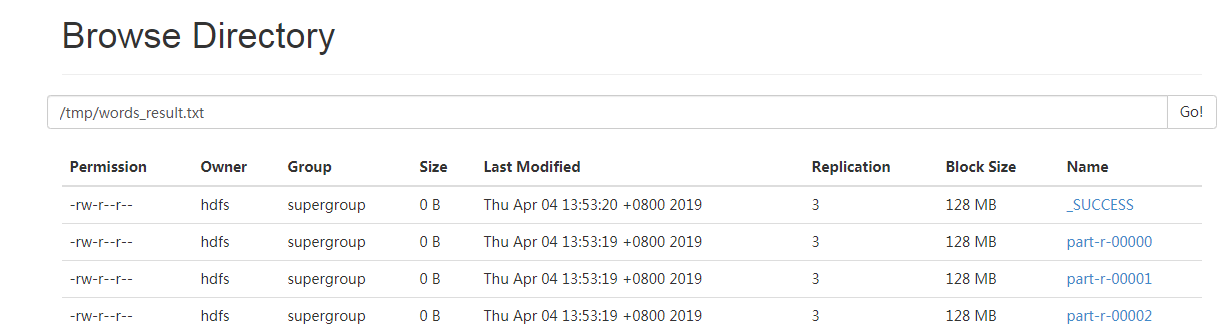
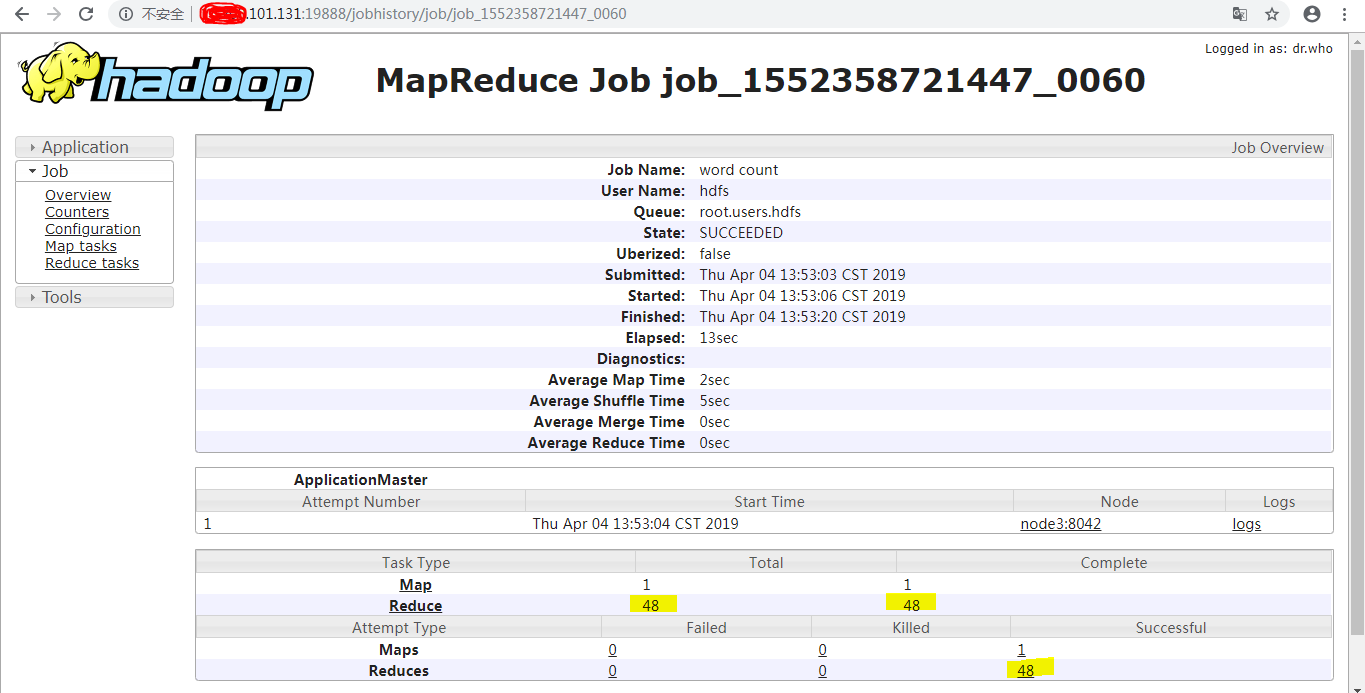
结果记录条目从0计数到47,共计48条:

每一个part对应一个Reduce:
执行命令,查看任务执行后的结果:
bash-4.2$ hadoop fs -cat hdfs:///tmp/words_result.txt/part-r-*****
返回结果如下:
bash-4.2$ hadoop fs -cat hdfs:///tmp/words_result.txt/part-r-00000
bash-4.2$ hadoop fs -cat hdfs:///tmp/words_result.txt/part-r-00011
is
bash-4.2$ hadoop fs -cat hdfs:///tmp/words_result.txt/part-r-00015
this
bash-4.2$ hadoop fs -cat hdfs:///tmp/words_result.txt/part-r-00022
hadoop
bash-4.2$ hadoop fs -cat hdfs:///tmp/words_result.txt/part-r-00024
hbase
bash-4.2$ hadoop fs -cat hdfs:///tmp/words_result.txt/part-r-00040
hadoop-node1
bash-4.2$ hadoop fs -cat hdfs:///tmp/words_result.txt/part-r-00041
hadoop-master
hadoop-node2
bash-4.2$ hadoop fs -cat hdfs:///tmp/words_result.txt/part-r-00045
my
bash-4.2$ hadoop fs -cat hdfs:///tmp/words_result.txt/part-r-00047
mytest
参考: https://jeoygin.org/2012/02/22/running-hadoop-on-centos-single-node-cluster/
Hadoop基准测试(二)的更多相关文章
- MySQL基准测试(二)--方法
MySQL基准测试(二)--方法 目的: 方法不是越高级越好.而应该善于做减法.至简是一种智慧,首先要做的是收集MySQL的各状态数据.收集到了,不管各个时间段出现的问题,至少你手上有第一时间的状态数 ...
- Hadoop(二):MapReduce程序(Java)
Java版本程序开发过程主要包含三个步骤,一是map.reduce程序开发:第二是将程序编译成JAR包:第三使用Hadoop jar命令进行任务提交. 下面拿一个具体的例子进行说明,一个简单的词频统计 ...
- Hadoop 基准测试与example
#pi值示例 hadoop jar /app/cdh23502/share/hadoop/mapreduce2/hadoop-mapreduce-examples--cdh5. #生成数据 第一个参数 ...
- Hadoop系列(二)hadoop2.2.0伪分布式安装
一.环境配置 安装虚拟机vmware,并在该虚拟机机中安装CentOS 6.4: 修改hostname(修改配置文件/etc/sysconfig/network中的HOSTNAME=hadoop),修 ...
- Hadoop MapReduce 二次排序原理及其应用
关于二次排序主要涉及到这么几个东西: 在0.20.0 以前使用的是 setPartitionerClass setOutputkeyComparatorClass setOutputValueGrou ...
- Hadoop基准测试(转载)
<hadoop the definitive way>(third version)中的Benchmarking a Hadoop Cluster Test Cases的class在新的版 ...
- hadoop系列二:HDFS文件系统的命令及JAVA客户端API
转载请在页首明显处注明作者与出处 一:说明 此为大数据系列的一些博文,有空的话会陆续更新,包含大数据的一些内容,如hadoop,spark,storm,机器学习等. 当前使用的hadoop版本为2.6 ...
- hadoop(二)搭建伪分布式集群
前言 前面只是大概介绍了一下Hadoop,现在就开始搭建集群了.我们下尝试一下搭建一个最简单的集群.之后为什么要这样搭建会慢慢的分享,先要看一下效果吧! 一.Hadoop的三种运行模式(启动模式) 1 ...
- Hadoop基准测试
其实就是从网络上copy的吧,在这里做一下记录 这个是看一下有哪些测试方式: hadoop jar /opt/cloudera/parcels/CDH-5.3.6-1.cdh5.3.6.p0.11/ ...
随机推荐
- Unable to create a debugging engine.
用QT Creator调试的时候报如下错误: Unable to create a debugging engine. QT里面打开Tools -> Options -> Kits 发现D ...
- 使用SQL计算宝宝每次吃奶的时间间隔(数据保障篇)
目前程序从功能上其实已经完全满足客户(当然我这里的客户都是指媳妇儿^_^)需求,具体可参考: 使用SQL计算宝宝每次吃奶的时间间隔 使用SQL计算宝宝每次吃奶的时间间隔(续) 那么本篇 使用SQL计算 ...
- PHP如何实现处理过期或者超时订单的,并还原库存
订单是我们在日常开发中经常会遇到的一个功能,最近在做一个订单过期与超时的开发.订单过期与超时就不用我解释了吧,其实两者都是同一个问题来着,就是订单未支付的处理,我们要做的是对这些未支付的订单到了一定时 ...
- laravel 监听模型创建事件
注意:
- 【代码审计】MenInfo文件包含漏洞
代码审计是我之前一直不敢涉及的领域,它包含的知识面太广.最近才开始学习,前段时间写的第一篇代码审计的文章 更多的感觉像是一个黑盒测试.我也会尽量把文章写的通俗易懂.代码审计 0基础从大牛的蜕变 从这里 ...
- IoT协议LwM2M MQTT与CoAP
IoT协议LwM2M MQTT与CoAP 一.MQTT 1.概述: MQTT(Message Queuing Telemetry Transport,消息队列遥测传输)是IBM开发的一个即时通讯协议, ...
- spring boot中配置文件中变量的引用
配置文件中 变量的自身引用 ${名称} java文件中引用:非静态变量 之间在变量上面注释@Value("${名称}") 静态变量 在set方法上注释@Value("$ ...
- ubuntu资料
1.VNC实现Windows远程访问Ubuntu 16.04(无需安装第三方桌面,直接使用自带远程工具) https://www.cnblogs.com/xuliangxing/p/7642650.h ...
- Nexus-配置vPC 实验三
配置EvPC(增强的vPC),下面两个FEX可以同时被两个N5K管理.注意:FEX只支持静态的Channel-group(mode on) N5K-1配置:配置FEXN5K-1(config)#fea ...
- Laravel 6.X 数据库迁移 创建表 与 修改表
数据库迁移创建表 本篇文章中使用的是mysql数据库,其他数据库需要修改env文件和app配置,请其他地方搜索一下就会找到. 创建示例 1.创建users表: 命令行键入 php artisan ma ...