
HBase2.0 meta信息丢失的修复方法
在HBase入库日志中发现有一个表入库失败,检查HBase服务端后发现该表的meta信息丢失了:

而HDFS上的region还在:

而HBCK工具不支持HBase2.0版本,只好自己写一个修复工具。网上可以搜到前辈们自己编写的一些工具,比如这一篇写的就比较详细 https://blog.csdn.net/xyzkenan/article/details/103476160
我们引用一下,再对个别地方略微讲解。
看一下'hbase:meta'中正常的存储结构:
| 列名 | 说明 |
| info:state | Region状态 |
| info:sn | Region Server Node,由 server和serverstartcode组成,如slave1,16020,1557998852385 |
| info:serverstartcode | Region Server启动Code,实质上就是Region Server启动的时间戳 |
| info:server | Region Server 地址和端口,如slave1:16020 |
| info:seqnumDuringOpen | 表示Region在线时长的一个二进制串 |
| info:regioninfo | Region Info,和.regioninfo内容相同 |
接下来就开始动手coding:
获取'hbase:mata'中的Region信息
     public Set<String> getMetaRegions(Configuration conf, String tableName) throws Exception {

         Connection conn = ConnectionFactory.createConnection(conf);

         Table table = conn.getTable(TableName.valueOf(TABLE));

         PrefixFilter filter = new PrefixFilter(Bytes.toBytes(tableName + ","));

         Scan scan = new Scan();

         scan.setFilter(filter);

         Set<String> metaRegions = new HashSet<>();

         Iterator<Result> iterator = table.getScanner(scan).iterator();

         while (iterator.hasNext()) {

             Result result = iterator.next();

             metaRegions.add(Bytes.toString(result.getRow()));

         }

         conn.close();

         return metaRegions;

     }
读取.regioninfo中的Region信息
     public Map<String, RegionInfo> getHdfsRegions(Configuration conf, String tablePath) throws Exception {

         FileSystem fs = FileSystem.get(conf);

         Path path = new Path(hdfsRootDir + "/data/default/" + tablePath + "/");

         Map<String, RegionInfo> hdfsRegions = new HashMap<>();

         FileStatus[] list = fs.listStatus(path);

         for (FileStatus status : list) {

             if (!status.isDirectory()) {

                 continue;

             }

             boolean isRegion = false;

             FileStatus[] regions = fs.listStatus(status.getPath());

             for (FileStatus regionStatus : regions) {

                 if (regionStatus.toString().contains(REGION_INFO_FILE)) {

                     isRegion = true;

                     break;

                 }

             }

             if (!isRegion) {

                 continue;

             }

             RegionInfo hri = HRegionFileSystem.loadRegionInfoFileContent(fs, status.getPath());

             hdfsRegions.put(hri.getRegionNameAsString(), hri);

         }

         return hdfsRegions;

     }
两者进行对比取差集
         Set<String> metaRegions = getMetaRegions(configuration, repairTableName);

         Map<String, RegionInfo> hdfsRegions = getHdfsRegions(configuration, repairTableName);

         Set<String> hdfsRegionNames = hdfsRegions.keySet();

         metaRegions.removeAll(hdfsRegionNames);
构造META信息并写入HBase
         ServerName[] regionServers = admin.getRegionServers().toArray(new ServerName[0]);

         int rsLength = regionServers.length;

         int i = 0;

         for (String regionName : hdfsRegionNames) {

             String sn = regionServers[i % rsLength].getServerName();

             String[] snSig = sn.split(",");

             RegionInfo hri = hdfsRegions.get(regionName);

             Put info = MetaTableAccessor.makePutFromRegionInfo(hri, EnvironmentEdgeManager.currentTime());

             info.addColumn(Bytes.toBytes(FAMILY), Bytes.toBytes(SN), Bytes.toBytes(sn));

             info.addColumn(Bytes.toBytes(FAMILY), Bytes.toBytes(SERVER), Bytes.toBytes(snSig[0] + ":" + snSig[1]));

             info.addColumn(Bytes.toBytes(FAMILY), Bytes.toBytes(STATE), Bytes.toBytes("OPEN"));

             table.put(info);

             i++;

         }
注意这里的各个region是轮流分配给各个regionServers,具体分配可能和meta信息丢失前不同,但是没关系,一个regionServer管理多个region,映射关系可以改变的,重启HBase服务后会生效,HBase内部也会平衡每个regionServer管理的region数量,也可在hbase shell中手动触发平衡。
使用工具修复后,先验证一下是否生成了新的meta信息:
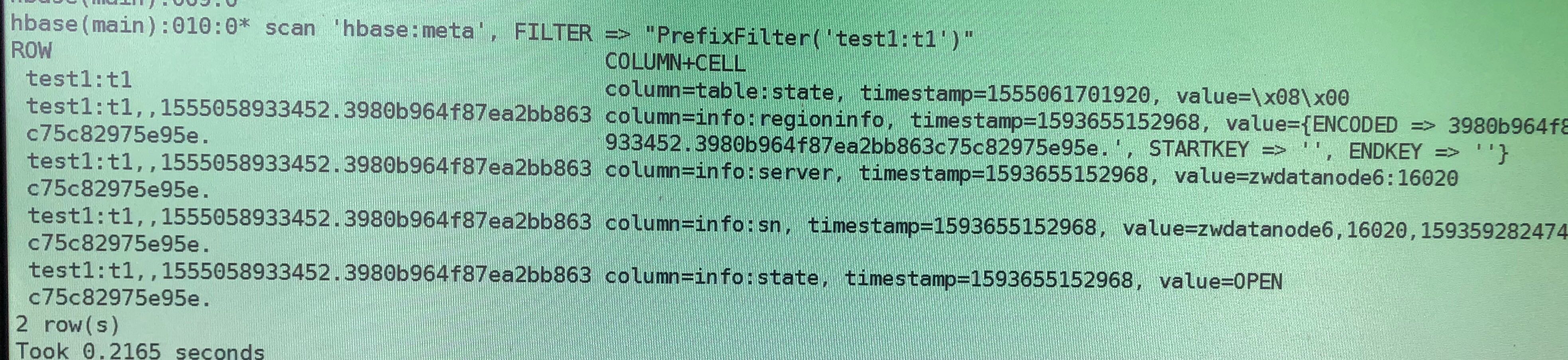
确认无误,接下来重启所有HBase服务,重启之后会自动生成'info:seqnumDuringOpen'以及'info:serverstartcode'
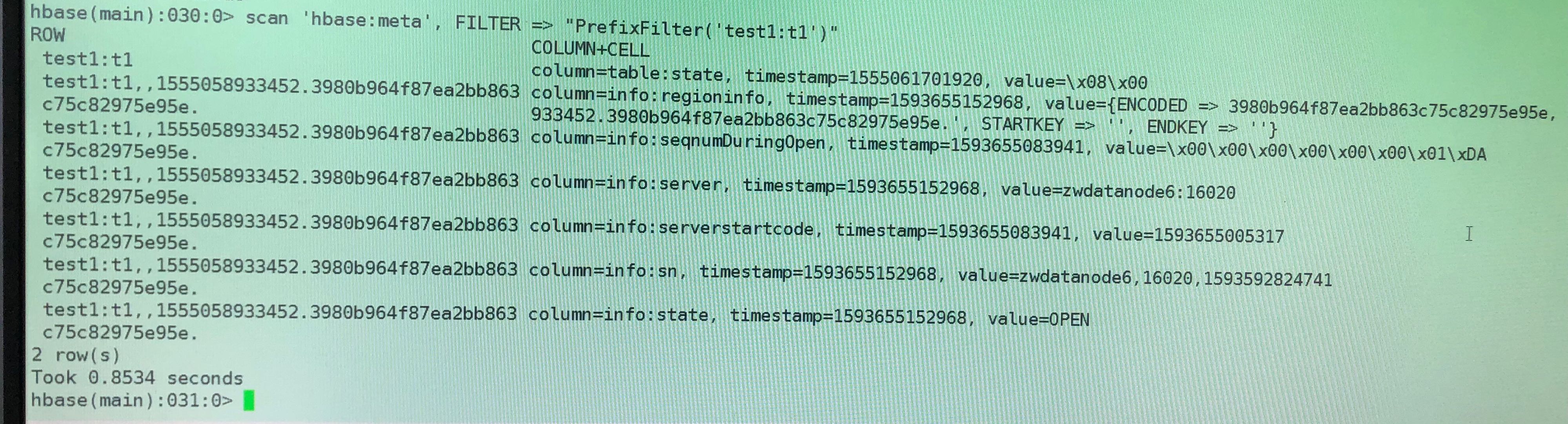
重启之后,验证修复好的表是否可以读写:
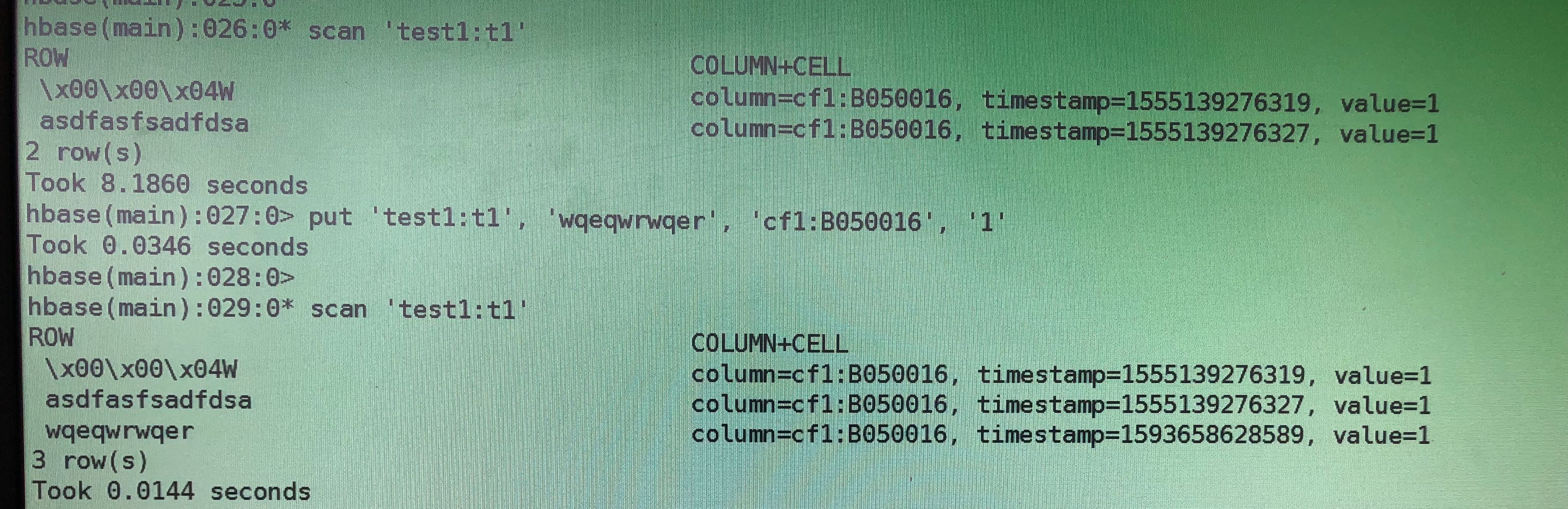
OK,至此基本大功告成,再把工具稍加封装,融入我的组件包内,添加到REST API里,以后再遇到这种问题,发一个POST请求,瞬间修复。
最后还引用一下前辈封装好的工具以供下载使用,https://github.com/darkphoenixs/hbase-meta-repair
自己使用时要略加修改,比如你的hbase.root.dir可能不同,此外,我的HBase服务端虽然是2.0,但是我的修复工具使用的是1.x的包,有些接口略有不同,RegionInfo对应的是HRegionInfo,此外,1.x获取RegionServer使用的是
ServerName[] regionServers = admin.getClusterStatus.getServers().toArray(new ServerName[0]);
HBase2.0 meta信息丢失的修复方法的更多相关文章
- scrapy meta信息丢失
在做58同城爬二手房时,由于房产详情页内对价格进行了转码处理,所以只能从获取详情页url时同时获取该url对应房产的价格,并通过meta传递给下回调函数 现在问题是,在回调函数中找不到原函数meta信 ...
- Zabbix 2.2.x, 3.0.x SQL注射漏洞修复方法
1.漏洞测试 在您的zabbix的地址后面加上如下url: jsrpc.php?type=&method=screen.get×tamp=&pageFile=hist ...
- SpringCloud升级之路2020.0.x版-43.为何 SpringCloudGateway 中会有链路信息丢失
本系列代码地址:https://github.com/JoJoTec/spring-cloud-parent 在开始编写我们自己的日志 Filter 之前,还有一个问题我想在这里和大家分享,即在 Sp ...
- SpringCloud升级之路2020.0.x版-44.避免链路信息丢失做的设计(1)
本系列代码地址:https://github.com/JoJoTec/spring-cloud-parent 我们在这一节首先分析下 Spring Cloud Gateway 一些其他可能丢失链路信息 ...
- SpringCloud升级之路2020.0.x版-44.避免链路信息丢失做的设计(2)
本系列代码地址:https://github.com/JoJoTec/spring-cloud-parent 我们在这一节我们将继续讲解避免链路信息丢失做的设计,主要针对获取到现有 Span 之后,如 ...
- HBase2.0新特性解析
作者 | 个推大数据运维工程师 行者 升级背景 个推作为专业的数据智能服务商,在业务开展过程中存在海量的数据存储与查询的需求,为此个推选用了高可靠.高性能.面向列.可伸缩的分布式数据存储系统--HBa ...
- MYSQL数据表损坏的原因分析和修复方法小结
MYSQL数据表损坏的原因分析和修复方法小结 1.表损坏的原因分析 以下原因是导致mysql 表毁坏的常见原因: 1. 服务器突然断电导致数据文件损坏. 2. 强制关机,没有先关闭mysql 服务. ...
- mfc110.dll丢失,解决方法
mfc110.dll下载_附文件使用方法 mfc110.dll是存放在windows系统中的一个重要dll文件,缺少它可能会造成部分软件或游戏无法正常运行.当系统提示“没有找到mfc110.dll”或 ...
- SQL Server服务器名称与默认实例名不一致的修复方法
SQL Server服务器名称与默认实例名不一致的修复方法 分类: 个人累积 SQl SERVER 数据库复制2011-08-10 09:49 10157人阅读 评论(0) 收藏 举报 sql ser ...
随机推荐
- Linux 独立服务管理
RPM包安装在默认位置 /etc/init.d/:启动脚本位置 /etc/sysconfig/:初始化环境配置文件位置 /etc/:配置文件位置 /etc/xinetd.conf/:xinetd配置文 ...
- 还在用SimpleDateFormat格式化时间?小心经理锤你
还在用SimpleDateFormat格式化时间?小心经理锤你 场景 本来开开心心的周末时光,线上突然就疯狂报错,以为程序炸了,截停日志,发现是就是类似下述一段错误 java.lang.NumberF ...
- Apollo移植
Apollo移植 环境 平台 ubuntu16.04 Apollo_kernel 1.0 安装步骤步骤 步骤一:安装ubuntu(官方建议使用Ubuntu 14.04.3) 步骤一和步骤二参考文档路径 ...
- markdown分页导出pdf
在需要分页之处,插入代码: <div STYLE="page-break-after: always;"></div>
- @bzoj - 3724@ PA2014Final Krolestwo
目录 @description@ @solution@ @accepted code@ @details@ @description@ 你有一个无向连通图,边的总数为偶数. 设图中有k个奇点(度数为奇 ...
- (八)postman请求的form-data、x-www-form-urlencoded、raw、binary的区别
原文链接:https://blog.csdn.net/jiadajing267/article/details/87883725 1.form-data 等价于http请求中的multipart/fo ...
- VMWare12安装CentOS7操作系统并搭建GitLab环境【1】
查看了网上这方面的资料,发现都比较复杂,自己到官方网站上查询,并实际动手安装了一下,发现还是比较简单的. 1.VMWare Workstation 12 Professinal安装 2.安装64位Ce ...
- Head_First_Python(中文版)完整版PDF免费下载_百度云盘
Head_First_Python(中文版)完整版PDF免费下载_百度云盘 提取码:bjbg 本书特色 根据认知科学和学习理论的最新研究成果,这本书采用一种适合大脑的丰富格式娓娓道来,而不是长篇累牍地 ...
- springboot 配置本地文件映射路径
@Configuration public class MyBlogWebMvcConfigurer extends WebMvcConfigurerAdapter { @Autowired priv ...
- opencv C++全局直方图均衡化
cv::Mat histogramEqualization(cv::Mat img){ int rows=img.rows; int cols=img.cols; cv::Mat grayScale= ...