
使用urllib
urlopen的基本用法:
工具为:python3(windows)
其完整表达式为:
urllib.request.urlopen(url, data=None, [timeout, ]*, cafile=None, capath=None, cadefault=False, context=None)
1、发出一个请求.打开bttpbin.org网页,此处为get方式的请求类型
>>>import urllib.request
>>> response = urllib.request.urlopen("http://httpbin.org")
#此处为将 结果赋值给response
>>> print(response.read().decode('utf-8'))
#得到的response是bytes类型,所以我们需要使用decode
httpbin.org:可以以后用来做http测试

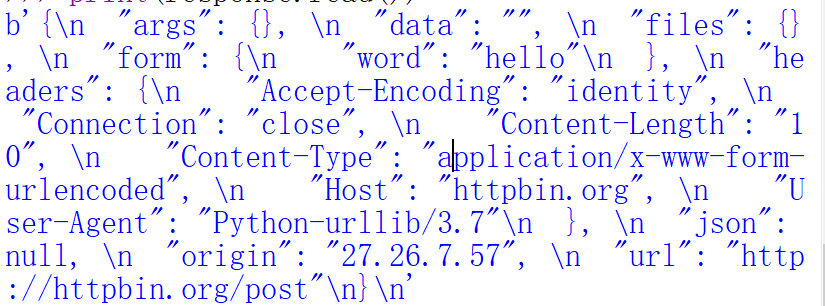
2、此处为POST 类型的请求需要使用到data
>>> import urllib.parse
>>> import urllib.request
>>> data = bytes(urllib.parse.urlencode({"word":"hello"}),encoding="utf8")
#需要创建data参数,需要为bytes类型,用urlencode将字典传过去
>>> response = urllib.request.urlopen("http://httpbin.org/post",data = data)
>>> print(response.read())
3、超时设置timeout
>>> import urllib.request
>>> response = urllib.request.urlopen("http://httpbin.org/get",timeout=1 )
>>> print(response.read())
发现下方有正常的响应

若超时的时间为0.1,如果出现异常,对异常进行捕获
>>> import socket
>>> import urllib.request
>>> import urllib.error
try:
response = urllib.request.urlopen("http://httpbin.org/get",timeout=0.1)
except urllib.error.URLError as e:
if isinstance(e.reason,socket.timeout):
print("TIME OUT")
会出现TIME OUT 结果。
发送请求之后出现响应

1、响应类型
>>> import urllib.request
>>> response = urllib.request.urlopen("http://httpbin.org")
>>> print(type(response))
<class 'http.client.HTTPResponse'>
2、状态码 响应头
>>> import urllib.request
>>> response =urllib.request.urlopen("http://httpbin.org")
>>> print(response.status) #此处为状态码,200显示为成功的意思
200
>>> print(response.getheaders()) #此处为获取所有的状态头,并且以元组的形式输出
[('Connection', 'close'), ('Server', 'gunicorn/19.9.0'), ('Date', 'Tue, 09 Oct 2018 12:49:34 GMT'), ('Content-Type', 'text/html; charset=utf-8'), ('Content-Length', '10122'), ('Access-Control-Allow-Origin', '*'), ('Access-Control-Allow-Credentials', 'true'), ('Via', '1.1 vegur')]
>>> print(response.getheader('Server'))
gunicorn/19.9.0
[此处表示为此处的服务器是由gunicorn/19.9.0所做]
response.read():获取响应体内容为bytes类型,我们可以用decode进行转化
>>> import urllib.request
>>> response = urllib.request.urlopen("http://httpbin.org")
>>> print(response.read().decode('utf-8'))
Request的基本用法
(如果我们想要发送header对象或者其他复杂东西,就需要用到Request)
>>> import urllib.request
>>> response = urllib.request.Request("http://httpbin.org")
>>> response = urllib.request.urlopen(request)
>>> print(response.read().decode('utf-8'))
正常输出,与上方直接输入的结果是完全一致,有了Request能够更加方便
此处为模仿火狐浏览器进行请求
from urllib import request,parse
url = "http://httpbin.org/post"
headers = {
"User-Agent":'Mozllia/4.0(compatible;MSIE 5.5;Windows NT)',
"Host":'httpbin.org'
}
dict = {
'name':'Germey'
}
data = bytes(parse.urlencode(dict),encoding="utf8")
req = request.Request(url=url,data=data,headers=headers,method="POST")
response= request.urlopen(req)
print(response.read().decode("utf-8"))
也会出现结果
使用urllib的更多相关文章
- python urllib
在伴随学习爬虫的过程中学习了解的一些基础库和方法总结扩展 1. urllib 在urllib.request module中定义下面的一些方法 urllib.request.urlopen(url,d ...
- Python3使用urllib访问网页
介绍 改教程翻译自python官网的一篇文档. urllib.request是一个用于访问URL(统一资源定位符)的Python模块.它以urlopen函数的形式提供了一个非常简单的接口,可以访问使用 ...
- 爬虫初探(1)之urllib.request
-----------我是小白------------ urllib.request是python3自带的库(python3.x版本特有),我们用它来请求网页,并获取网页源码. # 导入使用库 imp ...
- python 3.x urllib学习
urllib.request import urllib.request as ur url='http://ie.icoa.cn' user_agent = 'Mozilla/4.0 (compat ...
- Python爬虫学习(1): urllib的使用
1.urllib.urlopen 打开一个url的方法,返回一个文件对象,然后可以进行类似文件对象的操作 In [1]: import urllibIn [2]: file = urllib.urlo ...
- python2 与 python3 urllib的互相对应关系
urllib Python2 name Python3 nameurllib.urlopen() Deprecated. See urllib.request.urlopen() which mirr ...
- urllib+BeautifulSoup无登录模式爬取豆瓣电影Top250
对于简单的爬虫任务,尤其对于初学者,urllib+BeautifulSoup足以满足大部分的任务. 1.urllib是Python3自带的库,不需要安装,但是BeautifulSoup却是需要安装的. ...
- 初学python之urllib
urllib.request urlopen()urllib.urlopen(url, data, proxies) :创建一个表示远程url的类文件对象,然后像本地文件一样操作这个类文件对象来获取远 ...
- urllib.urlretrieve的用法
urllib.urlretrieve(url, local, cbk) urllib.urlretrieve(p,'photo/%s.jpg'%p.split('/')[-4]) url要下载的网站 ...
- 关于python3.X 报"import urllib.request ImportError: No module named request"错误,解决办法
#encoding:UTF-8 import urllib.request url = "http://www.baidu.com" data = urllib.request.u ...
随机推荐
- tcp的重传与超时
TCP协议是一种面向连接的可靠的传输层协议,它保证了数据的可靠传输,对于一些出错,超时丢包等问题TCP设计的超时与重传机制. 其基本原理:在发送一个数据之后,就开启一个定时器,若是在这个时间内没有收到 ...
- Linux系统硬件时间12小时制和24小时制表示设置
目前的服务器status是下面这样的 服务器系统 centos7 Linux系统时间 Fri Mar 20 15:26:27 CST 2020 Linux系统硬件时间 Fri 20 ...
- Java第一阶段作业总结
目录 0.前言 1.作业过程总结 2.OO设计心得 3.测试的理解与实践 4.课程收获 5.对课程的建议 前言 本次博客针对第一阶段的三次作业发表总结,作业要求主要是初学者对于Java的基本语法.用法 ...
- 在 ubuntu20 上替换原有的源,解决下载软件慢的问题
处理方式 使用命令查看到所有的下载源 sudo gedit /etc/apt/sources.list 使用163的源替换掉原始的源 163:http://mirrors.163.com/ubuntu ...
- Python 3之bytes新特性
转载: Python 3最重要的新特性大概要算是对文本和二进制数据作了更为清晰的区分. 文本总是Unicode,由str类型表示,二进制数据则由bytes类型表示. Python 3不会以任意隐式的方 ...
- telnet 636端口不通
今天发生了一件奇怪的事情,LDAP的636端口突然就不通了报错如下 [www@DC ~]$ telnet 10.219.90.173 636Trying10.219.90.173...Connecte ...
- 算法——Java实现队列
顺序队列: 概念: 队列是一种先进先出的线性表,只允许在一端插入,另一端删除.允许插入的一端称为队尾,允许删除的一端称为队头 顺序队列的实现: import org.junit.jupiter.api ...
- 构建自己的专用OpenCV----记录一次由applyColorMap()引发的探索
在编写实际项目的过程中,我需要实现绿色主题的"伪彩色"变换.在目前提供的模板中,只有summer最为接近,但是它的颜色太浅了,看上去不是很清晰.所以我结合ocean和summer两 ...
- Java 多线程启动为什么调用 start() 方法而不是 run() 方法?
多线程在工作中多多少少会用到,我们知道启动多线程调用的是 start() 方法,而不是 run() 方法,你知道原因吗? 在探讨这个问题之前,我们先来了解一些多线程的基础知识~ 线程的状态 Java ...
- navicat 远程链接Mysql问题
mysql服务器需要配置 给远程访问配置权限:注意自己的用户名和密码 使用select host, user, password from mysql.user;查看是否配置好相应的用户和密码 nav ...