
Yuchuan_linux_C 编程之八 文件操作相关函数
一、整体大纲

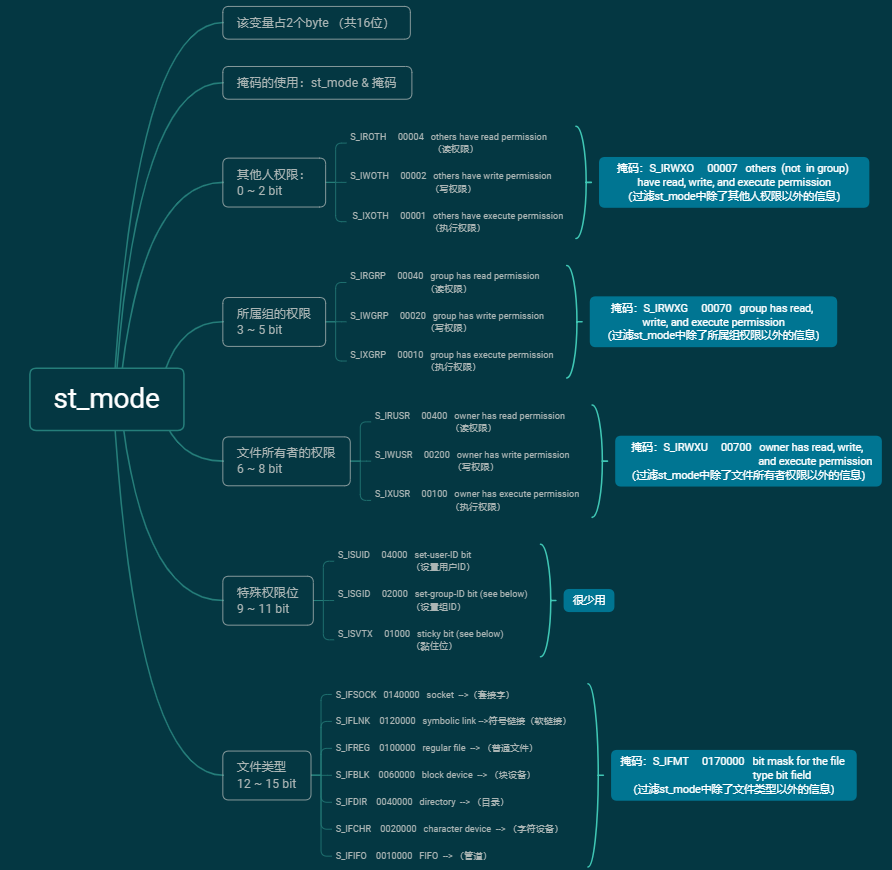
st_mode整体介绍:
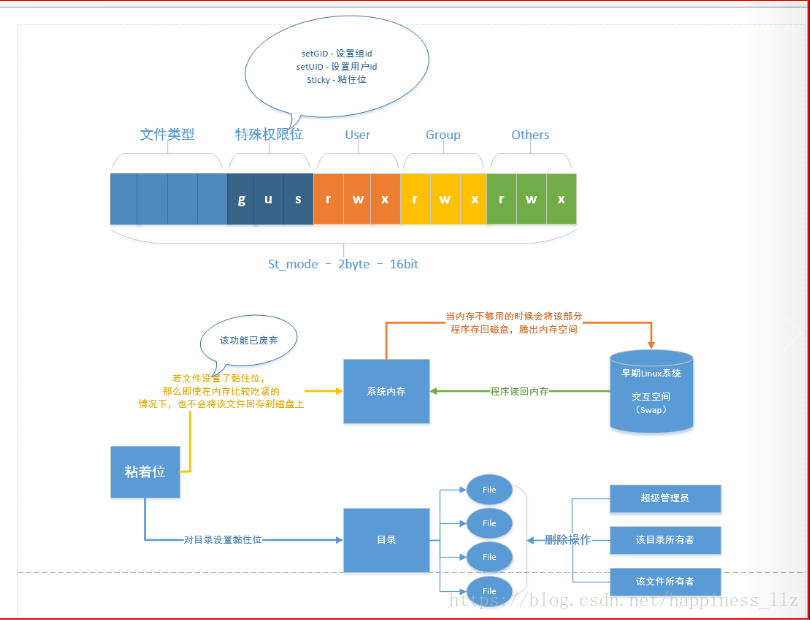
st_mode详细介绍:
二、 Linux文件操作相关函数
1. stat
- 作用:获得文件信息,也可以获取文件大小。
- 头文件
 #include <sys/types.h>

 #include <sys/stat.h>

 #include <unistd.h>
- 函数原型
 int stat(const char *path, struct stat *buf);

 int fstat(int fd, struct stat *buf);

 int lstat(const char *path, struct stat *buf);
- 参数说明:
path文件名
buf传出参数,定义结构体struct stat sb; &sb
- 返回值
失败:返回-1,设置errno
成功:返回0
注意: stat碰到链接,会追溯到源文件,穿透!!!lstat并不会穿透。
stat结构体:
 struct stat {

                dev_t     st_dev;     /* ID of device containing file */

                ino_t     st_ino;     /* inode number */

                mode_t    st_mode;    /* protection */

                nlink_t   st_nlink;   /* number of hard links */

                uid_t     st_uid;     /* user ID of owner */

                gid_t     st_gid;     /* group ID of owner */

                dev_t     st_rdev;    /* device ID (if special file) */

                off_t     st_size;    /* total size, in bytes */

                blksize_t st_blksize; /* blocksize for file system I/O */

                blkcnt_t  st_blocks;  /* number of 512B blocks allocated */

                time_t    st_atime;   /* time of last access */

                time_t    st_mtime;   /* time of last modification */

                time_t    st_ctime;   /* time of last status change */

 };
struct stat
linux命令stat执行结果:
 [root@centos linuxC]# stat stat.c

   文件:"stat.c"

   大小:            块:          IO 块:   普通文件

 设备:fd00h/64768d      Inode:    硬链接:

 权限:(/-rw-r--r--)  Uid:(    /    root)   Gid:(    /    root)

 环境:unconfined_u:object_r:usr_t:s0

 最近访问:-- ::15.149083960 +

 最近更改:-- ::15.149083960 +

 最近改动:-- ::15.202084912 +
注意三个时间的区别
 time_t    st_atime;   /* time of last access */ 文件被读,比如cat,open读等

 time_t    st_mtime;   /* time of last modification */  文件内容发生改变

 time_t    st_ctime;   /* time of last status change */ 文件属性发生变化,比如大小,权限,硬连接数等
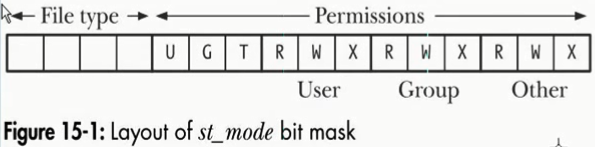
上图的解释:
- 其他用户权限

- 组用户权限

- 用户权限

- 特殊权限位

- 文件类型
示例:
 #include <sys/types.h>

 #include <sys/stat.h>

 #include <time.h>

 #include <stdio.h>

 #include <stdlib.h>

 int

 main(int argc, char *argv[])

 {

     struct stat sb;

     if (argc != ) {

         fprintf(stderr, "Usage: %s <pathname>\n", argv[]);

         exit(EXIT_FAILURE);

     }

     if (stat(argv[], &sb) == -) {

         perror("stat");

         exit(EXIT_FAILURE);

     }

     printf("File type:                ");

     switch (sb.st_mode & S_IFMT) {

     case S_IFBLK:  printf("block device\n");            break;

     case S_IFCHR:  printf("character device\n");        break;

     case S_IFDIR:  printf("directory\n");               break;

     case S_IFIFO:  printf("FIFO/pipe\n");               break;

     case S_IFLNK:  printf("symlink\n");                 break;

     case S_IFREG:  printf("regular file\n");            break;

     case S_IFSOCK: printf("socket\n");                  break;

     default:       printf("unknown?\n");                break;

     }

     printf("I-node number:            %ld\n", (long) sb.st_ino);

     printf("Mode:                     %lo (octal)\n",

             (unsigned long) sb.st_mode);

     printf("Link count:               %ld\n", (long) sb.st_nlink);

     printf("Ownership:                UID=%ld   GID=%ld\n",

             (long) sb.st_uid, (long) sb.st_gid);

     printf("Preferred I/O block size: %ld bytes\n",

             (long) sb.st_blksize);

     printf("File size:                %lld bytes\n",

             (long long) sb.st_size);

     printf("Blocks allocated:         %lld\n",

             (long long) sb.st_blocks);

     printf("Last status change:       %s", ctime(&sb.st_ctime));

     printf("Last file access:         %s", ctime(&sb.st_atime));

     printf("Last file modification:   %s", ctime(&sb.st_mtime));

     exit(EXIT_SUCCESS);

 }

 Linux自带示例(打印文件相关信息)
Linux自带示例(打印文件相关信息)
需求:使用stat实现实现 ls -l 的功能?如下所示
 [root@centos linuxC]# ll -l xx.log

 -rw-r--r--.  root root  4月   : xx.log
在实现的过程中需要获取用户名及组名,因此先看两个函数:
1)getpwuid
- 作用:通过用户的uid获取用户名
- 头文件
 #include <sys/types.h>

 #include <pwd.h>
- 函数原型
struct passwd *getpwuid(uid_t uid);
- 参数说明:
uid用户的uid
- 返回值
失败:返回NULL
成功:返回 struct passwd * 结构体指针
其中:
 struct passwd {

     char   *pw_name;       /* username */  用户名

     char   *pw_passwd;     /* user password */

     uid_t   pw_uid;        /* user ID */

     gid_t   pw_gid;        /* group ID */

     char   *pw_gecos;      /* user information */

     char   *pw_dir;        /* home directory */

     char   *pw_shell;      /* shell program */

 };
struct passwd
2)getgrgid
- 作用:通过用户的gid获取用户组名
- 头文件
 #include <sys/types.h>

 #include <grp.h>
- 函数原型
struct group *getgrgid(gid_t gid);
- 参数说明:
gid用户组的gid
- 返回值
失败:返回NULL
成功:返回 struct group * 结构体指针
其中:
 struct group {

     char   *gr_name;       /* group name */

     char   *gr_passwd;     /* group password */

     gid_t   gr_gid;        /* group ID */

     char  **gr_mem;        /* group members */

 };
struct group
3)localtime
- 作用:获取本地时间
- 头文件
#include <time.h>
- 函数原型
struct tm *localtime(const time_t *timep);
- 参数说明:
timep:一个时间相关的结构体
- 返回值
失败:返回NULL
成功:返回 struct tm * 结构体指针
其中:
 struct tm {

     int tm_sec;         /* seconds */

     int tm_min;         /* minutes */

     int tm_hour;        /* hours */

     int tm_mday;        /* day of the month */

     int tm_mon;         /* month */

     int tm_year;        /* year */

     int tm_wday;        /* day of the week */

     int tm_yday;        /* day in the year */

     int tm_isdst;       /* daylight saving time */

 };
struct tm
传入参数 timep 对应stat函数得到的结构体的秒数(time_t类型)。
最终实现:
 #include<stdio.h>

 #include<unistd.h>

 #include<sys/types.h>

 #include<sys/stat.h>

 #include<fcntl.h>

 #include<string.h>

 #include<time.h>

 #include <grp.h>

 #include <pwd.h>

 int main(int argc, char *argv[])

 {

     if (argc != )

     {

         printf("./a.out filename\n");

         return -;

     }

     struct stat sb;

     stat(argv[], &sb);

     char stmode[] = {};

     memset(stmode, '-', sizeof(stmode)-);

     //解析文件属性

     if (S_ISREG(sb.st_mode)) stmode[] = '-'; //普通文件

     if (S_ISDIR(sb.st_mode)) stmode[] = 'd';

     if (S_ISCHR(sb.st_mode)) stmode[] = 'c';

     if (S_ISBLK(sb.st_mode)) stmode[] = 'b';

     if (S_ISFIFO(sb.st_mode)) stmode[] = 'p';

     if (S_ISLNK(sb.st_mode))  stmode[] = 'l';

     if (S_ISSOCK(sb.st_mode)) stmode[] = 's';

     //解析权限

     //user

     if (sb.st_mode & S_IRUSR) stmode[] = 'r';

     if (sb.st_mode & S_IWUSR) stmode[] = 'w';

     if (sb.st_mode & S_IXUSR) stmode[] = 'x';

     //group

     if (sb.st_mode & S_IRGRP) stmode[] = 'r';

     if (sb.st_mode & S_IWGRP) stmode[] = 'w';

     if (sb.st_mode & S_IXGRP) stmode[] = 'x';

     //other

     if (sb.st_mode & S_IROTH) stmode[] = 'r';

     if (sb.st_mode & S_IWOTH) stmode[] = 'w';

     if (sb.st_mode & S_IXOTH) stmode[] = 'x';

     //分析 用户名,组名可以通过函数获得 getpwuid, getgrgid

     //时间获取

     struct tm *filetm = localtime(&sb.st_atim.tv_sec);

     char timebuf[] = {};

     sprintf(timebuf, "%d月    %d %02d:%02d", filetm->tm_mon+, filetm->tm_mday, filetm->tm_hour, filetm->tm_min);

     printf("%s %ld %s %s %ld %s %s\n", stmode, sb.st_nlink, getpwuid(sb.st_uid)->pw_name,

            getgrgid(sb.st_gid)->gr_name, sb.st_size, timebuf, argv[]);

     return ;

 }

 使用stat实现一个ls -l命令
使用stat实现一个ls -l命令
2. access
- 作用:测试指定文件是否有某种权限
- 头文件
#include <unistd.h>
- 函数原型
int access(const char *pathname, int mode);
- 参数说明:
pathname文件名
mode:
R_OK
W_OK
X_OK
F_OK
- 返回值
失败:返回-1,设置errno
成功:如果有权限或者文件存在,对应返回0
 #include<stdio.h>

 #include <unistd.h>

 int main(int argc, char *argv[])

 {

     if (argc != )

     {

         printf("./a.out filename\n");

         return -;

     }

     if (access(argv[], R_OK) == ) printf("%s read ok!\n", argv[]);

     if (access(argv[], W_OK) == ) printf("%s write ok!\n", argv[]);

     if (access(argv[], X_OK) == ) printf("%s exe ok!\n", argv[]);

     if (access(argv[], F_OK) == ) printf("%s file exists!\n", argv[]);

     return ;

 }

 判断文件读写执行及文件是否存在
判断文件读写执行及文件是否存在
3. chmod
 #include <sys/stat.h>

 int chmod(const char *path, mode_t mode);
4. truncate
- 函数作用:截断文件
- 头文件
 #include <unistd.h>

 #include <sys/types.h>
- 函数原型
 int truncate(const char *path, off_t length);

 int ftruncate(int fd, off_t length);
- 参数说明:
path文件名
length长度,长度如果大于原文件,直接拓展,如果小于原文件,截断为length长度。
- 返回值
成功:返回0
失败:返回-1,设置errno
示例:
 #include<stdio.h>

 #include<sys/types.h>

 #include<stdio.h>

 int main(int argc, char *argv[])

 {

     if (argc != )

     {

         printf("./a.out filename\n");

         return -;

     }

     truncate(argv[], );

     return ;

 }

 truncate示例
truncate示例
5. link
- 函数作用:创建硬连接
- 头文件
#include <unistd.h>
- 函数原型
int link(const char *oldpath, const char *newpath);
- 参数说明:
oldpath原文件
newpath硬连接文件
- 返回值
成功:返回0
失败:返回-1,设置errno
示例:
 #include<stdio.h>

 #include <unistd.h>

 int main(int argc, char *argv[])

 {

     if (argc != )

     {

         printf("./a.out filename\n");

         return -;

     }

     char filename[] = {};

     sprintf(filename, "%s_hard", argv[]);

     link(argv[], filename);

     return ;

 }

 创建硬连接示例
创建硬连接示例
6. symlink
- 函数作用:创建软连接
- 头文件
#include <unistd.h>
- 函数原型
int symlink(const char *oldpath, const char *newpath);
- 参数解释:
oldpath原文件
newpath创建软连接文件
- 返回值
成功:返回0
失败:返回-1,设置errno
示例:
 #include<stdio.h>

 #include <unistd.h>

 int main(int argc, char *argv[])

 {

     if (argc != )

     {

         printf("./a.out filename\n");

         return -;

     }

     char filename[] = {};

     sprintf(filename, "%s_soft", argv[]);

     symlink(argv[], filename);

     return ;

 }

 创建软连接
创建软连接
6. readlink
- 函数作用:读取文件链接信息
- 头文件
#include <unistd.h>
- 函数原型
ssize_t readlink(const char *path, char *buf, size_t bufsiz);
- 参数解释:
path链接名
buf缓冲区
bufsiz缓冲区大小
- 返回值
成功:返回buf填充的大小
失败:返回-1,设置errno
示例:
 #include<stdio.h>

 #include <unistd.h>

 int main(int argc, char *argv[])

 {

     if (argc != )

     {

         printf("./a.out filename\n");

         return -;

     }

     char buf[] = {};

     readlink(argv[], buf, sizeof(buf));

     printf("buf is %s\n", buf);

     unlink(argv[]);

     return ;

 }

 readlink示例
readlink示例
7. unlink
- 函数作用:删除软硬链接
- 头文件
#include <unistd.h>
- 函数原型
int unlink(const char *pathname);
- 函数参数:
pathname 链接名,文件也可以
- 返回值
成功:返回0
失败:返回-1,设置errno
示例:
 #include<stdio.h>

 #include <unistd.h>

 #include<stdlib.h>

 #include<fcntl.h>

 #include<string.h>

 #include<sys/types.h>

 int main(int argc, char *argv[])

 {

     if (argc != )

     {

         printf("./a.out filename\n");

         return -;

     }

     int fd = open(argv[], O_WRONLY|O_CREAT, );

    //注意只要有进程在使用该文件,则unlink在该文件退出时删除该文件

     unlink(argv[]);

     int ret = write(fd, "hello", );

     if (ret > )

     {

         printf("write ok! %d\n", ret);

     }

     if (ret < )

     {

         perror("write err");

     }

     close(fd);

     return ;

 }

 unlink示例
unlink示例
8. chown
- 函数作用:修改文件属主及属组
- 头文件
#include <unistd.h>
- 函数原型
int chown(const char *path, uid_t owner, gid_t group);
- 函数参数:
path文件名
owner用户ID,/etc/passwd
owner组ID,/etc/group
- 返回值
成功:返回0
失败:返回-1,设置errno
9. rename
- 函数作用:文件或者目录重命名
- 头文件
#include <stdio.h>
- 函数原型
int rename(const char *oldpath, const char *newpath);
- 参数说明:
oldpath文件名
newpath文件新名
- 返回值
成功:返回0
失败:返回-1,设置errno
示例:
 #include<stdio.h>

 int main(int argc, char *argv[])

 {

     if (argc != )

     {

         printf("./a.out filename\n");

         return -;

     }

     char buf[] = {};

     sprintf(buf, "%s_new", argv[]);

     rename(argv[], buf);

     return ;

 }

 rename示例
rename示例
Yuchuan_linux_C 编程之八 文件操作相关函数的更多相关文章
- C语言文件操作相关函数
在实际应用中,我们往往需要对文件进行操作,下面我将介绍C语言的一些关于操作文件的函数. 一.计算机文件 计算机文件是以计算机硬盘为载体存储在计算机上的信息集合,是存储在某种长期储存设备上的一段数据流. ...
- (安全之路)从头开始学python编程之文件操作
0x00 python学习路径 b站(哔哩哔哩)视频,w3cschool(详情百度),官方文档,各大群内获取资料等等方式 0x01 python的学习要点 open()函数:有两个参数,文件名跟模式, ...
- linux编程之文件操作
在linux下用文件描述符来表示设备文件盒普通文件,文件描述符是一个整型的数据,所有对文件的操作都是通过文件描述符来实现的. 文件描述符是文件系统中连接用户空间和内核空间的枢纽,当我们打开一个或者创建 ...
- Java IO编程——File文件操作类
在Java语言里面提供有对于文件操作系统操作的支持,而这个支持就在java.io.File类中进行了定义,也就是说在整个java.io包里面,File类是唯一 一个与文件本身操作(创建.删除.重命名等 ...
- 文件操作相关函数(POSIX 标准 open,read,write,lseek,close)
POSIX标准 open函数属于Linux中系统IO,用于“打开”文件,代码打开一个文件意味着获得了这个文件的访问句柄. int fd = open(参数1,参数2,参数3): int fd = op ...
- java学习笔记之IO编程—File文件操作类
1. File类说明 在Java语言里面提供有对于文件操作系统操作的支持,而这个支持就在java.io.File类中进行了定义,也就是说在整个java.io包里面,File类是唯一一个与文件本身操作( ...
- POJ C++程序设计 编程题#3 编程作业—文件操作与模板
编程题#3: 整数的输出格式 来源: POJ(Coursera声明:在POJ上完成的习题将不会计入Coursera的最后成绩.) 注意: 总时间限制: 1000ms 内存限制: 1000kB 描述 利 ...
- POJ C++程序设计 编程题#2 编程作业—文件操作与模板
编程题#2: 实数的输出格式 来源: POJ (Coursera声明:在POJ上完成的习题将不会计入Coursera的最后成绩.) 注意: 总时间限制: 1000ms 内存限制: 1000kB 描述 ...
- POJ C++程序设计 编程题#1 编程作业—文件操作与模板
编程题#1 来源: POJ (Coursera声明:在POJ上完成的习题将不会计入Coursera的最后成绩.) 注意: 总时间限制: 1000ms 内存限制: 65536kB 描述 实现一个三维数组 ...
随机推荐
- Springmvc多视图
Springmvc多视图 多视图是一个方法可以返回json/xml等格式的数据 第一步:导入xml格式支持的jar包 spring-oxm-3.2.0.RC2.jar 第二步:配置支持多视图 < ...
- Laravel5.4 队列简单配置与使用
概述 什么是队列? 百度百科是这样说的 “队列”是在传输过程中保存数据的容器. 举几个生活中例子: * iphone手机新款发布,三里屯iphone进的新货.大家要排队买,不能说一大堆人一起冲进去,那 ...
- Qt QLabel show 显示图像、填充、缩放
主要成员函数: 1.void setText(QString); //设置label框内的文本. 2.void hide(); //隐藏label框. 3.void setBuddy(QWidget* ...
- EmguCV C# 安装入门教程
EmguCv3的安装. EmguCv3下载网址 http://sourceforge.net/projects/emgucv/files/emgucv/3.0.0/ 推荐下载第一个: 点击direct ...
- 前端-bootstrap-长期维护
############### bootstrap简介 ################ Bootstrap是Twitter开源的基于HTML.CSS.JavaScript的前端框架. ...
- Heartbeat(注意iptables和selinux的问题)
安装 yum –y install heartbeat libnet配置 通过yum安装配置文件目录/etc/ha.d目录下没有配置文件需要从doc目录中复制三个文件.ha.cf.authkeys.h ...
- (警告)不要轻易删除libc.so.6,以及误删恢复
网上有很多帖子介绍升级libc.so.6库的帖子,这里存在巨大的坑: 如: Linux/CentOS 升级C基本运行库CLIBC的注意事项(当想解决GLIBC_2.x找不到的编译问题) 里边都会有这样 ...
- IT男频繁猝死背后的心理探秘
"深圳36岁IT男猝死酒店马桶上"这条新闻再次成为人们眼球的焦点,每每发生这样的事情,难免让人扼腕唏嘘,他们本该是风华正茂的年纪,家有老母贤妻爱子,甚至房子车子票子都不缺,该是一边 ...
- JS数字千分
JS数字千分: 1.例子:1000--->1,000 2.实现如下: salesToFormat: function (num) { var num = (num || 0).toString( ...
- 杂谈php之什么是cgi,fastcgi,fpm,cli,mod
杂谈PHP极少关注的问题 本话题来自于我使用PHP进行网页爬虫的一次经历.对于一个web开发者来说,PHP解释器本身却知之甚小,实在是惭愧呐! 首先这个话题要从几个提问开始. PHP是什么? 外文名: ...