
Django(六)实战2:向数据库添加,删除数据、重定向写法、重定向简写
一、向数据库添加图书数据
【上接】https://blog.csdn.net/u010132177/article/details/103831173
1)首先开启mysql服务,并运行项目
启动mysql服务:

net start mysql80

启动项目:

py manage.py runserver
2)在templates/app1/book.html添加按钮
【1】添加新书按钮 <a href="/detail/{{book.id}}">
hre里的斜杠/默认一定要加上,否则其它页面,如下面的delete中,会导致定向到 /index/delete/不存在 的页面中去
<!DOCTYPE html>

<html lang="en">

<head>

    <meta charset="UTF-8">

    <title>书籍页面</title>

</head>

<body>

本站的图书有:<br/>

<ul>

    {% for book in books %}

        <!--通过href属性,把book的id做为参数传给详情页,进而查询对应英雄信息-->

        <li><a href="/detail/{{book.id}}"> {{book.btitle}}</a>:{{book.bpub_date}}</li>

    {%empty%}

    	暂时没有图书!!!

    {% endfor %}

</ul>

<!--【1】添加新书按钮-->

<a href="/addInfo">添加一本三国书</a><br/>

</body>

</html>
3)app1/views.py 编写向数据表中增加书籍函数
【0】引入返回请求模块、重新定向模块
【0.1】引用时间模块
【1】添加书籍函数:创建bookinfo对象,并添加一本书
【2.0】成功 return HttpResponse('数据添加成功')
【2】添加成功后重新定向到页面:http://127.0.0.1:8000/books/
from django.shortcuts import render

from app1.models import BookInfo #从模型下导入bookinfo数据模型

from django.http import HttpResponse,HttpResponseRedirect #【0】引入返回请求模块、重新定向模块

from datetime import date #【0.1】引用时间模块

def index(request):

    '''app1应用:首页'''

    context={} #定义1个字典

    context['hello']='hello world!!!' #向字典写一个键:值(hello:'hello world!!')

    context['wa']='wawawawawahahahaha!'

    context['list']=list(range(1,10)) #定义一个字典值为一个列表,list为把内容转换为列表

    return render(request,'app1/index.html',context) #返回:把context渲染到app1/index.html的模板文件

def books(request):

    '''app1应用:图书列表页'''

    books=BookInfo.objects.all()#从数据库获取图书对象列表

    return render(request,'app1/book.html',{'books':books})#把获取到的图书对象赋值给books键。【注意】键'books'必须要加引号

def detail(request,bookId):# bookId为接收urls.py中指定的参数,来源页templates/app1/book.html

    '''app1应用:图书详情页,显示英雄信息'''

    book=BookInfo.objects.get(pk=bookId) #查询主键为url中传过来的参数Id。或写成:id=bookId

    heros=book.heroinfo_set.all() #关联查询:查询对应书的所有英雄信息

    return render(request,'app1/detail.html',{'book':book,'heros':heros}) #把参数渲染到detail页面去

def addInfo(request):

    '''添加新书到bookinfo表里'''

    #【1】创建bookinfo对象,并添加一本书

    b=BookInfo()

    b.btitle='水浒传'

    b.bpub_date=date(1989,9,9)

    b.save()

    #return HttpResponse('数据添加成功')

    #【2】添加成功后重新定向到页面:http://127.0.0.1:8000/books/

    return HttpResponseRedirect('/books')
4)添加app1/urls.py信息
添加三国书
from django.urls import path,re_path

from . import views

urlpatterns=[

    path('app1/',views.index),

    path('books/',views.books),

    # 书详情页,通过url接收参数2种写法以下两种都可:

    # path(r"detail/<int:bookId>",views.detail), #参数用尖括号包起来<>

    re_path(r"^detail/(\d+)",views.detail), #参数必须要带括号

    path('addInfo/',views.addInfo),#添加三国书

]
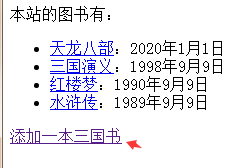
5)效果:http://127.0.0.1:8000/books/
点击后即向数据库添加一本书,添加成功后,重定向回books页面。
二、删除对应图书
1) templates/app1/book.html
关键行:<a href="/delete/{{book.id}}">删除</a>
<!DOCTYPE html>

<html lang="en">

<head>

    <meta charset="UTF-8">

    <title>书籍页面</title>

</head>

<body>

本站的图书有:<br/>

<ul>

    {% for book in books %}

        <!--通过href属性,把book的id做为参数传给详情页,进而查询对应英雄信息-->

        <li><a href="/detail/{{book.id}}"> {{book.btitle}}</a>:{{book.bpub_date}}-----<a href="/delete/{{book.id}}">删除</a> </li>

    {%empty%}

    	暂时没有图书!!!

    {% endfor %}

</ul>

<!--添加新书按钮-->

<a href="/addInfo">添加一本书</a><br/>

</body>

</html>
2 )配置App1/urls.py
关键:path(r'delete/<int:bid>',views.deleteInfo), #删除对应图书
注意:path()间逗号一定别忘记写,否则可能导致未知错误
from django.urls import path,re_path

from . import views

urlpatterns=[

    path('app1/',views.index),

    path('books/',views.books),

    # 书详情页,通过url接收参数2种写法以下两种都可:

    # path(r"detail/<int:bookId>",views.detail), #参数用尖括号包起来<>

    re_path(r"^detail/(\d+)",views.detail), #参数必须要带括号

    path('addInfo/',views.addInfo), #添加三国书

    path(r'delete/<int:bid>',views.deleteInfo), #删除对应图书

]
3)app1/views.py编写删除函数
删除bookinfo id=bid的书籍
from django.shortcuts import render

from app1.models import BookInfo #从模型下导入bookinfo数据模型

from django.http import HttpResponse,HttpResponseRedirect #【0】引入返回请求模块、重新定向模块

from datetime import date #【0.1】引用时间模块

def index(request):

    '''app1应用:首页'''

    context={} #定义1个字典

    context['hello']='hello world!!!' #向字典写一个键:值(hello:'hello world!!')

    context['wa']='wawawawawahahahaha!'

    context['list']=list(range(1,10)) #定义一个字典值为一个列表,list为把内容转换为列表

    return render(request,'app1/index.html',context) #返回:把context渲染到app1/index.html的模板文件

def books(request):

    '''app1应用:图书列表页'''

    books=BookInfo.objects.all()#从数据库获取图书对象列表

    return render(request,'app1/book.html',{'books':books})#把获取到的图书对象赋值给books键。【注意】键'books'必须要加引号

def detail(request,bookId):# bookId为接收urls.py中指定的参数,来源页templates/app1/book.html

    '''app1应用:图书详情页,显示英雄信息'''

    book=BookInfo.objects.get(pk=bookId) #查询主键为url中传过来的参数Id。或写成:id=bookId

    heros=book.heroinfo_set.all() #关联查询:查询对应书的所有英雄信息

    return render(request,'app1/detail.html',{'book':book,'heros':heros}) #把参数渲染到detail页面去

def addInfo(request):

    '''添加新书到bookinfo表里'''

    #【1】创建bookinfo对象,并添加一本书

    b=BookInfo()

    b.btitle='水浒传'

    b.bpub_date=date(1989,9,9)

    b.save()

    #return HttpResponse('数据添加成功')

    #【2】添加成功后重新定向到页面:http://127.0.0.1:8000/books/

    return HttpResponseRedirect('/books')

def deleteInfo(request,bid):

    '''删除bookinfo id=bid的书籍'''

    #根据传过来的bid查到对应书籍

    b=BookInfo.objects.get(id=bid) #也可(主键)pk=bid

    b.delete()

    return HttpResponseRedirect('/books')
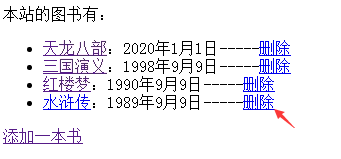
效果:http://127.0.0.1:8000/books/
点删除,删除对应图书,并重定向回books页面
三、重定向简写
关键:from django.shortcuts import render,redirect #引入重定向简写模块
使用:return redirect('/books') #【2】简写重定向
app1/views.py
from django.shortcuts import render,redirect #引入重定向简写模块

from app1.models import BookInfo #从模型下导入bookinfo数据模型

from django.http import HttpResponse,HttpResponseRedirect #引入返回请求模块、重新定向模块

from datetime import date # 引用时间模块

def index(request):

    '''app1应用:首页'''

    context={} #定义1个字典

    context['hello']='hello world!!!' #向字典写一个键:值(hello:'hello world!!')

    context['wa']='wawawawawahahahaha!'

    context['list']=list(range(1,10)) #定义一个字典值为一个列表,list为把内容转换为列表

    return render(request,'app1/index.html',context) #返回:把context渲染到app1/index.html的模板文件

def books(request):

    '''app1应用:图书列表页'''

    books=BookInfo.objects.all()#从数据库获取图书对象列表

    return render(request,'app1/book.html',{'books':books})#把获取到的图书对象赋值给books键。【注意】键'books'必须要加引号

def detail(request,bookId):# bookId为接收urls.py中指定的参数,来源页templates/app1/book.html

    '''app1应用:图书详情页,显示英雄信息'''

    book=BookInfo.objects.get(pk=bookId) #查询主键为url中传过来的参数Id。或写成:id=bookId

    heros=book.heroinfo_set.all() #关联查询:查询对应书的所有英雄信息

    return render(request,'app1/detail.html',{'book':book,'heros':heros}) #把参数渲染到detail页面去

def addInfo(request):

    '''添加新书到bookinfo表里'''

    #【1】创建bookinfo对象,并添加一本书

    b=BookInfo()

    b.btitle='水浒传'

    b.bpub_date=date(1989,9,9)

    b.save()

    #return HttpResponse('数据添加成功')

    #【2】添加成功后重新定向到页面:http://127.0.0.1:8000/books/

    return HttpResponseRedirect('/books')

def deleteInfo(request,bid):

    '''删除bookinfo id=bid的书籍'''

    #根据传过来的bid查到对应书籍

    b=BookInfo.objects.get(id=bid) #也可(主键)pk=bid

    b.delete()

    #return HttpResponseRedirect('/books')

    return  redirect('/books') #【2】简写重定向
效果同上
Django(六)实战2:向数据库添加,删除数据、重定向写法、重定向简写的更多相关文章
- 使用Bootstrap + Vue.js实现 添加删除数据
界面首先需要引入bootstrap的css和bootstrap的js文件,还有vue.js和jQuery.js才可以看见效果. 这里提供bootstrap的在线文件给大家引用: <!-- 最新版 ...
- JDBC操作数据库之删除数据
删除数据使用的SQL语句为delete语句,如果删除图书id为1的图书信息,其SQL语句为: delete from book where id=1 在实际开发中删除数据通常使用PreparedSta ...
- Oracle数据库添加删除主外键
(一)添加主键 1.表创建的同时,添加主键约束 语法: create table "表名" ( "列名1" 数据类型及长度 constraint "主 ...
- Python - Django - form 组件动态从数据库取 choices 数据
app01/models.py: from django.db import models class UserInfo(models.Model): username = models.CharFi ...
- Hadoop 添加删除数据节点(datanode)
前提条件: 添加机器安装jdk等,最好把环境都搞成一样,示例可做相应改动 实现目的: 在hadoop集群中添加一个新增数据节点. 1. 创建目录和用户 mkdir -p /app/hadoop gr ...
- 向数据库添加中文数据乱码的解决办法(本文使用spring-jdbcTemplate)
由于编码字符集的不同通常容易导致数据库中文乱码问题,如显示问号. 往往由以下三个方面所造成的 (一):数据库端字符集设置 1.安装mysql时,会有一个数据库编码设置,将其设置为utf-8 2.先设置 ...
- 微信小程序云开发-数据库-用户删除数据
一.在商品详情页添加[删除单条数据]按钮 进入goodDetail.wxml页面,添加[删除单条数据]按钮,绑定点击事件removeGood() 二.进入goodDetail.js文件,定义remo ...
- 用存储过程向数据库添加大量数据【mysql】
预分配ID的设计,需要先为数据库生成大量的数据.比如对用户ID有要求的系统,那么用户ID就要预先生成. 通过python,php,c/c++/c#,js等程序生成也是可以,但需要这些程序环境,而且单条 ...
- 数据库当中删除数据后主键id不连续的问题
新建查询: ALTER TABLE `表名` DROP `主键名`;ALTER TABLE `表名` ADD `主键名` int NOT NULL FIRST;ALTER TABLE `表名` MOD ...
- WPF XML序列化保存数据 支持Datagrid 显示/编辑/添加/删除数据
XML序列化保存数据 using System; using System.Collections.Generic; using System.Linq; using System.Text; usi ...
随机推荐
- VM player无法联网问题
情况就是vmplayer不能联网,能联网的话右上角会显示Wired Connected的 在VM里面看了网络设置,是和主机共享IP(常用)没错.那问题就在PC上了,在win+r输入services.m ...
- Simple English
Simple English 1. Basic English 1.1 设计原则: 1.2 基本英语单词列表850个 1.3 规则: 1.4 质疑 1.5 维基百科:基本英语组合词表 1.6 简单英文 ...
- The way get information from mssql by using excel vba and special port
Yes, we can get information from mssql by using excel vba. But the default port of MSSQL is 1433. ...
- 劫后余生--New Start
被搁置的计划 It was the best of times,it was the worst of times,it was the age of wisidom,it was the age o ...
- 移动端一像素边框解决方案[css scale]
新建一个border.css的文件,然后将代码复制粘贴,然后引用border.css样式文件,然后给需要添加边框的元素,加相应的类样式. tips: border-bottom[一像素下边框]:bor ...
- 应用间的API访问如何认证?
任何一个一个应用要访问另一个应用的API,需要首先到开放平台获取访问accesskey, 然后访问目标应用,目标应用中先检查来源访问token是否已存在缓存中,不存在需要去开放平台校验accesske ...
- 吴裕雄 Bootstrap 前端框架开发——Bootstrap 按钮:按钮大小
<!DOCTYPE html> <html> <head> <meta charset="utf-8"> <title> ...
- js实现深度拷贝
js实现拷贝,使用普通赋值对象,在操作其中一个对象值的时候,另一个也会更改,不符合需求 因此引入深度拷贝,以下为实现深度拷贝的几种法: Object.assign // 合并多个对象 var targ ...
- threading 多线程
# coding:utf- import time from threading import Thread def foo(x):#这里可以带参数def foo(x) print "foo ...
- django+celery+ RabbitMQ实现异步任务实例
背景 django要是针对上传文件等需要异步操作的场景时,celery是一个非常不错的选择.笔者的项目就是使用了这个组合,这里就做一个备忘吧. 安装RabbitMQ 这个安装及使用我已经在前一 ...