
世界疫情app柱形图显示


访问云服务器的mysql实现数据的获取。最后通过柱形图的形式将数据显示在页面上;
遇到的主要困难时对于云服务器的mysql连接本地的navicat之间事情,最后通过网上的各种解决办法完成了相关的内容。具体的实现代码如下:
package com.example.yiqingw;

public class City {

    private String confirm,heal,dead,name;

    public String getHeal() {

        return heal;

    }

    public String getDead() {

        return dead;

    }

    public String getName() {

        return name;

    }

    public String getConfirm() {

        return confirm;

    }

    public void setConfirm(String confirm) {

        this.confirm = confirm;

    }

    public void setHeal(String heal) {

        this.heal = heal;

    }

    public void setDead(String dead) {

        this.dead = dead;

    }

    public void setName(String name) {

        this.name = name;

    }

    public City(String confirm, String heal, String dead, String name) {

        this.confirm = confirm;

        this.heal = heal;

        this.dead = dead;

        this.name = name;

    }

    public City(){}

    @Override

    public String toString() {

        return "City{" +

                "confirm='" + confirm + '\'' +

                ", heal='" + heal + '\'' +

                ", dead='" + dead + '\'' +

                ", name='" + name + '\'' +

                '}';

    }

}
然后main方法:
package com.example.yiqingw;

import androidx.appcompat.app.AppCompatActivity;

import android.graphics.Color;

import android.os.Bundle;

import android.util.EventLogTags;

import android.util.Log;

import android.view.View;

import android.widget.AdapterView;

import android.widget.ArrayAdapter;

import android.widget.Button;

import android.widget.EditText;

import android.widget.Spinner;

import android.widget.Toast;

import com.android.volley.RequestQueue;

import com.android.volley.Response;

import com.android.volley.VolleyError;

import com.android.volley.toolbox.StringRequest;

import com.android.volley.toolbox.Volley;

import com.github.mikephil.charting.components.Description;

import com.github.mikephil.charting.components.XAxis;

import com.github.mikephil.charting.components.YAxis;

import com.github.mikephil.charting.data.BarData;

import com.github.mikephil.charting.data.BarDataSet;

import com.github.mikephil.charting.data.BarEntry;

import com.github.mikephil.charting.formatter.IndexAxisValueFormatter;

import com.google.gson.Gson;

import com.github.mikephil.charting.charts.BarChart;

import com.google.gson.reflect.TypeToken;

import java.lang.reflect.Type;

import java.util.ArrayList;

import java.util.List;

public class MainActivity extends AppCompatActivity{

//android:networkSecurityConfig="@xml/network_security_config"

    private String way="";

    private String key="";

    private String data="";

    private Button chaxun;

    private EditText key1,date1;

    private List<City> cityList = new ArrayList<City>();

    private BarChart barChart;

    @Override

    protected void onCreate(Bundle savedInstanceState) {

        super.onCreate(savedInstanceState);

        setContentView(R.layout.activity_main);

        chaxun=(Button)findViewById(R.id.chaxun);

        key1=(EditText)findViewById(R.id.key);

        date1=(EditText)findViewById(R.id.data);

        barChart=(BarChart)findViewById(R.id.wen1);

        String[] ctype = new String[]{"国家", "省份", "城市"};

        ArrayAdapter<String> adapter = new ArrayAdapter<String>(this, android.R.layout.simple_spinner_item, ctype);  //创建一个数组适配器

        adapter.setDropDownViewResource(android.R.layout.simple_spinner_dropdown_item);     //设置下拉列表框的下拉选项样式

        final Spinner spinner = super.findViewById(R.id.spinner);

        spinner.setAdapter(adapter);

        //让第一个数据项已经被选中

        spinner.setSelection(, true);

        //给Spinner添加事件监听

        spinner.setOnItemSelectedListener(new AdapterView.OnItemSelectedListener() {

            //当选中某一个数据项时触发该方法

            /*

             * parent接收的是被选择的数据项所属的 Spinner对象,

             * view参数接收的是显示被选择的数据项的TextView对象

             * position接收的是被选择的数据项在适配器中的位置

             * id被选择的数据项的行号

             */

            @Override

            public void onItemSelected(AdapterView<?> parent, View view,int position, long id) {

                //System.out.println(spinner==parent);//true

                //System.out.println(view);

                //String data = adapter.getItem(position);//从适配器中获取被选择的数据项

                //String data = list.get(position);//从集合中获取被选择的数据项

                way = (String)spinner.getItemAtPosition(position);//从spinner中获取被选择的数据

               // Toast.makeText(MainActivity.this, way, Toast.LENGTH_SHORT).show();

            }

            @Override

            public void onNothingSelected(AdapterView<?> parent) {

                // TODO Auto-generated method stub

            }

        });

        chaxun.setOnClickListener(new View.OnClickListener() {

            @Override

            public void onClick(View v) {

                if(way.equals("国家")) {

                    way="getInfoByCountry";

                }

                else if(way.equals("城市")) {

                    way="getInfoByName";

                }

                else if(way.equals("省份")) {

                    way="getInfoByProvince";

                }

                else {

                    way = "";

                }

                key=String.valueOf(key1.getText().toString().trim());

                data=String.valueOf(date1.getText().toString());

                if(key.equals("")||data.equals(""))

                {

                    Toast.makeText(MainActivity.this,"请填写齐全",Toast.LENGTH_SHORT).show();

                }

                else

                {

                    key1.setText("中国");

                    date1.setText("2020-02-18");

                    key="中国";

                    data="2020-03-18";

                    way="getInfoByCountry";

                    String url = "http://117.50.96.227/EpidemicInfo/city/" + way + "/" + key + "/" + data;

                    RequestQueue queue = Volley.newRequestQueue(MainActivity.this);

//                Toast.makeText(getActivity(),url,Toast.LENGTH_SHORT).show();

                    StringRequest stringRequest = new StringRequest(StringRequest.Method.GET,

                            url,

                            new Response.Listener<String>() {

                                @Override

                                public void onResponse(String response) {

                                    Gson gson = new Gson();

                                    Type cityType = new TypeToken<ArrayList<City>>() {

                                    }.getType();

                                    cityList = gson.fromJson(response, cityType);

                                    Toast.makeText(MainActivity.this, cityList.get().getName(),Toast.LENGTH_SHORT).show();

                                    barChart.setNoDataText("暂无内容");

                                    barChart.clear();

                                    showMyView(cityList);

                                }

                            },

                            new Response.ErrorListener() {

                                @Override

                                public void onErrorResponse(VolleyError error) {

                                    Log.e("myTAG", "onErrorResponse: " + error);

                                }

                            });

                    queue.add(stringRequest);

                }

            }

        });

    }

    private void showMyView(List<City> cityList) {

        //chart的设计

        Description description = new Description();

        description.setText("该页面数据仅供参考");

        barChart.setNoDataText("没有数据!");

        barChart.setDescription(description);

        barChart.setDrawBorders(false);

        barChart.setBackgroundColor(Color.WHITE);

        barChart.setDrawGridBackground(false);

        barChart.setDrawBarShadow(false);

        barChart.setHighlightFullBarEnabled(false);

        barChart.setDragEnabled(true);

        barChart.setNoDataText("正在加载数据...");

        //X轴数据

        ArrayList<BarEntry> entries_all = new ArrayList<>();

        ArrayList<BarEntry> entries_cure = new ArrayList<>();

        ArrayList<BarEntry> entries_dead = new ArrayList<>();

        for (int i = ; i < cityList.size(); i++) {

            entries_all.add(new BarEntry(i, Float.parseFloat(cityList.get(i).getConfirm())));

            entries_cure.add(new BarEntry(i, Float.parseFloat(cityList.get(i).getHeal())));

            entries_dead.add(new BarEntry(i, Float.parseFloat(cityList.get(i).getDead())));

        }

        List<String> citiesName = new ArrayList<>();

        for (int i = ; i < cityList.size(); i++) {

            citiesName.add(cityList.get(i).getName());

        }

        //X轴设计

        XAxis xAxis = barChart.getXAxis();

        xAxis.setAxisMinimum(0f);

        xAxis.setAxisMaximum(cityList.size());

        xAxis.setValueFormatter(new IndexAxisValueFormatter(citiesName));

        xAxis.setPosition(XAxis.XAxisPosition.BOTTOM);

        xAxis.setDrawAxisLine(false);

        xAxis.setLabelCount(cityList.size());

        xAxis.setCenterAxisLabels(true);

        //Y轴的设计

        YAxis rightY = barChart.getAxisRight();

        YAxis leftY = barChart.getAxisLeft();

        rightY.setEnabled(false);

        leftY.setEnabled(false);

        BarDataSet barDataSet_all = new BarDataSet(entries_all, "确诊人数");

        barDataSet_all.setColor(Color.RED);

        BarDataSet barDataSet_cure = new BarDataSet(entries_cure, "治愈人数");

        barDataSet_cure.setColor(Color.GREEN);

        BarDataSet barDataSet_dead = new BarDataSet(entries_dead, "死亡人数");

        barDataSet_dead.setColor(Color.GRAY);

        BarData barData = new BarData();

        barData.addDataSet(barDataSet_all);

        barData.addDataSet(barDataSet_cure);

        barData.addDataSet(barDataSet_dead);

        barData.setBarWidth(0.3f);

        barData.groupBars(0f, 0.1f, 0f);

        barChart.setData(barData);

    }

}
最后的布局文件:
<?xml version="1.0" encoding="utf-8"?>

<LinearLayout xmlns:android="http://schemas.android.com/apk/res/android"

    xmlns:app="http://schemas.android.com/apk/res-auto"

    xmlns:tools="http://schemas.android.com/tools"

    android:orientation="vertical"

    android:layout_width="match_parent"

    android:layout_height="match_parent"

    tools:context=".MainActivity">

    <TextView

        android:layout_width="match_parent"

        android:layout_height="wrap_content"

        android:text="疫情柱形图显示"

        android:layout_marginTop="5dp"

        android:textSize="30dp"

        android:textColor="@color/lanse"

        android:layout_marginBottom="20dp"

        android:gravity="center_horizontal"/>

    <LinearLayout

        android:layout_width="wrap_content"

        android:layout_height="wrap_content"

        android:layout_marginBottom="5dp">

        <TextView

            android:layout_width="wrap_content"

            android:layout_height="wrap_content"

            android:textColor="@color/colorAccent"

            android:layout_marginLeft="70dp"

            android:textSize="20dp"

            android:text="请选择类别:"/>

        <Spinner

            android:layout_width="wrap_content"

            android:layout_marginLeft="20dp"

            android:layout_height="wrap_content"

            android:id="@+id/spinner"/>

    </LinearLayout>

    <LinearLayout

        android:layout_width="wrap_content"

        android:layout_height="wrap_content"

        android:layout_marginBottom="5dp">

        <TextView

            android:layout_width="wrap_content"

            android:layout_height="wrap_content"

            android:textColor="@color/colorAccent"

            android:layout_marginLeft="70dp"

            android:textSize="20dp"

            android:text="输入日期:"/>

        <EditText

            android:id="@+id/data"

            android:layout_width="wrap_content"

            android:layout_height="wrap_content"

            android:textColor="@color/colorPrimaryDark"

            android:layout_marginLeft="10dp"

            android:hint="yyyy-MM-dd"

            android:textSize="20dp"

            android:text=""/>

    </LinearLayout>

    <LinearLayout

        android:layout_width="wrap_content"

        android:layout_height="wrap_content"

        android:layout_marginBottom="5dp">

        <TextView

            android:layout_width="wrap_content"

            android:layout_height="wrap_content"

            android:layout_marginLeft="70dp"

            android:text="输入关键字:"

            android:textColor="@color/colorAccent"

            android:textSize="20dp" />

        <EditText

            android:id="@+id/key"

            android:layout_width="wrap_content"

            android:layout_height="wrap_content"

            android:layout_marginLeft="10dp"

            android:hint="请输入"

            android:text=""

            android:textColor="@color/colorPrimaryDark"

            android:textSize="20dp" />

        <Button

            android:id="@+id/chaxun"

            android:layout_width="wrap_content"

            android:layout_height="wrap_content"

            android:layout_gravity="center_horizontal"

            android:layout_marginLeft="20dp"

            android:background="@color/danlan"

            android:text="查询"

            android:textSize="30dp" />

    </LinearLayout>

    <com.github.mikephil.charting.charts.BarChart

        android:id="@+id/wen1"

        android:layout_width="match_parent"

        android:layout_height="400dp"

        android:layout_gravity="center_vertical">

    </com.github.mikephil.charting.charts.BarChart>

</LinearLayout>
最后的实现结果: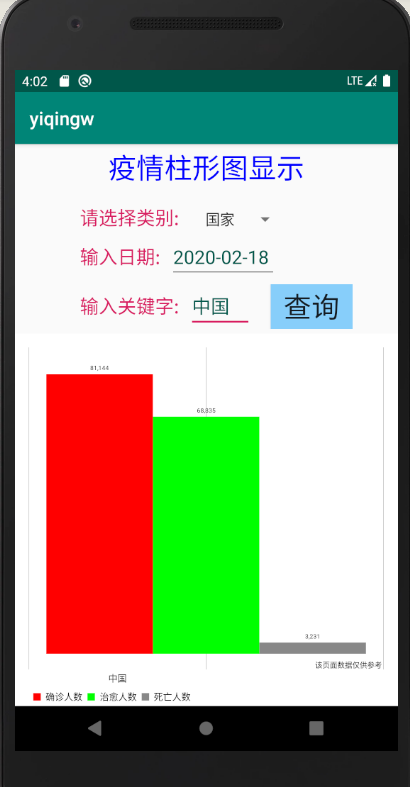
世界疫情app柱形图显示的更多相关文章
- chrome远程调试真机上的app - 只显示空白页面
chrome远程调试真机上的app - 只显示空白页面 这个是chrome需要的插件没办法自动下载导致的,怎么办你懂得,越狱... 调试起来感觉卡顿的厉害哇,有没有更好的方式?
- Android - 安装应用(APP) 不显示图标
装应用(APP) 不显示图标 本文地址:www.2cto.com 在启动的activity的AndroidManifest注册中,添加隐式启动的data: 删除应用图标的若干解决方案: 1.Andro ...
- App页面显示优化
在开发移动端APP页面时,对各操作系统各种型号的手机进行适配是必须的.然鹅,上周在开发完一个落地页后,被测试给打了回来,其中列出了一个在我看来很小的问题:单击进入页面的时候,页面还没加载完的时候字体显 ...
- 【Python学习笔记】-APP图标显示未读消息数目
以小米手机系统为例,当安装的某个APP有未读消息时,就会在该APP图标的右上角显示未读消息的数目.本文主要解说怎样用Python语言实现图标显示未读消息的数目.首先,还是要用到Python中PIL库, ...
- 关于emoji表情,支持在app端发送web端显示,web端发送给app端显示,web与wap端互相显示。
要用到emoji.js和emoji.jquery.js两个插件配合实现三端互通. 1.app端发送的emoji表情----到服务器---服务器存储的是‘问号’,无法显示如图所示: 后台的同学也试验了网 ...
- 课堂练习之疫情APP
title: 课堂练习之疫情查询APP date: 2020-03-17 20:08:51 tags: 在之前的体温记录APP上改进,只写出疫情信息查询页面的代码. 实体类与上篇博客SSM整合中的Ci ...
- iOS: 首次使用App时,显示半透明新手指引
在很多的app,我们都会发现这样一个功能:就是app启动后进入主界面时,会有一个半透明的指引图,它会提示用户如何一步步进行操作,快速的熟悉app的使用规则,极大地方便了用户的使用,也加快了app的推广 ...
- 手机安装app总是显示未安装
手机安装软件总是显示未安装 查看是否开启了护眼模式或者护眼工具等干扰屏幕的软件.关掉,再安装即可
- App中显示html网页
在现在的移动开发中,越来越多的web元素增加到了app里面,hybrid app可以综合native app 和 web app的长处,可以通过webView实现 htmllayout.xml: &l ...
随机推荐
- Serverless与微服务
Serverless 是一个更大的范畴,Serverless 不只计算,也包括存储.数据库.中间件等各种服务.Serverless = FaaS(函数即服务) + BaaS(后端即服务).其中 Ser ...
- 《JavaScript 模式》读书笔记(2)— 基本技巧2
前一篇,简单介绍了一些js代码的基本技巧.那么这篇文章,我们继续后续的内容. 一.for循环 for循环经常用在遍历数组或者类数组对象,如引数(arguments)和HTML容器(HTMLCollti ...
- npm 安装 electron 出现的奇葩错误
起因 使用yarn安装electron有时稳定,在搭配别的框架时有时又出现无解的错误了,于是打开electron官网,发现: emm,似乎官方对npm情有独钟.于是我遵从官方旨意使用npm安装elec ...
- vue-autoui自匹配webapi的UI控件
vue-autoui 是一款基于vue和element扩展的一个自动化UI控件,它主要提供两个控件封装分别是auto-form和auto-grid; 通过这两个控件可以完成大多数的信息输入和查询输出的 ...
- Asp.net textbox 控件 的 onTextChange 事件
<asp:TextBox ID="txt_MailType" runat="server" OnTextChanged="exitMailTyp ...
- Minio 集群扩容存储空间,配合nginx 负载反向代理后端minio 集群服务器,提升高可用性
环境:Centos 7 软件:minio,Etcd 需求:通过联盟两个集群实例,实现水平扩容存储空间问题: 服务器使用阿里云,一共4台服务器(官方说明最好4台服务器做分布式,测试节省服务器所以我们使 ...
- pycharm+keras+yolo3的使用和自选模型的训练中遇到的坑
1.TensorFlow版本的问题 报错:RuntimeError: `get_session` is not available when using TensorFlow 2.0. 解决办法:这个 ...
- json到底是什么??????
JSON(JavaScript Object Notation)是一种基于JavaScript语法子集的开放标准数据交换格式.JSON是基于文本的,轻量级的,通常被认为易于读/写. 通俗解释: 1.j ...
- JAVA为什么不能通过构造函数传参来设置数组长度。
今天我们来说说 JAVA通过构造函数传递的参数来设置数组长度的问题. 问题在于我们没有明确知晓JVM的运行顺序.在new对象的时候,先调用构造函数,但是并没有将执行构造函数的代码,随机之后就初始化了 ...
- 我是如何用IDEA调试BUG的?
最近小明的bug有点多,忙的连王者荣耀都顾不上玩了,导致现在不得不抽点时间研究一下作为当前大多Java程序员开发工具的IDEA DEBUG功能,以提高效率. 一.条件断点 场景:我们在遍历某个集合,期 ...