
ActiveMQ--模式(队列模式/主题模式)
两种模式:队列模式/主题模式
pom.xml

<dependency>

        <groupId>org.apache.activemq</groupId>

        <artifactId>activemq-all</artifactId>

        <version>5.15.9</version>

</dependency>
队列模式,其实就是分食模式。
比如生产方发了 10条消息到 activeMQ 服务器, 而此时有多个 消费方,那么这些消费方就会瓜分这些10条消息,一条消息只会被一个消费方得到。
主题模式,就是订阅模式。
比如生产方发了10条消息,而此时有多个消费方,那么多个消费方都能得到这 10条消息,就如同订阅公众号那样。
队列模式:
1. 首先运行两次 TestConsumer 类,以启动两个不同的消费者
2. 运行一次 TestProducer, 以启动 生产者
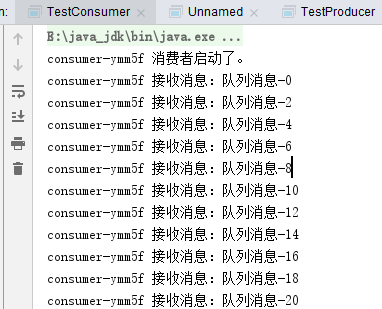
生产者生产100个,两个消费者瓜分
消费者:
public class TestConsumer {

    //服务地址,端口默认61616

    private static final String url="tcp://127.0.0.1:61616";

    //这次消费的消息名称

    private static final String topicName="queue_style";

    //消费者有可能是多个,为了区分不同的消费者,为其创建随机名称

    private static final String consumerName="consumer-" + RandomUtil.randomString(5);

    public static void main(String[] args) throws JMSException {

        //0. 先判断端口是否启动了 Active MQ 服务器

        ActiveMQUtil.checkServer();

        System.out.printf("%s 消费者启动了。 %n", consumerName);

        //1.创建ConnectiongFactory,绑定地址

        ConnectionFactory factory=new ActiveMQConnectionFactory(url);

        //2.创建Connection

        Connection connection= factory.createConnection();

        //3.启动连接

        connection.start();

        //4.创建会话

        Session session=connection.createSession(false, Session.AUTO_ACKNOWLEDGE);

        //5.创建一个目标 (主题类型)

        Destination destination=session.createQueue(topicName);

        //6.创建一个消费者

        MessageConsumer consumer=session.createConsumer(destination);

        //7.创建一个监听器

        consumer.setMessageListener(new MessageListener() {

            public void onMessage(Message arg0) {

                // TODO Auto-generated method stub

                TextMessage textMessage=(TextMessage)arg0;

                try {

                    System.out.println(consumerName +" 接收消息:"+textMessage.getText());

                } catch (JMSException e) {

                    // TODO Auto-generated catch block

                    e.printStackTrace();

                }

            }

        });

        //8. 因为不知道什么时候有,所以没法主动关闭,就不关闭了,一直处于监听状态

        //connection.close();

    }

}
生产者:
public class TestProducer {

    //服务地址,端口默认61616

    private static final String url="tcp://127.0.0.1:61616";

    //这次发送的消息名称

    private static final String topicName="queue_style";

    public static void main(String[] args) throws JMSException {

        //0. 先判断端口是否启动了  Active MQ 服务器

        ActiveMQUtil.checkServer();

        //1.创建ConnectiongFactory,绑定地址

        ConnectionFactory factory=new ActiveMQConnectionFactory(url);

        //2.创建Connection

        Connection connection= factory.createConnection();

        //3.启动连接

        connection.start();

        //4.创建会话

        Session session=connection.createSession(false, Session.AUTO_ACKNOWLEDGE);

        //5.创建一个目标 (队列类型)

        Destination destination=session.createQueue(topicName);

        //6.创建一个生产者

        MessageProducer producer=session.createProducer(destination);

        for (int i = 0; i < 100; i++) {

            //7.创建消息

            TextMessage textMessage=session.createTextMessage("队列消息-"+i);

            //8.发送消息

            producer.send(textMessage);

            System.out.println("发送:"+textMessage.getText());

        }

        //7. 关闭连接

        connection.close();

    }

}
2个consumer:

生产者生产:


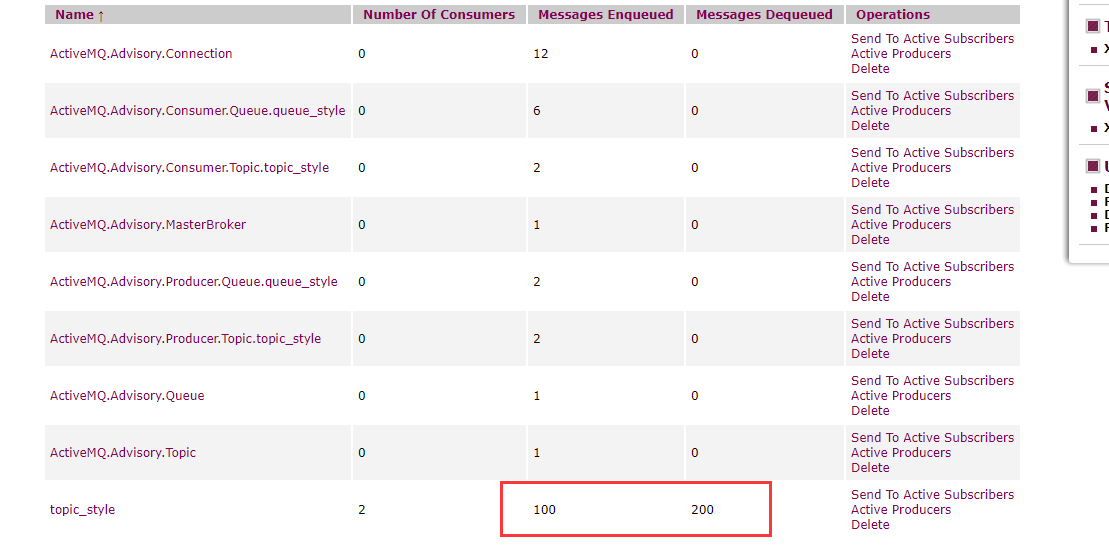
主题模式:
消费者,生产者
public class TestConsumer {

    //服务地址,端口默认61616

    private static final String url="tcp://127.0.0.1:61616";

    //这次消费的消息名称

    private static final String topicName="topic_style";

    //消费者有可能是多个,为了区分不同的消费者,为其创建随机名称

    private static final String consumerName="consumer-" + RandomUtil.randomString(5);

    public static void main(String[] args) throws JMSException {

        //0. 先判断端口是否启动了 Active MQ 服务器

        ActiveMQUtil.checkServer();

        System.out.printf("%s 消费者启动了。 %n", consumerName);

        //1.创建ConnectiongFactory,绑定地址

        ConnectionFactory factory=new ActiveMQConnectionFactory(url);

        //2.创建Connection

        Connection connection= factory.createConnection();

        //3.启动连接

        connection.start();

        //4.创建会话

        Session session=connection.createSession(false, Session.AUTO_ACKNOWLEDGE);

        //5.创建一个目标 (主题类型)

        Destination destination=session.createTopic(topicName);

        //6.创建一个消费者

        MessageConsumer consumer=session.createConsumer(destination);

        //7.创建一个监听器

        consumer.setMessageListener(new MessageListener() {

            public void onMessage(Message arg0) {

                // TODO Auto-generated method stub

                TextMessage textMessage=(TextMessage)arg0;

                try {

                    System.out.println(consumerName +" 接收消息:"+textMessage.getText());

                } catch (JMSException e) {

                    // TODO Auto-generated catch block

                    e.printStackTrace();

                }

            }

        });

        //8. 因为不知道什么时候有,所以没法主动关闭,就不关闭了,一直处于监听状态

        //connection.close();

    }

}
public class TestProducer {

    //服务地址,端口默认61616

    private static final String url="tcp://127.0.0.1:61616";

    //这次发送的消息名称

    private static final String topicName="topic_style";

    public static void main(String[] args) throws JMSException {

        //0. 先判断端口是否启动了  Active MQ 服务器

        ActiveMQUtil.checkServer();

        //1.创建ConnectiongFactory,绑定地址

        ConnectionFactory factory=new ActiveMQConnectionFactory(url);

        //2.创建Connection

        Connection connection= factory.createConnection();

        //3.启动连接

        connection.start();

        //4.创建会话

        Session session=connection.createSession(false, Session.AUTO_ACKNOWLEDGE);

        //5.创建一个目标 (主题类型)

        Destination destination=session.createTopic(topicName);

        //6.创建一个生产者

        MessageProducer producer=session.createProducer(destination);

        for (int i = 0; i < 100; i++) {

            //7.创建消息

            TextMessage textMessage=session.createTextMessage("主题消息-"+i);

            //8.发送消息

            producer.send(textMessage);

            System.out.println("发送:"+textMessage.getText());

        }

        //7. 关闭连接

        connection.close();

    }

}
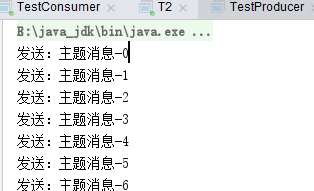
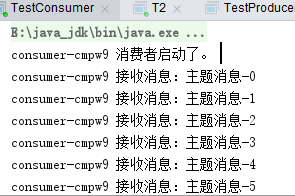
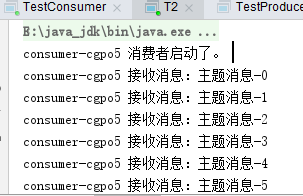
生产者生产100个,两个消费者都分别接受了100个
ActiveMQ--模式(队列模式/主题模式)的更多相关文章
- ActiveMQ队列、主题模式区别
1.ActiveMQ队列模式如下图,生产者创建消息到消息中间件,再“均分给消费者”. 2.ActiveMQ主题模式如下图,生产者创建消息到消息中间件,消费者会接受到订阅的主题中所有的消息.在主题模式下 ...
- activeMQ队列模式和主题模式的Java实现
一.队列模式 生产者 import javax.jms.Connection; import javax.jms.ConnectionFactory; import javax.jms.Destina ...
- ActiveMQ的两种消息模式,主题、队列
1.开发的模式流程如下: 2.队列模式Queue 如果生产者产生了100条消息,那么两个消费同时在的话,会分工合作来接收这100条消息.就是每个消费者接收到50条来处理. 3.主题模式topic 如果 ...
- ActiveMQ基本详解与总结& 消息队列-推/拉模式学习 & ActiveMQ及JMS学习
转自:https://www.cnblogs.com/Survivalist/p/8094069.html ActiveMQ基本详解与总结 基本使用可以参考https://www.cnblogs.co ...
- 消息队列-推/拉模式学习 & ActiveMQ及JMS学习
一种分类是推和拉 . 还有一种分类是 Queue 和 Pub/Sub . 先看的这一篇:http://blog.csdn.net/heyutao007/article/details/50131089 ...
- RabbitMQ消息队列(八)-通过Topic主题模式分发消息(.Net Core版)
前两章我们讲了RabbitMQ的direct模式和fanout模式,本章介绍topic主题模式的应用.如果对direct模式下通过routingkey来匹配消息的模式已经有一定了解那fanout也很好 ...
- 队列模式&主题模式
# RabbitMQ 消息中间件 **Advanced Message Queuing Protocol (高级消息队列协议** The Advanced Message Queuing Protoc ...
- (八)RabbitMQ消息队列-通过Topic主题模式分发消息
原文:(八)RabbitMQ消息队列-通过Topic主题模式分发消息 前两章我们讲了RabbitMQ的direct模式和fanout模式,本章介绍topic主题模式的应用.如果对direct模式下通过 ...
- RabbitMQ六种队列模式-主题模式
前言 RabbitMQ六种队列模式-简单队列RabbitMQ六种队列模式-工作队列RabbitMQ六种队列模式-发布订阅RabbitMQ六种队列模式-路由模式RabbitMQ六种队列模式-主题模式 [ ...
随机推荐
- Django框架之ORM的相关操作之分页(六)
分页是每个项目必不可少要写的一个功能,该篇文章就将记录一下使用ORM写分页的过程. 假设我们的数据库里面需要显示一些数据,而这个表中的数据大约有几千条数据,那么我们不可能将所有的数据都显示出来,那么就 ...
- idea左侧出现日期和文件大小怎么关闭
shift+alt+\
- linux中的diff命令
今天在公司的代码中看到了一个用的不是很多的命令diff,一开始以为不是,后来一查发现还真有这个命令,有关它的详细资料在这个网址中查看[http://blog.chinaunix.net/uid-253 ...
- springboot整合cache报错org.springframework.cache.ehcache.EhCacheCacheManager cannot be cast to net.sf.ehcache.CacheManager
原来的代码 private static CacheManager cacheManager = SpringContextHolder.getBean("cacheManager" ...
- Navicat连接远程主机(腾讯云服务器)的mysql失败,解决
赋予所有用户远程连接的权限,重启mysql即可连接成功: grant all privileges on . to 'root'@'%' identified by 'admin'; systemct ...
- Jenkins显示语言切换为中文(最终解决办法)
网上大部分搜索结果都指向同一种方法就是下载Locale插件,但该方法已失效. 新的解决办法: 下载完成之后重启Jenkins生效,会汉化大部分内容,部分设置不会汉化. 注:重启后不生效请检查 1.已安 ...
- python opencv:保存图像
- Bugku-CTF社工篇之简单的社工尝试
- IPSec的高可用性技术
IPSec VPN的高可用性技术:①.DPD(Dead Peer Detection)对等体检测 ——旨在检查有问题的IPSec VPN网络,并快速的切换到备 ...
- 02-15Android学习进度报告十五
今天学习了关于ListView Item多布局的实现.感觉有点困难. 何为ListView Item多布局,打个比方,QQ这种聊天列表 代码示例如下: public class MutiLayoutA ...