
asp.net mvc 短信验证码
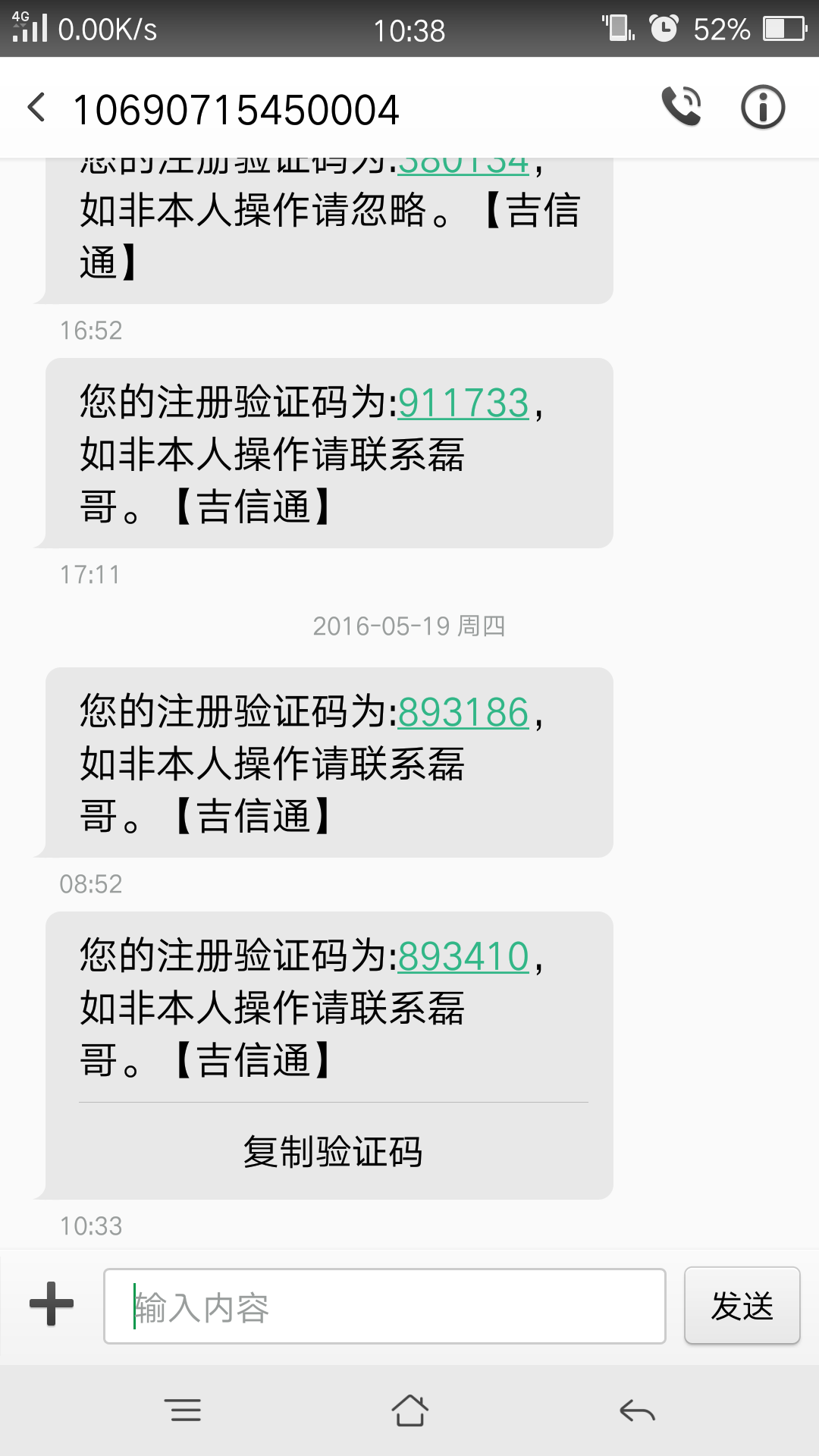
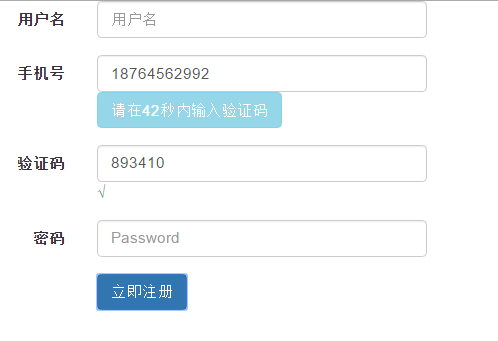
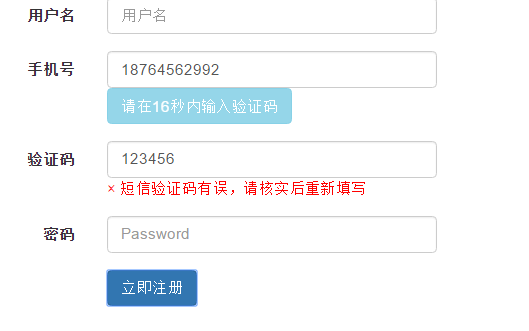
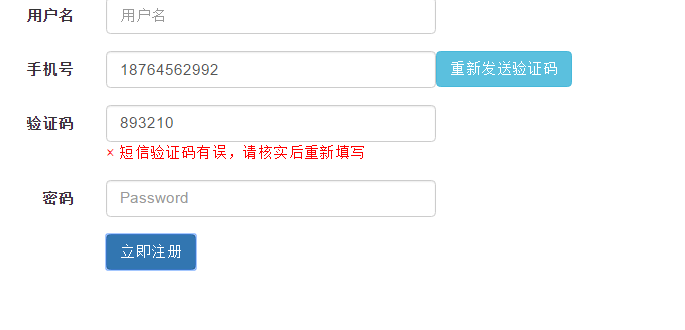
把发短信功能写成一个类包,需要引用:
SmsUtillity.cs:
using System;

using System.Collections.Generic;

using System.Linq;

using System.Text;

using System.Net;

using System.IO;

//到吉信通申请试用账号

namespace ProcuracyRoom.Dll

{

    public sealed class SmsUtility : ISmsUtility

    {

        //这里使用的是吉信通,注册个账号密码 联系管理员 让他给你开通测试就可以,应该能有几块钱的短信费

        private string url = "http://service.winic.org:8009/sys_port/gateway/index.asp";

        private string id = "onepiece";//账号

        private string pass = "";//密码

        public Sms send(string phone, string content)

        {

            Stream stream;

            //发送中文内容时,首先要将其进行编码成 %0D%AC%E9 这种形式

            byte[] data = Encoding.GetEncoding("GB2312").GetBytes(content);

            string encodeContent = "";

            foreach (var b in data)

            {

                encodeContent += "%" + b.ToString("X2");

            }

            //string temp = string.Format("{0}?id={1}&pwd={2}&to={3}&content={4}", url, id, pass, phone, content);

            string temp = string.Format("{0}?id={1}&pwd={2}&to={3}&content={4}", url, id, pass, phone, encodeContent);

            HttpWebRequest request = (HttpWebRequest)WebRequest.Create(temp);

            request.ContentType = "text/html;charset=GB2312";

            request.Method = "GET";

            HttpWebResponse response = (HttpWebResponse)request.GetResponse();

            stream = response.GetResponseStream();

            StreamReader reader = new StreamReader(stream, Encoding.GetEncoding("GB2312"));

            string text = reader.ReadToEnd();

            reader.Close();

            stream.Close();

            Sms status = Sms.parse(text);

            return status;

        }

    }

    public interface ISmsUtility

    {

        Sms send(string phone, string content);

    }

    public  class Sms

    {

        public string SmsStatus { get; set; }

        public bool Success { get; set; }

        public double CostMoney { get; set; }

        public double RemainMoney { get; set; }

        public string SmsId { get; set; }

        public static Sms parse(string text)

        {

            string[] words = text.Split(new char[] { '/' }, StringSplitOptions.RemoveEmptyEntries);

            if (words.Length != ) throw new ApplicationException("字符串格式不正确");

            Sms result = new Sms();

            result.SmsStatus = words[];

            result.Success = words[] == "";

            result.CostMoney = double.Parse(afterComma(words[]));

            result.RemainMoney = double.Parse(afterComma(words[]));

            result.SmsId = afterComma(words[]);

            return result;

        }

        private static string afterComma(string text)

        {

            int n = text.IndexOf(':');

            if (n < ) return text;

            return text.Substring(n + );

        }

    }

}
View部分:
@{

    Layout = null;

}

<!DOCTYPE html>

<html>

<head>

    <meta name="viewport" content="width=device-width" />

    <link href="~/Content/bootstrap.min.css" rel="stylesheet" />

    <script src="~/Scripts/jquery-1.11.2.min.js"></script>

    <script src="~/Scripts/bootstrap.min.js"></script>

    <title>Index</title>

    <script type="text/javascript">

        window.onload = function () {

            var InterValObj; //timer变量,控制时间

            var count = ; //间隔函数,1秒执行

            var curCount;//当前剩余秒数

            var code = ""; //验证码

            var codeLength = ;//验证码长度

            $("#getcode").click(function () {

                //获取输入的手机号码

                var phoNum = $("#phone").val();

                //alert(phoNum);

                curCount = count;

                $.getJSON('/Admin/GetCode/', { phoNum: phoNum }, function (result) {

                    if (result) {

                        // 设置按钮显示效果,倒计时

                        $("#getcode").attr("disabled", "true");

                        $("#getcode").val("请在" + curCount + "秒内输入验证码");

                        InterValObj = window.setInterval(SetRemainTime, ); // 启动计时器,1秒执行一次

                    } else {

                        $("#getcode").val("重新发送验证码");

                    }

                });

            });

            //timer处理函数

            function SetRemainTime() {

                if (curCount == ) {

                    window.clearInterval(InterValObj);// 停止计时器

                    $("#getcode").removeAttr("disabled");// 启用按钮

                    $("#getcode").val("重新发送验证码");

                    code = ""; // 清除验证码。如果不清除,过时间后,输入收到的验证码依然有效

                } else {

                    curCount--;

                    $("#getcode").val("请在" + curCount + "秒内输入验证码");

                }

            }

            //提交注册按钮

            $("#submit").click(function () {

                var CheckCode = $("#codename").val();

                // 向后台发送处理数据

                $.ajax({

                    url: "/Admin/CheckCode",

                    data: { "CheckCode": CheckCode },

                    type: "POST",

                    dataType: "text",

                    success: function (data) {

                        if (data == "true") {

                            $("#codenameTip").html("<font color='#339933'>√</font>");

                        } else {

                            $("#codenameTip").html("<font color='red'>× 短信验证码有误,请核实后重新填写</font>");

                            return;

                        }

                    }

                });

            });

        }

    </script>

</head>

<body>

    <form class="form-horizontal" role="form">

        <div class="form-group">

            <label class="col-sm-2 control-label">用户名</label>

            <div class="col-sm-6">

                <input type="text" style="width: 300px;" class="form-control" id="Name" placeholder="用户名">

            </div>

        </div>

        <div class="form-group">

            <label for="inputEmail3" class="col-sm-2 control-label">手机号</label>

            <div class="col-sm-6">

                <div style="float: left;">

                    <input id="phone" type="text" class="form-control" style="width: 300px;">

                </div>

                <div style="float: left;">

                    <input class="btn btn-info" type="button" id="getcode" value="点击获取手机验证码" />

                    <span id="telephonenameTip"></span>

                </div>

            </div>

        </div>

        <div class="form-group">

            <label class="col-sm-2 control-label">验证码</label>

            <div class="col-sm-6">

                <input style="width: 300px;" class="form-control" id="codename">

                <span id="codenameTip"></span>

            </div>

        </div>

        <div class="form-group">

            <label for="inputPassword3" class="col-sm-2 control-label">密码</label>

            <div class="col-sm-6">

                <input type="password" style="width: 300px;" class="form-control" id="" placeholder="Password">

            </div>

        </div>

        <div class="form-group">

            <div class="col-sm-offset-2 col-sm-6">

                <button type="button" id="submit" class="btn btn-primary">立即注册</button>

            </div>

        </div>

    </form>

</body>

</html>
AdminContorller部分:
using ChengJiDaoRuChaXun.Dao;

using System;

using System.Collections.Generic;

using System.Linq;

using System.Web;

using System.Web.Mvc;

using ProcuracyRoom.Dll;

namespace ChengJiDaoRuChaXun.Controllers

{

    public class AdminController : Controller

    {

        public ActionResult Index(string m)

        {

            return View();

        }

        #region GetCode()-获取验证码

        /// <summary>

        /// 返回json到界面

        /// </summary>

        /// <returns>string</returns>

        public ActionResult GetCode(string phoNum)

        {

            try

            {

                bool result;

                string code = "";

                //随机生成6位短信验证码

                Random rand = new Random();

                for (int i = ; i < ; i++)

                {

                    code += rand.Next(, ).ToString();

                }

                // 短信验证码存入session(session的默认失效时间30分钟)

                Session.Add("code", code);

                Session["CodeTime"] = DateTime.Now;//存入时间一起存到Session里

                // 短信内容+随机生成的6位短信验证码

                String content = "【欢迎注册】 您的注册验证码为:" + code + ",如非本人操作请联系磊哥。";

                // 单个手机号发送短信

                SmsUtility su = new SmsUtility();

                if (su.send(phoNum, content).Success)

                {

                    result = true;// 成功

                }

                else {

                    result = false;//失败

                }

                return Json(result, JsonRequestBehavior.AllowGet);

            }

            catch (Exception ex)

            {

                throw ex;

            }

        }

        #endregion

        #region CheckCode()-检查验证码是佛正确

        public ActionResult CheckCode()

        {

            bool result = false;

            //用户输入的验证码

            string checkCode = Request["CheckCode"].Trim();

            //取出存在session中的验证码

            string code = Session["code"].ToString();

            DateTime time = (DateTime)Session["CodeTime"];

            try

            {

                //验证是否一致并且产生验证码的时间+60秒与当前时间相比较是否小于60

                if (checkCode != code || time.AddSeconds() < DateTime.Now)

                {

                    result = false;

                }

                else

                {

                    result = true;

                }

                return Json(result, JsonRequestBehavior.AllowGet);

            }

            catch (Exception e)

            {

                throw new Exception("短信验证失败", e);

            }

        }

        #endregion

    }

}
asp.net mvc 短信验证码的更多相关文章
- asp.net mvc短信接口调用——阿里大于API开发心得
互联网上有许多公司提供短信接口服务,诸如网易云信.阿里大于等等.我在自己项目里需要使用到短信服务起到通知作用,实际开发周期三天,完成配置.开发和使用,总的说,阿里大于提供的接口易于开发,非常的方便,短 ...
- 在ASP.NET MVC下通过短信验证码注册
以前发短信使用过短信猫,现在,更多地是使用第三方API.大致过程是: → 用户在页面输入手机号码→ 用户点击"获取验证码"按钮,把手机号码发送给服务端,服务端产生几位数的随机码,并 ...
- 请给你的短信验证码接口加上SSL双向验证
序言 去年年底闲来几天,有位同事专门在网上找一些注册型的app和网站,研究其短信接口是否安全,半天下来找到30来家,一些短信接口由于分析难度原因,没有继续深入,但差不多挖掘到20来个,可以肆意被调用, ...
- SSH2框架实现注冊发短信验证码实例
这两天開始写程序了,让用SSH2框架,曾经没有接触过Java项目更没有接触过SSH2框架,所以用注冊開始了我Java之旅.后来发现,后台代码挺easy理解的,跟.net的差点儿相同.就是层与层之间的调 ...
- Atitit. 破解 拦截 绕过 网站 手机 短信 验证码 方式 v2 attilax 总结
Atitit. 破解 拦截 绕过 网站 手机 短信 验证码 方式 v2 attilax 总结 1. 验证码的前世今生11.1. 第一代验证码 图片验证码11.2. 第二代验证码 用户操作 ,比如 ...
- jQuery获取短信验证码+倒计时实现
jQuery 短信验证码倒计时 <script type="text/javascript" charset="utf-8"> $(function ...
- 转载:Android自动化测试- 自动获取短信验证码
前言:android应用的自动化测试必然会涉及到注册登录功能,而许多的注册登录或修改密码功能常常需要输入短信验证码,因此有必要能够自动获得下发的短信验证码. 主要就是实时获取短信信息. android ...
- App开发(Android与php接口)之:短信验证码
最近和同学们一起开发一个自主项目,要用到短信验证码,在网上搜索了很久,看到一个推荐贴,提到了很多不错的短信服务商.经过测试,帖子中提到的服务商他们的短信到达率和到达速度也都不错.最后,由于经费问题,我 ...
- android自动获取短信验证码
前言:android应用的自动化测试必然会涉及到注册登录功能,而许多的注册登录或修改密码功能常常需要输入短信验证码,因此有必要能够自动获得下发的短信验证码.主要就是实时获取短信信息.android上获 ...
随机推荐
- 通过WMI获取网卡MAC地址、硬盘序列号、主板序列号、CPU ID、BIOS序列号
转载:https://www.cnblogs.com/tlduck/p/5132738.html #define _WIN32_DCOM #include<iostream> #inclu ...
- crawlSpider全站爬取 分布式
# 如何提升scrapy爬取数据的效率? 推荐: 单线程加异步协程 增加并发: 默认scrapy开启的并发线程为32个,可以适当进行增加.在settings.py中修改 CONCURRENT_REQU ...
- 解决安装 fireworks、photoshop 时卡在输入账号、手机号处等问题
一定要断网! 一定要断网! 一定要断网! 重要的事情说三遍! 我安装的是破解版CS6系列: 安装步骤如下: 1.当进行安装到此步时,(前面的步骤为解压文件等便不解释),选择“试用”,此时应该是 断网 ...
- JavaScirpt - 模块的写法
传送门 http://www.ruanyifeng.com/blog/2012/10/javascript_module.html 1. 原始写法 function f1() { // do sth. ...
- spark实验(三)--Spark和Hadoop的安装(1)
一.实验目的 (1)掌握在 Linux 虚拟机中安装 Hadoop 和 Spark 的方法: (2)熟悉 HDFS 的基本使用方法: (3)掌握使用 Spark 访问本地文件和 HDFS 文件的方法. ...
- 数据表损坏:Incorrect key file for table
最近做项目过程中,调用数据库内容,老是出现一些类似于数据表损坏的提示信息(Incorrect key file for table edison_category),查询不到数据,很是恼火,后来冷静下 ...
- java 协程
协程是比线程更轻量级的程序处理单元,也可以说是运行在线程上的线程,由自己控制 1.适用于被阻塞的,且需要大量并发的场景. 2.不适用于,大量计算的多线程,遇到此种情况,更好实用线程去解决. 虽然Jav ...
- ZOJ1006 Do the Untwist
简单模拟~ #include<bits/stdc++.h> using namespace std; ; int a[maxn]; unordered_map<char,int> ...
- 吴裕雄--天生自然Numpy库学习笔记:NumPy IO
Numpy 可以读写磁盘上的文本数据或二进制数据. NumPy 为 ndarray 对象引入了一个简单的文件格式:npy. npy 文件用于存储重建 ndarray 所需的数据.图形.dtype 和其 ...
- Cisco AP-Mobility Express基础
Part I 介绍 1.1基本概况 Cisco Mobility Express这个名词出现在Cisco “8”系列的AP上,例如现在的AP1852,AP2802,AP3802等都是Mobility ...