
iptables/Netfilter 学习
开始学iptables,因为它是和路由器技术紧密结合在一起的。
iptables的命令看起来眼花缭乱,随便找两个:
iptables -A FORWARD -p tcp -s 192.168.1.0/ -d 192.168.1.234 --dport  -j ACCEPT

iptables -A FORWARD -f -p tcp -s 192.168.1.0/ -d 192.168.1.234 --dport  -j ACCEPT
看了一些博客,还是云里雾里的,所以开始看内核里面的实现。看了内核的实现之后,再回过来
看别人的博客,整个框架就清晰多了。
实际上iptables这个工具在新版的kernel已经换成nftable了,但是通过看kernel里面的实现,可以
掌握linux数据包控制的大体实现。
整体分析
这里以3.10.79 kernel为例,这里采用的工具仍然还是iptables。
首先要搞清楚iptables的整体架构:

(上图转自http://segmentfault.com/a/1190000002540601)
所以说iptables对应内核的Netfilter,搞懂Netfilter是怎么工作的话,那么iptables也就容易理解了。
样例分析
下面分析一个样例,从ip_rcv开始:
/*

 *     Main IP Receive routine.

 */

int ip_rcv(struct sk_buff *skb, struct net_device *dev, struct packet_type *pt, struct net_device *orig_dev)

{

        ...

    return NF_HOOK(NFPROTO_IPV4, NF_INET_PRE_ROUTING, skb, dev, NULL, ip_rcv_finish);

}
可以看到最后return的时候使用了NF_HOOK。接下来继续调用NF_HOOK_THRESH,nf_hook_thresh。
/**

 *    nf_hook_thresh - call a netfilter hook

 *

 *    Returns 1 if the hook has allowed the packet to pass.  The function

 *    okfn must be invoked by the caller in this case.  Any other return

 *    value indicates the packet has been consumed by the hook.

 */

static inline int nf_hook_thresh(u_int8_t pf, unsigned int hook,

                 struct sk_buff *skb,

                 struct net_device *indev,

                 struct net_device *outdev,

                 int (*okfn)(struct sk_buff *), int thresh)

{

    if (nf_hooks_active(pf, hook))

        return nf_hook_slow(pf, hook, skb, indev, outdev, okfn, thresh);

    return ;

}
这里先判断,再决定。
static inline bool nf_hooks_active(u_int8_t pf, unsigned int hook)

{

    return !list_empty(&nf_hooks[pf][hook]);

}
Normal
0
7.8 pt
0
2
false
false
false
EN-US
ZH-CN
X-NONE
MicrosoftInternetExplorer4
/* Style Definitions */
table.MsoNormalTable
{mso-style-name:"Table Normal";
mso-tstyle-rowband-size:0;
mso-tstyle-colband-size:0;
mso-style-noshow:yes;
mso-style-priority:99;
mso-style-qformat:yes;
mso-style-parent:"";
mso-padding-alt:0cm 5.4pt 0cm 5.4pt;
mso-para-margin:0cm;
mso-para-margin-bottom:.0001pt;
mso-pagination:widow-orphan;
font-size:10.0pt;
font-family:宋体;
mso-ascii-font-family:Calibri;
mso-hansi-font-family:Calibri;}
这里很简单,检查nf_hooks表中对应的项是否为0。这里若发现这个表为空的话会立马返回,也就是不进行检查。
Normal
0
7.8 pt
0
2
false
false
false
EN-US
ZH-CN
X-NONE
MicrosoftInternetExplorer4
下面整理了一下这个表里面可能的值,这个表有两部分,左边的部分是表的第一维,右边部分是表的第二维。
/* Style Definitions */
table.MsoNormalTable
{mso-style-name:"Table Normal";
mso-tstyle-rowband-size:0;
mso-tstyle-colband-size:0;
mso-style-noshow:yes;
mso-style-priority:99;
mso-style-qformat:yes;
mso-style-parent:"";
mso-padding-alt:0cm 5.4pt 0cm 5.4pt;
mso-para-margin:0cm;
mso-para-margin-bottom:.0001pt;
mso-pagination:widow-orphan;
font-size:10.0pt;
font-family:宋体;
mso-ascii-font-family:Calibri;
mso-hansi-font-family:Calibri;}
table.MsoTableMediumGrid2Accent6
{mso-style-name:"Medium Grid 2 - Accent 6";
mso-tstyle-rowband-size:1;
mso-tstyle-colband-size:1;
mso-style-priority:68;
mso-style-unhide:no;
border:solid #F79646 1.0pt;
mso-border-themecolor:accent6;
mso-padding-alt:0cm 5.4pt 0cm 5.4pt;
mso-border-insideh:1.0pt solid #F79646;
mso-border-insideh-themecolor:accent6;
mso-border-insidev:1.0pt solid #F79646;
mso-border-insidev-themecolor:accent6;
mso-tstyle-shading:#FDE4D0;
mso-tstyle-shading-themecolor:accent6;
mso-tstyle-shading-themetint:63;
mso-para-margin:0cm;
mso-para-margin-bottom:.0001pt;
mso-pagination:widow-orphan;
font-size:10.0pt;
font-family:宋体;
mso-ascii-font-family:Cambria;
mso-ascii-theme-font:major-latin;
mso-fareast-font-family:宋体;
mso-fareast-theme-font:major-fareast;
mso-hansi-font-family:Cambria;
mso-hansi-theme-font:major-latin;
mso-bidi-font-family:"Times New Roman";
mso-bidi-theme-font:major-bidi;
color:black;
mso-themecolor:text1;}
table.MsoTableMediumGrid2Accent6FirstRow
{mso-style-name:"Medium Grid 2 - Accent 6";
mso-table-condition:first-row;
mso-style-priority:68;
mso-style-unhide:no;
mso-tstyle-shading:#FEF4EC;
mso-tstyle-shading-themecolor:accent6;
mso-tstyle-shading-themetint:25;
color:black;
mso-themecolor:text1;
mso-ansi-font-weight:bold;
mso-bidi-font-weight:bold;}
table.MsoTableMediumGrid2Accent6LastRow
{mso-style-name:"Medium Grid 2 - Accent 6";
mso-table-condition:last-row;
mso-style-priority:68;
mso-style-unhide:no;
mso-tstyle-shading:white;
mso-tstyle-shading-themecolor:background1;
mso-tstyle-border-top:1.5pt solid black;
mso-tstyle-border-top-themecolor:text1;
mso-tstyle-border-left:cell-none;
mso-tstyle-border-bottom:cell-none;
mso-tstyle-border-right:cell-none;
mso-tstyle-border-insideh:cell-none;
mso-tstyle-border-insidev:cell-none;
color:black;
mso-themecolor:text1;
mso-ansi-font-weight:bold;
mso-bidi-font-weight:bold;}
table.MsoTableMediumGrid2Accent6FirstCol
{mso-style-name:"Medium Grid 2 - Accent 6";
mso-table-condition:first-column;
mso-style-priority:68;
mso-style-unhide:no;
mso-tstyle-shading:white;
mso-tstyle-shading-themecolor:background1;
mso-tstyle-border-top:cell-none;
mso-tstyle-border-left:cell-none;
mso-tstyle-border-bottom:cell-none;
mso-tstyle-border-right:cell-none;
mso-tstyle-border-insideh:cell-none;
mso-tstyle-border-insidev:cell-none;
color:black;
mso-themecolor:text1;
mso-ansi-font-weight:bold;
mso-bidi-font-weight:bold;}
table.MsoTableMediumGrid2Accent6LastCol
{mso-style-name:"Medium Grid 2 - Accent 6";
mso-table-condition:last-column;
mso-style-priority:68;
mso-style-unhide:no;
mso-tstyle-shading:#FDE9D9;
mso-tstyle-shading-themecolor:accent6;
mso-tstyle-shading-themetint:51;
mso-tstyle-border-top:cell-none;
mso-tstyle-border-left:cell-none;
mso-tstyle-border-bottom:cell-none;
mso-tstyle-border-right:cell-none;
mso-tstyle-border-insideh:cell-none;
mso-tstyle-border-insidev:cell-none;
color:black;
mso-themecolor:text1;
mso-ansi-font-weight:normal;
mso-bidi-font-weight:normal;}
table.MsoTableMediumGrid2Accent6OddColumn
{mso-style-name:"Medium Grid 2 - Accent 6";
mso-table-condition:odd-column;
mso-style-priority:68;
mso-style-unhide:no;
mso-tstyle-shading:#FBCAA2;
mso-tstyle-shading-themecolor:accent6;
mso-tstyle-shading-themetint:127;}
table.MsoTableMediumGrid2Accent6OddRow
{mso-style-name:"Medium Grid 2 - Accent 6";
mso-table-condition:odd-row;
mso-style-priority:68;
mso-style-unhide:no;
mso-tstyle-shading:#FBCAA2;
mso-tstyle-shading-themecolor:accent6;
mso-tstyle-shading-themetint:127;
mso-tstyle-border-insideh:.75pt solid #F79646;
mso-tstyle-border-insideh-themecolor:accent6;
mso-tstyle-border-insidev:.75pt solid #F79646;
mso-tstyle-border-insidev-themecolor:accent6;}
table.MsoTableMediumGrid2Accent6NWCell
{mso-style-name:"Medium Grid 2 - Accent 6";
mso-table-condition:nw-cell;
mso-style-priority:68;
mso-style-unhide:no;
mso-tstyle-shading:white;
mso-tstyle-shading-themecolor:background1;}
|
pf |
hook |
hook example function(ipv4) |
|
NFPROTO_UNSPEC |
NF_INET_PRE_ROUTING |
ip_rcv |
|
NFPROTO_IPV4 |
NF_INET_LOCAL_IN |
ip_local_deliver |
|
NFPROTO_ARP |
NF_INET_FORWARD |
ip_forward |
|
NFPROTO_BRIDGE |
NF_INET_LOCAL_OUT |
__ip_local_out |
|
NFPROTO_IPV6 |
NF_INET_POST_ROUTING |
ip_output |
|
NFPROTO_DECNET |
这里第二列举了一个例子,是关于NFPROTO_IPV4 的。
这个表是Netfilter里面最关键的一个部分,这个数组的每一个单元都是一个链表。
struct list_head nf_hooks[NFPROTO_NUMPROTO][NF_MAX_HOOKS];
这里存储了对于各种协议、各个钩子的规则信息。iptables用户层将用户定义的规则设置到对应链表里面。
接下来是一个关键的函数,nf_hook_slow。这个函数里面进行主要的检查过程。
next_hook:

    verdict = nf_iterate(&nf_hooks[pf][hook], skb, hook, indev,

                 outdev, &elem, okfn, hook_thresh);

    if (verdict == NF_ACCEPT || verdict == NF_STOP) {

        ret = ;

    } else if ((verdict & NF_VERDICT_MASK) == NF_DROP) {

        kfree_skb(skb);

        ret = NF_DROP_GETERR(verdict);

        if (ret == )

            ret = -EPERM;

    } else if ((verdict & NF_VERDICT_MASK) == NF_QUEUE) {

        int err = nf_queue(skb, elem, pf, hook, indev, outdev, okfn,

                        verdict >> NF_VERDICT_QBITS);

        if (err < ) {

            if (err == -ECANCELED)

                goto next_hook;

            if (err == -ESRCH &&

               (verdict & NF_VERDICT_FLAG_QUEUE_BYPASS))

                goto next_hook;

            kfree_skb(skb);

        }

    }
这里检查的返回结果有多个,总结表格如下:
Normal
0
7.8 pt
0
2
false
false
false
EN-US
ZH-CN
X-NONE
MicrosoftInternetExplorer4
/* Style Definitions */
table.MsoNormalTable
{mso-style-name:"Table Normal";
mso-tstyle-rowband-size:0;
mso-tstyle-colband-size:0;
mso-style-noshow:yes;
mso-style-priority:99;
mso-style-qformat:yes;
mso-style-parent:"";
mso-padding-alt:0cm 5.4pt 0cm 5.4pt;
mso-para-margin:0cm;
mso-para-margin-bottom:.0001pt;
mso-pagination:widow-orphan;
font-size:10.0pt;
font-family:宋体;
mso-ascii-font-family:Calibri;
mso-hansi-font-family:Calibri;}
|
Filter result |
meaning |
|
NF_DROP |
丢弃报文 |
|
NF_ACCEPT/ NF_STOP |
继续正常的报文处理 |
|
NF_STOLEN |
由钩子函数处理了该报文 |
|
NF_QUEUE |
将报文入队,交由用户程序 |
|
NF_REPEAT |
再次调用该钩子函数 |
总的来说,在数据表处理的某个阶段,Netfilter会将这个数据包遍历nf_hooks对应单元的链表的规则,然后根据规则作出相应的处理结果。
数据流分析
Netfilter在报文流经的一些地方做了拦截处理,可以从下图中得知:
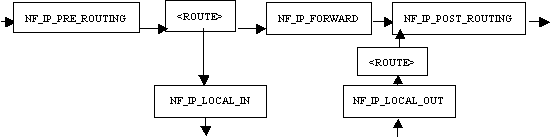
(图片转自http://www.ibm.com/developerworks/cn/linux/l-ntflt/)
前面分析的是ip_rcv,也就是NF_INET_PRE_ROUTING,这个参数和上图的名字不太一样,可能是kernel版本的问题。
我将上面的部分和代码对应起来:
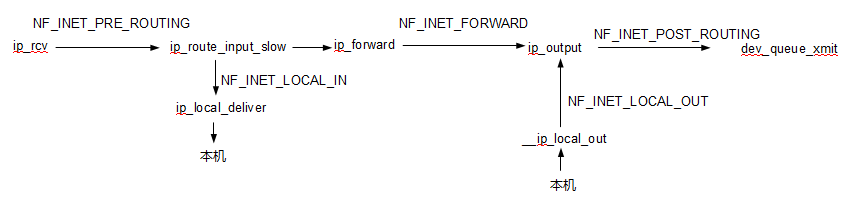
另外又仔细分析了一下代码的详细流程:
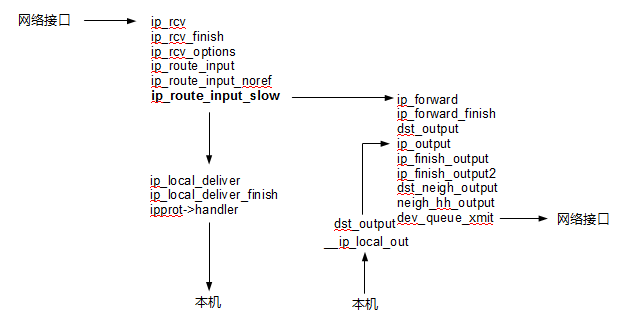
到这里为止,iptables内核部分已经可以大致了解到是怎么回事了。
关于用户层的iptables,一般是这样划分的:
表 -> 链 -> 规则
但是这样看的话一开始也不容易理解,而且不同表和不同链容易混在一起理解。
当理解了内核的Netfilter的时候,这个规则就可以这样划分了:
链 -> (表 + 规则)
因为根本上以链为主体,数据是在链之间流动的。
其他
关于iptables网上的资料太多了,所以随便找几篇看看就可以开始上手,关于这个东西
用多了就会慢慢熟悉,另外要注意到自己设置的规则的先后顺序,如果顺序不对的话会事与愿违。
参考资料:
1.http://www.ibm.com/developerworks/cn/linux/l-ntflt/
2.http://www.360doc.com/content/08/1225/18/36491_2197786.shtml
iptables/Netfilter 学习的更多相关文章
- Linux数据包路由原理、Iptables/netfilter入门学习
相关学习资料 https://www.frozentux.net/iptables-tutorial/cn/iptables-tutorial-cn-1.1.19.html http://zh.wik ...
- IPtables/NetFilter
前提知识 任何主机若要与非同网络中的主机通信,则必须将报文发送到默认网关: 对Linux而言,IP地址是属于主机(内核中)的,不属于网卡,只要属于当前主机的IP地址间,都可直接响应,不称为转发 私有地 ...
- Linux对外提供服务 网络操作 端口操作 1.开启服务监听端口 2.设置防火墙,放行访问端口的包 iptables&netfilter 四表五链和通堵策略
主题: Linux服务器上软件提供服务 1.网络操作 2.端口操作 1.网络操作 本机必须能够ping通目标主机(本地虚拟机或者远程主机) 2.端口操作 1.开启服务监听端口 2.设置防火墙,放行访问 ...
- Linux内核下包过滤框架——iptables&netfilter
iptables & netfilter 1.简介 netfilter/iptables(下文中简称为iptables)组成Linux内核下的包过滤防火墙,完成封包过滤.封包重定向和网络地址转 ...
- iptables/netfilter命令、实现及利用(转)
原文链接:http://blog.csdn.net/sealyao/article/details/5934268 一.Netfilter和Iptables概述 netfilter/iptables ...
- iptables关键学习总结
iptables技术推荐参考这位仁兄的博客:http://www.zsythink.net/archives/category/%E8%BF%90%E7%BB%B4%E7%9B%B8%E5%85%B3 ...
- netfilter 学习摘要
netfilter 子系入口在L3,完成后把数据包发往L4 netfilter 主要功能: 数据包选择(iptables) 数据包过滤 网络地址转换(NAT) 数据包操纵(在路由选择之前或之后修改数据 ...
- centos下防火墙iptables日志学习笔记
一直找不到日志方面怎么弄,问了同事,同事给了个网址: http://www.thegeekstuff.com/2012/08/iptables-log-packets/ 下面就是我根据这个网址里面的设 ...
- Linux netfilter 学习笔记
https://blog.csdn.net/lickylin/article/details/33321905
随机推荐
- spring中的bean
环境准备 Eclipse上新建一个简单的maven工程,Artifact Id选择maven-archetype-quickstart: 添加spring-context依赖: <depende ...
- Oracle脚本笔记
//创建一个表create table 表名(字段名1 varchar2(20) not null);//多个用 , 隔开//添加字段alter table 表名add (字段名2 varchar2 ...
- Java并发之CyclicBarrier 可重用同步工具类
package com.thread.test.thread; import java.util.Random; import java.util.concurrent.*; /** * Cyclic ...
- SQL语句查询某表的所有字段及数据类型
SQL语句查询某表的所有字段及数据类型 SELECT name AS column_name , TYPE_NAME(system_type_id) AS column_type , max_leng ...
- 前端构建工具gulp介绍
2016年3月3日 10:46:08 晴 前端构建工具gulpjs的使用介绍及技巧 gulpjs是一个前端构建工具,与gruntjs相比,gulpjs无需写一大堆繁杂的配置参数,API也非常简 ...
- 新手开发android容易出现的错误(不断更新中...)
才开始开发android app,因为以前一直是java开发,学习也比较容易. 记录下自己开发过程中出现的一些小问题: 静态变量 在开发中,因为习惯性的问题,经常将一些常用数据(如用户信息等)进行st ...
- 烂泥:nagios学习(四):pnp4nagios图形化绘制nagios数据
本文由秀依林枫提供友情赞助,首发于烂泥行天下 在nagios安装完毕后,我们也添加了一些监控对象,但是你会发现nagios只是简单的给我们列出那些监控对象是正常的,而没有把这些监控对象的数据进行整合. ...
- Fragment中添加ListView而不使用ListFragment
最初的构想是,将Fragment和ViewPager结合起来, 然后突发奇想,在第一个Fragment里添加了ListView, 依照网上的建议,extends了ListFragment,接着各种报错 ...
- 学习OpenStack之 (0):基础知识
vi 方向键出现字母问题解决方法 执行命令 sudo apt-get remove vim-common 执行命令 sudo apt-get install vim 鼠标被virtualbox捕获无法 ...
- 在dreamweaver上面制作表格
开始有点犯二,准备一行一行敲,五六十行,人都得敲疯,还容易出错...... 直接从wps复制粘贴到设计里面,立马就出来了,费那事干嘛,哎,工具还是用的不熟