
Android新浪微博获取评论信息、发表评论、转发微博等
首先前面一节中说过,获取用户的微博信息,这里简单介绍下获取微博的评论信息,以及对微博进行评论,转发微博等.
OAuth认证,这里就不多说了,
我说名一下接口:
获取微博的评论列表接口: http://api.t.sina.com.cn/statuses/comments.json
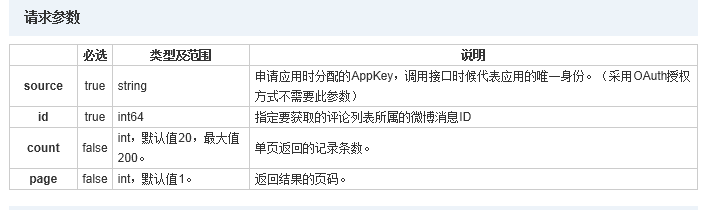
我们这里需要把微博ID做为参数请求,这个ID我们可以根据前面一节解析用户的微博信息得到.
对微博进行评论接口:http://api.t.sina.com.cn/statuses/comment.json
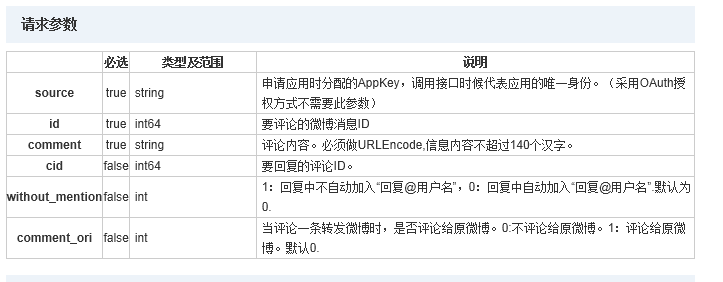
我们需要把微博的id,与我们的评论comment做为参数进行请求.
微博转发接口:http://api.t.sina.com.cn/statuses/repost.json
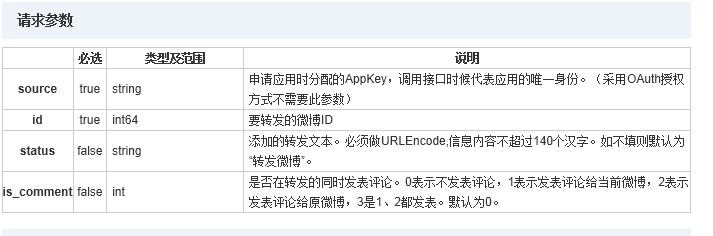
这里我们只需要微博的id.
下面是实现部分代码:
- /***
- * 获取用户的评论
- *
- * @param requstURL
- * 请求url
- * @param blog_id
- * 微博id
- * @return JSON(String)
- * @throws OAuthMessageSignerException
- * @throws OAuthExpectationFailedException
- * @throws OAuthCommunicationException
- * @throws ClientProtocolException
- * @throws IOException
- * @throws JSONException
- */
- public static String getJSONBlogsComments(String requstURL, String blog_id)
- throws OAuthMessageSignerException,
- OAuthExpectationFailedException, OAuthCommunicationException,
- ClientProtocolException, IOException, JSONException {
- String jsonArray = null;
- HttpResponse httpResponse;
- HttpClient client = new DefaultHttpClient();
- HttpPost httpPost = new HttpPost(requstURL);
- getTokenAndTokenSecret();
- CommonsHttpOAuthConsumer authConsumer = new CommonsHttpOAuthConsumer(
- Constant.weiBo.consumerKey, Constant.weiBo.consumerSecret);
- authConsumer.setTokenWithSecret(token, tokenSecret);
- List<NameValuePair> nameValuePairs = new ArrayList<NameValuePair>();
- nameValuePairs
- .add(new BasicNameValuePair(Constant.weiBoTag.id, blog_id));
- httpPost.setEntity(new UrlEncodedFormEntity(nameValuePairs, HTTP.UTF_8));
- httpPost.getParams().setBooleanParameter(
- CoreProtocolPNames.USE_EXPECT_CONTINUE, false);
- authConsumer.sign(httpPost);
- httpResponse = client.execute(httpPost);
- if (HttpStatus.SC_OK == httpResponse.getStatusLine().getStatusCode()) {
- jsonArray = EntityUtils.toString(httpResponse.getEntity());
- }
- Log.i(Constant.TAG, jsonArray);
- return jsonArray;
- }
- /***
- * 评论一条微博
- *
- * @throws IOException
- * @throws ClientProtocolException
- * @throws OAuthCommunicationException
- * @throws OAuthExpectationFailedException
- * @throws OAuthMessageSignerException
- */
- public static boolean CommentBlogByID(String blog_ID, String comment,
- String requstURL) throws ClientProtocolException, IOException,
- OAuthMessageSignerException, OAuthExpectationFailedException,
- OAuthCommunicationException {
- HttpResponse httpResponse;
- HttpClient client = new DefaultHttpClient();
- HttpPost httpPost = new HttpPost(requstURL);
- getTokenAndTokenSecret();
- CommonsHttpOAuthConsumer authConsumer = new CommonsHttpOAuthConsumer(
- Constant.weiBo.consumerKey, Constant.weiBo.consumerSecret);
- authConsumer.setTokenWithSecret(token, tokenSecret);
- List<NameValuePair> nameValuePairs = new ArrayList<NameValuePair>();
- nameValuePairs
- .add(new BasicNameValuePair(Constant.weiBoTag.id, blog_ID));
- nameValuePairs.add(new BasicNameValuePair(Constant.weiBoTag.comment,
- comment));
- httpPost.setEntity(new UrlEncodedFormEntity(nameValuePairs, HTTP.UTF_8));
- httpPost.getParams().setBooleanParameter(
- CoreProtocolPNames.USE_EXPECT_CONTINUE, false);
- authConsumer.sign(httpPost);
- httpResponse = client.execute(httpPost);
- if (HttpStatus.SC_OK == httpResponse.getStatusLine().getStatusCode()) {
- return true;
- }
- return false;
- }
- /****
- * 微博转发
- *
- * @param blog_ID
- * 微博id
- * @param requstURL
- * 请求URL
- * @return
- * @throws OAuthMessageSignerException
- * @throws OAuthExpectationFailedException
- * @throws OAuthCommunicationException
- * @throws ClientProtocolException
- * @throws IOException
- */
- public static boolean TranspondBlog(String blog_ID, String requstURL)
- throws OAuthMessageSignerException,
- OAuthExpectationFailedException, OAuthCommunicationException,
- ClientProtocolException, IOException {
- HttpResponse httpResponse;
- HttpClient client = new DefaultHttpClient();
- HttpPost httpPost = new HttpPost(requstURL);
- getTokenAndTokenSecret();
- CommonsHttpOAuthConsumer authConsumer = new CommonsHttpOAuthConsumer(
- Constant.weiBo.consumerKey, Constant.weiBo.consumerSecret);
- authConsumer.setTokenWithSecret(token, tokenSecret);
- List<NameValuePair> nameValuePairs = new ArrayList<NameValuePair>();
- nameValuePairs
- .add(new BasicNameValuePair(Constant.weiBoTag.id, blog_ID));
- httpPost.setEntity(new UrlEncodedFormEntity(nameValuePairs, HTTP.UTF_8));
- httpPost.getParams().setBooleanParameter(
- CoreProtocolPNames.USE_EXPECT_CONTINUE, false);
- authConsumer.sign(httpPost);
- httpResponse = client.execute(httpPost);
- if (HttpStatus.SC_OK == httpResponse.getStatusLine().getStatusCode()) {
- return true;
- }
- return false;
- }
/***

	 * 获取用户的评论

	 *

	 * @param requstURL

	 *            请求url

	 * @param blog_id

	 *            微博id

	 * @return JSON(String)

	 * @throws OAuthMessageSignerException

	 * @throws OAuthExpectationFailedException

	 * @throws OAuthCommunicationException

	 * @throws ClientProtocolException

	 * @throws IOException

	 * @throws JSONException

	 */

	public static String getJSONBlogsComments(String requstURL, String blog_id)

			throws OAuthMessageSignerException,

			OAuthExpectationFailedException, OAuthCommunicationException,

			ClientProtocolException, IOException, JSONException {

		String jsonArray = null;

		HttpResponse httpResponse;

		HttpClient client = new DefaultHttpClient();

		HttpPost httpPost = new HttpPost(requstURL);

		getTokenAndTokenSecret();

		CommonsHttpOAuthConsumer authConsumer = new CommonsHttpOAuthConsumer(

				Constant.weiBo.consumerKey, Constant.weiBo.consumerSecret);

		authConsumer.setTokenWithSecret(token, tokenSecret);

		List<NameValuePair> nameValuePairs = new ArrayList<NameValuePair>();

		nameValuePairs

				.add(new BasicNameValuePair(Constant.weiBoTag.id, blog_id));

		httpPost.setEntity(new UrlEncodedFormEntity(nameValuePairs, HTTP.UTF_8));

		httpPost.getParams().setBooleanParameter(

				CoreProtocolPNames.USE_EXPECT_CONTINUE, false);

		authConsumer.sign(httpPost);

		httpResponse = client.execute(httpPost);

		if (HttpStatus.SC_OK == httpResponse.getStatusLine().getStatusCode()) {

			jsonArray = EntityUtils.toString(httpResponse.getEntity());

		}

		Log.i(Constant.TAG, jsonArray);

		return jsonArray;

	}

		/***

	 * 评论一条微博

	 *

	 * @throws IOException

	 * @throws ClientProtocolException

	 * @throws OAuthCommunicationException

	 * @throws OAuthExpectationFailedException

	 * @throws OAuthMessageSignerException

	 */

	public static boolean CommentBlogByID(String blog_ID, String comment,

			String requstURL) throws ClientProtocolException, IOException,

			OAuthMessageSignerException, OAuthExpectationFailedException,

			OAuthCommunicationException {

		HttpResponse httpResponse;

		HttpClient client = new DefaultHttpClient();

		HttpPost httpPost = new HttpPost(requstURL);

		getTokenAndTokenSecret();

		CommonsHttpOAuthConsumer authConsumer = new CommonsHttpOAuthConsumer(

				Constant.weiBo.consumerKey, Constant.weiBo.consumerSecret);

		authConsumer.setTokenWithSecret(token, tokenSecret);

		List<NameValuePair> nameValuePairs = new ArrayList<NameValuePair>();

		nameValuePairs

				.add(new BasicNameValuePair(Constant.weiBoTag.id, blog_ID));

		nameValuePairs.add(new BasicNameValuePair(Constant.weiBoTag.comment,

				comment));

		httpPost.setEntity(new UrlEncodedFormEntity(nameValuePairs, HTTP.UTF_8));

		httpPost.getParams().setBooleanParameter(

				CoreProtocolPNames.USE_EXPECT_CONTINUE, false);

		authConsumer.sign(httpPost);

		httpResponse = client.execute(httpPost);

		if (HttpStatus.SC_OK == httpResponse.getStatusLine().getStatusCode()) {

			return true;

		}

		return false;

	}

	/****

	 * 微博转发

	 *

	 * @param blog_ID

	 *            微博id

	 * @param requstURL

	 *            请求URL

	 * @return

	 * @throws OAuthMessageSignerException

	 * @throws OAuthExpectationFailedException

	 * @throws OAuthCommunicationException

	 * @throws ClientProtocolException

	 * @throws IOException

	 */

	public static boolean TranspondBlog(String blog_ID, String requstURL)

			throws OAuthMessageSignerException,

			OAuthExpectationFailedException, OAuthCommunicationException,

			ClientProtocolException, IOException {

		HttpResponse httpResponse;

		HttpClient client = new DefaultHttpClient();

		HttpPost httpPost = new HttpPost(requstURL);

		getTokenAndTokenSecret();

		CommonsHttpOAuthConsumer authConsumer = new CommonsHttpOAuthConsumer(

				Constant.weiBo.consumerKey, Constant.weiBo.consumerSecret);

		authConsumer.setTokenWithSecret(token, tokenSecret);

		List<NameValuePair> nameValuePairs = new ArrayList<NameValuePair>();

		nameValuePairs

				.add(new BasicNameValuePair(Constant.weiBoTag.id, blog_ID));

		httpPost.setEntity(new UrlEncodedFormEntity(nameValuePairs, HTTP.UTF_8));

		httpPost.getParams().setBooleanParameter(

				CoreProtocolPNames.USE_EXPECT_CONTINUE, false);

		authConsumer.sign(httpPost);

		httpResponse = client.execute(httpPost);

		if (HttpStatus.SC_OK == httpResponse.getStatusLine().getStatusCode()) {

			return true;

		}

		return false;

	}
其实主要是Oauth认证,我们只需要相应的Token 和Tokensecret,这些接口没有什么,相信大家看过新浪API都会的.
下面是实现后的效果:


获取用微博的评论列表 获取用户的评论列表
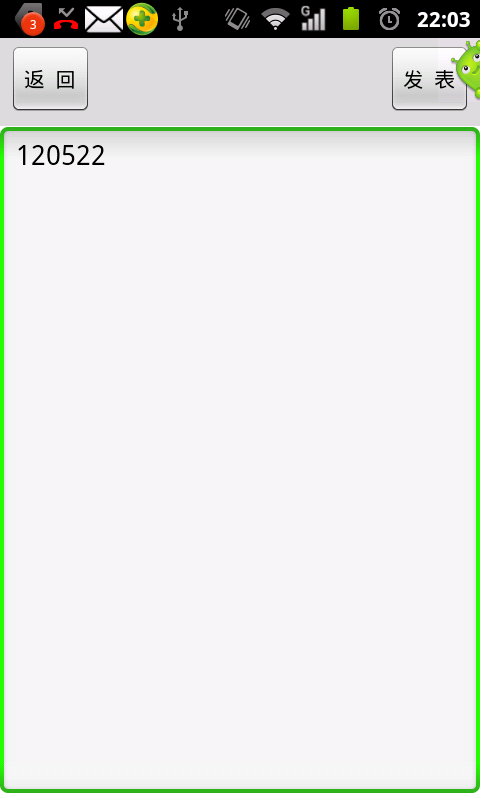
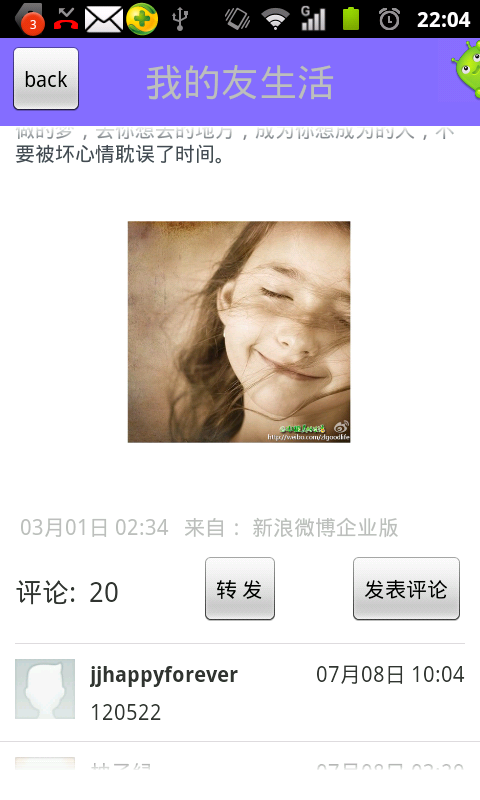
微博评论界面 刚评论的信息
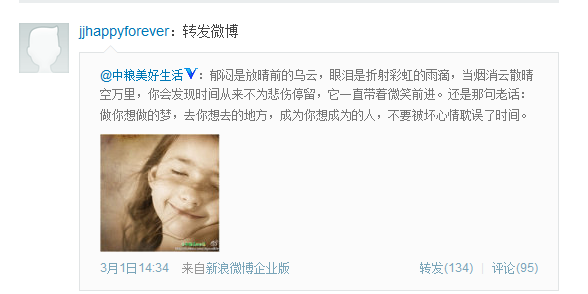
转发的微博.
Android新浪微博获取评论信息、发表评论、转发微博等的更多相关文章
- 【Android Studio安装部署系列】十一、Android studio获取数字签名信息
版权声明:本文为HaiyuKing原创文章,转载请注明出处! 概述 下面介绍下调试版本和发布版本获取数字签名的方法,通过以下方法可以获取到SHA1和MD5. 一般在使用分享功能,在第三方平台中创建应用 ...
- Android 开发 获取设备信息与App信息
设备信息 设备ID(DeviceId) 获取办法 android.telephony.TelephonyManager tm = (android.telephony.TelephonyManager ...
- 如何通过android代码获取LTE信息?
最近为了成功得到LTE的信号强度,尝试了很多种方法: (1)通过解析signalstrength字符串,但是不同手机设备获得的字符串排列顺序不同,代码如下: private PhoneStateLis ...
- Android之使用MediaMetadataRetriever类获取媒体信息
一.昨天.介绍了使用MediaMetadataRetriever类来获取视频第一帧:http://blog.csdn.net/u012561176/article/details/47858099,今 ...
- Android 获取内存信息
由于工作需要,研究了一下android上获取内存信息的方法,总结如下: 1.SDK获取 在Java层利用API获取很简单,直接使用ActivityManager.MemoryInfo类即可,代码如下: ...
- android之读取联系人信息
联系人信息被存放在一个contacts2.db的数据库中 主要的两张表 读取联系人 读取联系人需要知道联系人内容提供者的地址,以及对应的操作对象.一般情况下操作对象是的命名方式和表明是一致的. 布局文 ...
- [Python爬虫] Selenium爬取新浪微博客户端用户信息、热点话题及评论 (上)
转载自:http://blog.csdn.net/eastmount/article/details/51231852 一. 文章介绍 源码下载地址:http://download.csdn.net/ ...
- 好客租房43-react组件基础综合案例-4获取评论信息
获取评论信息 1使用受控组件方式创建表单 //导入react import React from 'react' import ReactDOM from 'react-dom' //导入组件 // ...
- [Python爬虫] Selenium+Phantomjs动态获取CSDN下载资源信息和评论
前面几篇文章介绍了Selenium.PhantomJS的基础知识及安装过程,这篇文章是一篇应用.通过Selenium调用Phantomjs获取CSDN下载资源的信息,最重要的是动态获取资源的评论,它是 ...
随机推荐
- 数据库学习(-)--sqlserver数据类型
第一大类:整数数据 bit:bit数据类型代表0,1或NULL,就是表示true,false.占用1byte.int:以4个字节来存储正负数.可存储范围为:-2^31至2^31-1.smallint: ...
- css中的display以及position属性
我们都知道,元素分为行内元素和块级元素,在页面布局中,我们常常需要让行内元素具有块级元素的特性,或者使块级元素转换成行内元素,这就要使用我们的display属性了. 我们先定义三个div: 以上的三个 ...
- BZOJ 2286 树链剖分+DFS序+虚树+树形DP
第一次学习虚树,就是把无关的点去掉.S里维护一条链即可. #include <iostream> #include <cstring> #include <cstdio& ...
- 三部曲一(数据结构)-1020-Ultra-QuickSort
通过这道题我大体理解了树状数组的原理和用法,完全用的别人的算法,我把别人算法看懂之后有自己敲了一遍,不得不说这算法真是高深巧妙啊,我开始看都看不懂,还是在别人的讲解下才看懂的,我觉得有必要写个博客记录 ...
- Roman to Integer -- LeetCode 13
Given a roman numeral, convert it to an integer. Input is guaranteed to be within the range from 1 t ...
- Jquery 读取表单选中值
1.获取复选框的选中值 <title> JS 获取复选框选中的值</title> <script src="jquery-1.11.2.min.js" ...
- VNC-Server安装及配置
一.什么是VNC? VNC (Virtual Network Computer)是虚拟网络计算机的缩写.VNC 是一款优秀的远程控制工具软件,由著名的 AT&T 的欧洲研究实验室开发的.VNC ...
- ooize节点的属性控制
<workflow-app name="[WF-DEF-NAME]" xmlns="uri:oozie:workflow:[version]"> & ...
- 黑马程序员——JAVA基础之正则表达式,网络爬虫
------Java培训.Android培训.iOS培训..Net培训.期待与您交流! ------- 正则表达式: 概念:用于操作字符串的符合一定规则的表达式 特点:用于一些特定的符号来表示一些代码 ...
- Windows下RCNN的使用
RCNN 一种把目标图像分割转化为CNN分类问题进行目标检测的方法. 以下转自魏晋的知乎回答 Ross B. Girshick的RCNN使用region proposal(具体用的是Selecti ...