
QT笔记
1.菜单栏上的弹出窗口
void MainWindow::on_new_action_triggered()

{

    MyDialog myDialog;//MyDialog是一个ui

    myDialog.setModal(true);

    myDialog.exec();

    /*******上面的写法弹出的窗口挡住后面的窗口***********/

    /*******下面的写法弹出的窗口不挡住后面的窗口,并且可以弹出多个****/

//    myDialog = new MyDialog(this);

//    myDialog->show();

}
2.水平布局&垂直布局
QWidget *window = new QWidget;

window->setWindowTitle("Layout测试");

QPushButton *button1 = new QPushButton("one");

QPushButton *button2 = new QPushButton("two");

QPushButton *button3 = new QPushButton("three");

QHBoxLayout * hlayout = new QHBoxLayout;

hlayout->addWidget(button1);

hlayout->addWidget(button2);

hlayout->addWidget(button3);

window->setLayout(hlayout);

window->show();
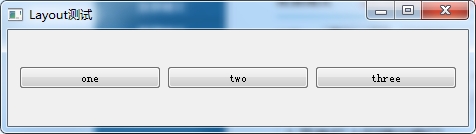 650) this.width=650;" src="http://s3.51cto.com/wyfs02/M00/27/9D/wKioL1Nzc43RxUmAAABmPedd_k4814.jpg" title="QQ截图20140514214110.png" alt="wKioL1Nzc43RxUmAAABmPedd_k4814.jpg" />
QVBoxLayout * hlayout = new QVBoxLayout;//垂直布局
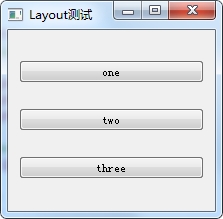 650) this.width=650;" src="http://s3.51cto.com/wyfs02/M01/27/9D/wKioL1Nzc-bjRFIlAABSqEd680s737.jpg" title="QQ截图20140514214231.png" alt="wKioL1Nzc-bjRFIlAABSqEd680s737.jpg" />
void Mainwindow::init(){
vBoxLayout = new QVBoxLayout(this);
topWidget = new QWidget;
topWidget->setStyleSheet("background:#FFCCCC");
topWidget->setMaximumHeight(50);
topWidget->setMinimumHeight(50);
vBoxLayout->addWidget(topWidget);
mainWidget = new QWidget;
mainWidget->setStyleSheet("background:#0099CC");
vBoxLayout->addWidget(mainWidget);
mainVBoxLayout = new QVBoxLayout(mainWidget);
//定义一个垂直布局,垂直布局放到mainWidget中
//MAX_X MAX_Y 都在.h中预定义
for(int i = 0 ; i < MAX_X ; i++){
mainHBoxLayout[i] = new QHBoxLayout();//新建一个水平布局
for(int j = 0 ; j < MAX_Y ; j++){
buttons[i][j] = new QPushButton;
buttons[i][j]->setStyleSheet("background:black");
buttons[i][j]->setSizePolicy(QSizePolicy::Expanding, QSizePolicy::Expanding);
//Expanding填充
mainHBoxLayout[i]->addWidget(buttons[i][j]);
//将每一行的button添加到水平布局
}
mainVBoxLayout->addLayout(mainHBoxLayout[i]);
//将水平布局添加到垂直布局中
}
}
650) this.width=650;" src="http://s3.51cto.com/wyfs02/M00/2A/A1/wKioL1OEWjGB7FixAAG0BdoWs9U446.jpg" title="QQ截图20140527172030.png" alt="wKioL1OEWjGB7FixAAG0BdoWs9U446.jpg" />
3.小球碰撞边框反弹算法
void MainWindow::slotBallMove(){

    //小球的坐标

    int mx = ball.x() + ball.width() / 2;

    int my = ball.y() + ball.height();

    if(my >= bat.y()){

        if(mx >= bat.x() && mx <= bat.x() + bat.width()){

            dy = -1;

        }

        else{

            timer.stop();

            emit signalGameOver();

        }

    }

    else if(x > this->width() - ball.width()){

        dx = -1;

    }

    else if(y < 0){

        dy = 1;

    }

    else if(x < 0){

        dx = 1;

    }

    x += dx;

    y += dy;

    ball.move(x, y);

}
4.弹出的messageBox
QMessageBox::information(this, "提示", "*** Game Over ***", QMessageBox::Ok);
5.设置ico图标
myapp.rc//放在项目目录下

IDI_ICON1               ICON    DISCARDABLE     "appico.ico"

//然后在.pro文件中添加下面的语句

RC_FILE = myapp.rc
6.获取屏幕分辨率、计算机最佳显示位置,最小window大小
    QDesktopWidget* desktopWidget = QApplication::desktop();

    //获取可用桌面大小

    QRect deskRect = desktopWidget->availableGeometry();

    //获取设备屏幕大小

    QRect screenRect = desktopWidget->screenGeometry();

    int screenX = screenRect.width();

    int screenY = screenRect.height();

    int screenCount = desktopWidget->screenCount();//可用的显示器数

    int appWidth = 1000;

    int appHeight = 618;

    int x_p = screenX/2 - appWidth/2;//计算出居中显示位置

    int y_p = screenY/2 - appHeight/2;

    this->setGeometry(x_p, y_p, appWidth, appHeight);

    this->setMinimumHeight(appHeight);

    this->setMinimumWidth(appWidth);

    qDebug() << screenX << screenY << screenCount;
本文出自 “阿凡达” 博客,请务必保留此出处http://shamrock.blog.51cto.com/2079212/1411247
QT笔记的更多相关文章
- QT笔记之解决QT5.2.0和VS2012中文乱码 以及在Qt Creator中文报错
转载:http://bbs.csdn.net/topics/390750169 VS2012 中文乱码 1.方法一: 包含头文件 #include <QTextCodec> ....... ...
- QT笔记之VS开发程序遇到的问题
转载:http://www.cnblogs.com/li-peng/p/3644812.html 转载:http://www.cnblogs.com/csuftzzk/p/VS_Qt_Experien ...
- QT笔记之不规则窗口的实现
QT实现的不规则窗口,是根据图片的形状显示 1.去标题栏 2.设置窗口背景为透明色 3.最后给窗口设置背景色 注:背景图为镂空的 格式为.png 图片资源下载:http://pan.baidu.com ...
- QT笔记之模态对话框及非模态对话框
模态对话框(Modal Dialog)与非模态对话框(Modeless Dialog)的概念不是Qt所独有的,在各种不同的平台下都存在.又有叫法是称为模式对话框,无模式对话框等.所谓模态对话框就是在其 ...
- QT笔记之QLineEdit自动补全以及控件提升
转载:http://www.cnblogs.com/csuftzzk/p/qss_lineedit_completer.html?utm_source=tuicool&utm_medium=r ...
- QT笔记之VS2010 Qt中导入qrc资源文件
转载1:http://qimo601.iteye.com/blog/1404693 转载2:http://blog.sina.com.cn/s/blog_92cde3060101lobm.html 转 ...
- QT笔记之实现阴影窗口
方法一: 代码实现 在窗口构造函数中加入:setAttribute(Qt::WA_TranslucentBackground),保证不被绘制上的部分透明 重写void paintEvent(QPain ...
- QT笔记之自定义窗口拖拽移动
1.QT自定义标题栏,拖拽标题栏移动窗口(只能拖拽标题,其他位置无法拖拽) 方法一: 转载:http://blog.sina.com.cn/s/blog_4ba5b45e0102e83h.html . ...
- 自学QT笔记
前言: Qt 是一个跨平台的 C++图形用户界面库,由挪威 TrollTech 公司于1995年底出品. Trolltech 公司在 1994 年成立,但是在 1992 年,成立 Trolltech ...
- QT笔记(1)--QT编程环境搭建
一.QT简介 Qt 是一个1991年由奇趣科技开发的跨平台C++图形用户界面应用程序开发框架.它既可以开发GUI程序,也可用于开发非GUI程序,比如控制台工具和服务器.Qt是面向对象的框架,使用特殊 ...
随机推荐
- Xcode插件VVDocumenter Alcatraz KSImageNamed等安装
今天安装VVDocumenter,总是不起作用...所以用Alcatraz...下面介绍下Alcatraz 一.Alcatraz Alcatraz 是一款 Xcode的插件管理工具,可以用来管理XCo ...
- R语言快速入门上手
导言: 较早之前就听说R是一门便捷的数据分析工具,但由于课程设计的原因,一直没有空出足够时间来进行学习.最近自从决定本科毕业出来找工作之后,渐渐开始接触大数据行业的技术,现在觉得是时候把R拿下 ...
- C#版 Socket编程(最简单的Socket通信功能)
示例程序是同步套接字程序,功能很简单,只是客户端发给服务器一条信息,服务器向客户端返回一条信息:这里只是一个简单的示例,是一个最基本的socket编程流程,在接下来的文章中,会依次记录套接字的同步和异 ...
- 76.Android之EventBus源码解析
转载:http://p.codekk.com/blogs/detail/54cfab086c4761e5001b2538 1. 功能介绍 1.1 EventBus EventBus 是一个 Andro ...
- bzoj 1257
商最多有sqrt(n)个. #include<iostream> #include<cstdio> #include<cstring> #include<al ...
- IE中使用jquery的fadeIn()失效的问题
在自己写的一个轮播组件中遇到一个问题,使用jquery的fadeIn动画时,在IE11中表现不正常,没有渐入的效果. 1.HTML结构 <div class="mainpage-sli ...
- 【bzoj2242】 SDOI2011—计算器
http://www.lydsy.com/JudgeOnline/problem.php?id=2242 (题目链接) 题意 给出y,z,p.求:1.yz mod p:2.xy=z(mod p):3. ...
- linux内核增加系统调用--Beginner‘s guide
Linux内核中设置了一组用于实现系统功能的子程序,称为系统调用.系统调用和普通库函数调用非常相似明知是系统调用由操作系统核心提供,运行于核心态,而普通的函数调用由函数库或用户自己提供,运行于用户态. ...
- hdu3932 模拟退火
模拟退火绝对是从OI--ACM以来接触过的所有算法里面最黑科技的orz 题意:地上有一堆hole,要找一个点,使得(距离该点最远的hole的距离)最小. sol:本来想套昨天的模拟退火模板,初值(0, ...
- [NOIP2012] 普及组
寻宝 大模拟 #include<iostream> #include<cmath> #include<algorithm> using namespace std; ...