
.net core webapi搭建(3)Code first+拆层三层+仓储
将项目拆层
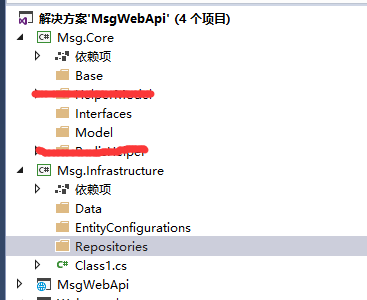
我们要 将项目拆分成
Infrastructure 基础层
Core 核心层
Utility 工具
我们想在就把项目拆分开,拆分后的结构如下:
创建BaseEntity
    public abstract class EntityBase

    {

        //自增长逐渐

        public int Id { get; set; }

        //是否删除 今后肯定要软删除的

        public bool Deleted { get; set; }

        //创建时间

        public DateTime CreateTime { get; set; }

        //删除时间

        public DateTime? DeleteTime { get; set; }

    }
创建IRepository
public interface IRepository<T> where T : EntityBase

    {

        /// <summary>

        /// 通过自增长主键获取唯一Model

        /// </summary>

        /// <param name="id"></param>

        /// <returns></returns>

        Task<T> GetByIdAsync(int id);

        /// <summary>

        /// 通过自增长主键获取唯一Model(包含字段)

        /// </summary>

        /// <param name="id"></param>

        /// <returns></returns>

        Task<T> GetByIdAsync(int id, params Expression<Func<T, object>>[] includes);

        Task<T> GetSingleAsync(Expression<Func<T, bool>> criteria);

        Task<T> GetSingleAsync(Expression<Func<T, bool>> criteria, params Expression<Func<T, object>>[] includes);

        IEnumerable<T> ListAll();

        Task<List<T>> ListAllAsync();

        IEnumerable<T> List(Expression<Func<T, bool>> criteria);

        Task<List<T>> ListAsync(Expression<Func<T, bool>> criteria);

        IEnumerable<T> List(Expression<Func<T, bool>> criteria, params Expression<Func<T, object>>[] includes);

        Task<List<T>> ListAsync(Expression<Func<T, bool>> criteria, params Expression<Func<T, object>>[] includes);

        Task<int> CountAsync();

        Task<int> CountAsync(Expression<Func<T, bool>> criteria);

        T Add(T entity, bool IsCommit = false);

        void Update(T entity);

        void Delete(T entity, bool IsCommit = false);

        void DeleteWhere(Expression<Func<T, bool>> criteria, bool IsCommit = false);

        void AddRange(IEnumerable<T> entities, bool IsCommit = false);

        void DeleteRange(IEnumerable<T> entities, bool IsCommit = false);

        void Attach(T entity);

        void AttachRange(IEnumerable<T> entities);

        void Detach(T entity);

        void DetachRange(IEnumerable<T> entities);

        void AttachAsModified(T entity);

        bool Commit();

        bool Commit(bool acceptAllChangesOnSuccess);

        Task<bool> CommitAsync(bool acceptAllChangesOnSuccess, CancellationToken cancellationToken = default(CancellationToken));

        Task<bool> CommitAsync(CancellationToken cancellationToken = default(CancellationToken));

    }
创建UserInfo实体类
    [Table("UserInfo")]

    public class UserInfo : EntityBase

    {

        /// <summary>

        /// 用户名

        /// </summary>

        public string UserName { get; set; }

        /// <summary>

        /// 用户密码

        /// </summary>

        public string Password { get; set; }

        /// <summary>

        /// 用户邮箱

        /// </summary>

        public string UserMail { get; set; }

    }
Infrastructure添加Nuget管理
Microsoft.EntityFrameworkCore.Design
Microsoft.EntityFrameworkCore.Tools
Pomelo.EntityFrameworkCore.MySql
创建EntityBaseConfiguration
    public abstract class EntityBaseConfiguration<T> : IEntityTypeConfiguration<T> where T : EntityBase

    {

        public virtual void Configure(EntityTypeBuilder<T> builder)

        {

            builder.HasKey(e => e.Id);

            ConfigureDerived(builder);

        }

        public abstract void ConfigureDerived(EntityTypeBuilder<T> b);

    }
创建UserInfoConfiguration
    public class UserInfoConfiguration : EntityBaseConfiguration<UserInfo>

    {

        public override void ConfigureDerived(EntityTypeBuilder<UserInfo> b)

        {

            //根据自己情况看着瞎写吧  就这样 不BB

        }

    }
开整BaseContext
    public class BaseContext : DbContext

    {

        public BaseContext(DbContextOptions<BaseContext> options)

    : base(options)

        {

        }

        protected override void OnModelCreating(ModelBuilder modelBuilder)

        {

            base.OnModelCreating(modelBuilder);

            //modelBuilder.ApplyConfiguration(new CustomerConfiguration());

            modelBuilder.ApplyConfiguration(new UserInfoConfiguration());

        }

        public DbSet<UserInfo> Users { get; set; }

    }
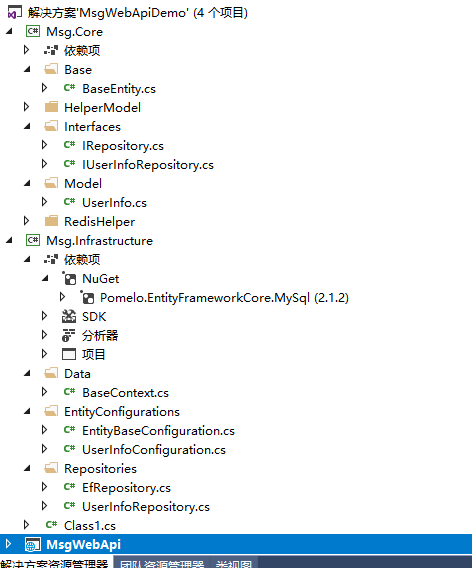
这时候的项目结构呢就变成了这个模样
好~到这里我打算结束了。算了。接着写吧。怕你们骂我。
开始创建数据库
修改webapi的startup.cs
ConfigureServices方法改为
        public void ConfigureServices(IServiceCollection services)

        {

            var connection = Configuration.GetConnectionString("MySqlConnection");

            services.AddDbContext<BaseContext>(options => options.UseMySql(connection));

            services.AddSingleton<IConfiguration>(Configuration);

            services.AddMvc();

        }
对喽,要修改appsettings.json
改成这样
{

  "Logging": {

    "IncludeScopes": false,

    "LogLevel": {

      "Default": "Warning"

    }

  },

  "ConnectionStrings": {

    "MySqlConnection": "Data Source=localhost;Database=Test;User ID=root;Password=2323232323;pooling=true;CharSet=utf8;port=3306;sslmode=none"

  },

  "RedisConfig": {

    "Redis_Default": {

      "Connection": "127.0.0.1: 6379",

      "InstanceName": "Redis1: "

    },

    "Redis_6": {

      "Connection": "127.0.0.1: 6379",

      "DefaultDatabase": ,

      "InstanceName": "Redis2: "

    },

    "ReadWriteHosts": "172.16.75.230:6379"

  }

}
然后我们开始创建数据库
Add-Migration MyFirstMigration
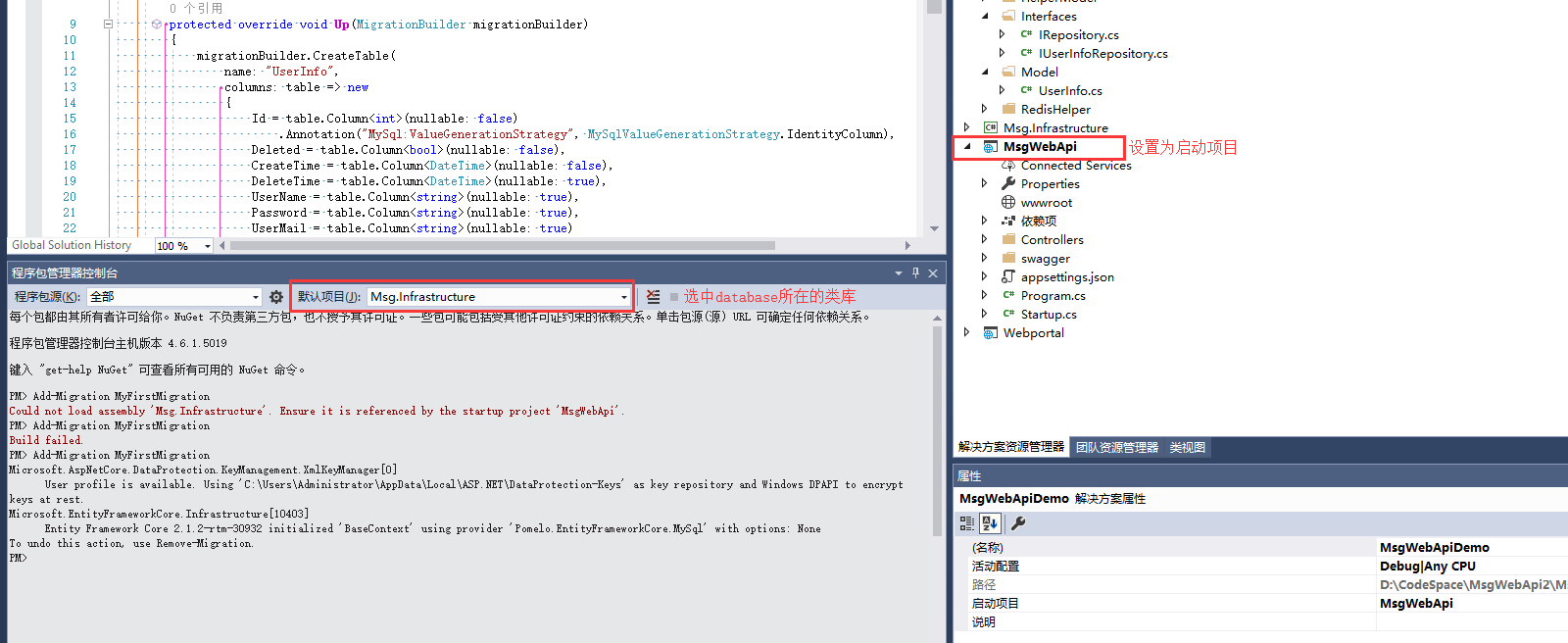
接着输入Update-Database执行。出现Done表示成功创建数据库。
本来写到这里我又不想写了。
但是写成这模样。不给大家看看实现方法 好像挺坑比的。
创建UserInfo的接口类:IUserInfoRepository
    public interface IUserInfoRepository : IRepository<UserInfo>

    {

        /// <summary>

        /// 检查用户是存在

        /// </summary>

        /// <param name="userName">用户名</param>

        /// <param name="password">密码</param>

        /// <returns>存在返回用户实体,否则返回NULL</returns>

        UserInfo CheckUser(string userName, string password);

    }
创建UserInfo的实现类
    public class UserInfoRepository : EfRepository<UserInfo>, IUserInfoRepository

    {

        public UserInfoRepository(BaseContext dbcontext) : base(dbcontext)

        {

        }

        /// <summary>

        /// 获取用户

        /// </summary>

        /// <param name="userName"></param>

        /// <param name="password"></param>

        /// <returns></returns>

        public UserInfo CheckUser(string userName, string password)

        {

            return List(x => x.UserName == userName && x.Password == password).FirstOrDefault() ?? new UserInfo() { UserName = "哈哈哈哈" };

        }

    }
去webapi整他丫的
在startup.cs中的ConfigureServices方法中撸入以下代码
        var connection = Configuration.GetConnectionString("MySqlConnection");

            services.AddDbContext<BaseContext>(options => options.UseMySql(connection));

            services.AddScoped<IUserInfoRepository, UserInfoRepository>();

            services.AddSingleton<IConfiguration>(Configuration);
好了。我们去创建一个UserApi
    [Route("api/[controller]")]

    public class UserController : Controller

    {

        private IUserInfoRepository _userRepository;

        private IConfiguration _configuration;

        public UserController(IUserInfoRepository UserRepository, IConfiguration Configuration)

        {

            _userRepository = UserRepository;

            _configuration = Configuration;

        }

        [HttpPost("Get")]

        [EnableCors("any")] //设置跨域处理的 代理

        public IActionResult Get()

        {

            var _Sel = _userRepository.CheckUser("", "");

            return Ok(_Sel.UserName);

        }

    }
好了哥们们。完活了。
.net core webapi搭建(3)Code first+拆层三层+仓储的更多相关文章
- .Net Core WebAPI 搭建
.Net Core WebAPI 搭建 1.创建项目 使用开发工具为 Visual Studio 2017 2.创建 Controller 实体类 public class Book { public ...
- .net core webapi搭建(2)跨域
Core WebAPI中的跨域处理 在使用WebAPI项目的时候基本上都会用到跨域处理 Core WebAPI的项目中自带了跨域Cors的处理,不需要单独添加程序包 如图所示 修改 Configure ...
- NET CORE WebAPI 搭建--基础搭建
之前我们写了一个系统架构,是用.NET CORE 3.1.2 版本写的,没有使用前后端分离,说话老实话,本屌前端不是非常牛逼,太多的样式需要写,而且还要兼容响应式页面,一个人确实忙不过来,所以就想搞一 ...
- .net core webapi搭建(1)
创建一个webapi项目 修改launchSettings.json 将launchSettings.json中的IIS启动删掉.别问我为啥 原因就是IISEXPRESS有时候需要我手动重启.我嫌麻 ...
- SAAS云平台搭建札记: (三) AntDesign + .Net Core WebAPI权限控制、动态菜单的生成
我们知道,当下最火的前端框架,非蚂蚁金服的AntDesign莫属,这个框架不仅在国内非常有名,在国外GitHub上React前端框架也排名第一.而且这个框架涵盖了React.Vue.Angular等多 ...
- dotnet core webapi +vue 搭建前后端完全分离web架构
架构 服务端采用 dotnet core webapi 前端采用: Vue + router +elementUI+axios 问题 使用前后端完全分离的架构,首先遇到的问题肯定是跨域访问.前后端可 ...
- dotnet core webapi +vue 搭建前后端完全分离web架构(一)
架构 服务端采用 dotnet core webapi 前端采用: Vue + router +elementUI+axios 问题 使用前后端完全分离的架构,首先遇到的问题肯定是跨域访问.前后端可 ...
- net core Webapi基础工程搭建(六)——数据库操作_Part 2
目录 前言 开始 使用 小结 前言 昨天是写着写着发现,时间不早了,已经养成了晚上下班抽时间看看能写点儿啥的习惯(貌似),今天实在是不想让昨天没做完的事情影响,所以又坐下,沉下心(周末了),开始把数据 ...
- net core Webapi基础工程搭建(六)——数据库操作_Part 1
目录 前言 SqlSugar Service层 BaseService(基类) 小结 前言 后端开发最常打交道的就是数据库了(静态网站靠边),上一篇net core Webapi基础工程搭建(五)-- ...
随机推荐
- POJ 2253 Frogger(SPFA运用)
Description Freddy Frog is sitting on a stone in the middle of a lake. Suddenly he notices Fiona Fro ...
- childNodes和children
childNodes 返回指定元素的子节点集合,包括HTML节点,所有文本(元素之间的空格换行childNodes会看作文本节点). 通过nodeType来判断节点的类型: 元素 1 属性 2 文本 ...
- JS 手札记
addEventListener中的事件如果移除(removeEventListener)的话不能在事件中执行bind(this)否则会移除无效! // selectCurrent() // copy ...
- 【53.57%】【codeforces 610C】Harmony Analysis
time limit per test3 seconds memory limit per test256 megabytes inputstandard input outputstandard o ...
- Python安装jpype调用java,安装jaydebeapi通过jdbc连接数据库
pip install JPype1或下载JPype1-0.7.0.tar.gz包 经常出现需要安装VC++服务等 测试代码如下: # Author: zfh import jpype,os,time ...
- 【Linux】grep笔记
Linux grep命令用于查找文件里符合条件的字符串. 参数: -a 或 --text : 不要忽略二进制的数据. -A<显示行数> 或 --after-context=<显示行数 ...
- Google 浏览器设置打开超链接到新窗口标签页
一.windows 按住Ctrl + 鼠标点击,在新窗口打开,停留在当前页面: 按住Ctrl + Shift + 鼠标点击,在新窗口打开,停留在新窗口: 登录Google账号,管理Google账号, ...
- TDengine 时序数据库的 ADO.Net Core 提供程序 Maikebing.EntityFrameworkCore.Taos
简介 Entity, Framework, EF, Core, Data, O/RM, entity-framework-core,TDengine Maikebing.Data.Taos 是一个基于 ...
- 最全最详细的PHP面试题(带有答案)
这篇文章介绍的内容是关于最全最详细的PHP面试题(带有答案),有着一定的参考价值,现在分享给大家,有需要的朋友可以参考一下 相关推荐: 分享一波腾讯PHP面试题 2019年PHP最新面试题(含答案) ...
- Asp.net导入Excel并读取数据
protected void Button1_Click(object sender, EventArgs e) { if (station.HasFile == false)//HasFile用来检 ...