
DMVPN基础配置
DMVPN基础拓扑:
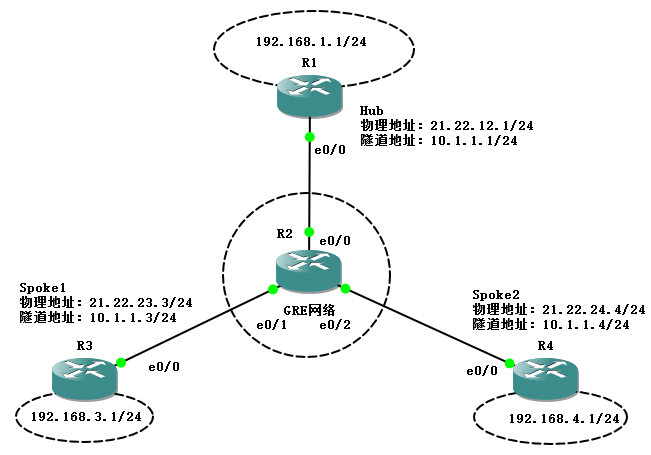
配置步骤:
1. 基本IP地址配置实现网络可达
2. 配置GRE多点隧道(mGRE)和NHRP(下一跳解析协议)
3. 配置EIGRP路由协议
4. 配置IPSec
------------------------------------------------------------------------------------------------------------------------------------------
备注:由于这里的IOS(IOU或EVE可以)不能在Hub配置ip nhrp redirect;也不能在Spoke配置ip nhrp shortcut;所以Spoke1到Spoke2的流量都需要经过Hub。
DMVPN中“包治百病”的大招(Hub端):
int tun 0
shut
no shu
------------------------------------------------------------------------------------------------------------------------------------------
R1
!
hostname Hub
!
crypto isakmp policy 10
authentication pre-share
crypto isakmp key cisco address 0.0.0.0 0.0.0.0
!
crypto ipsec transform-set Trans esp-des esp-md5-hmac
mode transport
!
crypto ipsec profile DMVPN
set transform-set Trans
!
interface Loopback0
ip address 192.168.1.1 255.255.255.0
!
interface Tunnel0
ip address 10.1.1.1 255.255.255.0
no ip redirects
ip mtu 1400
ip nhrp authentication cisco
ip nhrp map multicast dynamic
ip nhrp network-id 10
ip summary-address eigrp 10 192.168.0.0 255.255.0.0 5
tunnel source Ethernet0/0
tunnel mode gre multipoint
tunnel key 123
tunnel protection ipsec profile DMVPN
!
interface Ethernet0/0
ip address 21.22.12.1 255.255.255.0
ip ospf network point-to-point
half-duplex
!
router eigrp 10
network 10.1.1.0 0.0.0.255
network 192.168.1.0
no auto-summary
!
router ospf 10
router-id 192.168.1.1
log-adjacency-changes
network 21.22.12.0 0.0.0.255 area 0
!
R2
hostname R2
!
interface Ethernet0/0
ip address 21.22.12.2 255.255.255.0
ip ospf network point-to-point
half-duplex
!
router ospf 10
router-id 2.2.2.2
log-adjacency-changes
network 21.22.12.0 0.0.0.255 area 0
network 21.22.23.0 0.0.0.255 area 0
network 21.22.24.0 0.0.0.255 area 0
R3
hostname Spoke1
!
crypto isakmp policy 10
authentication pre-share
crypto isakmp key cisco address 0.0.0.0 0.0.0.0
!
!
crypto ipsec transform-set Trans esp-des esp-md5-hmac
mode transport
!
crypto ipsec profile DMVPN
set transform-set Trans
!
interface Loopback0
ip address 192.168.3.1 255.255.255.0
!
interface Tunnel0
ip address 10.1.1.3 255.255.255.0
no ip redirects
ip mtu 1400
ip nhrp authentication cisco
ip nhrp map 10.1.1.1 21.22.12.1
ip nhrp map multicast 21.22.12.1
ip nhrp network-id 10
ip nhrp nhs 10.1.1.1
tunnel source Ethernet0/0
tunnel mode gre multipoint
tunnel key 123
tunnel protection ipsec profile DMVPN
!
interface Ethernet0/0
ip address 21.22.23.3 255.255.255.0
ip ospf network point-to-point
half-duplex
!
router eigrp 10
network 10.1.1.0 0.0.0.255
network 192.168.3.0
no auto-summary
!
router ospf 10
router-id 192.168.3.1
log-adjacency-changes
network 21.22.23.0 0.0.0.255 area 0
R4
hostname Spoke2
!
crypto isakmp policy 10
authentication pre-share
crypto isakmp key cisco address 0.0.0.0 0.0.0.0
!
!
crypto ipsec transform-set Trans esp-des esp-md5-hmac
mode transport
!
crypto ipsec profile DMVPN
set transform-set Trans
!
interface Loopback0
ip address 192.168.4.1 255.255.255.0
!
interface Tunnel0
ip address 10.1.1.4 255.255.255.0
no ip redirects
ip mtu 1400
ip nhrp authentication cisco
ip nhrp map 10.1.1.1 21.22.12.1
ip nhrp map multicast 21.22.12.1
ip nhrp network-id 10
ip nhrp nhs 10.1.1.1
tunnel source Ethernet0/0
tunnel mode gre multipoint
tunnel key 123
tunnel protection ipsec profile DMVPN
!
interface Ethernet0/0
ip address 21.22.24.4 255.255.255.0
ip ospf network point-to-point
half-duplex
!
router eigrp 10
network 10.1.1.0 0.0.0.255
network 192.168.4.0
no auto-summary
!
router ospf 10
router-id 192.168.4.1
log-adjacency-changes
network 21.22.24.0 0.0.0.255 area 0
查看NHRP信息:
Hub#sho ip nhrp
10.1.1.3/32 via 10.1.1.3, Tunnel0 created 00:13:51, expire 01:49:43
Type: dynamic, Flags: authoritative unique registered
NBMA address: 21.22.23.3
10.1.1.4/32 via 10.1.1.4, Tunnel0 created 00:13:53, expire 01:50:40
Type: dynamic, Flags: authoritative unique registered
NBMA address: 21.22.24.4
Spoke1#sho ip nhrp
10.1.1.1/32 via 10.1.1.1, Tunnel0 created 00:24:26, never expire
Type: static, Flags: authoritative used
NBMA address: 21.22.12.1
Spoke2#sho ip nhrp
10.1.1.1/32 via 10.1.1.1, Tunnel0 created 00:22:03, never expire
Type: static, Flags: authoritative used
NBMA address: 21.22.12.1
可以看到在Hub上已经有两个分支的解析,同样的两个分支也可以解析到Hub物理接口的地址。
测试联通性:
Spoke1#ping 192.168.4.1 source 192.168.3.1 repeat 1000
Type escape sequence to abort.
Sending 1000, 100-byte ICMP Echos to 192.168.4.1, timeout is 2 seconds:
Packet sent with a source address of 192.168.3.1
!!!!!!!!!!!!!!!!!!!!!!!!!!!!!!!!!!!!!!!!!!!!!!!!!!.
Success rate is 98 percent (50/51), round-trip min/avg/max = 20/44/88 ms
分支1到分支2的ping包可以通信,那么看是否需要经过Hub进行转发。
Spoke1#traceroute 192.168.4.1 source 192.168.3.1
Type escape sequence to abort.
Tracing the route to 192.168.4.1
1 10.1.1.1 20 msec 40 msec 16 msec
2 10.1.1.4 40 msec 32 msec 52 msec
路由表情况
Hub#sho ip route eigrp
D 192.168.4.0/24 [90/297372416] via 10.1.1.4, 00:13:14, Tunnel0
D 192.168.3.0/24 [90/297372416] via 10.1.1.3, 00:14:09, Tunnel0
D 192.168.0.0/16 is a summary, 00:17:48, Null0
Spoke1#sho ip route eigrp
D 192.168.0.0/16 [90/297372416] via 10.1.1.1, 00:14:02, Tunnel0
Spoke2#sho ip route eigrp
D 192.168.0.0/16 [90/297372416] via 10.1.1.1, 00:13:30, Tunnel0
DMVPN基础配置的更多相关文章
- StackExchange.Redis帮助类解决方案RedisRepository封装(基础配置)
本文版权归博客园和作者吴双本人共同所有,转载和爬虫,请注明原文地址.http://www.cnblogs.com/tdws/p/5815735.html 写在前面 这不是教程,分享而已,也欢迎园友们多 ...
- Hibernate 基础配置及常用功能(三)
本章重点讲述Hibernate对象的三种状态以及如何配置二级缓存 有关Hibernate的三种状态如何相互转换网上都能查到,官方文档描述的也比较详细.这里主要是针对几个重点方法做代码演示. 一.状态转 ...
- Emacs学习心得之 基础配置
作者:枫雪庭 出处:http://www.cnblogs.com/FengXueTing-px/ 欢迎转载 Emacs学习心得之 基础配置 1.前言2.基础配置 一.前言 本篇博文记录了Emacs的一 ...
- nginx 的基础配置[转]
nginx 的基础配置 分类: 工具软件2013-11-13 23:26 11人阅读 评论(0) 收藏 举报 目录(?)[-] 管理配置文件 全局配置 虚拟机server配置 location配置 ...
- freeRadius 基础配置及测试
国内私募机构九鼎控股打造APP,来就送 20元现金领取地址:http://jdb.jiudingcapital.com/phone.html 内部邀请码:C8E245J (不写邀请码,没有现金送) 国 ...
- Oracle 10g DataGuard手记之基础配置
DataGuard为企业数据的高可用性,数据安全以及灾难恢复提供支持,一般由一个primary db与几个物理或逻辑standby db组成一个DataGuard配置. 系统环境 操作系统为windo ...
- SpringMVC最基础配置
SpringMVC和Struts2一样,是前后台的一个粘合剂,struts2用得比较熟悉了,现在来配置一下SpringMVC,看看其最基础配置和基本使用.SpriingMVC不是太难,学习成本不高,现 ...
- 使用Java管理Azure(1):基础配置
Azure针对Java开发人员提供了非常丰富的开发库,开发工具,和相关插件,让你通过Java对Azure进行服务管理和开发,本文第一步先介绍如何快速的配置Java开发工具,主要针对目前比较流行的Ecl ...
- Linux网络基础配置
这是看itercast视频的笔记 Linux网络基础配置 以太网连接 在Linux中,以太网接口被命令为:eth0, eth1等, 0,1代表网卡编号 通过lspci命令可以查看网上硬件信息(如果是u ...
随机推荐
- HTML5学习(6)a元素
a元素代表超链接 href属性 hyper reference:通常代表跳转地址 target属性:_self在本窗口中打开(默认),_blank在新窗口中打开. id属性:全局属性,表示元素在文档中 ...
- 每天进步一点点------Allegro 修线
Allegro中修线的方法有很多种,这里重点介绍走线的移动和走线的替换,掌握这两种方法,基本可以完成电路板的修线工作. 走线的移动 第1步:执行菜单命令Route->Slide,进入移动走线命 ...
- 为什么Oracle等数据库软件可以同时创建多个连接
首先我们要明确的是一个IP跟一个端口确定的是一个进程的地址,也就是我们运行了一个Oracle的数据库,这时候就已经确定的了. oracle监听器也是一个TCP/IP网络中的进程,默认的端口号是1521 ...
- linux服务器上部署springboot项目,并让他持续运行到后台
我们知道在运行springboot 项目只需要java -jar + 项目的war包(jar包)名. 但是只要终端已停止那么服务就会被关闭,也就无法访问到我们的项目了.所以我们可以使用守护进程的方式来 ...
- 题解【洛谷P3385】【模板】负环
题目描述 暴力枚举/\(SPFA\)/\(Bellman-ford\)/奇怪的贪心/超神搜索 寻找一个从顶点1所能到达的负环,负环定义为:一个边权之和为负的环. 输入输出格式 输入格式 第一行一个正整 ...
- FromBase64String 输入的不是有效的 Base-64 字符串,因为它包含非 Base-64 字符、两个以上的填充字符,或者填充字符间包含非法字符
js前台: <input id="upload_img_input" v-on:change="onFileChange" type="file ...
- 解决teamviewer试用期到期的方法
Teamviewer是一款远程控制软件,使用过程中系统弹出“Teamviewer试用版已到期”的提示, 需要用户购买许可证或延长试用期才能继续使用,解决teamviewer试用期到期问题步骤如下: 出 ...
- INCA二次开发-INCACOM
1.INCA介绍 INCA是常用的汽车ECU测试和标定的,广泛应用于动力总成等领域.INCA提供了丰富的接口,供用户自动化.定制化.本公众号通过几篇文章,介绍下一些二次开发的方法,本篇介绍INCA-C ...
- 批处理设置IP
@echo off title 静态IP设置 set netName=本地连接 set address=192.168.1.202 netsh netsh interface ipv4 set dns ...
- oracle 11g快捷版的安装与使用
oracle 11g快捷版的安装与使用 [oracle 11g 下载地址(]https://www.oracle.com/technetwork/cn/database/enterprise-edit ...