
XAML 特效
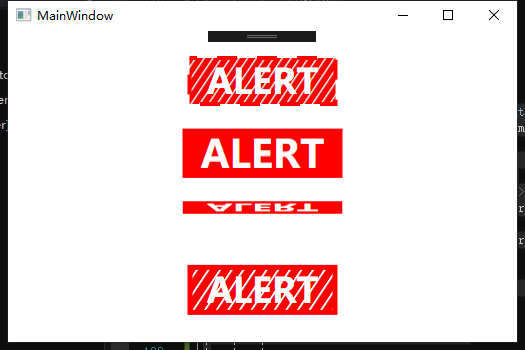
<Window

    x:Class="WpfApp5.MainWindow"

    xmlns="http://schemas.microsoft.com/winfx/2006/xaml/presentation"

    xmlns:x="http://schemas.microsoft.com/winfx/2006/xaml"

    xmlns:d="http://schemas.microsoft.com/expression/blend/2008"

    xmlns:local="clr-namespace:WpfApp5"

    xmlns:mc="http://schemas.openxmlformats.org/markup-compatibility/2006"

    xmlns:sys="clr-namespace:System;assembly=mscorlib"

    Name="UI"

    Title="MainWindow"

    Background="White"

    mc:Ignorable="d"    Height="350"

        Width="525">

    <Window.Resources>

        <!-- Marching Ants -->

        <Storyboard x:Key="MarchingAnts">

            <DoubleAnimation BeginTime="00:00:00"

                                Storyboard.TargetName="AlertBox"

                                Storyboard.TargetProperty="StrokeThickness"

                                To="4"

                                Duration="0:0:0.25" />

            <!-- If you want to run counter-clockwise, just swap the 'From' and 'To' values. -->

            <DoubleAnimation BeginTime="00:00:00" RepeatBehavior="Forever" Storyboard.TargetName="AlertBox" Storyboard.TargetProperty="StrokeDashOffset"

                                Duration="0:3:0" From="1000" To="0"/>

        </Storyboard>

        <!-- Pulse -->

        <Storyboard x:Key="Pulse" RepeatBehavior="Forever">

            <DoubleAnimationUsingKeyFrames Storyboard.TargetProperty="(UIElement.RenderTransform).(TransformGroup.Children)[0].(ScaleTransform.ScaleX)" Storyboard.TargetName="PulseBox">

                <EasingDoubleKeyFrame KeyTime="0:0:0.5" Value="1.15"/>

                <EasingDoubleKeyFrame KeyTime="0:0:1" Value="1"/>

            </DoubleAnimationUsingKeyFrames>

            <DoubleAnimationUsingKeyFrames Storyboard.TargetProperty="(UIElement.RenderTransform).(TransformGroup.Children)[0].(ScaleTransform.ScaleY)" Storyboard.TargetName="PulseBox">

                <EasingDoubleKeyFrame KeyTime="0:0:0.5" Value="1.15"/>

                <EasingDoubleKeyFrame KeyTime="0:0:1" Value="1"/>

            </DoubleAnimationUsingKeyFrames>

        </Storyboard>

        <!-- Flipper -->

        <Storyboard x:Key="Flipper" RepeatBehavior="Forever">

            <PointAnimationUsingKeyFrames Storyboard.TargetProperty="(UIElement.RenderTransformOrigin)" Storyboard.TargetName="FlipperBox">

                <EasingPointKeyFrame KeyTime="0:0:1" Value="0.5,0.5"/>

                <EasingPointKeyFrame KeyTime="0:0:2" Value="0.5,0.5"/>

            </PointAnimationUsingKeyFrames>

            <DoubleAnimationUsingKeyFrames Storyboard.TargetProperty="(UIElement.RenderTransform).(TransformGroup.Children)[0].(ScaleTransform.ScaleY)" Storyboard.TargetName="FlipperBox">

                <EasingDoubleKeyFrame KeyTime="0:0:1" Value="-1"/>

                <EasingDoubleKeyFrame KeyTime="0:0:2" Value="1"/>

            </DoubleAnimationUsingKeyFrames>

        </Storyboard>

        <!-- Elasic Lines -->

        <Storyboard x:Key="ElasticLines" RepeatBehavior="Forever" AutoReverse="True">

            <PointAnimationUsingKeyFrames Storyboard.TargetProperty="(Shape.Fill).(LinearGradientBrush.EndPoint)" Storyboard.TargetName="ElasticBox">

                <EasingPointKeyFrame KeyTime="0:0:4" Value="12,8"/>

            </PointAnimationUsingKeyFrames>

        </Storyboard>

        <!-- Knight Rider -->

        <Storyboard x:Key="KnightRider" RepeatBehavior="Forever" AutoReverse="True">

            <DoubleAnimationUsingKeyFrames Storyboard.TargetProperty="(UIElement.RenderTransform).(TransformGroup.Children)[3].(TranslateTransform.X)" Storyboard.TargetName="KRBox">

                <EasingDoubleKeyFrame KeyTime="0:0:1" Value="-50"/>

                <EasingDoubleKeyFrame KeyTime="0:0:2" Value="50"/>

                <EasingDoubleKeyFrame KeyTime="0:0:3" Value="0"/>

            </DoubleAnimationUsingKeyFrames>

        </Storyboard>

    </Window.Resources>

    <Window.Triggers>

        <EventTrigger RoutedEvent="FrameworkElement.Loaded">

            <BeginStoryboard Storyboard="{StaticResource Pulse}"/>

            <BeginStoryboard Storyboard="{StaticResource MarchingAnts}"/>

            <BeginStoryboard Storyboard="{StaticResource Flipper}"/>

            <BeginStoryboard Storyboard="{StaticResource ElasticLines}"/>

            <BeginStoryboard Storyboard="{StaticResource KnightRider}"/>

        </EventTrigger>

    </Window.Triggers>

    <Grid HorizontalAlignment="Center" VerticalAlignment="Center">

        <Grid.Resources>

            <Style TargetType="{x:Type TextBlock}">

                <Setter Property="Foreground" Value="White"/>

                <Setter Property="FontWeight" Value="Bold"/>

                <Setter Property="FontSize" Value="35"/>

                <Setter Property="HorizontalAlignment" Value="Center"/>

                <Setter Property="VerticalAlignment" Value="Center"/>

                <Setter Property="Text" Value="ALERT"/>

            </Style>

            <Style TargetType="{x:Type Grid}">

                <Setter Property="Margin" Value="0,10"/>

            </Style>

            <Style TargetType="{x:Type Rectangle}">

                <Setter Property="Height" Value="50"/>

                <Setter Property="Width" Value="150"/>

            </Style>

        </Grid.Resources>

        <StackPanel>

            <!-- Marching Ants -->

            <Grid>

                <Rectangle x:Name="AlertBox"

                      Stroke="Red"

                       StrokeDashOffset="2" StrokeDashArray="5" Margin="5">

                    <Rectangle.Fill>

                        <LinearGradientBrush StartPoint="0,0" EndPoint="6,4" MappingMode="Absolute" SpreadMethod="Repeat">

                            <GradientStop Color="Red" Offset="0.25"/>

                            <GradientStop Color="#00000000" Offset="0.15"/>

                        </LinearGradientBrush>

                    </Rectangle.Fill>

                </Rectangle>

                <TextBlock/>

            </Grid>

            <!-- End Marching Ants -->

            <!-- Pulse : Will not skew other elements location like width/height animations would. -->

            <Grid>

                <Border x:Name="PulseBox"

                        Background="Red" RenderTransformOrigin="0.5,0.5">

                    <Border.RenderTransform>

                        <TransformGroup>

                            <ScaleTransform/>

                            <SkewTransform/>

                            <RotateTransform/>

                            <TranslateTransform/>

                        </TransformGroup>

                    </Border.RenderTransform>

                    <TextBlock/>

                </Border>

            </Grid>

            <!-- End Pulse -->

            <!-- Flipper -->

            <Grid>

                <Border x:Name="FlipperBox"

                        Background="Red">

                    <Border.RenderTransform>

                        <TransformGroup>

                            <ScaleTransform/>

                            <SkewTransform/>

                            <RotateTransform/>

                            <TranslateTransform/>

                        </TransformGroup>

                    </Border.RenderTransform>

                    <TextBlock/>

                </Border>

            </Grid>

            <!-- End Flipper -->

            <!-- Elastic Lines -->

            <Grid>

                <Rectangle x:Name="ElasticBox"

                      Stroke="Red" StrokeThickness="5" Margin="5">

                    <Rectangle.Fill>

                        <LinearGradientBrush StartPoint="0,0" EndPoint="6,4" MappingMode="Absolute" SpreadMethod="Repeat">

                            <GradientStop Color="Red" Offset="0.25"/>

                            <GradientStop Color="#00000000" Offset="0.15"/>

                        </LinearGradientBrush>

                    </Rectangle.Fill>

                </Rectangle>

                <TextBlock/>

            </Grid>

            <!-- End Elastic Box -->

            <!-- Knight Rider -->

            <Grid>

                <Rectangle Fill="Red"/>

                <Rectangle x:Name="KRBox" Width="50" Fill="White" RenderTransformOrigin="0.5,0.5">

                    <Rectangle.RenderTransform>

                        <TransformGroup>

                            <ScaleTransform/>

                            <SkewTransform/>

                            <RotateTransform/>

                            <TranslateTransform/>

                        </TransformGroup>

                    </Rectangle.RenderTransform>

                </Rectangle>

                <TextBlock Foreground="Red"/>

            </Grid>

            <!-- End Knight Rider -->

        </StackPanel>

    </Grid>

</Window>
XAML 特效的更多相关文章
- 基于<MediaElement>的WPF视频播放器(带部分特效)【2】
一.前言 上回说到需要做放视频的使用向导,这两天公司里的老司机一直帮我答疑解惑,让这个任务变得挺顺的,真心感谢他们! 这次与[1]中的不同之处在于: (1)播放和暂停按钮集成在<Me ...
- Windows Store App 偏移特效
通过前面讲解的内容,读者已经了解了如何在三维空间中使旋转对象绕指定的旋转中心旋转一定的角度.接下来在这个基础上进一步讲解如何对旋转对象进行平移.下面首先介绍一下用到的几个属性. q LocalOff ...
- Windows Store App 旋转特效
使用Projection类可以实现界面元素的三维效果,它可以使界面上的元素在三维空间中沿着X轴.Y轴或者Z轴旋转一定的角度,在透视转换中此类又称为元素的Projection属性,用于对元素使用3D特效 ...
- winrt 上的翻书特效组件 源码分享 转载请说明
http://blog.csdn.net/wangrenzhu2011/article/details/10207413 (转) [TemplatePart(Name = A_PARTNAME, Ty ...
- WPF制作QQ列表(仿qq列表特效)
先看效果图:这个是折叠特效. 代码结构: model是我们的数据模型,定义了在列表显示的人物名称 图片 简介 . Resource是我们的图片资源 和 存储图片资源路径.名称 ...
- Silverlight & Blend动画设计系列六:动画技巧(Animation Techniques)之对象与路径转化、波感特效
当我们在进行Silverlight & Blend进行动画设计的过程中,可能需要设计出很多效果不一的图形图像出来作为动画的基本组成元素.然而在设计过程中可能会出现许多的问题,比如当前绘制了一个 ...
- wpf利用线程制作初始界面和关闭窗体特效
1.首先定义初始窗体,和主窗体. 初始窗体(StartWindow) 主窗体(MainWindow): 2.在主窗体界面中,加载初始窗体.注意在线程中操作UI元素需要使用BeginInvoke或者In ...
- xaml可扩展应用程序标记语言
xaml 类似于 html,但不是html,它是基于xml语言的:’html可以呈现在浏览器中而xaml 可以现实 3d动画等特效. xaml 是强类型语言, 是解释性语言,虽然他可以被编译.
- 浅谈WPF中对控件的位图特效(WPF Bitmap Effects)
原文:浅谈WPF中对控件的位图特效(WPF Bitmap Effects) -------------------------------------------------------------- ...
随机推荐
- workbench使用
1.你是指默认的mysql目录下data里面的'mysql'这个schema没有在workbench里面看到吧?点击菜单-Edit->Preferences里面的SQL Editor,然后把&q ...
- cmd命令调用powershell脚本方法
cmd方法: powershell -command ". ('ps1脚本路径'); WriteInfo -param 'param参数值'" ps1脚本代码: function ...
- (2)卷积 & 卷积和
参考资料:<信号与系统(第二版)> 杨晓非 何丰 连续信号的是卷积积分,离散信号的是卷积和. 脉冲分量 任意非周期信号,将横坐标分为若干个微小等分,得到Δτ为宽,f(kΔτ)为高的一系列微 ...
- 【html、CSS、javascript-5】css应用场景补充
一.CSS全局应用 父标签div下包含两个子标签div,当子标签dvi全部向左float,此时父标签设置的背景色是不显示的 <!DOCTYPE html> <html lang=&q ...
- niec-validator 表单验证使用案例
css .msg-box span { font-size: .5rem; color: #7699c6; } .msg-box .tip { padding-left: 18px; backgrou ...
- spring cloud深入学习(四)-----eureka源码解析、ribbon解析、声明式调用feign
基本概念 1.Registe 一一服务注册当eureka Client向Eureka Server注册时,Eureka Client提供自身的元数据,比如IP地址.端口.运行状况指标的Uri.主页地址 ...
- jsp页面el表达式<c:choose> <c:when的用法
等于 是if else <c:choose> <c:when test="${paginationModel.py_province != ''}"> 如果 ...
- 出现$(#form).validate is not a function的问题
最近为项目写cms系统,在新增/编辑文章的页面,一些input诸如文章题目,作者等等需要验证是否已经填写,于是使用jquery.validate.js来做这个工作,自己写了个验证的validate.j ...
- 学习线程池源码--ThreadPoolExecutor
1 创建ThreadPoolExecutor ThreadPollExecutor有四个构造函数,但本质上都是调用这一个构造函数. public ThreadPoolExecutor(int core ...
- pytorch 常用问题解决
1.RuntimeError: cuda runtime erorr (77): an illegal memory access was encountered at 在使用命令前面加上CUDA_L ...