
demo ‘todolist’项目开发
todolist-site-----------主文件夹

  css------------css文件文件夹

    header.css---主页面头部样式css

       section.css---主页面内容样式css

       footer.css---主页面尾部样式css

    reset.css---清除默认样式css

  js-------------js文件文件夹

    index.js---js脚本文件

  index.html-----启动程序
本项目参考了http://www.todolist.cn/点击打开链接,对代码进行了一些精简,并添加了一些功能。在实现项目的过程中,首先是实现最基本的功能,然后不断地添加增强功能和美化。
|
1
2
3
4
5
6
7
8
9
|
参考链接http://www.todolist.cn/1.将用户输入添加至待办项2.可以对todolist进行分类(待办项和已完成组),用户勾选既将待办项分入已完成组3.todolist的每一项可删除和编辑4.下方有clear按钮,并清空所有todolist项 |
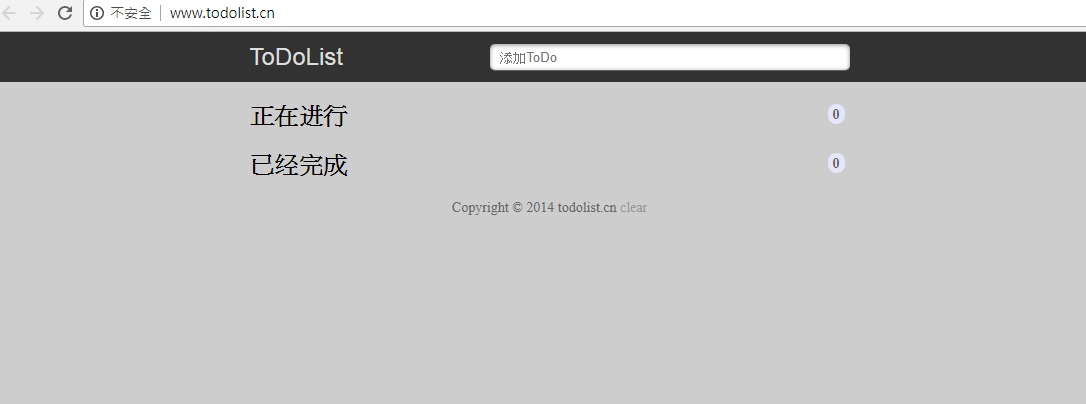
header.css
 /*背景*/

 body{

     background-color: #cdcdcd;

     font-size: 16px;

 }

 /*头部*/

 .header{

     height: 50px;

     background-color: #333;

 }

 .header .section h3{

     float: left;

     color: #ddd;

     font-size: 24px;

     line-height: 50px;

 }

 .header .section input{

     float: right;

     width: 60%;

     height: 24px;

     margin-top: 12px;

     text-indent: 10px;

     border-radius: 5px;

     border: none;

 }

 .header .section button{

     float: right;

     width: 35px;

     height: 24px;

     margin-top: 12px;

     border-radius: 5px;

     border: none;

     text-indent:10px 10px;

     text-align: center;

 }
section.css
 .section{

     width: 600px;

     padding: 0 10px;

     margin: 0 auto;

     overflow:hidden;

 }

 .section h2{

     position: relative;

     display: block;

     width: 100%;

     font-size: 24px;

     line-height: 30px;

     margin-block-start: 0.83em;

     margin-block-end: 0.83em;

     font-weight: bold;

     text-align: left

 }

 .section h2 span{

     position: absolute;

     top: 13px;

     right: 5px;

     display: inline-block;

     padding: 0 5px;

     height: 20px;

     border-radius: 20px;

     background: #E6E6FA;

     line-height: 22px;

     text-align: center;

     color: #666;

     font-size: 14px;

 }

 .section ul{

     list-style: none;

 }

 .section ul li{

     height: 32px;

     line-height: 32px;

     background: #fff;

     position: relative;

     margin-bottom: 10px;

     padding: 0 45px;

     border-radius: 3px;

     border-left: 5px solid #629A9C;

     box-shadow: 0 1px 2px rgba(0,0,0,0.07);

 }

 .section ul li>input{

     position: absolute;

     top: 6px;

     left: 10px;

     width: 22px;

     height: 22px;

     cursor: pointer;

 }

 .section ul li a{

     position: absolute;

     top: 2px;

     right: 5px;

     display: inline-block;

     width: 14px;

     height: 12px;

     border-radius: 14px;

     border: 6px double #FFF;

     background: #CCC;

     line-height: 14px;

     text-align: center;

     color: #FFF;

     font-weight: bold;

     font-size: 14px;

     cursor: pointer;

 }

 .section #donelist li{

     opacity: 0.5;

 }
footer.css
 .footer {

     color: #666;

     font-size: 15px;

     text-align: center;

 }

 .footer a{

     color: #666;

     text-decoration: none;

     color: #999;

 }
reset.css
/*百度*/

body{

font-family:arial,helvetica,sans-serif;

font-size:13px;

font-size-adjust:none;

font-stretch:normal;

font-style:normal;

font-variant:normal;

font-weight:normal;

line-height:1.4;

text-align:center;

}

body, ul, ol, dl, dd, h1, h2, h3, h4, h5, h6, p, form, fieldset, legend, input, textarea, select, button, th, td {

margin:0;

padding:0;

}

h1, h2, h3, h4, h5, h6 {

font-size:100%;

font-weight:normal;

}

table {

font-size:inherit;

}

input, select {

font-family:arial,helvetica,clean,sans-serif;

font-size:100%;

font-size-adjust:none;

font-stretch:normal;

font-style:normal;

font-variant:normal;

font-weight:normal;

line-height:normal;

}

button {

overflow:visible;

}

th, em, strong, b, address, cite {

font-style:normal;

font-weight:normal;

}

li {

list-style-image:none;

list-style-position:outside;

list-style-type:none;

}

img, fieldset {

border:0 none;

}

ins {

text-decoration:none;

}
index.js
 var todolist = $('todolist');

 var donelist = $('donelist');

 var todoCount = $('todocount');

 var doneCount = $('donecount');

 var todoc =0;

 var donec=0;

 //添加todolist

 function postaction(){

     //获取用户输入内容

     var contant = $('searchinput').value;

     //判断

     if(contant.length === 0){

         alert('请输入内容');

         return;

     }

     //创建li标签插入

     var newli = document.createElement('li');

     newli.innerHTML ="<input type='checkbox' onchange ='update()'>"+"<p onclick='edit()'>"+ contant+ "</p>" + "<a herf = 'javescript:void(0)'>-</a>";

     $('todolist').insertBefore(newli,$('todolist').children[0]);

     loop('todolist');

     todoc++;

     todoCount.innerText = todoc;

     //清空输入框的内容

     $('searchinput').value = '';

 }

 // 循环每次添加不同的i值

 function loop(str){

     var list = null;

     str ==='todolist' ? list = todolist :list =donelist;

     childs = list.childNodes;

     for(var i=0; i<childs.length;i++){

         childs[i].children[0].setAttribute('onchange','update("'+i+'","'+str+'")');

         childs[i].children[1].setAttribute('onclick','edit("'+i+'","'+str+'")');

         childs[i].children[1].setAttribute('onchange','change("'+i+'","'+str+'")');

         childs[i].children[2].setAttribute('href','javascript:remove("'+i+'","'+str+'")');

     }

 }

 //update方法

 function update(n,str){

     var list = null;

     str === 'todolist' ? list = todolist : list = donelist;

     var li = null;

     childs = list.childNodes;

     for(var i=0;i<childs.length;i++){

         if(i===Number(n)){

             li = childs[i];

         }

     }

      // 删除原有的,得到li 并刷新了原有的li

     remove(n,str);

     if(str==='todolist'){

         if(donec ===0){

             donelist.appendChild(li);

         }else {

             donelist.insertBefore(li,donelist.children[0]);

         }

         loop('donelist');

         donec++;

         doneCount.innerText = donec;

     }else if(str ==='donelist'){

         todolist.appendChild(li);

         loop('todolist');

         todoc++;

         todoCount.innerText = todoc;

     }

 }

 //修改span

 function edit(n,str){

     var list = null;

     str ==='todolist' ? list = todolist : list = donelist;

     childs = list.childNodes;

     p = childs[n].children[1];

     title = p.innerHTML;

     p.innerHTML="<input id='input-"+ n +"' value='"+title+"' />";

     var input = $("input-"+n);

     input.setSelectionRange(0,input.value.length);

     input.focus();

 }

 //修改input成p标签

 function change(n,str){

     var list = null;

     str ==='todolist' ? list = todolist : list = donelist;

     childs = list.childNodes;

     p = childs[n].children[1];

     title = p.children[0].value;

     if(title.length === 0){

         alert("内容不能为空");

     }

     else{

         p.innerHTML = title;

     }

 }

 //删除一个li

 function remove(n,str){

     var list=null;

     if (str==='todolist'){

         list = todolist;

         todoc--;

         todoCount.innerText = todoc;

     } else if(str==='donelist'){

         list = donelist;

         donec--;

         doneCount.innerText = donec;

     }

     childs = list.childNodes;

     for(var i=childs.length-1;i>=0;i--){

         if(i===Number(n)){

             list.removeChild(childs[n]);

         }

     }

     loop(str);

 }

 //删除全部li

 function clear(){

     childs1 = todolist.childNodes;

     for(var i=childs1.length-1;i>=0;i--){

         todolist.removeChild(childs1[i]);

     }

     childs2 = donelist.childNodes;

     for(var j=childs2.length-1;j>=0;j--){

         donelist.removeChild(childs2[j]);

     }

     todoc = 0;

     donec = 0;

     todoCount.innerText = todoc;

     doneCount.innerText = donec;

 }

 //根据id获取

 function $(id){

     return typeof id === 'string' ? document.getElementById(id) : null;

 }
 <!DOCTYPE html>

 <html>

 <head>

     <meta charset="utf-8">

     <title>todolist</title>

     <link rel="stylesheet" type="text/css" href="css/reset.css">

     <link rel="stylesheet" type="text/css" href="css/header.css">

     <link rel="stylesheet" type="text/css" href="css/section.css">

     <link rel="stylesheet" type="text/css" href="css/footer.css">

 </head>

 <body>

     <div class="header">

         <div class="section">

             <h3>ToDolist</h3>

             <input type="text" name="title" placeholder="添加ToDo" id="searchinput">

             <button id="btn" onclick="postaction()">添加</button>

         </div>

     </div>

     <div class="section">

         <h2>

             正在进行

             <span id="todocount">0</span>

         </h2>

         <ul id="todolist"></ul>

         <h2>

             已经完成

             <span id="donecount">0</span>

         </h2>

         <ul id="donelist"></ul>

     </div>

     <div class="footer">

             Copyright © 2019 todolist.cn

             <a href="javascript:clear();">clear</a>

     </div>

     <script type="text/javascript" src="js/index.js"></script>

 </body>

 </html>
demo ‘todolist’项目开发的更多相关文章
- 炼金术(1): 识别项目开发中的ProtoType、Demo、MVP
软件开发是很分裂的,只有不断使用原则和规律,才能带来质量. 只要不是玩具性质的项目,项目应该可以大概划分为0-1,1-10,10-100,100-1000四个种重要阶段.其中,0-1是原型验证性的:1 ...
- demo项目开发(Python+flask+mysql+redis只包含后端接口)
[demo项目开发需求] 用户信息管理,可以注册.登录.添加用户.删除用户 注册:任何用户可以注册,对用户提交的注册信息进行校验,返回对应的信息,其中: 用户名:必填,唯一 密码:必填,只能6-12位 ...
- 开发“todolist“”项目及其自己的感悟
一,项目题目: 实现“todolist项目” 该项目主要可以练习js操控dom事件,事件触发之间的逻辑关系,以及如何写入缓存,获取缓存.固定. 二,todolist简介 ToDoList是一款非常优秀 ...
- Jquery开发&BootStrap 实现“todolist项目”
作业题目:实现“todolist项目” 作业需求: 基础需求:85%参考链接http://www.todolist.cn/1. 将用户输入添加至待办项2. 可以对todolist进行分类(待办项和已完 ...
- TODOList项目
[ 爱上Swift]十二期:TODOList项目 好久没有写Swift甚是想念,Swift,Xcode都比较稳定了写个程序熟悉一下,当然时间原因都是小Demo,废话不多说先上图. 下面是跑起来之后 ...
- HTML+CSS项目开发总结
好几天没更新博客了,刚实战完一个HTML+CSS的简单项目.经过几天的摸索,发现收益良多.之前只是单纯得写demo,看知识点,没有亲自实战项目.但实战过后才会了解,如何才能更好地提升自己的技术.针对这 ...
- 用vuejs实现一个todolist项目
用vue.js实现一个todolist项目:input输入框输入的值会呈现在下方,并且会保存在localStorage里面,而且下方的列表点击之后也会有变化: 完整代码: App.vue <te ...
- [转]基于Starling移动项目开发准备工作
最近自己趁业余时间做的flash小游戏已经开发得差不多了,准备再完善下ui及数值后,投放到国外flash游戏站.期间也萌生想法,想把游戏拓展到手机平台.这两天尝试了下,除去要接入ane接口的工作,小游 ...
- 使用MyEclipse搭建java Web项目开发
转自:http://blog.csdn.net/jiuqiyuliang/article/details/36875217 首先,在开始搭建MyEclipse的开发环境之前,还有三步工具的安装需要完成 ...
随机推荐
- CSS颜色表示的几种方式
在CSS中颜色有很多表示方式,今天列出一些常见的颜色表示方式及它们的用法. ①color:blue; 第一种,调用颜色属性,将颜色的英文输入在冒号后,以分号结束. 这种方法直接了当,但是能表示的颜色 ...
- Java入门基础(类)
类 在Java中表示自定义的数据类型,一个class可以是若干基本类型的组合. public class Student { public String id;//学号 public String n ...
- pyspark 记录
import os import sys spark_name = os.environ.get('SPARK_HOME',None) if not spark_name: raise ValueEr ...
- BZOJ 1046 [HAOI2007]上升序列(LIS + 贪心)
题意: m次询问,问下标最小字典序的长度为x的LIS是什么 n<=10000, m<=1000 思路: 先nlogn求出f[i]为以a[i]开头的LIS长度 然后贪心即可,复杂度nm 我们 ...
- Codeforces 1064D Labyrinth(双端队列BFS)
题意: 给一个图,"*"不可以走,给你一个起点,限制向左走L次,向右走R次,上下不限制,问你最多可以走到多少个格子 思路: BFS,每次将上下走的策略加入队首,左右加入队尾,(相当 ...
- 题解【[AHOI2013]作业】
\[ \texttt{Preface} \] 数据貌似很水,据说 \(A_i\leq n\) ,连离散化都不需要. 不知道为啥设块大小为 \(\frac{n}{\sqrt m}\) 会一直 Runti ...
- 14-SSM整合
今日知识 1. Spring整合MyBatis 2. SSM普通整合 3. SSM整合(Spring和SpringMVC分离) 4. 纯JavaConfig的SSM Spring整合MyBatis 1 ...
- css浮动(float)详解
一.什么是浮动? 浮动,顾名思义,就是漂浮的意思.指的是一个元素脱离文档流,悬浮在父元素之上的现象. 二.如何产生浮动? 给元素本身添加float属性 float值: left 元素向左浮动. rig ...
- Postman之命令测试
前言 今天我们来学习一下Postman的命令行测试 1.先安装node.js ,https://nodejs.org/en/#home-downloadhead 2.安装cnpm npm instal ...
- Ts环境搭建
一.ts环境搭建 安装node.js,用dos命令npm全局安装typescripe包环境 进入vscode官网下载zip文件解压后使用code.exe