
深入delphi编程理解之消息(六)无窗口单元消息的创建、接受及dispatch模式编程
一、程序界面
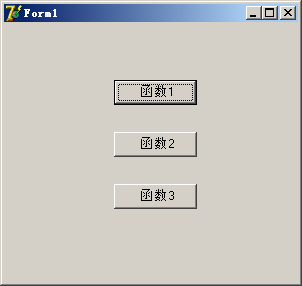
二、程序代码
(一)、主界面代码
//==============================================================================

// 主窗口

//==============================================================================

unit Unit1;

interface

uses

  Windows, Messages, SysUtils, Variants, Classes, Graphics, Controls, Forms,

  Dialogs, StdCtrls, Unit2, Unit4,Unit3;

type

  TForm1 = class(TForm)

    Button1: TButton;

    Button2: TButton;

    Button3: TButton;

    procedure Button1Click(Sender: TObject);

    procedure Button2Click(Sender: TObject);

    procedure Button3Click(Sender: TObject);

    procedure FormCreate(Sender: TObject);

    procedure FormClose(Sender: TObject; var Action: TCloseAction);

  private

    { Private declarations }

    fNotFormMsg: TMyNotFormMsg;

    fMyDispatcher: TMyDispatcher;

    fObjectProc: TObjectProc;

  public

     property MyDispatcher:TMyDispatcher read fMyDispatcher;

    { Public declarations }

  end;

var

  Form1: TForm1;

implementation

{$R *.dfm}

procedure TForm1.Button1Click(Sender: TObject);

begin

  PostMessage(HWND_BROADCAST, fMyDispatcher.GetMsgID(MyMP1), 1, 0)

end;

procedure TForm1.Button2Click(Sender: TObject);

begin

PostMessage(HWND_BROADCAST, fMyDispatcher.GetMsgID(MyMP2), 2, 0)

end;

procedure TForm1.Button3Click(Sender: TObject);

begin

 PostMessage(HWND_BROADCAST, fMyDispatcher.GetMsgID(MyMP3), 3, 0)

end;

procedure TForm1.FormCreate(Sender: TObject);

begin

  fMyDispatcher := TMyDispatcher.create;

  fObjectProc := TObjectProc.Create;

  fNotFormMsg := TMyNotFormMsg.Create;

  fMyDispatcher.AddMyMessageProc(MyMP1, fObjectProc.Proc1);

  fMyDispatcher.AddMyMessageProc(MyMP2, fObjectProc.Proc2);

  fMyDispatcher.AddMyMessageProc(MyMP3, fObjectProc.Proc3);

end;

procedure TForm1.FormClose(Sender: TObject; var Action: TCloseAction);

begin

  fNotFormMsg.Free;

  fMyDispatcher.Free;

  fObjectProc.Free;

end;

end.
(二)、dispatch单元,主要负责消息分发
//==============================================================================

// dispatchÄ£¿é

//==============================================================================

unit Unit2;

interface

uses

  Messages, Classes, SysUtils, Dialogs, Windows;

const

  MyMP1 = 'MyMp1';

  MyMP2 = 'MyMp2';

  MyMP3 = 'MyMP3';

  MaxMsgCount = 10;

type

  TMyMessageProc = procedure(var AMessage: TMessage) of object;

  PMsgR = ^TMsgR;

  TMsgR = packed record

    MsgInfo: PAnsiChar;

    Msg: Cardinal;

    MyMessageProc: TMyMessageProc;

  end;

  TMyDispatcher = class(TObject)

  private

    DispatcherList: TList;

  public

    constructor Create;

    destructor destroy; override;

    function GetBaseIndex(MsgID: Integer): Integer;

    procedure AddMyMessageProc(MsgInfo: PAnsiChar; MessageProc: TMyMessageProc);

    procedure SendMessage(var Amessage: TMessage);

    function RegMessages(MsgInfo: PAnsiChar): Integer;

    function GetMsgID(MsgInfo: PAnsiChar): Integer;

  end;

implementation

function Tmydispatcher.GetMsgID(MsgInfo: PAnsiChar): Integer;

var

  I: Integer;

begin

  for I := 0 to DispatcherList.Count - 1 do

    if Trim(Tmsgr(DispatcherList[I]^).MsgInfo) = Trim(MsgInfo) then

    begin

      Result := Tmsgr(DispatcherList[I]^).Msg;

      break;

    end;

end;

function TMyDispatcher.RegMessages(MsgInfo: PAnsiChar): Integer;

begin

  Result := RegisterWindowMessage(MsgInfo);

end;

constructor TMyDispatcher.Create;

begin

  inherited Create;

  DispatcherList := TList.Create;

end;

destructor TMyDispatcher.destroy;

var

  I:Integer;

  PmP:PMsgR;

begin

  for I:=DispatcherList.Count-1 downto 0 do

   begin

     pmp:=DispatcherList[I];

     Dispose(PmP);

     DispatcherList.Delete(I);

   end;

  DispatcherList.Free;

  inherited destroy;

end;

function TMyDispatcher.GetBaseIndex(MsgID: Integer): Integer;

var

  I: Integer;

begin

  Result := -1;

  for I := 0 to DispatcherList.Count - 1 do

  begin

    if Tmsgr(DispatcherList[I]^).Msg = MsgID then

    begin

      Result := I;

      Break;

    end;

  end;

end;

procedure TMyDispatcher.AddMyMessageProc(MsgInfo: PAnsiChar; MessageProc: TMyMessageProc);

var

  PMP: PMsgR;

begin

  New(PMP);

  PMP^.MyMessageProc := MessageProc;

  PMP^.MsgInfo := MsgInfo;

  PMP^.Msg:=RegMessages(MsgInfo);

  DispatcherList.Add(PMP);

end;

procedure TMyDispatcher.SendMessage(var Amessage: TMessage);

begin

  if Assigned(Tmsgr(DispatcherList[GetBaseIndex(Amessage.Msg)]^).MyMessageProc) then

    Tmsgr(DispatcherList[GetBaseIndex(Amessage.Msg)]^).MyMessageProc(Amessage);

end;

end.
(三)、功能函数单元。主要实现程序的功能
unit Unit3;

//==============================================================================

// ¹¦Äܺ¯Êýµ¥Ôª

//==============================================================================

interface

uses

  messages, SysUtils,Dialogs;

type

  TObjectProc = class(TObject)

  public

    procedure Proc1(var Amessage: TMessage);

    procedure Proc2(var Amessage: TMessage);

    procedure Proc3(var Amessage: TMessage);

  end;

implementation

  procedure Tobjectproc.Proc1(var Amessage: TMessage);

  begin

    showmessage('函数1,消息编号 '+IntToStr(Amessage.Msg));

  end;

   procedure Tobjectproc.Proc2(var Amessage: TMessage);

  begin

    showmessage('函数2,消息编号 '+IntToStr(Amessage.Msg));

  end;

   procedure Tobjectproc.Proc3(var Amessage: TMessage);

  begin

    showmessage('函数3,消息编号'+IntToStr(Amessage.Msg));

  end;

end.
(四)、无窗口消息单元。主要演示无窗口单元如何创建和接受消息。
//==============================================================================

// ÎÞ´°¿Ú½ÓÊÜÏûÏ¢µ¥Ôª

//==============================================================================

unit Unit4;

interface

uses

  Messages, Classes, SysUtils, Unit2, Unit3;

type

  TMyNotFormMsg = class

  private

    fHWND: THandle;

  public

    constructor Create;

    destructor destroy;

    procedure MyMsgMethod(var Message: TMessage);

  end;

implementation

   uses Unit1;

constructor TMyNotFormMsg.Create;

begin

  fHWND := AllocateHWnd(MyMsgMethod);       {´´½¨ÎÞ´°¿ÚÏûÏ¢}

end;

destructor TMyNotFormMsg.destroy;

begin

  FreeAndNil(fHWND);

end;

procedure TMyNotFormMsg.MyMsgMethod(var Message: TMessage);

begin

  if Form1.MyDispatcher.GetBaseIndex(Message.Msg) > -1 then

    Form1.MyDispatcher.SendMessage(Message);

end;

end.
深入delphi编程理解之消息(六)无窗口单元消息的创建、接受及dispatch模式编程的更多相关文章
- VS2010/MFC编程入门之十六(对话框:消息对话框)
前面几节鸡啄米讲了属性页对话框,我们可以根据所讲内容方便的建立自己的属性页对话框.本节讲解Windows系统中最常用最简单的一类对话框--消息对话框. 我们在使用Windows系统的过程中经常会见到消 ...
- 工作总结:VS2010/MFC编程入门之十六(对话框:消息对话框)
原文地址:http://www.jizhuomi.com/software/171.html 我们在使用Windows系统的过程中经常会见到消息对话框,提示我们有异常发生或提出询问等.因为在软件开发中 ...
- 深入delphi编程理解之消息(一)WINDOWS原生窗口编写及消息处理过程
通过以sdk方式编制windows窗口程序,对理解windows消息驱动机制和delphi消息编程有很大的帮助. sdk编制windows窗口程序的步骤: 1.对TWndClass对象进行赋值; 2. ...
- 深入delphi编程理解之消息(二)发送消息函数及消息编号、消息结构体的理解
一.delphi发送消息的函数主要有以下三个: (一).SendMessage函数,其原型如下: function SendMessage( hWnd: HWND; {目标句柄} Msg: UINT; ...
- 网络编程懒人入门(六):深入浅出,全面理解HTTP协议
本文引用了自简书作者“涤生_Woo”的文章,内容有删减,感谢原作者的分享. 1.前言 HTTP(全称超文本传输协议,英文全称HyperText Transfer Protocol)是互联网上应用最为广 ...
- Java并发编程原理与实战三十六:阻塞队列&消息队列
一.阻塞队列 1.阻塞队列BlockingQueue ---->可以理解成生产者消费者的模式---->消费者要等待到生产者生产出来产品.---->而非阻塞队列ConcurrentLi ...
- 第3章 窗口与消息_3.1Windows编程模型
第3章窗口与消息 3.1 Windows_编程模型 (1)窗口程序的运行过程 ①设计窗口 ②注册窗口类(RegisterClassEx).在注册之前,要先填写RegisterClassEx的参 ...
- 关于Delphi XE2的FMX的一点点研究之消息篇
Delphi XE2出来了一阵子了,里面比较抢眼的东西,除了VCLStyle这个换肤的东西之外,另外最让人眼亮的应该是FMX这个东西了.万一的博客上都连载了一票的关于FMX的使用心得了.我还是没咋去关 ...
- 深入浅出理解基于 Kafka 和 ZooKeeper 的分布式消息队列
消息队列中间件是分布式系统中重要的组件,主要解决应用耦合,异步消息,流量削锋等问题.实现高性能,高可用,可伸缩和最终一致性架构,是大型分布式系统不可缺少的中间件. 本场 Chat 主要内容: Kafk ...
随机推荐
- python 处理protobuf协议
背景:需要用django基于python3模拟一个http接口,请求是post方式,body是protobuf string,返回也是protobuf string 设计:django获取pb str ...
- orm 相关
优化
- [CodeIgniter4]故障排除和本地开发服务器
故障排除 以下是一些常见的安装问题,以及建议的解决方法. 我必须在我的URL中包含index.php 如果``/mypage/find/apple``类似的URL``/index.php/mypage ...
- 《NVMe-over-Fabrics-1_0a-2018.07.23-Ratified》阅读笔记(3)-- 命令
3 命令 Fabrics命令用于创建队列和初始化controller.Fabrics命令的Opcode字段填写0x7F.无论controller是否处于使能状态(CC.EN)Fabrics命令都会被处 ...
- hrtf 旋转音效matlab实现
原理参考: http://www.mahong.me/archives/97 将音频分段,各个段分别使用hrtf在Ls, L, R, Ls, Rrs, Lrs位置处的filter系数.是声音听起来来自 ...
- java基础(三)之面向对象编程
对象的创建方法 语法: class 类名{ 属性; 方法; } 生成对象的方法 类名 对象名 = new 类名(); Dog dog = new Dog(); 对象的使用方法1.对象.变量;2.对象. ...
- leetcode全部滑动窗口题目总结C++写法(完结)
3. 无重复字符的最长子串 A: 要找最长的无重复子串,所以用一个map保存出现过的字符,并且维持一个窗口,用le和ri指针标识.ri为当前要遍历的字符,如果ri字符在map中出现过,那么将le字符从 ...
- Visual Studio Code快捷键大全
原文链接:https://segmentfault.com/a/1190000007688656 常用 General 按 Press 功能 Function Ctrl + Shift + P,F1 ...
- 1-Django2.2安装指南
django快速安装指南 作为一个Python Web框架,Django需要Python环境.下面是Django需要对应的python版本. Django版本 python版本 1.11 2.7, 3 ...
- MongoDB - String转换为Int,并更新到数据库中
方法1 使用$convert, MongoDB版本 >= 4,速度快. 使用pymongo示范,原生mongo语句并没有尝试. # 假设{'age': '47'}, 转换后为{'age': 47 ...