
Vue - 过渡 列表过渡
列表的进入/离开过渡
获取不大于数组长度的随机数,作为插入新值的位置
<div id="app" class="demo">

	<button @click="add">Add</button>

	<button @click="remove">Remove</button>

	<br>

	<br>

	<transition-group name="list">

		<span v-for="item in items" :key="item" class="list-item">{{item}}</span>

	</transition-group>

</div>

<script>

new Vue({

	el: '#app',

	data: {

		items: [1, 2, 3, 4, 5, 6, 7, 8, 9],

		num: 10

	},

	methods: {

		randomIndex () {

			// 获取不超过数组长度的随机数

			return Math.floor(Math.random() * this.items.length)

		},

		add () {

			// 把获取的随机数作为位置插入新元素

			this.items.splice(this.randomIndex(), 0, this.num++)

		},

		remove () {

			// 随机删除某个位置的元素

			this.items.splice(this.randomIndex(), 1)

		}

	}

})

</script>

<style>

.list-item{

	margin-right: 10px;

	display: inline-block;

}

.list-enter-active, .list-leave-active{

	transition: all 1s;

}

.list-enter, .list-leave-to{

	opacity: 0;

	transform: translateY(30px);

}

</style>

列表的排序过渡
<transition-group> 组件还有一个特殊之处。不仅可以进入和离开动画,还可以改变定位。要使用这个新功能只需了解新增的 v-move 特性,它会在元素的改变定位的过程中应用。像之前的类名一样,可以通过 name 属性来自定义前缀,也可以通过 move-class 属性手动设置。
<div id="app">

	<button @click="shuffle">Shuffle</button>

	<br>

	<br>

	<transition-group name="flip-list">

		<li v-for="item in items" :key="item">{{item}}</li>

	</transition-group>

</div>

<script>

new Vue({

	el: '#app',

	data: {

		items: [1, 2, 3, 4, 5, 6, 7, 8, 9]

	},

	methods: {

		shuffle () {

			this.items = _.shuffle(this.items);

		}

	}

})

</script>

<style>

.flip-list-move{

	transition: all .3s;

}

</style>

这个看起来很神奇,内部的实现,Vue 使用了一个叫 FLIP 简单的动画队列
使用 transforms 将元素从之前的位置平滑过渡新的位置。
我们将之前实现的例子和这个技术结合,使我们列表的一切变动都会有动画过渡。
<div id="app">

	<button @click="shuffle">Shuffle</button>

	<button @click="add">Add</button>

	<button @click="remove">Remove</button>

	<br>

	<br>

	<transition-group name="list">

		<span v-for="item in items" :key="item" class="list-item">{{item}}</span>

	</transition-group>

</div>

<script>

new Vue({

	el: '#app',

	data: {

		items: [1, 2, 3, 4, 5, 6, 7, 8, 9],

		num: 10

	},

	methods: {

		randomIndex () {

			// 获取不超过数组长度的随机数

			return Math.floor(Math.random() * this.items.length)

		},

		add () {

			// 把获取的随机数作为位置插入新元素

			this.items.splice(this.randomIndex(), 0, this.num++)

		},

		remove () {

			// 随机删除某个位置的元素

			this.items.splice(this.randomIndex(), 1)

		},

		shuffle () {

			this.items = _.shuffle(this.items)

		}

	}

})

</script>

<style>

.list-item{

	transition: all 1s;

	margin-right: 10px;

	display: inline-block;

}

.list-enter, .list-leave-to{

	opacity: 0;

	transform: translateY(30px);

}

.list-leave-active{

	position: absolute;

}

</style>
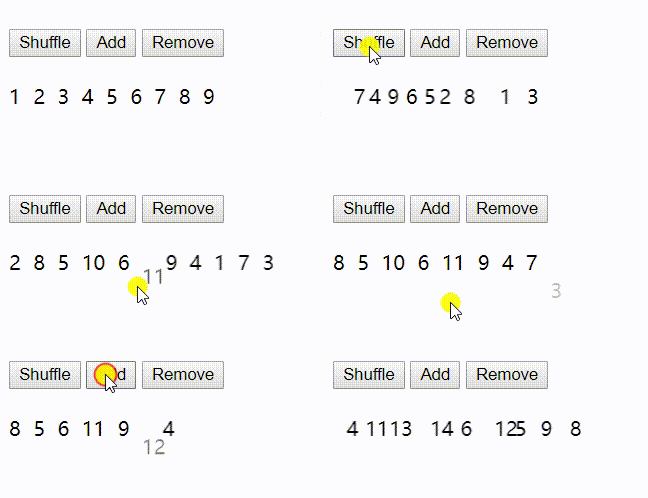
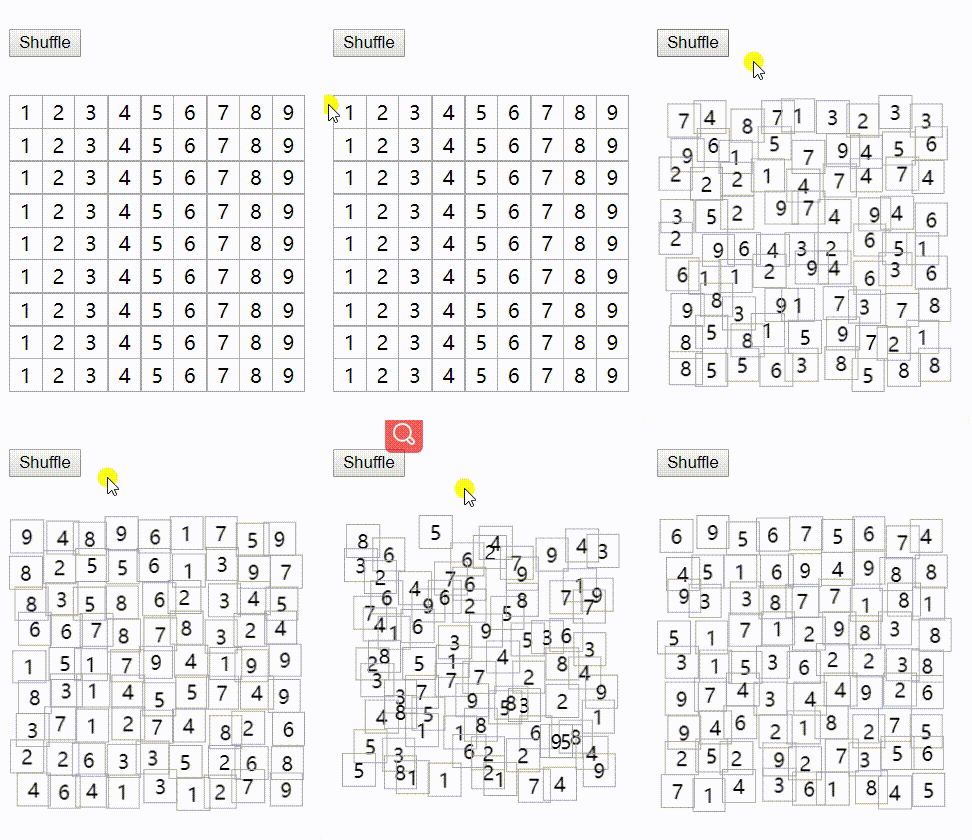
>FLIP 动画不仅可以实现单列过渡,多维网格也同样可以过渡:
```
{{cell.number}}
.sudoku-container {
display: flex;
flex-wrap: wrap;
width: 238px;
margin-top: 10px;
}
.cell {
display: flex;
justify-content: space-around;
align-items: center;
width: 25px;
height: 25px;
border: 1px solid #aaa;
margin-right: -1px;
margin-bottom: -1px;
}
.cell:nth-child(3n) {
margin-right: 0;
}
.cell:nth-child(27n) {
margin-bottom: 0;
}
.cell-move {
transition: transform 1s;
}
```
Vue - 过渡 列表过渡的更多相关文章
- vue 过渡效果-列表过渡
到目前为止,关于过渡我们已经讲到, 单个节点 同一时间渲染多个节点的一个 那么怎么同时渲染整个列表,比如使用v-if?在这种场景下,使用<transition-group>组件,在我们深入 ...
- VUE笔记 - 列表过渡动画 v-enter, v-leave-to | v-enter-active, v-leave-active | v-move
本例要结合过渡动画四个过程的示意图一起理解. https://cn.vuejs.org/v2/guide/transitions.html 疑问: v-for="(item,i) in li ...
- Vue中Js动画 与Velocity.js 多组件多元素 列表过渡
Vue提供我们很多js动画钩子 写在tansition标签内部 入场动画 @before-enter="" 处理函数收到一个参数(e l) el为这个元素 @enter=" ...
- Vue列表过渡
前面的话 本文将详细介绍Vue列表过渡 概述 前面分别介绍了单元素CSS过渡和JS过渡,以及多元素过渡.如何同时渲染整个列表呢?在这种情景中,需要使用<transition-group>组 ...
- Vue基础进阶 之 列表过渡
在前面的博客我们一直在操作单个元素的过渡,如果是对多个元素过渡,例如列表,这时就要用到<transition-group>这个组件了: 如何使用:将要操作的列表元素放在<transi ...
- vue总结 04过渡--进入/离开 列表过渡
进入/离开 & 列表过渡 概述 Vue 在插入.更新或者移除 DOM 时,提供多种不同方式的应用过渡效果.包括以下工具: 在 CSS 过渡和动画中自动应用 class 可以配合使用第三方 CS ...
- vue过渡 & 动画---进入/离开 & 列表过渡
(1)概述 Vue 在插入.更新或者移除 DOM 时,提供多种不同方式的应用过渡效果.包括以下工具: 在 CSS 过渡和动画中自动应用 class 可以配合使用第三方 CSS 动画库,如 Animat ...
- Vue多元素过渡
前面的话 前面分别介绍了单元素过渡的CSS过渡和JS过渡,本文将详细介绍Vue多元素过渡 常见示例 最常见的多标签过渡是一个列表和描述这个列表为空消息的元素: <transition> & ...
- Vue——关于css过渡和动画那些事
1. 单元素/组件的过渡transition Vue 提供了 transition 的封装组件,在下列情形中,可以给任何元素和组件添加进入/离开过渡 条件渲染 (使用 v-if) 条件展示 (使用 v ...
随机推荐
- Excel如何快速选定所需数据区域
在使用Excel处理数据时,快速选定所需数据区域的一些小技巧. 第一种方法:(选定指定区域) Ctrl+G调出定位对话框,在[引用位置]处输入A1:E5000,点击[确定]即可. 第二种方法:(选定 ...
- MariaDB Windows 安装
1.复制安装文件到服务器 2.解压到指定的目录,并创建my.ini: 3.编辑my.ini文件内容 [client] port=3307 [mysql] default-character-set=u ...
- Linux 环境c++ 编码转换
#include <iconv.h> //代码转换:从一种编码转为另一种编码 static int CodeConvert(char *from_charset,char *to_char ...
- ubuntu18.04 编译fortran出现 ‘没有f951这个文件’处理
机器自带了gcc所以可以编译fortran文件, 使用时, gcc **.for –o ***.out 提示,没有找到f951. 然后去网上找解决方案,有的人说在其他地方找到了f951,然后把他复制到 ...
- mybatis-plus - buildSqlSessionFactory()
一. buildSqlSessionFactory() mybatis-plus 同样的是调用 factory.getObject() 方法来进行 SqlSessionFactory 创建的. 然后 ...
- Appium连接模拟器
Appnium 环境搭建 覆盖文件 将SDK中platform-tools目录下的这三个文件 复制到模拟安装路径bin目录下,覆盖原有的这三个文件 adb命令 开启服务 adb start-serve ...
- TCP/IP详解,卷1:协议--第8章 Traceroute程序
引言 由Van Jacobson编写的Tr a c e r o u t e程序是一个能更深入探索T C P / I P协议的方便可用的工具. 尽管不能保证从源端发往目的端的两份连续的 I P数据报具有 ...
- 题解【AcWing176】装满的油箱
题面 一开始拿到这个问题并不好做,于是考虑拆点. 考虑将一个点拆成 \(c+1\) 个,每个点表示(编号,剩余油量). 然后 \(\text{Dijkstra}\) 最短路即可. 每次跑 \(\tex ...
- sql查询 ——聚合函数
--聚合函数 -- sum() -- 求和 select sum(age) from student; -- count() -- 求数量 -- 数据量 select count(*) as '数量' ...
- python3练习100题——010
第10天了,今天的题目跟009类似,都比较水,有时间的话再做一道- 链接:http://www.runoob.com/python/python-exercise-example10.html 题目: ...