
java 直接调用micorosoft office (2003-2007和2010版本)中excel中计算函数
主要是讲述java中poi读取excel,而excel的版本包括:2003-2007和2010两个版本, 即excel的后缀名为:xls和xlsx
读取excel和MySQL相关: java的poi技术读取Excel数据到MySQL
你也可以在 : java的poi技术读取和导入Excel了解到写入Excel的方法信息
使用JXL技术 :java的jxl技术导入Excel
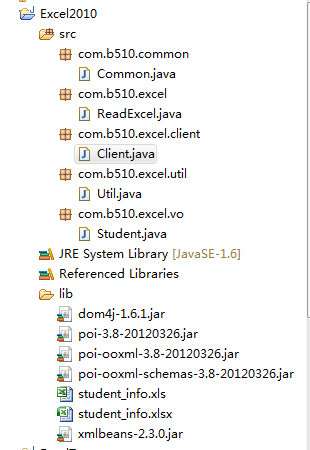
下面是本文的项目结构:
========================================
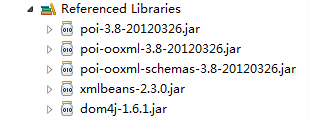
项目中所需要的jar文件:
==================================
所用的Excel数据(2003-2007,2010都是一样的数据)

===========================================================================
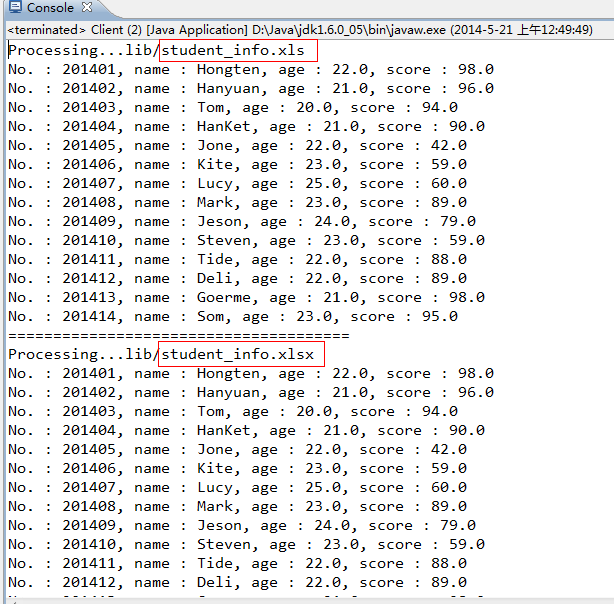
运行效果:
=================================================
源码部分:
=================================================
/Excel2010/src/com/b510/common/Common.java
/**
*
*/
package com.b510.common;
/**
* @author Hongten
* @created 2014-5-21
*/
public class Common {
public static final String OFFICE_EXCEL_2003_POSTFIX = "xls";
public static final String OFFICE_EXCEL_2010_POSTFIX = "xlsx";
public static final String EMPTY = "";
public static final String POINT = ".";
public static final String LIB_PATH = "lib";
public static final String STUDENT_INFO_XLS_PATH = LIB_PATH + "/student_info" + POINT + OFFICE_EXCEL_2003_POSTFIX;
public static final String STUDENT_INFO_XLSX_PATH = LIB_PATH + "/student_info" + POINT + OFFICE_EXCEL_2010_POSTFIX;
public static final String NOT_EXCEL_FILE = " : Not the Excel file!";
public static final String PROCESSING = "Processing...";
}
==============================================
=================================================
/Excel2010/src/com/b510/excel/ReadExcel.java
/**
*
*/
package com.b510.excel;
import java.io.FileInputStream;
import java.io.IOException;
import java.io.InputStream;
import java.util.ArrayList;
import java.util.List;
import org.apache.poi.hssf.usermodel.HSSFCell;
import org.apache.poi.hssf.usermodel.HSSFRow;
import org.apache.poi.hssf.usermodel.HSSFSheet;
import org.apache.poi.hssf.usermodel.HSSFWorkbook;
import org.apache.poi.xssf.usermodel.XSSFCell;
import org.apache.poi.xssf.usermodel.XSSFRow;
import org.apache.poi.xssf.usermodel.XSSFSheet;
import org.apache.poi.xssf.usermodel.XSSFWorkbook;
import com.b510.common.Common;
import com.b510.excel.util.Util;
import com.b510.excel.vo.Student;
/**
* @author Hongten
* @created 2014-5-20
*/
public class ReadExcel {
/**
* read the Excel file
* @param path the path of the Excel file
* @return
* @throws IOException
*/
public List<Student> readExcel(String path) throws IOException {
if (path == null || Common.EMPTY.equals(path)) {
return null;
} else {
String postfix = Util.getPostfix(path);
if (!Common.EMPTY.equals(postfix)) {
if (Common.OFFICE_EXCEL_2003_POSTFIX.equals(postfix)) {
return readXls(path);
} else if (Common.OFFICE_EXCEL_2010_POSTFIX.equals(postfix)) {
return readXlsx(path);
}
} else {
System.out.println(path + Common.NOT_EXCEL_FILE);
}
}
return null;
}
/**
* Read the Excel 2010
* @param path the path of the excel file
* @return
* @throws IOException
*/
public List<Student> readXlsx(String path) throws IOException {
System.out.println(Common.PROCESSING + path);
InputStream is = new FileInputStream(path);
XSSFWorkbook xssfWorkbook = new XSSFWorkbook(is);
Student student = null;
List<Student> list = new ArrayList<Student>();
// Read the Sheet
for (int numSheet = 0; numSheet < xssfWorkbook.getNumberOfSheets(); numSheet++) {
XSSFSheet xssfSheet = xssfWorkbook.getSheetAt(numSheet);
if (xssfSheet == null) {
continue;
}
// Read the Row
for (int rowNum = 1; rowNum <= xssfSheet.getLastRowNum(); rowNum++) {
XSSFRow xssfRow = xssfSheet.getRow(rowNum);
if (xssfRow != null) {
student = new Student();
XSSFCell no = xssfRow.getCell(0);
XSSFCell name = xssfRow.getCell(1);
XSSFCell age = xssfRow.getCell(2);
XSSFCell score = xssfRow.getCell(3);
student.setNo(getValue(no));
student.setName(getValue(name));
student.setAge(getValue(age));
student.setScore(Float.valueOf(getValue(score)));
list.add(student);
}
}
}
return list;
}
/**
* Read the Excel 2003-2007
* @param path the path of the Excel
* @return
* @throws IOException
*/
public List<Student> readXls(String path) throws IOException {
System.out.println(Common.PROCESSING + path);
InputStream is = new FileInputStream(path);
HSSFWorkbook hssfWorkbook = new HSSFWorkbook(is);
Student student = null;
List<Student> list = new ArrayList<Student>();
// Read the Sheet
for (int numSheet = 0; numSheet < hssfWorkbook.getNumberOfSheets(); numSheet++) {
HSSFSheet hssfSheet = hssfWorkbook.getSheetAt(numSheet);
if (hssfSheet == null) {
continue;
}
// Read the Row
for (int rowNum = 1; rowNum <= hssfSheet.getLastRowNum(); rowNum++) {
HSSFRow hssfRow = hssfSheet.getRow(rowNum);
if (hssfRow != null) {
student = new Student();
HSSFCell no = hssfRow.getCell(0);
HSSFCell name = hssfRow.getCell(1);
HSSFCell age = hssfRow.getCell(2);
HSSFCell score = hssfRow.getCell(3);
student.setNo(getValue(no));
student.setName(getValue(name));
student.setAge(getValue(age));
student.setScore(Float.valueOf(getValue(score)));
list.add(student);
}
}
}
return list;
}
@SuppressWarnings("static-access")
private String getValue(XSSFCell xssfRow) {
if (xssfRow.getCellType() == xssfRow.CELL_TYPE_BOOLEAN) {
return String.valueOf(xssfRow.getBooleanCellValue());
} else if (xssfRow.getCellType() == xssfRow.CELL_TYPE_NUMERIC) {
return String.valueOf(xssfRow.getNumericCellValue());
} else {
return String.valueOf(xssfRow.getStringCellValue());
}
}
@SuppressWarnings("static-access")
private String getValue(HSSFCell hssfCell) {
if (hssfCell.getCellType() == hssfCell.CELL_TYPE_BOOLEAN) {
return String.valueOf(hssfCell.getBooleanCellValue());
} else if (hssfCell.getCellType() == hssfCell.CELL_TYPE_NUMERIC) {
return String.valueOf(hssfCell.getNumericCellValue());
} else {
return String.valueOf(hssfCell.getStringCellValue());
}
}
}
=========================
=============================================================================
/Excel2010/src/com/b510/excel/client/Client.java
/**
*
*/
package com.b510.excel.client;
import java.io.IOException;
import java.util.List;
import com.b510.common.Common;
import com.b510.excel.ReadExcel;
import com.b510.excel.vo.Student;
/**
* @author Hongten
* @created 2014-5-21
*/
public class Client {
public static void main(String[] args) throws IOException {
String excel2003_2007 = Common.STUDENT_INFO_XLS_PATH;
String excel2010 = Common.STUDENT_INFO_XLSX_PATH;
// read the 2003-2007 excel
List<Student> list = new ReadExcel().readExcel(excel2003_2007);
if (list != null) {
for (Student student : list) {
System.out.println("No. : " + student.getNo() + ", name : " + student.getName() + ", age : " + student.getAge() + ", score : " + student.getScore());
}
}
System.out.println("======================================");
// read the 2010 excel
List<Student> list1 = new ReadExcel().readExcel(excel2010);
if (list1 != null) {
for (Student student : list1) {
System.out.println("No. : " + student.getNo() + ", name : " + student.getName() + ", age : " + student.getAge() + ", score : " + student.getScore());
}
}
}
}
===============================================-----------========================
====================
/Excel2010/src/com/b510/excel/util/Util.java
/**
*
*/
package com.b510.excel.util;
import com.b510.common.Common;
/**
* @author Hongten
* @created 2014-5-21
*/
public class Util {
/**
* get postfix of the path
* @param path
* @return
*/
public static String getPostfix(String path) {
if (path == null || Common.EMPTY.equals(path.trim())) {
return Common.EMPTY;
}
if (path.contains(Common.POINT)) {
return path.substring(path.lastIndexOf(Common.POINT) + 1, path.length());
}
return Common.EMPTY;
}
}
===============================
===============================================================================
/Excel2010/src/com/b510/excel/vo/Student.java
/**
*
*/
package com.b510.excel.vo;
/**
* Student
*
* @author Hongten
* @created 2014-5-18
*/
public class Student {
/**
* id
*/
private Integer id;
/**
* 学号
*/
private String no;
/**
* 姓名
*/
private String name;
/**
* 学院
*/
private String age;
/**
* 成绩
*/
private float score;
public Integer getId() {
return id;
}
public void setId(Integer id) {
this.id = id;
}
public String getNo() {
return no;
}
public void setNo(String no) {
this.no = no;
}
public String getName() {
return name;
}
public void setName(String name) {
this.name = name;
}
public String getAge() {
return age;
}
public void setAge(String age) {
this.age = age;
}
public float getScore() {
return score;
}
public void setScore(float score) {
this.score = score;
}
}
==============================================================================
++++++++++++++++++++++++++++++++++++++++++++++_____________________+++++++++++++++++
java 直接调用micorosoft office (2003-2007和2010版本)中excel中计算函数的更多相关文章
- Office 2003 2007 2010 配置进度 正在配置 解决方案 (转载)
在安装过Office2003.2007 或者2010之后,如果没有选择全部的组件,或者是因为安装到非系统盘,有时候打开 Office 文档的时候就会出现正在配置Office,或者Office配置进度的 ...
- java api 调用es集群(1.7版本)
public static void main(String[] args) { Settings settings = ImmutableSettings.settingsBuilder() // ...
- 通过java程序调用ant build.xml配置文件中指定的target
一.概述 通过ant实现项目的自动化部署,jar包生成,替换,tomcat关停.启动,查看项目日志: 通过java程序调用已编辑好的ant脚本build.xml配置文件中指定的target: 文中文件 ...
- Java Struts2读取Excel 2003/2007/2010例子
Java读写Excel的包是Apache POI(项目地址:http://poi.apache.org/),因此需要先获取POI的jar包,本实验使用的是POI 3.9稳定版. Apache POI ...
- 【java】: 操作excel2007/2003
//上传位置(与操作excel无关,可不看) public String getUploadPath() { File theWebFolder = XMPPServer.getInstance(). ...
- office 2003和office 2013同时安装使用的问题
电脑上同时安装了Office 2003和Office 2007/2010,先打开Word 2003,然后再打开Word 2010,总会弹出安装配置界面,反之亦然. 解决方法:使用快捷键Win+R打开 ...
- (转载)office 2003 gaozhi.msi 缺失提示问题修复
某些GHOST版win7,自带office 2003,每次启动word,它都会提示"稿纸没安装"云云,找不到那个文件.可是我搜遍了硬盘,确实没有那个文件.每次都要点取消,这个提示才 ...
- 让 Visio 2003/2007 同时开多个独立窗口
1. 打开 Visio 2003/2007 2. 点击菜单[工具] -> [选项]: 3. 在弹出的“选项” 对话框中选择“高级”选项页: 4. 去掉“在同一窗口中打开每一 ShapeSheet ...
- JAVA读取Excel2003、2007、2010教程
import java.io.File;import java.io.FileInputStream;import org.apache.poi.ss.usermodel.Row;import org ...
随机推荐
- redis相关笔记(一.安装及单机及哨兵使用)
redis笔记一 redis笔记二 redis笔记三 1.安装 cd /usr/src #进入下载目录(这个目录自己定) yum install -y wget gcc make tcl #安装依赖 ...
- SQL Select选择
SQL Select(选择) 语法 SELECT 语法用于从数据库中选择数据. 返回的数据存储在结果表中,称为结果集. SQL SELECT 语法 SELECT column1, column2, . ...
- [7.18NOIP模拟测试5]星际旅行 题解
题面(加密) 考场上靠打表yy出的规律进而想到的正解233333 可以把一条双向边拆成两条单向边,这样的话每个点度数都为偶数,符合欧拉图的定义. 那么题目可以转化为:去掉两条边,使图中存在一条欧拉路. ...
- (转)秒懂,Java 注解 (Annotation)你可以这样学 ---- 重要 注解定义与反射解析
转:http://blog.csdn.net/briblue/article/details/73824058 文章开头先引入一处图片. 这处图片引自老罗的博客.为了避免不必要的麻烦,首先声明我个人 ...
- flutter 小知识
隐藏控件,占空间 new Offstage( offstage: true, //这里控制 child: Container(color: Colors.blue,height: 100.0,), ) ...
- HTTP与HTTPS的区别与联系
HTTP与HTTPS的区别与联系 HTTP协议传输的数据都是未加密的,也就是明文的,因此使用HTTP协议传输隐私信息非常不安全,为了保证这些隐私数据能加密传输,于是网景公司设计了SSL(Secure ...
- Linux两台机器简历信任
cd ~/.ssh ssh-keygen -t rsa scp ./id_rsa.pub root@192.168.1.1:/root/.ssh/authorized_keys
- LaTex 插入图像,以及应用表格
插入图像 参考:http://www.ctex.org/documents/latex/graphics/ 1: \includegraphics[width=20mm]{head.png} 应用表格 ...
- PAT_A1080#Graduate Admission
Source: PAT A1080 Graduate Admission (30 分) Description: It is said that in 2011, there are about 10 ...
- Lambda表达式底层分析
一.我们先看下C#代码下Lamdba表达式的写法 // <summary> /// 写入日志委托 /// </summary> /// <param name=" ...