
java 直接调用micorosoft office (2003-2007和2010版本)中excel中计算函数
主要是讲述java中poi读取excel,而excel的版本包括:2003-2007和2010两个版本, 即excel的后缀名为:xls和xlsx
读取excel和MySQL相关: java的poi技术读取Excel数据到MySQL
你也可以在 : java的poi技术读取和导入Excel了解到写入Excel的方法信息
使用JXL技术 :java的jxl技术导入Excel
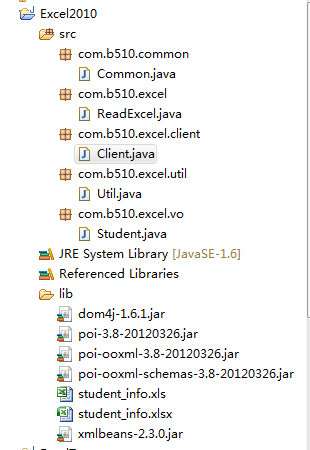
下面是本文的项目结构:
========================================
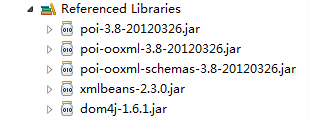
项目中所需要的jar文件:
==================================
所用的Excel数据(2003-2007,2010都是一样的数据)

===========================================================================
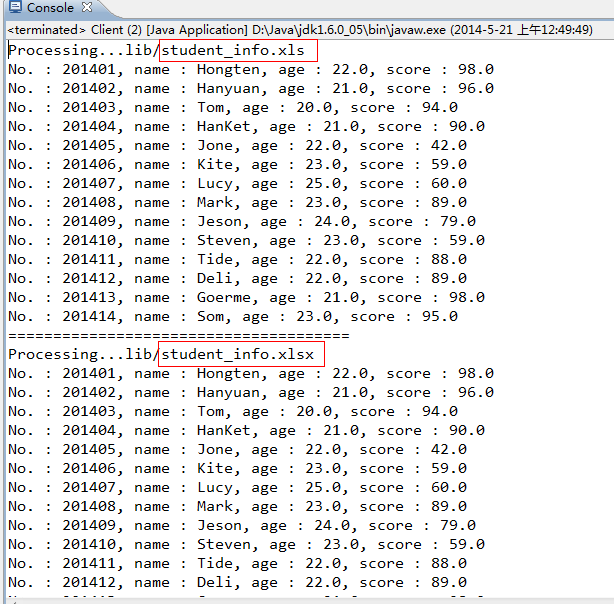
运行效果:
=================================================
源码部分:
=================================================
/Excel2010/src/com/b510/common/Common.java
/**
*
*/
package com.b510.common;
/**
* @author Hongten
* @created 2014-5-21
*/
public class Common {
public static final String OFFICE_EXCEL_2003_POSTFIX = "xls";
public static final String OFFICE_EXCEL_2010_POSTFIX = "xlsx";
public static final String EMPTY = "";
public static final String POINT = ".";
public static final String LIB_PATH = "lib";
public static final String STUDENT_INFO_XLS_PATH = LIB_PATH + "/student_info" + POINT + OFFICE_EXCEL_2003_POSTFIX;
public static final String STUDENT_INFO_XLSX_PATH = LIB_PATH + "/student_info" + POINT + OFFICE_EXCEL_2010_POSTFIX;
public static final String NOT_EXCEL_FILE = " : Not the Excel file!";
public static final String PROCESSING = "Processing...";
}
==============================================
=================================================
/Excel2010/src/com/b510/excel/ReadExcel.java
/**
*
*/
package com.b510.excel;
import java.io.FileInputStream;
import java.io.IOException;
import java.io.InputStream;
import java.util.ArrayList;
import java.util.List;
import org.apache.poi.hssf.usermodel.HSSFCell;
import org.apache.poi.hssf.usermodel.HSSFRow;
import org.apache.poi.hssf.usermodel.HSSFSheet;
import org.apache.poi.hssf.usermodel.HSSFWorkbook;
import org.apache.poi.xssf.usermodel.XSSFCell;
import org.apache.poi.xssf.usermodel.XSSFRow;
import org.apache.poi.xssf.usermodel.XSSFSheet;
import org.apache.poi.xssf.usermodel.XSSFWorkbook;
import com.b510.common.Common;
import com.b510.excel.util.Util;
import com.b510.excel.vo.Student;
/**
* @author Hongten
* @created 2014-5-20
*/
public class ReadExcel {
/**
* read the Excel file
* @param path the path of the Excel file
* @return
* @throws IOException
*/
public List<Student> readExcel(String path) throws IOException {
if (path == null || Common.EMPTY.equals(path)) {
return null;
} else {
String postfix = Util.getPostfix(path);
if (!Common.EMPTY.equals(postfix)) {
if (Common.OFFICE_EXCEL_2003_POSTFIX.equals(postfix)) {
return readXls(path);
} else if (Common.OFFICE_EXCEL_2010_POSTFIX.equals(postfix)) {
return readXlsx(path);
}
} else {
System.out.println(path + Common.NOT_EXCEL_FILE);
}
}
return null;
}
/**
* Read the Excel 2010
* @param path the path of the excel file
* @return
* @throws IOException
*/
public List<Student> readXlsx(String path) throws IOException {
System.out.println(Common.PROCESSING + path);
InputStream is = new FileInputStream(path);
XSSFWorkbook xssfWorkbook = new XSSFWorkbook(is);
Student student = null;
List<Student> list = new ArrayList<Student>();
// Read the Sheet
for (int numSheet = 0; numSheet < xssfWorkbook.getNumberOfSheets(); numSheet++) {
XSSFSheet xssfSheet = xssfWorkbook.getSheetAt(numSheet);
if (xssfSheet == null) {
continue;
}
// Read the Row
for (int rowNum = 1; rowNum <= xssfSheet.getLastRowNum(); rowNum++) {
XSSFRow xssfRow = xssfSheet.getRow(rowNum);
if (xssfRow != null) {
student = new Student();
XSSFCell no = xssfRow.getCell(0);
XSSFCell name = xssfRow.getCell(1);
XSSFCell age = xssfRow.getCell(2);
XSSFCell score = xssfRow.getCell(3);
student.setNo(getValue(no));
student.setName(getValue(name));
student.setAge(getValue(age));
student.setScore(Float.valueOf(getValue(score)));
list.add(student);
}
}
}
return list;
}
/**
* Read the Excel 2003-2007
* @param path the path of the Excel
* @return
* @throws IOException
*/
public List<Student> readXls(String path) throws IOException {
System.out.println(Common.PROCESSING + path);
InputStream is = new FileInputStream(path);
HSSFWorkbook hssfWorkbook = new HSSFWorkbook(is);
Student student = null;
List<Student> list = new ArrayList<Student>();
// Read the Sheet
for (int numSheet = 0; numSheet < hssfWorkbook.getNumberOfSheets(); numSheet++) {
HSSFSheet hssfSheet = hssfWorkbook.getSheetAt(numSheet);
if (hssfSheet == null) {
continue;
}
// Read the Row
for (int rowNum = 1; rowNum <= hssfSheet.getLastRowNum(); rowNum++) {
HSSFRow hssfRow = hssfSheet.getRow(rowNum);
if (hssfRow != null) {
student = new Student();
HSSFCell no = hssfRow.getCell(0);
HSSFCell name = hssfRow.getCell(1);
HSSFCell age = hssfRow.getCell(2);
HSSFCell score = hssfRow.getCell(3);
student.setNo(getValue(no));
student.setName(getValue(name));
student.setAge(getValue(age));
student.setScore(Float.valueOf(getValue(score)));
list.add(student);
}
}
}
return list;
}
@SuppressWarnings("static-access")
private String getValue(XSSFCell xssfRow) {
if (xssfRow.getCellType() == xssfRow.CELL_TYPE_BOOLEAN) {
return String.valueOf(xssfRow.getBooleanCellValue());
} else if (xssfRow.getCellType() == xssfRow.CELL_TYPE_NUMERIC) {
return String.valueOf(xssfRow.getNumericCellValue());
} else {
return String.valueOf(xssfRow.getStringCellValue());
}
}
@SuppressWarnings("static-access")
private String getValue(HSSFCell hssfCell) {
if (hssfCell.getCellType() == hssfCell.CELL_TYPE_BOOLEAN) {
return String.valueOf(hssfCell.getBooleanCellValue());
} else if (hssfCell.getCellType() == hssfCell.CELL_TYPE_NUMERIC) {
return String.valueOf(hssfCell.getNumericCellValue());
} else {
return String.valueOf(hssfCell.getStringCellValue());
}
}
}
=========================
=============================================================================
/Excel2010/src/com/b510/excel/client/Client.java
/**
*
*/
package com.b510.excel.client;
import java.io.IOException;
import java.util.List;
import com.b510.common.Common;
import com.b510.excel.ReadExcel;
import com.b510.excel.vo.Student;
/**
* @author Hongten
* @created 2014-5-21
*/
public class Client {
public static void main(String[] args) throws IOException {
String excel2003_2007 = Common.STUDENT_INFO_XLS_PATH;
String excel2010 = Common.STUDENT_INFO_XLSX_PATH;
// read the 2003-2007 excel
List<Student> list = new ReadExcel().readExcel(excel2003_2007);
if (list != null) {
for (Student student : list) {
System.out.println("No. : " + student.getNo() + ", name : " + student.getName() + ", age : " + student.getAge() + ", score : " + student.getScore());
}
}
System.out.println("======================================");
// read the 2010 excel
List<Student> list1 = new ReadExcel().readExcel(excel2010);
if (list1 != null) {
for (Student student : list1) {
System.out.println("No. : " + student.getNo() + ", name : " + student.getName() + ", age : " + student.getAge() + ", score : " + student.getScore());
}
}
}
}
===============================================-----------========================
====================
/Excel2010/src/com/b510/excel/util/Util.java
/**
*
*/
package com.b510.excel.util;
import com.b510.common.Common;
/**
* @author Hongten
* @created 2014-5-21
*/
public class Util {
/**
* get postfix of the path
* @param path
* @return
*/
public static String getPostfix(String path) {
if (path == null || Common.EMPTY.equals(path.trim())) {
return Common.EMPTY;
}
if (path.contains(Common.POINT)) {
return path.substring(path.lastIndexOf(Common.POINT) + 1, path.length());
}
return Common.EMPTY;
}
}
===============================
===============================================================================
/Excel2010/src/com/b510/excel/vo/Student.java
/**
*
*/
package com.b510.excel.vo;
/**
* Student
*
* @author Hongten
* @created 2014-5-18
*/
public class Student {
/**
* id
*/
private Integer id;
/**
* 学号
*/
private String no;
/**
* 姓名
*/
private String name;
/**
* 学院
*/
private String age;
/**
* 成绩
*/
private float score;
public Integer getId() {
return id;
}
public void setId(Integer id) {
this.id = id;
}
public String getNo() {
return no;
}
public void setNo(String no) {
this.no = no;
}
public String getName() {
return name;
}
public void setName(String name) {
this.name = name;
}
public String getAge() {
return age;
}
public void setAge(String age) {
this.age = age;
}
public float getScore() {
return score;
}
public void setScore(float score) {
this.score = score;
}
}
==============================================================================
++++++++++++++++++++++++++++++++++++++++++++++_____________________+++++++++++++++++
java 直接调用micorosoft office (2003-2007和2010版本)中excel中计算函数的更多相关文章
- Office 2003 2007 2010 配置进度 正在配置 解决方案 (转载)
在安装过Office2003.2007 或者2010之后,如果没有选择全部的组件,或者是因为安装到非系统盘,有时候打开 Office 文档的时候就会出现正在配置Office,或者Office配置进度的 ...
- java api 调用es集群(1.7版本)
public static void main(String[] args) { Settings settings = ImmutableSettings.settingsBuilder() // ...
- 通过java程序调用ant build.xml配置文件中指定的target
一.概述 通过ant实现项目的自动化部署,jar包生成,替换,tomcat关停.启动,查看项目日志: 通过java程序调用已编辑好的ant脚本build.xml配置文件中指定的target: 文中文件 ...
- Java Struts2读取Excel 2003/2007/2010例子
Java读写Excel的包是Apache POI(项目地址:http://poi.apache.org/),因此需要先获取POI的jar包,本实验使用的是POI 3.9稳定版. Apache POI ...
- 【java】: 操作excel2007/2003
//上传位置(与操作excel无关,可不看) public String getUploadPath() { File theWebFolder = XMPPServer.getInstance(). ...
- office 2003和office 2013同时安装使用的问题
电脑上同时安装了Office 2003和Office 2007/2010,先打开Word 2003,然后再打开Word 2010,总会弹出安装配置界面,反之亦然. 解决方法:使用快捷键Win+R打开 ...
- (转载)office 2003 gaozhi.msi 缺失提示问题修复
某些GHOST版win7,自带office 2003,每次启动word,它都会提示"稿纸没安装"云云,找不到那个文件.可是我搜遍了硬盘,确实没有那个文件.每次都要点取消,这个提示才 ...
- 让 Visio 2003/2007 同时开多个独立窗口
1. 打开 Visio 2003/2007 2. 点击菜单[工具] -> [选项]: 3. 在弹出的“选项” 对话框中选择“高级”选项页: 4. 去掉“在同一窗口中打开每一 ShapeSheet ...
- JAVA读取Excel2003、2007、2010教程
import java.io.File;import java.io.FileInputStream;import org.apache.poi.ss.usermodel.Row;import org ...
随机推荐
- 手机号码格式验证和 FASTDFS 工具类
常见大陆和香港号码格式验证 import java.util.regex.Matcher; import java.util.regex.Pattern; import java.util.regex ...
- 【TCP/IP】TCP的三次握手和四次挥手
传输控制协议(TCP)是一种面向连接的协议,网络程序使用这个协议的时候,网络可以保证客户端和服务端的连接是可靠的,安全的. 如果 A机向 B机发送“hello”,在物理网线上传输的数据不仅仅是“hel ...
- Android编程:解决异常“android.view.InflateException: Binary XML file line # : Error inflating class”
今天写程序发现一个问题,就是XML中报出android.view.InflateException异常,可能的原因有: 1.XML中使用到得组件名称是否书写正确(包名+类名),可以使用crtl+鼠标点 ...
- JCF——set
HashSet LinkedHashSet TreeSet 联系与区别
- 数学思维——cf1244C
可惜cf不能用int128,不然这个题就是个exgcd的板子题 这是exgcd的解法,但是只用ll的话会溢出 #include<bits/stdc++.h> using namespace ...
- [CQOI2014]数三角形 题解(找规律乱搞)
题面 其实这道题不用组合数!不用容斥! 只需要一个gcd和无脑找规律(滑稽 乍一看题目,如果单纯求合法三角形的话情况太多太复杂,我们可以从局部入手,最终扩展到整体. 首先考虑这样的情况: 类似地,我们 ...
- tornado的安装
centos6.4 安装tornado框架连接工具 xshell 工具 1.如果在windows下有tornado的安装包首先现在上装到linux下的上传工具:yum install lrzsz ...
- scrapy主要防止封IP策略
scrapy如果抓取太频繁了,就被被封IP,目前有以下主要策略保证不会被封: 策略1:设置download_delay下载延迟,数字设置为5秒,越大越安全 策略2:禁止Cookie,某些网站会通过Co ...
- 1.6 flux介绍
这一节将介绍 React 的核心应用架构模式 Flux,包括内容: Flux 介绍 MVC 架构之痛 Flux 的理解 Flux 相关库和工具介绍 Flux 与 React 实例 最后我们将会把之前的 ...
- 机器学习技法笔记:Homework #6 AdaBoost&Kernel Ridge Regression相关习题
原文地址:http://www.jianshu.com/p/9bf9e2add795 AdaBoost 问题描述 程序实现 # coding:utf-8 import math import nump ...