
formbuild拖拽表单设计器
formbuild拖拽表单设计器
表单设计器适用于OA系统、问卷调查系统、考试系统等系统,具体使用请前至官网API请点击 formbuild拖拽表单设计器
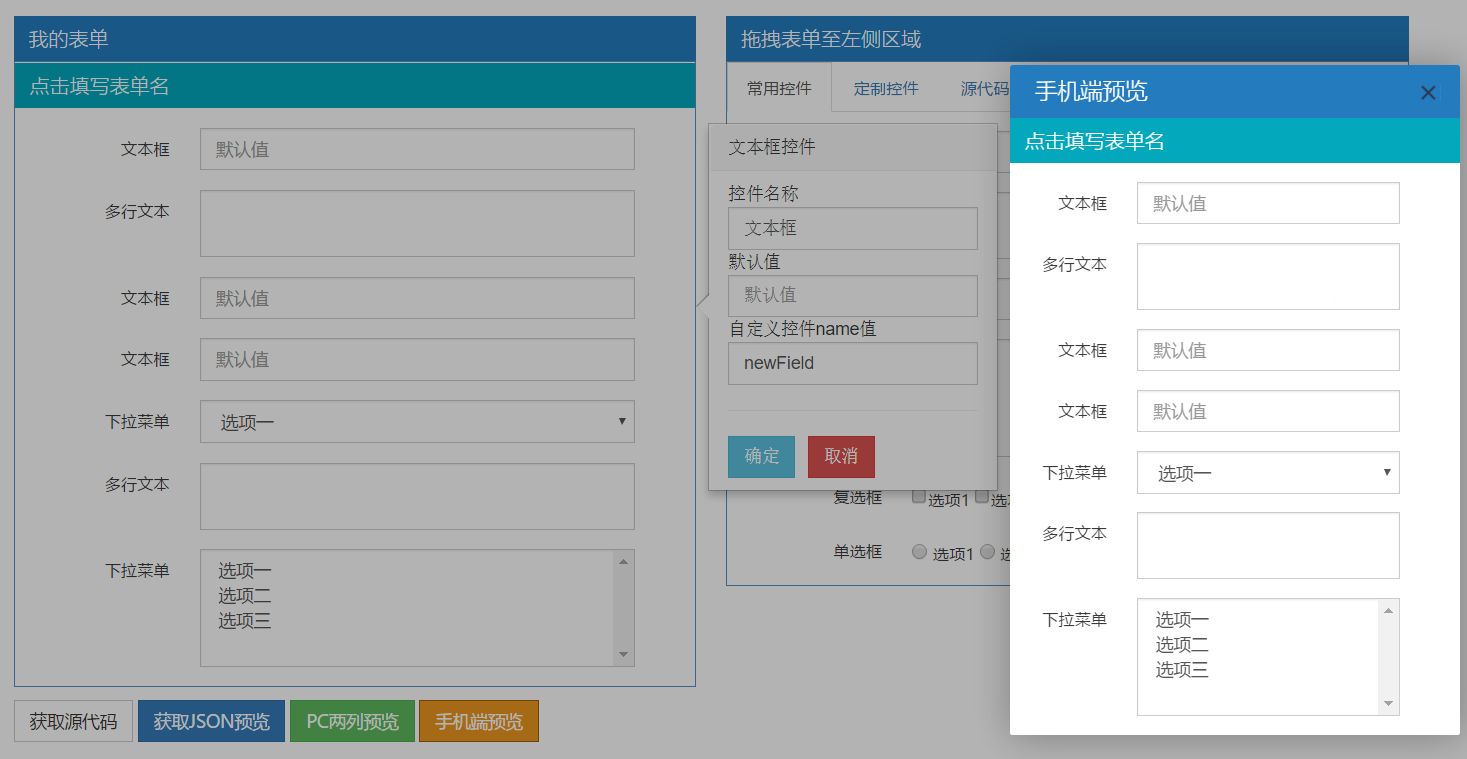
formbuild迭代几个功能
1.升级BootStrap3.0版本、代码DOM结构有所修改
2.form.build.core.js源代码解读
3.新增复制源代码copyToClipboard.js功能、html格式化
4.新增单列预、两列预览功能(layer.ui 交互)
5.popover文本控件自定义属性
form.build.core.js源代码解读
/**

 * form.build.core.js 迭代修改

 * @Date 2017-4-23

 */

(function(){

  var LPB = window.LPB = window.LPB || {

   plugins:[],

   genSource:function(){

      var $temptxt = $("<div>").html($("#build").html());

      //scrubbbbbbb

      $($temptxt).find(".component").attr({"title": null,

        "data-original-title":null,

        "data-type": null,

        "data-content": null,

        "rel": null,

        "trigger":null,

        "style": null});

      $($temptxt).find(".valtype").attr("data-valtype", null).removeClass("valtype");

      $($temptxt).find(".component").removeClass("component");

      $($temptxt).find("form").attr({"id":  null, "style": null});

      $("#source").val($temptxt.html().replace(/\n\ \ \ \ \ \ \ \ \ \ \ \ /g,"\n"));

    }

  };

   /* form_name 表单名称

    * active_component 是 class="component" 的DIV

    * leipiplugins class="leipiplugins" 的控件

    */

    LPB.plugins['form_name'] = function (active_component,leipiplugins) {

      var plugins = 'form_name',popover = $(".popover");

      //右弹form  初始化值

      $(popover).find("#orgvalue").val($(leipiplugins).val());

      //右弹form  取消控件

      $(popover).delegate(".btn-danger", "click", function(e){

          e.preventDefault();

          active_component.popover("hide");

      });

      //右弹form  确定控件

      $(popover).delegate(".btn-info", "click", function(e){

          e.preventDefault();//阻止元素发生默认的行为(例如,当点击提交按钮时阻止对表单的提交)

          var inputs = $(popover).find("input");

          $.each(inputs, function(i,e){

              var attr_name = $(e).attr("id");//属性名称

              var attr_val = $("#"+attr_name).val();

              if(attr_name == 'orgvalue')

              {

                  $(leipiplugins).attr("value", attr_val);

                  active_component.find(".leipiplugins-orgvalue").text(attr_val);

              }

              active_component.popover("hide");

              LPB.genSource();//重置源代码

          });

      });

    }

})();

$(document).ready(function(){

	//源代码

  $("#navtab").delegate("#sourcetab", "click", function(e){

    LPB.genSource();

  });

  //表单控件鼠标事件   ①鼠标按下  ②鼠标移动 ③鼠标松开

  $("form").delegate(".component", "mousedown", function(md){

    $(".popover").remove();

    md.preventDefault();

    var tops = [],

        mouseX = md.pageX,

        mouseY = md.pageY,

        $temp,

        timeout,

        $this = $(this),

        type,
        delays = {

		main: 0,

		form: 120

	};

    type = $this.closest('.form-horizontal').attr('id') === "components" ? "main" : "form";

    var delayed = setTimeout(function(){

    	//type 值决定$this('.component')append时是clone 还是直接append

      if(type === "main"){

        $temp = $("<form class='form-horizontal' id='temp'></form>").append($this.clone());

      } else {

        if($this.attr("id") !== "legend"){

          $temp = $("<form class='form-horizontal' id='temp'></form>").append($this);

        }

      }

      $("body").append($temp);

      $temp.css({"position" : "absolute",

                 "top"      : mouseY - ($temp.height()/2) + "px",

                 "left"     : mouseX - ($temp.width()/2) + "px",

                 "opacity"  : "0.9"}).show();

      var half_box_height = ($temp.height()/2);

      var half_box_width = ($temp.width()/2);

      var $target = $("#target");

      var tar_pos = $target.position();

      var $target_component = $("#target .component");

      $(document).delegate("body", "mousemove", function(mm){

        var mm_mouseX = mm.pageX;

        var mm_mouseY = mm.pageY;

        $temp.css({

        	"top": mm_mouseY - half_box_height + "px",

          "left": mm_mouseX - half_box_width  + "px"

        });

        if ( mm_mouseX > tar_pos.left &&

          mm_mouseX < tar_pos.left + $target.width() + $temp.width()/2 &&

          mm_mouseY > tar_pos.top &&

          mm_mouseY < tar_pos.top + $target.height() + $temp.height()/2

          ){

            $("#target").css("background-color", "#fafdff");

            $target_component.css({"border-top" : "1px solid white", "border-bottom" : "none"});

            //jQuery过滤

            tops = $.grep($target_component, function(e){

              return ($(e).position().top -  mm_mouseY + half_box_height > 0 && $(e).attr("id") !== "legend");

            });

            if (tops.length > 0){

              $(tops[0]).css("border-top", "1px solid #22aaff");

            } else{

              if($target_component.length > 0){

                $($target_component[$target_component.length - 1]).css("border-bottom", "1px solid #22aaff");

              }

            }

          } else{

            $("#target").css("background-color", "#fff");

            $target_component.css({"border-top" : "1px solid white", "border-bottom" : "none"});

            $target.css("background-color", "#fff");

          }

      });

      $("body").delegate("#temp", "mouseup", function(mu){

        mu.preventDefault();

        var mu_mouseX = mu.pageX;

        var mu_mouseY = mu.pageY;

        var tar_pos = $target.position();

        $("#target .component").css({"border-top" : "1px solid white", "border-bottom" : "none"});

        // acting only if mouse is in right place

        if (mu_mouseX + half_box_width > tar_pos.left &&

          mu_mouseX - half_box_width < tar_pos.left + $target.width() &&

          mu_mouseY + half_box_height > tar_pos.top &&

          mu_mouseY - half_box_height < tar_pos.top + $target.height()

          ){

            $temp.attr("style", null);

            // where to add

            if(tops.length > 0){

              $($temp.html()).insertBefore(tops[0]);

            } else {

              $("#target fieldset").append($temp.append("\n\n\ \ \ \ ").html());

            }

          } else {

            // no add

            $("#target .component").css({"border-top" : "1px solid white", "border-bottom" : "none"});

            tops = [];

          }

        //clean up & add popover

        $target.css("background-color", "#fff");

        $(document).undelegate("body", "mousemove");

        $("body").undelegate("#temp","mouseup");

        $("#target .component").popover({trigger: "manual"});

        $temp.remove();

        LPB.genSource();

      });

    }, delays[type]);

    $(document).mouseup(function () {

      clearInterval(delayed);

      return false;

    });

    $(this).mouseout(function () {

      clearInterval(delayed);

      return false;

    });

  });

  //activate legend popover

  $("#target .component").popover({trigger: "manual"});

  //popover on click event

  $("#target").delegate(".component", "click", function(e){

    e.preventDefault();

    //$(".popover").hide();

    var active_component = $(this);

    active_component.popover("show");

    //class="leipiplugins"

    var leipiplugins = active_component.find(".leipiplugins"),

        plugins =$(leipiplugins).attr("leipiplugins");//leipiplugins="text"

      //exec plugins

      if(typeof(LPB.plugins[plugins]) =='function')

      {

        try{

            LPB.plugins[plugins](active_component,leipiplugins);

          }catch ( e ) {

            layer.alert('控件异常......');

          }

      }else

      {

          layer.alert("控件有误或不存在......");

      }

  });

});
formbuild拖拽表单设计器的更多相关文章
- 基于Extjs的web表单设计器 第一节
前面一节介绍了表单设计器的背景和最终的大概样式,本节主要介绍表单设计器的需求及功能设计. 在讲需求之前先明确几个常用的概念: 主表或者卡片表——具有多行多列的一个区域的控件块,如下图所示. 明细表—— ...
- 基于Extjs的web表单设计器 第三节——控件拖放
看过之前设计器截图的朋友应该有印象,可能会发觉我们的设计器UI设计布局其实类似Visual studio 的设计界面,采用的是左.中.右三个区域布局.左侧为控件区域.中间为表单的画布设区域.右侧为属性 ...
- 纯JS Web在线可拖拽的流程设计器
F2工作流引擎之-纯JS Web在线可拖拽的流程设计器 Web纯JS流程设计器无需编程,完全是通过鼠标拖.拉.拽的方式来完成,支持串行.并行.分支.异或分支.M取N路分支.会签.聚合.多重聚合.退回. ...
- .net erp(办公oa)开发平台架构概要说明之表单设计器
背景:搭建一个适合公司erp业务的开发平台. 架构概要图: 表单设计开发部署示例图 表单设计开发部署示例说明1)每个开发人员可以自己部署表单设计至本地一份(当然也可以共用一套开发环境,但是如 ...
- YbSoftwareFactory 代码生成插件【十六】:Web 下灵活、强大的审批流程实现(含流程控制组件、流程设计器和表单设计器)
程序=数据结构+算法,而企业级的软件=数据+流程,流程往往千差万别,客户自身有时都搞不清楚,随时变化的情况更是家常便饭,抛开功能等不谈,需求变化很大程度上就是流程的变化,流程的变化会给开发工作造成很大 ...
- 纯JS实现可拖拽表单
转载注明出处!!! 转载注明出处!!! 转载注明出处!!! 因为要用到可拖拽表单,个人要比较喜欢自己动手,不怎么喜欢在不懂实现或者原理的情况下用插件,所以查找资料实现了一个. 思路:放入:用mouse ...
- 基于Extjs的web表单设计器 第七节——取数公式设计之取数公式的使用
基于Extjs的web表单设计器 基于Extjs的web表单设计器 第一节 基于Extjs的web表单设计器 第二节——表单控件设计 基于Extjs的web表单设计器 第三节——控件拖放 基于Extj ...
- 基于Extjs的web表单设计器 第六节——界面框架设计
基于Extjs的web表单设计器 基于Extjs的web表单设计器 第一节 基于Extjs的web表单设计器 第二节——表单控件设计 基于Extjs的web表单设计器 第三节——控件拖放 基于Extj ...
- 基于Extjs的web表单设计器 第五节——数据库设计
这里列出表单设计器系列的内容,6.7.8节的内容应该在春节后才有时间出了.因为这周末就请假回老家了,准备我的结婚大事.在此提前祝大家春节快乐! 基于Extjs的web表单设计器 基于Extjs的web ...
随机推荐
- 从零开始学安全(十九)●PHP数组函数
$temp= array(1,2,3,,,,) 创建一个数组赋值给temp $id=range(1,6,2); 成长值 1到6 跨度为2 就是3个长度数组 也可以是字符“a” &quo ...
- T-SQL基础(四)之集合运算
三个运算符 T-SQL支持三个集合运算符:UNION.INTERSECT.EXCEPT. 集合运算符查询的一般形式如下: Query1 <set_operator> Query2 -- 这 ...
- laravel的时间日期处理包Carbon用法
时间日期处理包--Carbon Carbon – 是继承自 PHP DateTime 类的 API 扩展,它使得处理日期和时间更加简单.Laravel 中默认使用的时间处理类就是 Carbon. La ...
- 【Java每日一题】20170215
20170214问题解析请点击今日问题下方的“[Java每日一题]20170215”查看(问题解析在公众号首发,公众号ID:weknow619) package Feb2017; public cla ...
- (9)Microsoft office Word 2013版本操作入门_文本框_word排版
1.插入文本框 :[插入]---[文本框]可以自己画,也可以选择已有的模板 2.文本框设置 :点中文本框选择[格式]---[对齐文本]可以让文字上下居中,[形状填充]填充不同的颜色.[形状轮廓]可以改 ...
- VSCode Snippet 小试牛刀
这几天因为一个需求,要不断重复一个用特定代码段去包围不同代码的需求. 这个要不断移动鼠标以及重复敲打相同代码的体力活,实在让我老眼昏花,体内的懒人之力迫使我想一个快捷的方法来代替之. 之前就知道Sni ...
- PNG,GIF,JPG的区别及如何选
GIF: 1:256色 2: 无损,编辑 保存时候,不会损失. 3:支持简单动画. 4:支持boolean透明,也就是要么完全透明,要么不透明 JPEG: 1:millions of colors 2 ...
- IP 地址基本知识
ip地址被分成了5类:A类,B类,C类,D类,E类 私有地址 只能在局域网内使用,不能在internet上使用的ip地址称为私有ip地址,私有ip地址有: 10.0.0.0-10.255.255.25 ...
- CentOS-7.2安装Ambari-2.6.1
CentOS-7.2安装Ambari-2.6.1 一.Ambari 是什么? Ambari 跟 Hadoop 等开源软件一样,也是 Apache Software Foundation 中的一个项目, ...
- 从项目需求角度,使用纯CSS方案解决垂直居中
CSS是HTML元素的剪刀手,它极度的丰富了web页面的修饰.在众多CSS常见的样式需求中,有一奇葩式的存在[垂直居中],因为不管是从逻辑实现方面还是从正常需求量来讲,这都没理由让这个需求在实践过程中 ...