
jedis单机版应用
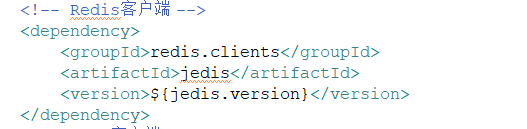
1.pom文件添加依赖:
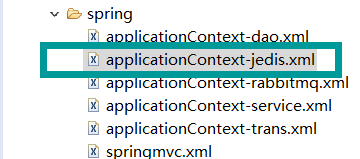
2.创建配置文件

创建单机版redisClient
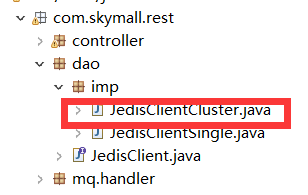
代码:
package com.skymall.rest.dao.imp;

import org.springframework.beans.factory.annotation.Autowired;

import com.skymall.rest.dao.JedisClient;

import redis.clients.jedis.Jedis;

import redis.clients.jedis.JedisPool;

/**

 * jedis单机版客户端 dao

* @ClassName: JedisClientSingle

* @Description: TODO

* @author

* @date 2018年3月22日 下午1:46:20

* @version V1.0

 */

public class JedisClientSingle implements JedisClient {

	@Autowired

	private JedisPool jedisPool;

	@Override

	public String get(String key) {

		Jedis jedis = jedisPool.getResource();

		String value = jedis.get(key);

		jedis.close();

		return value;

	}

	@Override

	public String set(String key, String value) {

		Jedis jedis=jedisPool.getResource();

		jedis.set(key, value);

		jedis.close();

		return null;

	}

	@Override

	public String hget(String hkey, String key) {

		Jedis jedis= jedisPool.getResource();

		String str=jedis.hget(hkey, key);

		jedis.close();

		return str;

	}

	@Override

	public long hset(String hkey, String key, String value) {

		Jedis jedis= jedisPool.getResource();

		long result=jedis.hset(hkey, key,value);

		jedis.close();

		return result;

	}

	@Override

	public long incr(String key) {

		Jedis jedis= jedisPool.getResource();

		long result=jedis.incr(key);

		jedis.close();

		return result;

	}

	@Override

	public long expire(String key, int second) {

		Jedis jedis= jedisPool.getResource();

		long result=jedis.expire(key, second);

		jedis.close();

		return result;

	}

	@Override

	public long ttl(String key) {

		Jedis jedis= jedisPool.getResource();

		long result=jedis.ttl(key);

		jedis.close();

		return result;

	}

	@Override

	public long del(String key) {

		Jedis jedis=jedisPool.getResource();

		long result=jedis.del(key);

		jedis.close();

		return result;

	}

	@Override

	public long hdel(String hkey, String key) {

		Jedis jedis=jedisPool.getResource();

		long result=jedis.hdel(hkey,key);

		jedis.close();

		return result;

	}

}
测试:
package com.skymall.rest.jedis;

import java.util.HashSet;

import org.junit.Test;

import org.springframework.context.ApplicationContext;

import org.springframework.context.support.ClassPathXmlApplicationContext;

import redis.clients.jedis.HostAndPort;

import redis.clients.jedis.Jedis;

import redis.clients.jedis.JedisCluster;

import redis.clients.jedis.JedisPool;

public class TestJedis {

	//测试jedis

//	@Test

//	public void testJedis(){

//		//创建jedis对象

//		Jedis jedis=new Jedis("192.168.203.137",6379);

//		//与reids指令操作一至

//		jedis.set("key1","88888888888888" );

//		//删除

//		Long del = jedis.del("cccc");

//		//添加

////		String result=jedis.get("cccc");

//		System.err.println(del);

//		//关闭jedis对象

//		jedis.close();

//	}

	// 测试jedis连接池

//	@Test

//	public void testJedisPool(){

//		//创建连接池

//		JedisPool jedisPool=new JedisPool("192.168.203.137",6379);

//		//从连接池里取jedis对象

//		Jedis jedis = jedisPool.getResource();

//		//一下操作都一样

//		String result=jedis.get("ddd");

//		System.err.println(result);

//	    //关闭jedis

//		jedis.close();

//		//关闭连接池

//		jedisPool.close();

//	}

//

//

//	//测试redis集群(自带连接池)不需要关闭否则会报错

//	@Test

//	public void testJedisCluster(){

//		HashSet<HostAndPort> nodes=new HashSet<>();

//		nodes.add(new HostAndPort("192.168.203.137", 6001));

//		nodes.add(new HostAndPort("192.168.203.137", 6002));

//		nodes.add(new HostAndPort("192.168.203.137", 6003));

//		nodes.add(new HostAndPort("192.168.203.137", 6004));

//		nodes.add(new HostAndPort("192.168.203.137", 6005));

//		nodes.add(new HostAndPort("192.168.203.137", 6006));

//		JedisCluster cluster=new JedisCluster(nodes);

//		cluster.set("key2","成功了");

//		System.out.println(cluster.get("key2"));

//

//

//	}

//	//测试单机版jedis与spring整合

//	@Test

//	public void testJedisAndSpring(){

//

//		ApplicationContext applicationContext=new ClassPathXmlApplicationContext("classpath:spring/applicationContext-*.xml");

//		JedisPool jedisPool=(JedisPool) applicationContext.getBean("redisClient");

//		Jedis jedis=jedisPool.getResource();

//		jedis.set("gggg", "09090900");

//		String str=jedis.get("gggg");

//		System.out.println(str);

//

//		jedis.close();

//		jedisPool.close();

//	}

//

//	//测试jedis集群与spring整合

//	@Test

//	public void JedisClusterAndSpring(){

//		ApplicationContext applicationContext=new ClassPathXmlApplicationContext("classpath:spring/applicationContext-*.xml");

//		JedisCluster jedisCluster=(JedisCluster) applicationContext.getBean("redisClient");

//		jedisCluster.set("name","8822288");

//		String str=jedisCluster.get("name");

//		System.out.println(str);

//

//

//	}

}
jedis单机版应用的更多相关文章
- Redis单机版以及集群版的安装搭建以及使用
1,redis单机版 1.1 安装redis n 版本说明 本教程使用redis3.0版本.3.0版本主要增加了redis集群功能. 安装的前提条件: 需要安装gcc:yum install g ...
- Java中Jedis操作Redis与Spring的整合
Redis是一个key-value存储系统.它支持存储的value类型相对更多,包括string(字符串).list(链表).set(集合)和zset(有序集合).这些数据类型都支持push/pop. ...
- 深入浅出Redis-Spring整合Redis
概述: 在之前的博客中,有提到过Redis 在服务端的一些相关知识,今天主要讲一下Java 整合Redis的相关内容. 下面是Jedis 的相关依赖: <dependency> <g ...
- redis客户端(三)
redis客户端 一.>redis自带的客户端 启动 启动客户端命令:[root@ming bin]# ./redis-cli -h xxx.xxx.xx.xxx-p 6379 注意: -h:指 ...
- 使用jedis客户端连接redis,单机版和集群版
单机版 1.入门实例 @Test public void testJedis(){ //创建一个jedis对象,需要指定服务的ip和端口号 Jedis jedis=new Jedis("19 ...
- Jedis测试redis
首先:Jedis是redis的java版本的客户端. public class JedisTest { //单机版测试Jedis,不使用连接池 @Test public void testJedis( ...
- Redis 一二事 - 在spring中使用jedis 连接调试单机redis以及集群redis
Redis真是好,其中的键值用起来真心强大啊有木有, 之前的文章讲过搭建了redis集群 那么咋们该如何调用单机版的redis以及集群版的redis来使用缓存服务呢? 先讲讲单机版的,单机版redis ...
- 十分钟搭建redis单机版 & java接口调用
本次单机版redis服务器搭建采用的包为redis-3.0.0.tar.gz,主要是记录下安装的心得,不喜勿喷! 一.搭建redis服务器单机版 1.上传redis-3.0.0.tar.gz到服务器上 ...
- redis集群配置,spring整合jedis,缓存同步
前台的商品数据(图片等加载缓慢)查询,先从redis缓存查询数据. redis是一个nosql数据库,内存版数据库,读取速度11w/s.本身具有内存淘汰机制,是单线程服务器(分时操作系统),线程安全. ...
随机推荐
- 理解Shadow DOM(一)
1. 什么是Shadow DOM? Shadow DOM 如果按照英文翻译的话可以理解为 影子DOM, 何为影子DOM呢?可以理解为一般情况下使用肉眼看不到的DOM结构,那如果一般情况下看不到的话,那 ...
- AI LeNet
LeNet 参考链接: http://yann.lecun.com/exdb/publis/pdf/lecun-01a.pdf https://www.charleychai.com/blogs/20 ...
- ASP.NET Core MVC – Tag Helpers 介绍
ASP.NET Core Tag Helpers系列目录,这是第一篇,共五篇: ASP.NET Core MVC – Tag Helpers 介绍 ASP.NET Core MVC – Caching ...
- mac sourcetree push分支选中所有tag的时候报错
错误信息: ....... ! [rejected] 573_0811_stable -> 573_0811_stable (already exists)updating local trac ...
- Linux运维必会的MySQL企业面试题大全
(1)基础笔试命令考察 1.开启MySQL服务 /etc/init.d/mysqld start service mysqld start systemctl start mysqld 2.检测端口是 ...
- .Net Core 在 Linux-Centos上的部署实战教程(二)
上篇我们说了 如何在Linux上部署.net core 但是有心的同学会发现你关闭掉终端网站就不能访问了,这个原因是因为直接 dotnet GetConfigFile.dll --server.ur ...
- 《Spring Boot 入门及前后端分离项目实践》系列介绍
课程计划 课程地址点这里 本课程是一个 Spring Boot 技术栈的实战类课程,课程共分为 3 个部分,前面两个部分为基础环境准备和相关概念介绍,第三个部分是 Spring Boot 项目实践开发 ...
- Python入门-从HelloWorld开始
前言 最近在招聘网上看了许多公司的招聘要求,发现很多公司希望求职者能会Python,特别是一些自动化测试的职位,以前对Python只是介于听说或是一些简单的了解,所以既然市场有需求,那么我们就来学习一 ...
- 【转载】KETTLE集群搭建
一.集群的原理与优缺点 1.1集群的原理 Kettle集群是由一个主carte服务器和多个从carte服务器组成的,类似于master-slave结构,不同的是’master’处理具体任务,只负责任务 ...
- H5 59-浮动元素的脱标
<!DOCTYPE html> <html lang="en"> <head> <meta charset="UTF-8&quo ...