
POI导入demo
前言
使用上篇博文的导入方法,写一个简单的导入demo。其实有了工具类之后就没啥难度了,也就只简单的拿数据。先写个简单的,然后想办法实现动态读取吧,这样读取其实还是比较烦的,每次该模板都要改代码,说到底我还是比较懒的。
excel文件
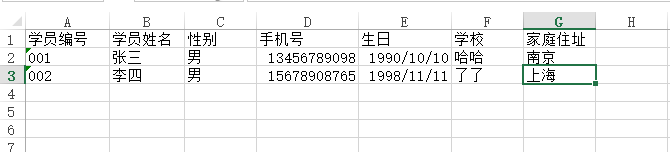
实体类
package cc.vvxtoys.poi;

public class Student {

	private String id;

	private String stcode;

	private String stname;

	private String sex;

	private String phone;

	private String school;

	private String address;

	private String birthday;

	public String getBirthday() {

		return birthday;

	}

	public void setBirthday(String birthday) {

		this.birthday = birthday;

	}

	public String getId() {

		return id;

	}

	public void setId(String id) {

		this.id = id;

	}

	public String getStcode() {

		return stcode;

	}

	public void setStcode(String stcode) {

		this.stcode = stcode;

	}

	public String getStname() {

		return stname;

	}

	public void setStname(String stname) {

		this.stname = stname;

	}

	public String getSex() {

		return sex;

	}

	public void setSex(String sex) {

		this.sex = sex;

	}

	public String getPhone() {

		return phone;

	}

	public void setPhone(String phone) {

		this.phone = phone;

	}

	public String getSchool() {

		return school;

	}

	public void setSchool(String school) {

		this.school = school;

	}

	public String getAddress() {

		return address;

	}

	public void setAddress(String address) {

		this.address = address;

	}

	public Student(String id, String stcode, String stname, String sex, String phone, String school, String address) {

		super();

		this.id = id;

		this.stcode = stcode;

		this.stname = stname;

		this.sex = sex;

		this.phone = phone;

		this.school = school;

		this.address = address;

	}

	public Student() {

		super();

	}

}
service
package cc.vvxtoys.poi;

import java.io.FileInputStream;

import java.io.FileNotFoundException;

import java.io.InputStream;

import java.util.ArrayList;

import java.util.HashMap;

import java.util.List;

import java.util.Map;

import org.apache.poi.hssf.usermodel.HSSFCell;

import org.apache.poi.hssf.usermodel.HSSFRow;

import org.apache.poi.hssf.usermodel.HSSFSheet;

import org.apache.poi.hssf.usermodel.HSSFWorkbook;

import org.apache.poi.xssf.usermodel.XSSFCell;

import org.apache.poi.xssf.usermodel.XSSFRow;

import org.apache.poi.xssf.usermodel.XSSFSheet;

import org.apache.poi.xssf.usermodel.XSSFWorkbook;

import cc.vvxtoys.util.CommonTools;

public class ExcelService {

	private static ImportExcelUtils utils = new ImportExcelUtils();

	public static Object getExcelParser(String path, String sheet, String start, String end) throws Exception {

		InputStream is = null;

		if (utils.isEmpty(path)) {

			return new FileNotFoundException("file not found");

		} else {

			is = new FileInputStream(path);

		}

		if (path.endsWith(ImportExcelUtils.EXCEL_2003)) {

			HSSFWorkbook workbook = new HSSFWorkbook(is);

			return importXls(start, end, workbook, sheet);

		} else if (path.endsWith(ImportExcelUtils.EXCEL_2007)) {

			XSSFWorkbook workbook = new XSSFWorkbook(is);

			return importXlsx(start, end, workbook, sheet);

		} else {

			is.close();

			return new Exception("type error");

		}

	}

	public static Map<String, Object> importXls(String start, String end, HSSFWorkbook workbook, String sheet) {

		Map<String, Object> result = new HashMap<String, Object>();

		List<Student> sList = new ArrayList<>();

		HSSFSheet hssfSheet = null;

		// 如果传过来sheet页的名称,取当前sheet页,否则遍历所有sheet

		if (!utils.isEmpty(sheet)) {

			hssfSheet = workbook.getSheet(sheet);

		} else {

			for (int i = 0; i < workbook.getNumberOfSheets(); i++) {

				hssfSheet = workbook.getSheetAt(i);

				int maxIndex = hssfSheet.getLastRowNum();// 获取最大下标

				int startIndex = 0;

				int endIndex = 0;

				if (utils.isEmpty(start)) {

					start = String.valueOf(0);

				}

				if (utils.isEmpty(end)) {

					end = maxIndex + String.valueOf(1);

				}

				if (Integer.parseInt(start) <= 1) {

					startIndex = 1;

				} else {

					startIndex = Integer.parseInt(start) - 1;

				}

				if (Integer.parseInt(end) > maxIndex) {

					endIndex = maxIndex + 1;

				} else {

					endIndex = Integer.parseInt(end);

				}

				for (int j = startIndex; j < endIndex; j++) {

					Student student = new Student();

					HSSFRow row = hssfSheet.getRow(j);

                      //空行

					if (utils.isBlank(row)) {

						break;

					}

					HSSFCell c1 = row.getCell(0);

					HSSFCell c2 = row.getCell(1);

					HSSFCell c3 = row.getCell(2);

					HSSFCell c4 = row.getCell(3);

					HSSFCell c5 = row.getCell(4);

					HSSFCell c6 = row.getCell(5);

					HSSFCell c7 = row.getCell(6);

					student.setId(CommonTools.get32UUID());//获取uuid 这个方法就不列出了,很简单

					if(!utils.isEmpty(c1)){

						String stcode = utils.getValue(c1);

						student.setStcode(stcode);

					}

					if(!utils.isEmpty(c2)){

						String stname = utils.getValue(c2);

						student.setStname(stname);

					}

					if(!utils.isEmpty(c3)){

						String sex = utils.getValue(c3);

						student.setSex(sex);

					}

					if(!utils.isEmpty(c4)){

						String phone = utils.getValue(c4);

						student.setPhone(phone);

					}

					if(!utils.isEmpty(c5)){

						String birthday = utils.getValue(c5).replaceAll("/", "-");

						student.setBirthday(birthday);

					}

					if(!utils.isEmpty(c6)){

						String school = utils.getValue(c6);

						student.setSchool(school);

					}

					if(!utils.isEmpty(c7)){

						String address = utils.getValue(c7);

						student.setAddress(address);

					}

					sList.add(student);

				}

			}

		}

		result.put("sList", sList);

		return result;

	}

	public static Map<String, Object> importXlsx(String start, String end, XSSFWorkbook workbook, String sheet) {

		Map<String, Object> result = new HashMap<String, Object>();

		List<Student> sList = new ArrayList<>();

		XSSFSheet xssfSheet = null;

		// 如果传过来sheet页的名称,取当前sheet页,否则遍历所有sheet

		if (!utils.isEmpty(sheet)) {

			xssfSheet = workbook.getSheet(sheet);

		} else {

			for (int i = 0; i < workbook.getNumberOfSheets(); i++) {

				xssfSheet = workbook.getSheetAt(i);

				int maxIndex = xssfSheet.getLastRowNum();// 获取最大下标

				int startIndex = 0;

				int endIndex = 0;

				if (utils.isEmpty(start)) {

					start = String.valueOf(0);

				}

				if (utils.isEmpty(end)) {

					end = maxIndex + String.valueOf(1);

				}

				if (Integer.parseInt(start) <= 1) {

					startIndex = 1;

				} else {

					startIndex = Integer.parseInt(start) - 1;

				}

				if (Integer.parseInt(end) > maxIndex) {

					endIndex = maxIndex + 1;

				} else {

					endIndex = Integer.parseInt(end);

				}

				for (int j = startIndex; j < endIndex; j++) {

					Student student = new Student();

					XSSFRow row = xssfSheet.getRow(j);

					XSSFCell c1 = row.getCell(0);

					XSSFCell c2 = row.getCell(1);

					XSSFCell c3 = row.getCell(2);

					XSSFCell c4 = row.getCell(3);

					XSSFCell c5 = row.getCell(4);

					XSSFCell c6 = row.getCell(5);

					XSSFCell c7 = row.getCell(6);

					student.setId(CommonTools.get32UUID());//uuid

					if(!utils.isEmpty(c1)){

						String stcode = utils.getValue(c1);

						student.setStcode(stcode);

					}

					if(!utils.isEmpty(c2)){

						String stname = utils.getValue(c2);

						student.setStname(stname);

					}

					if(!utils.isEmpty(c3)){

						String sex = utils.getValue(c3);

						student.setSex(sex);

					}

					if(!utils.isEmpty(c4)){

						String phone = utils.getValue(c4);

						student.setPhone(phone);

					}

					if(!utils.isEmpty(c5)){

						String birthday = utils.getValue(c5).replaceAll("/", "-");

						student.setBirthday(birthday);

					}

					if(!utils.isEmpty(c6)){

						String school = utils.getValue(c6);

						student.setSchool(school);

					}

					if(!utils.isEmpty(c7)){

						String address = utils.getValue(c7);

						student.setAddress(address);

					}

					sList.add(student);

				}

			}

		}

		result.put("sList", sList);

		return result;

	}

	public static void main(String[] args) throws Exception {

		String path = "D:\\Desktop\\2.xlsx"; //文件路径

		String start = "0"; //开始条数

		String end = "10";//结束条数

		String sheet = null;//sheet页名称

		ExcelService service = new ExcelService();

		Map<String, Object> result = (Map<String, Object>) service.getExcelParser(path, sheet, start, end);

	}

}
POI导入demo的更多相关文章
- POI导入导出
一.使用POI导出Execl表格 需要的jar包 package cn.yxj.poi; import java.io.FileOutputStream; import java.util.Date; ...
- Java利用POI导入导出Excel中的数据
首先谈一下今天发生的一件开心的事,本着一颗android的心我被分配到了PB组,身在曹营心在汉啊!好吧,今天要记录和分享的是Java利用POI导入导出Excel中的数据.下面POI包的下载地 ...
- Java中使用poi导入、导出Excel
一.介绍 当前B/S模式已成为应用开发的主流,而在企业办公系统中,常常有客户这样子要求:你要把我们的报表直接用Excel打开(电信系统.银行系统).或者是:我们已经习惯用Excel打印.这样在我们实际 ...
- poi 导入导出的api说明(大全)
原文链接:http://www.cnblogs.com/qingruihappy/p/8443101.html poi 导入导出的api说明(大全) 一. POI简介 ApachePOI是Apache ...
- poi导入Excel,数字科学记数法转换
在这里分享一下使用poi 导入Excel时 把数字转换为科学记数法的解决方法: 就是使用DecimalFormat对 i 进行了格式化 结果为:
- POI导入和导出Excel总结
POI导入和导出Excel总结 POI使用总结 1.POI读取Excel 打开工作簿的方式有以下两种简单的应用,POI读取和输出工作簿文件都可以通过以下两种方式来声明: //通过输入流的方式打开本 ...
- 使用POI导入EXCEL报java.lang.IncompatibleClassChangeError
使用POI导入xls格式的excel报java.lang.IncompatibleClassChangeError异常,而导入xlsx正常. oracle.apps.fnd.framework.OAE ...
- Java 使用poi导入excel,结合xml文件进行数据验证的例子(增加了jar包)
ava 使用poi导入excel,结合xml文件进行数据验证的例子(增加了jar包) 假设现在要做一个通用的导入方法: 要求: 1.xml的只定义数据库表中的column字段,字段类型,是否非空等条件 ...
- poi导入读取时间格式问题
万能处理方案: 所有日期格式都可以通过getDataFormat()值来判断 yyyy-MM-dd-----14 yyyy年m月d日--- 31 yyyy年m月-------57 m月d日 ---- ...
随机推荐
- Python Redis中Scan遇到问题
在项目启动中需要删除redis原先相同key储存的值,所以使用scan_iter来便利相关的key,并删除. 这里需要注意两个性能问题 1. scan_iter的模糊匹配的过滤器要正确,否则会带来很多 ...
- s21day20 python笔记
s21day20 python笔记 一.内容回顾 面向对象的三大特性 封装 函数封装到类 数据封装到对象 继承 多态 二.成员 2.1 类成员 类变量(静态字段) 定义:写在类的下一级,和方法同一级 ...
- linux 下 mysql 常用命令
linux 下 mysql 常用命令 阅读目录 ====================== 1.开启和关闭 1.1.开启 1.2.关闭 1.3.重启 2.登录 2.1.密码明文 2.2.密码密文 ...
- 使用find命令查找文件
find命令用法 语法: find (选项) (参数) 常用选项: -exec<执行命令>: 假设find指令的回传值为True,就执行该指令; -ls: 假设find指令的回传值为Tru ...
- 用python给邮箱发邮件,问题,以及解决方法。
模版 import smtplib #导入相关模块 from email.mime.text import MIMEText from email.utils import formataddr de ...
- 使用docker构建简约高效的镜像
背景介绍 最近在思考一个问题,我的golang运行到docker环境上的时候,需要安装很大依赖.思考发现我需要就是一个运行二进制的环境而已并不需要golang的编译器等等其他任何多余的. 当前的doc ...
- HDFS基本Shell命令
bin目录下: 1. hadoop fs 基本操作命令,类似linux shell 2. hadoop dfsadmin 管理命令 3. hadoop fsck (1. 检查hdfs中文件的健康 ...
- BF匹配器
对于BF匹配器,首先我们得用cv2.BFMatcher()创建BF匹配器对象.它取两个可选参数,第一个是normType.它指定要使用的距离量度.默认是cv2.NORM_L2.对于SIFT,SURF很 ...
- Java多线程学习(总结很详细!!!)
https://www.cnblogs.com/yjd_hycf_space/p/7526608.html
- python 集成cython && push 测试pip 仓库
昨天创建了一个简单的python 集成cython 的项目 master 但是有几个问题 目前的构建时基于make 同时需要本地执行,为了方便基于pip 的安装,做了如下调整 项目准备 项目使用ven ...