
python_Tkinter
Tkinter相关
python支持多种图形界面的第三方库,包括:
TK
wxWidgets
QT
GTK
等等
但是python自带的库是支持TK的TKinter,使用使用Tkinter,无需安装任何包,就可以直接使用。
我使用的是pycharm编写的python,用的是python2.7版本。
要使用tkinter,首先需要导入Python提供的tkinter模块。
from ttk import *
这是在我的电脑上适用的导入tkinter模块的语句。
在tkinter模块导入的时候遇到问题时,看见一个实用的回答:
try:

    from tkinter import *

except ImportError:  #Python 2.x

    PythonVersion = 2

    from Tkinter import *

    from tkFont import Font

    from ttk import *

    from tkMessageBox import *

    import tkFileDialog

else:  #Python 3.x

    PythonVersion = 3

    from tkinter.font import Font

    from tkinter.ttk import *

    from tkinter.messagebox import *
代码部分一个简单的的tkinter代码:
#coding:utf8

from ttk import *

import tkMessageBox

class Application(Frame):

    def __init__(self,master=None):

        Frame.__init__(self,master)

        self.pack()

        self.createWidgets()

    def createWidgets(self):

        #label文本

        self.helloLabel=Label(self,text="请输入你的名字:")

        self.helloLabel.pack()

        #输入框

        self.nameInput = Entry(self)

        self.nameInput.pack()

        #输入框对应的按钮,实现打招呼功能

        self.alertButton=Button(self,text='hello',command=self.hello)

        #退出按钮

        self.quitButton=Button(self,text="Quit",command=self.quit)

        self.alertButton.pack()

        self.quitButton.pack()

    def hello(self):

        name=self.nameInput.get() or 'world'
        #没有输入的时候,默认输入的是world

        tkMessageBox.showinfo('Message','hello,%s'%name)

app=Application()

#设置窗口标题

app.master.title('hello,world')

app.mainloop() #执行mainloop()让窗口活起来
贴图:
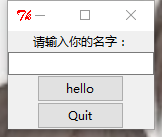
一个tkinter入门小代码就完成啦!
我的第一篇博客!
一直在努力
心有一隅,房子大的烦恼就只能挤在一隅中,
心有四方天地,山大的烦恼也不过是沧海一粟。
python_Tkinter的更多相关文章
- 利用 Python_tkinter 完成 2048 游戏
成品展示 具备基本的数据合并以及分数统计,不同数字的色块不同 产生随机数, 数据无法合并判定以及重新开始选项 同时可以判定游戏失败条件 需求分析 完成基本数据合并算法 游戏结束条件 界面展示 重置按钮 ...
- Python_tkinter(5)_GUI工具
1.Excel行数统计工具 源代码 import xlrd import tkinter as tk import tkinter.filedialog # 计算一个工作簿中所有Sheet表的行数 d ...
- Python_tkinter(2)_常用控件
1.Label--标签(文字/位图)控件 from tkinter import * root = Tk() root.geometry('200x200') # Label控件 字体.边框.背景 l ...
- Python_tkinter(3)_grid布局
Grid(网格)布局管理器,是Tkinter里面最灵活的几何管理布局器.注意:不要试图在一个主窗口中混合使用pack和grid. 1.简单的布局 from tkinter import * root ...
- Python_tkinter(4)_上传文件
1.上传单个文件 import tkinter as tk from tkinter import filedialog def upload_file(): selectFile = tk.file ...
- Python_tkinter(1)_窗口创建与布局
环境:Python 3.7.2 1. 窗口基本创建(窗口标题.窗口大小) import tkinter from tkinter import * # 初始化Tk() root = Tk() # 设置 ...
- python_tkinter事件
1.事件绑定函数(3个) 组件.bind('事件类型',事件函数) 为一个组件绑定一个操作 组件.bind_class('组件类型','事件类型',事件函数) 为一个类组件绑定一个操作 组件.bind ...
- python_tkinter弹出对话框2
1.fledialog对话框 示例:askopenfilename(选择单个文件,获取文件路径) import tkinter # 导入消息对话框子模块 import tkinter.filedial ...
- python_tkinter弹出对话框1
tkinter提供了三个模块,可以创建弹出对话窗口:(使用必须单独导入模块) 1.messagebox 消息对话框 示例:askokcancel import tkinter # 导入消息对话框子模块 ...
随机推荐
- es6入门总结
let和const命令 let命令 循环体的let变量只对花括号作用域可见,花括号外不可见 循环体的语句部分是一个父作用域,而循环体内部是一个单独的子作用域 let声明的变量不存在变量提升,未声明的使 ...
- vue 路由参数
<!DOCTYPE html> <html lang="en"> <head> <meta charset="UTF-8&quo ...
- 3阶马尔可夫链 自然语言处理python
一.简介: 把每三个三个单词作为一个整体进行训练. 举一个例子: input: my dream is that I can be an engineer, so I desi ...
- 在线学习在CTR上应用的综述
参考:https://mp.weixin.qq.com/s/p10_OVVmlcc1dGHNsYMQwA 在线学习只是一个机器学习的范式(paradigm),并不局限于特定的问题,模型或者算法. 架构 ...
- linux 安装中文支持
下载 fonts-chinese-3.02-12.el5.noarch.rpm fonts-ISO8859-2-75dpi-1.0-17.1.noarch.rpm 安装各种提示的依赖 安装 chkf ...
- How to compile tensorflow on CentOS
Tensorflow is a very effective machine learning library implemented by C++, we can use tensorflow wi ...
- SpringBoot+Mybatis+Maven+MySQL逆向工程实现增删改查
SpringBoot+Mybatis+MySQL+MAVEN逆向工程实现增删改查 这两天简单学习了下SpringBoot,发现这玩意配置起来是真的方便,相比于SpringMVC+Spring的配置简直 ...
- Error occurred during initialization of VM Could not reserve enough space for object heap
Error occurred during initialization of VM Could not reserve enough space for object heap Java虚拟机(JV ...
- mongo 数据库
一.管理mongo 配置文件在/etc/mongod.conf 默认端口27017 启动 sudo service mongod start 停止 ...
- 关于 /bin/bash: warning: setlocale: LC_ALL: cannot change locale (en.US_UTF-8) 问题
亲测可行 中文 # vim /etc/profile.d/locale.sh export LC_CTYPE=zh_CN.UTF-8 export LC_ALL=zh_CN.UTF-8 # vim / ...