
使用HttpClient发送Get/Post请求 你get了吗?
HttpClient 是Apache Jakarta Common 下的子项目,可以用来提供高效的、最新的、功能丰富的支持 HTTP 协议的客户端编程工具包,并且它支持 HTTP 协议最新的版本和建议。
1.引入jar包
http://hc.apache.org/downloads.cgi
2.需要一个HttpClientUtils工具类
package cn.happy.util;

import org.apache.http.HttpEntity;

import org.apache.http.HttpHost;

import org.apache.http.HttpResponse;

import org.apache.http.NameValuePair;

import org.apache.http.client.HttpClient;

import org.apache.http.client.config.RequestConfig;

import org.apache.http.client.methods.HttpUriRequest;

import org.apache.http.client.methods.RequestBuilder;

import org.apache.http.conn.routing.HttpRoute;

import org.apache.http.impl.client.CloseableHttpClient;

import org.apache.http.impl.client.HttpClientBuilder;

import org.apache.http.impl.client.HttpClients;

import org.apache.http.impl.conn.PoolingHttpClientConnectionManager;

import org.apache.http.message.BasicNameValuePair;

import org.apache.http.util.EntityUtils;

import java.io.IOException;

import java.util.*;

public class HttpClientUtils {

    private static PoolingHttpClientConnectionManager connectionManager = null;

    private static HttpClientBuilder httpBuilder = null;

    private static RequestConfig requestConfig = null;

    private static int MAXCONNECTION = 10;

    private static int DEFAULTMAXCONNECTION = 5;

    private static String IP = "cnivi.com.cn";

    private static int PORT = 80;

    static {

        //设置http的状态参数

        requestConfig = RequestConfig.custom()

                .setSocketTimeout(5000)

                .setConnectTimeout(5000)

                .setConnectionRequestTimeout(5000)

                .build();

        HttpHost target = new HttpHost(IP, PORT);

        connectionManager = new PoolingHttpClientConnectionManager();

        connectionManager.setMaxTotal(MAXCONNECTION);//客户端总并行链接最大数

        connectionManager.setDefaultMaxPerRoute(DEFAULTMAXCONNECTION);//每个主机的最大并行链接数

        connectionManager.setMaxPerRoute(new HttpRoute(target), 20);

        httpBuilder = HttpClients.custom();

        httpBuilder.setConnectionManager(connectionManager);

    }

    public static CloseableHttpClient getConnection() {

        CloseableHttpClient httpClient = httpBuilder.build();

        return httpClient;

    }

    public static HttpUriRequest getRequestMethod(Map<String, String> map, String url, String method) {

        List<NameValuePair> params = new ArrayList<NameValuePair>();

        Set<Map.Entry<String, String>> entrySet = map.entrySet();

        for (Map.Entry<String, String> e : entrySet) {

            String name = e.getKey();

            String value = e.getValue();

            NameValuePair pair = new BasicNameValuePair(name, value);

            params.add(pair);

        }

        HttpUriRequest reqMethod = null;

        if ("post".equals(method)) {

            reqMethod = RequestBuilder.post().setUri(url)

                    .addParameters(params.toArray(new BasicNameValuePair[params.size()]))

                    .setConfig(requestConfig).build();

        } else if ("get".equals(method)) {

            reqMethod = RequestBuilder.get().setUri(url)

                    .addParameters(params.toArray(new BasicNameValuePair[params.size()]))

                    .setConfig(requestConfig).build();

        }

        return reqMethod;

    }

    public static void main(String args[]) throws IOException {

        Map<String, String> map = new HashMap<String, String>();

        map.put("account", "");

        map.put("password", "");

        HttpClient client = getConnection();

        HttpUriRequest post = getRequestMethod(map, "http://cnivi.com.cn/login", "post");

        HttpResponse response = client.execute(post);

        if (response.getStatusLine().getStatusCode() == 200) {

            HttpEntity entity = response.getEntity();

            String message = EntityUtils.toString(entity, "utf-8");

            System.out.println(message);

        } else {

            System.out.println("请求失败");

        }

    }

}
3.发送Get请求
@Test

    public void tGet() throws IOException {

        //创建CloseableHttpClient对象,并为HttpClients赋默认值

        CloseableHttpClient httpClient= HttpClients.createDefault();

        //创建get请求http://www.baidu.com/          http://localhost:8080/isSelectUserto

        HttpGet httpGet=new HttpGet("https://home.cnblogs.com/u/java-263/");

        System.out.println("httpget的请求路径:"+httpGet.getURI());

        //得到响应结果

     CloseableHttpResponse httpResponse=httpClient.execute(httpGet);

     //为HttpEntity创建实体

     HttpEntity httpEntity=httpResponse.getEntity();

     System.out.println("============================");

     //打印响应状态

     System.out.println( httpResponse.getStatusLine());

     if (httpEntity!=null){

         //打印响应内容长度

         System.out.println("entity length:"+httpEntity.getContentLength());

         //打印响应内容

         System.out.println("entity:"+EntityUtils.toString(httpEntity,"UTF-8"));

     }

     httpResponse.close();

     httpClient.close();

 }

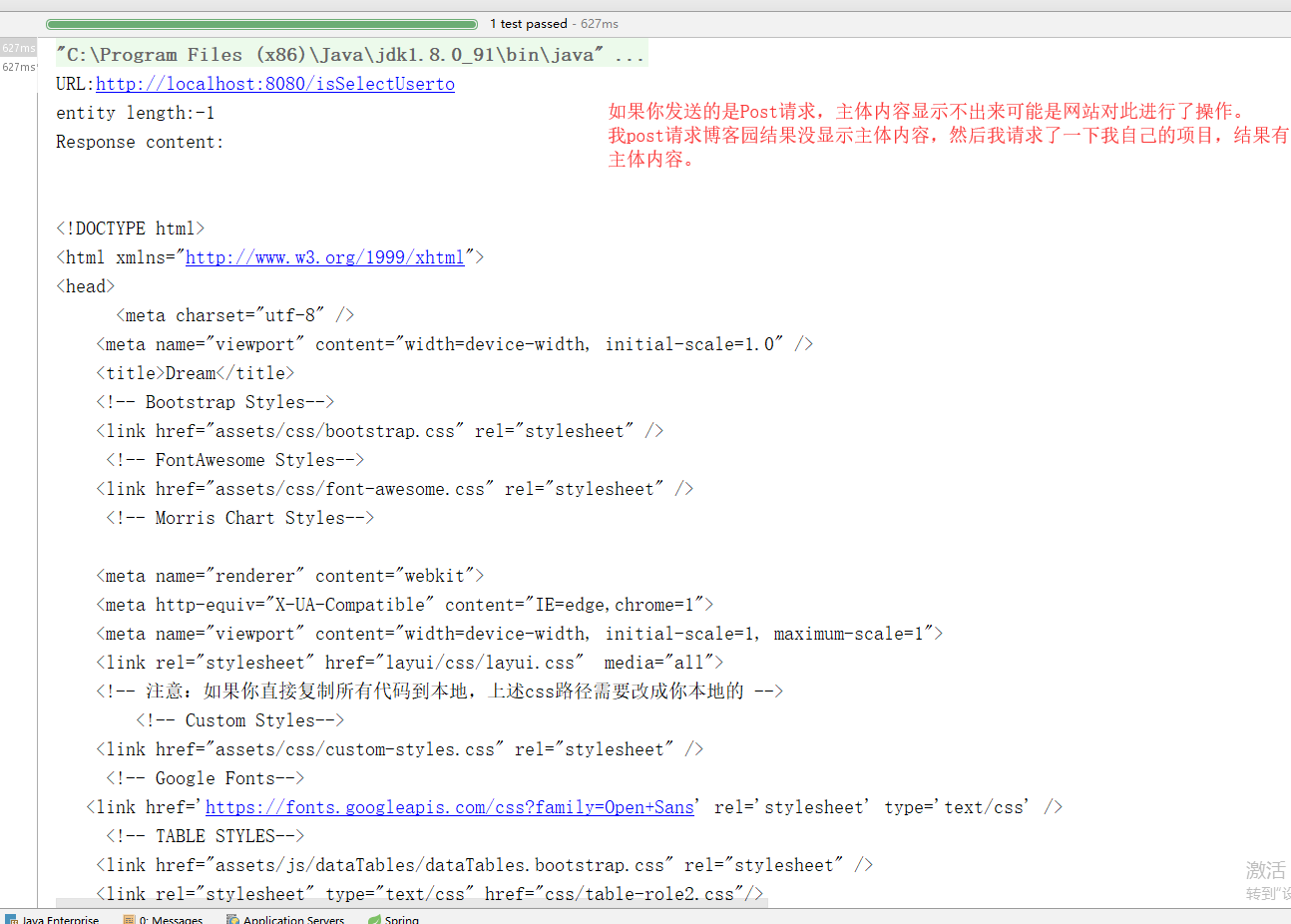
4.发送Post请求
@Test

    public void tPost() throws IOException {

     CloseableHttpClient httpClient=HttpClients.createDefault();

     /*=============================POST请求多出的部分内容=================================================*/

     HttpPost httpPost=new HttpPost("http://localhost:8080/isSelectUserto");

    //创建参数队列

     List<NameValuePair> list=new ArrayList<NameValuePair>();

     list.add(new BasicNameValuePair("type","house"));

     UrlEncodedFormEntity encodedFormEntity;

     encodedFormEntity=new UrlEncodedFormEntity(list,"UTF-8");

    /*====================================POST请求多出的部分内容==========================================*/

     httpPost.setEntity(encodedFormEntity);

     System.out.println("URL:"+httpPost.getURI());

 /*    System.out.println("entity length:"+ httpPost.getEntity().getContentLength());*/

    CloseableHttpResponse httpResponse=httpClient.execute(httpPost);

    HttpEntity httpEntity=httpResponse.getEntity();

    if (httpEntity!=null){

        System.out.println("entity length:"+httpEntity.getContentLength());

        System.out.println("Response content: " + EntityUtils.toString(httpEntity, "UTF-8"));

    }

    httpResponse.close();

    httpClient.close();

 }
更多了解参考:https://blog.csdn.net/zhuwukai/article/details/78644484
使用HttpClient发送Get/Post请求 你get了吗?的更多相关文章
- HttpClient发送get post请求和数据解析
最近在跟app对接的时候有个业务是微信登录,在这里记录的不是如何一步步操作第三方的,因为是跟app对接,所以一部分代码不是由我写,我只负责处理数据,但是整个微信第三方的流程大致都差不多,app端说要传 ...
- 使用httpClient发送get\post请求
maven依赖 <dependency> <groupId>org.apache.httpcomponents</groupId> <artifactId&g ...
- 在ASP.NET Core中用HttpClient(三)——发送HTTP PATCH请求
在前面的两篇文章中,我们讨论了很多关于使用HttpClient进行CRUD操作的基础知识.如果你已经读过它们,你就知道如何使用HttpClient从API中获取数据,并使用HttpClient发送PO ...
- 使用httpclient发送get或post请求
HttpClient 是 Apache Jakarta Common 下的子项目,可以用来提供高效的.最新的.功能丰富的支持 HTTP 协议的客户端编程工具包,并且它支持 HTTP 协议最新的版本和建 ...
- 【JAVA】通过HttpClient发送HTTP请求的方法
HttpClient介绍 HttpClient 不是一个浏览器.它是一个客户端的 HTTP 通信实现库.HttpClient的目标是发 送和接收HTTP 报文.HttpClient不会去缓存内容,执行 ...
- Android系列之网络(三)----使用HttpClient发送HTTP请求(分别通过GET和POST方法发送数据)
[声明] 欢迎转载,但请保留文章原始出处→_→ 生命壹号:http://www.cnblogs.com/smyhvae/ 文章来源:http://www.cnblogs.com/smyhvae/p/ ...
- Android系列之网络(一)----使用HttpClient发送HTTP请求(通过get方法获取数据)
[声明] 欢迎转载,但请保留文章原始出处→_→ 生命壹号:http://www.cnblogs.com/smyhvae/ 文章来源:http://www.cnblogs.com/smyhvae/p/4 ...
- httpclient 发送一个请求
httpclient版本 4.1 发送一个post请求 public static JSONObject post(String url,JSONObject json){ HttpClient cl ...
- 使用HttpClient发送请求、接收响应
使用HttpClient发送请求.接收响应很简单,只要如下几步即可. 1.创建HttpClient对象. CloseableHttpClient httpclient = HttpClients.c ...
随机推荐
- Windows PowerShell基本语法及常用命令
PowerShell常用命令: 一 Get类 1.Get-Command : 得到所有PowerShell命令,获取有关 cmdlet 以及有关 Windows PowerShell 命令的其他元素的 ...
- python 数据库mysql、redis及发送邮件
python 关系型数据库链接使用--mysql import pymysql # 引用mysql模块 # 创建连接,指定数据库的ip地址,账号.密码.端口号.要操作的数据库.字符集coon = py ...
- 上传文件,经过Zuul,中文文件名乱码
问题描述: 在学习<SpingCloud与Docker微服务架构实战>8.7节 使用Zuul上传文件,测试通过Zuul上传中文文件时出现,文件名.目录名或卷标语法不正确异常:但是直接通过上 ...
- Navicat Premium 修改MySQL密码(忘记密码的情况下)
Navicat Premium 修改MySQL密码 1,首先,Navicat Premium还能够连接MySQL. 2,选择数据库,右键单击,选择“命令行模式...”,下图示例 3,打开命令行模式, ...
- 微信for linux
http://blog.csdn.net/sunxiang_520/article/details/51637551
- Koa源码分析(一) -- generator
Abstract 本系列是关于Koa框架的文章,目前关注版本是Koa v1.主要分为以下几个方面: 1. Koa源码分析(一) -- generator 2. Koa源码分析(二) -- co的实现 ...
- 异常:No Spring WebApplicationInitializer types detected on classpath
原因: 启动服务提供者/服务消费者-->去注册中心Zookeeper无法注册这个服务 / 在监控中心无法发现服务 异常提示:No Spring WebApplicationInitializer ...
- H5新特性-视频,音频-Flash-canvas绘图
json格式 json - > AJAX json:数据格式,通常是以字符串形式表示 对象 {"name":"james","age" ...
- 开发HR人事考试系统介绍
确定好需要开发的模块以及功能 一套人事考试系统主要模块: 1)组织管理:公司部门成员信息 2)人事管理:人事信息,离职管理,职务管理,岗位管理: 3)考勤管理:班次设置,停工放假,假日设置,刷卡记录, ...
- Codeforces 1065 简要题解
文章目录 A题 B题 C题 D题 E题 F题 G题 传送门 GGG题略难,膜了一波zhouyuyang{\color{red} zhouyuyang}zhouyuyang巨佬的代码. 其余都挺清真的. ...