
sklearn-woe/iv-乳腺癌分类器实战

医药统计项目联系QQ:231469242
如果样本量太小,数据必须做分段化处理,否则会有很多空缺数据,woe效果不能有效发挥
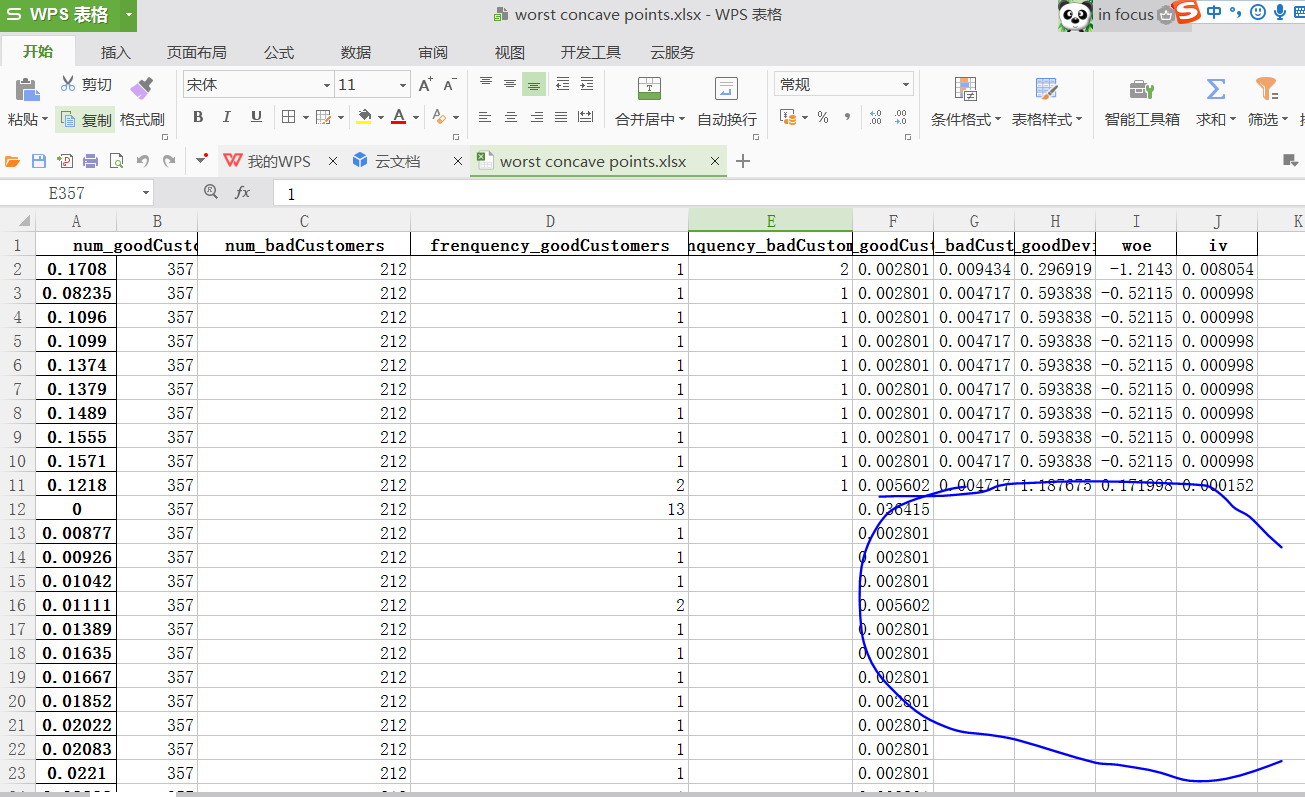
随机森林结果

iv》0.02的因子在随机森林结果里都属于有效因子,但是随机森林重要性最强的因子没有出现在有效iv参数里,说明这些缺失重要变量没有做分段处理,数据离散造成。
数据文件
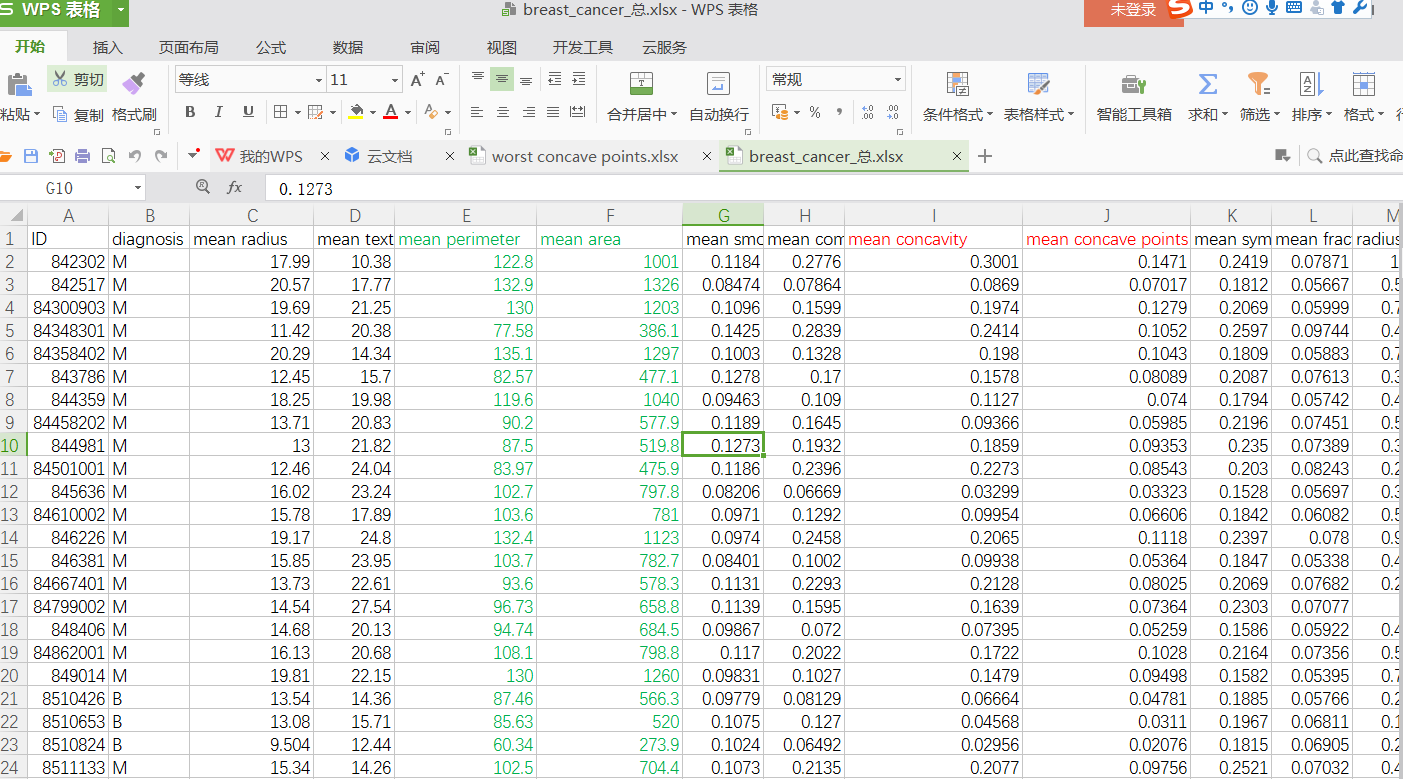
脚本备份
step1_customers_split_goodOrBad.py
# -*- coding: utf-8 -*-

"""

Created on Sun Jan 14 21:45:43 2018

@author  QQ:231469242

把数据源分类为两个Excel,好客户Excel数据和坏客户Excel数据

"""

import pandas as pd

import numpy as np

import matplotlib.pyplot as plt

#读取文件

readFileName="breast_cancer_总.xlsx"

#保存文件

saveFileName_good="result_good.xlsx"

saveFileName_bad="result_bad.xlsx"

#读取excel

df=pd.read_excel(readFileName)

#帅选数据

df_good=df[df.diagnosis=="B"]

df_bad=df[df.diagnosis=="M"]

#保存数据

df_good.to_excel(saveFileName_good, sheet_name='Sheet1')

df_bad.to_excel(saveFileName_bad, sheet_name='Sheet1')
step2_automate_find_informative_variables.py
# -*- coding: utf-8 -*-

"""

Created on Sun Jan 14 22:13:30 2018

@author: QQ:231469242

woe负数,好客户<坏客户

woe正数,好客户>坏客户

"""

import pandas as pd

import numpy as np

import matplotlib.pyplot as plt

import os

#创建save文件

newFile=os.mkdir("save/")

#读取文件

FileName_good="result_good.xlsx"

FileName_bad="result_bad.xlsx"

#保存文件

saveFileName="result_woe_iv.xlsx"

#读取excel

df_good=pd.read_excel(FileName_good)

df_bad=pd.read_excel(FileName_bad)

#所有变量列表

list_columns=list(df_good.columns[:-1])

index=0

def Ratio_goodDevideBad(index):

    #第一列字段名(好客户属性)

    columnName=list(df_good.columns)[index]

    #第一列好客户内容和第二列坏客户内容

    column_goodCustomers=df_good[columnName]

    column_badCustomers=df_bad[columnName]

    #去掉NAN

    num_goodCustomers=column_goodCustomers.dropna()

    #统计数量

    num_goodCustomers=num_goodCustomers.size

    #去掉NAN

    num_badCustomers=column_badCustomers.dropna()

    #统计数量

    num_badCustomers=num_badCustomers.size

    #第一列频率分析

    frenquency_goodCustomers=column_goodCustomers.value_counts()

    #第二列频率分析

    frenquency_badCustomers=column_badCustomers.value_counts()

    #各个元素占比

    ratio_goodCustomers=frenquency_goodCustomers/num_goodCustomers

    ratio_badCustomers=frenquency_badCustomers/num_badCustomers

    #最终好坏比例

    ratio_goodDevideBad=ratio_goodCustomers/ratio_badCustomers

    return (columnName,num_goodCustomers,num_badCustomers,frenquency_goodCustomers,frenquency_badCustomers,ratio_goodCustomers,ratio_badCustomers,ratio_goodDevideBad)

#woe函数,阵列计算

def Woe(ratio_goodDevideBad):

    woe=np.log(ratio_goodDevideBad)

    return woe

'''

#iv函数,阵列计算

def Iv(woe):

    iv=(ratio_goodCustomers-ratio_badCustomers)*woe

    return iv

    '''

#iv参数评估,参数iv_sum(变量iv总值)

def Iv_estimate(iv_sum):

    #如果iv值大于0.02,为有效因子

    if iv_sum>0.02:

        print("informative")

        return "A"

    #评估能力一般

    else:

        print("not informative")

        return "B"

'''

#详细参数输出

def Print():

    print ("columnName:",columnName)

    Iv_estimate(iv_sum)

    print("iv_sum",iv_sum)

    #print("",)

    #print("",)

    '''

#详细参数保存到excel,save文件里

def Write_singleVariable_to_Excel(index):

    #index为变量索引,第一个变量,index=0

    ratio=Ratio_goodDevideBad(index)

    columnName,num_goodCustomers,num_badCustomers,frenquency_goodCustomers,frenquency_badCustomers,ratio_goodCustomers,ratio_badCustomers,ratio_goodDevideBad=ratio[0],ratio[1],ratio[2],ratio[3],ratio[4],ratio[5],ratio[6],ratio[7]

    woe=Woe(ratio_goodDevideBad)

    iv=(ratio_goodCustomers-ratio_badCustomers)*woe

    df_woe_iv=pd.DataFrame({"num_goodCustomers":num_goodCustomers,"num_badCustomers":num_badCustomers,"frenquency_goodCustomers":frenquency_goodCustomers,

    "frenquency_badCustomers":frenquency_badCustomers,"ratio_goodCustomers":ratio_goodCustomers,

    "ratio_badCustomers":ratio_badCustomers,"ratio_goodDevideBad":ratio_goodDevideBad,

    "woe":woe,"iv":iv},columns=["num_goodCustomers","num_badCustomers","frenquency_goodCustomers","frenquency_badCustomers",

    "ratio_goodCustomers","ratio_badCustomers","ratio_goodDevideBad","woe","iv"])

    #sort_values(by=...)用于对指定字段排序

    df_sort=df_woe_iv.sort_values(by='iv',ascending=False)

    #ratio_badDevideGood数据写入到result_compare_badDevideGood.xlsx文件

    df_sort.to_excel("save/"+columnName+".xlsx")

    #计算iv总和,评估整体变量

    iv_sum=sum([i for i in iv if np.isnan(i)!=True])

    print ("变量:",columnName)

    #iv参数评估,参数iv_sum(变量iv总值)

    iv_estimate=Iv_estimate(iv_sum)

    print("iv_sum",iv_sum)

    return iv_estimate,columnName

#y\有价值变量列表存储器

list_Informative_variables=[]

#写入所有变量参数,保存到excel里,save文件

for i in range(len(list_columns)):

    status=Write_singleVariable_to_Excel(i)[0]

    columnName=Write_singleVariable_to_Excel(i)[1]

    if status=="A":

        list_Informative_variables.append(columnName)
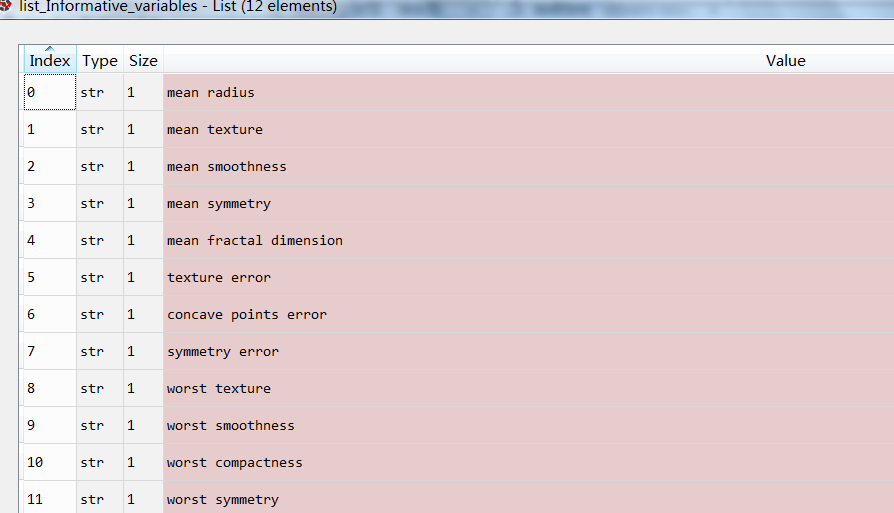
最终得到一部分有效因子,共12个,经过数据分段化处理,会得到更多有效因子。
sklearn-woe/iv-乳腺癌分类器实战的更多相关文章
- 基于sklearn的分类器实战
已迁移到我新博客,阅读体验更佳基于sklearn的分类器实战 完整代码实现见github:click me 一.实验说明 1.1 任务描述 1.2 数据说明 一共有十个数据集,数据集中的数据属性有全部 ...
- 【导包】使用Sklearn构建Logistic回归分类器
官方英文文档地址:http://scikit-learn.org/dev/modules/generated/sklearn.linear_model.LogisticRegression.html# ...
- sklearn_随机森林random forest原理_乳腺癌分类器建模(推荐AAA)
sklearn实战-乳腺癌细胞数据挖掘(博主亲自录制视频) https://study.163.com/course/introduction.htm?courseId=1005269003& ...
- 决策树decision tree原理介绍_python sklearn建模_乳腺癌细胞分类器(推荐AAA)
sklearn实战-乳腺癌细胞数据挖掘(博主亲自录制视频) https://study.163.com/course/introduction.htm?courseId=1005269003& ...
- 『Kaggle』Sklearn中几种分类器的调用&词袋建立
几种分类器的基本调用方法 本节的目的是基本的使用这些工具,达到熟悉sklearn的流程而已,既不会设计超参数的选择原理(后面会进行介绍),也不会介绍数学原理(应该不会涉及了,打公式超麻烦,而且近期也没 ...
- 线性Softmax分类器实战
1 概述 基础的理论知识参考线性SVM与Softmax分类器. 代码实现环境:python3 2 数据预处理 2.1 加载数据 将原始数据集放入"data/cifar10/"文件夹 ...
- 线性SVM分类器实战
1 概述 基础的理论知识参考线性SVM与Softmax分类器. 代码实现环境:python3 2 数据处理 2.1 加载数据集 将原始数据集放入"data/cifar10/"文件夹 ...
- 【转】风控中的特征评价指标(一)——IV和WOE
转自:https://zhuanlan.zhihu.com/p/78809853 1.IV值的用途 IV,即信息价值(Information Value),也称信息量. 目前还只是在对LR建模时用到过 ...
- 神经网络1_neuron network原理_python sklearn建模乳腺癌细胞分类器(推荐AAA)
sklearn实战-乳腺癌细胞数据挖掘(博客主亲自录制视频教程) https://study.163.com/course/introduction.htm?courseId=1005269003&a ...
随机推荐
- JSON 解析 (一)—— FastJSON的使用
FastJSON是一个高性能.功能完善的json序列化和解析工具库,可使用Maven添加依赖 <dependency> <groupId>com.alibaba</gro ...
- Flask 构建微电影视频网站(三)
搭建后台页面 视图函数位于admin文件夹下, app/admin/views.py 管理员登录页面搭建 视图函数 @admin.route('/') def index(): return '后台主 ...
- Matplotlib学习---用matplotlib画误差线(errorbar)
误差线用于显示数据的不确定程度,误差一般使用标准差(Standard Deviation)或标准误差(Standard Error). 标准差(SD):是方差的算术平方根.如果是总体标准差,那么用σ表 ...
- How to intall and configure Haproxy on Centos
Install Haproxy CentOS/RHEL 5 , 32 bit:# rpm -Uvh http://dl.fedoraproject.org/pub/epel/5/i386/epel-r ...
- Hdoj 1007 Quoit Design 题解
Problem Description Have you ever played quoit in a playground? Quoit is a game in which flat rings ...
- 【CF1097E】Egor and an RPG game(动态规划,贪心)
[CF1097E]Egor and an RPG game(动态规划,贪心) 题面 洛谷 CodeForces 给定一个长度为\(n\)的排列\(a\),定义\(f(n)\)为将一个任意一个长度为\( ...
- One Person Game ZOJ - 3329(期望dp, 数学)
There is a very simple and interesting one-person game. You have 3 dice, namely Die1, Die2 and Die3. ...
- javascript之判断专题
javascript有数组,对象,函数,字符串,布尔,还有Symbol,set,map,weakset,weakmap. 判断这些东西也是有很多坑,像原生的typeof,instanceOf有一些bu ...
- java实现sftp客户端上传文件以及文件夹的功能
1.依赖的jar文件 jsch-0.1.53.jar 2.登录方式有密码登录,和密匙登录 代码: 主函数: import java.util.Properties; import com.cloudp ...
- 关于PHP的 PHP-FPM进程CPU 100%的一些原因分析和解决方案
之前碰到过php-fpmCPU高达80%-90%,特此记录下 1. 查看是否是硬件问题 方式:top 命令 主要查看:load average(平均负载),这是一个4核8G内存的服务器 1分钟平均负 ...