
vue实现购物车和地址选配(二)
- 参考文献: vue官网: vue.js
- 效果展示:全选和取消全选,计算总金额
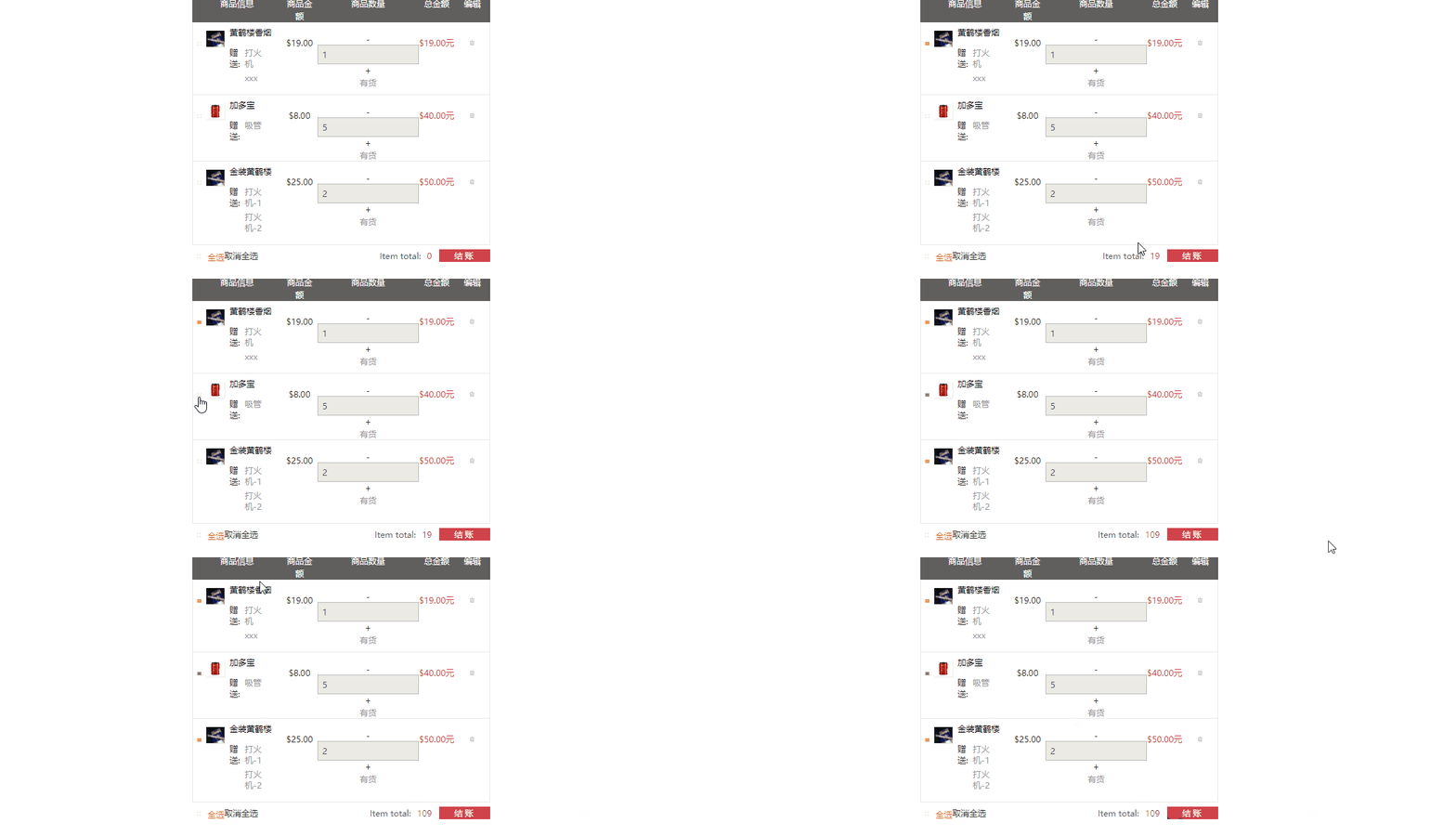
- 项目源代码:https://github.com/4561231/hello_world
- 项目核心代码实现及踩坑
- 1.全选和取消全选
vue实例代码如下
new Vue({

    el:'#app',

    data:{

      productlist:[]

    },

    //必须加mounted函数,这是页面初加载,如果不写这个函数,network中将请求不到数据

    mounted:function(){

          this.cartView();

    },

    //局部过滤器

    filters:{

        formatMoney:function(value){

            return "$" + value.toFixed(2);

        }

    },

    methods:{

        cartView:function(){

        var _this=this;    //要保存这个this,

        this.$http.get('data/cartData.json',{'id':'123'}).then(function(res){

          _this.productlist=res.data.result.list;   //这里的this已经不是实例对象了

        });

        },

        changeMoney:function(product,way){

         if(way>=1){

          product.productQuantity++;

         }else{

               product.productQuantity--;

             if(product.productQuantity<1){

                 product.productQuantity=1;

             }

         }

        },

        selectedProduct:function(item){

            //每次选中的时候先判断当前这个item.checked属性是否存在

            if(typeof item.check=="undefined"){

                this.$set(item,'check',true);//如果不存在就先给他设置一个

            }else{

                item.check=!item.check;

            }

        }

    }

});

Vue.filter('money',function(value,type){

    return '$' + value.toFixed(2)+type;

});
vue实例.js
- 单选:
当用户选择了按钮之后需要给选择按钮加上check这个class类,
<a href="javascript:void 0" class="item-check-btn" v-bind:class="{'check':item.check}" v-on:click="selectedProduct(item)">
当用户点击的时候会调用selectedProduct(item)函数,用item来区分每一个li
 selectedProduct:function(item){

            //每次选中的时候先判断当前这个item.checked属性是否存在

            if(typeof item.check=="undefined"){

                this.$set(item,'check',true);//如果不存在就先给他设置一个

            }else{

                item.check=!item.check;

            }

        }
踩坑一:局部注册:this.$set(item,'check',true);
全局注册:Vue.set(item,'check',true);
2.全选:
new Vue({

    el:'#app',

    data:{

      productlist:[],

      checkAllFrag:false//默认没有全选

    },

    //必须加mounted函数,这是页面初加载,如果不写这个函数,network中将请求不到数据

    mounted:function(){

          this.cartView();

    },

    //局部过滤器

    filters:{

        formatMoney:function(value){

            return "$" + value.toFixed(2);

        }

    },

    methods:{

        cartView:function(){

        var _this=this;    //要保存这个this,

        this.$http.get('data/cartData.json',{'id':'123'}).then(function(res){

          _this.productlist=res.data.result.list;   //这里的this已经不是实例对象了

        });

        },

        changeMoney:function(product,way){

         if(way>=1){

          product.productQuantity++;

         }else{

               product.productQuantity--;

             if(product.productQuantity<1){

                 product.productQuantity=1;

             }

         }

        },

        selectedProduct:function(item){

            //每次选中的时候先判断当前这个item.checked属性是否存在

            if(typeof item.check=="undefined"){

                this.$set(item,'check',true);//如果不存在就先给他设置一个

            }else{

                item.check=!item.check;

            }

        },

        //

        checkAll:function(){

          //只要点击了就把当前的check取反

          this.checkAllFrag=!this.checkAllFrag;

          var _this=this;

          if(this.checkAllFrag){

              _this.productlist.forEach(function(item,index){

                if(typeof item.check =="undefined"){

                  _this.$set(item,'check',true);

                }else{

                  item.check=true;

                }

              });

          }

        }

    }

});

Vue.filter('money',function(value,type){

    return '$' + value.toFixed(2)+type;

});
到全选时的实例.js
html代码:为全选添加了一个check属性,在实例里面定义了一个
checkAllFrag默认为false, 当点击的时候调用checkAll()方法
<a href="javascript:void 0" v-bind:class="{'check':checkAllFrag}" v-on:click="checkAll()">

                    <span class="item-check-btn" >

                      <svg class="icon icon-ok"><use xlink:href="#icon-ok"></use></svg>

                    </span>

                    <span>全选</span>
实例对象的checkAll()方法:
checkAll:function(){

          //只要点击了就把当前的check取反

          this.checkAllFrag=!this.checkAllFrag;

          var _this=this;

          if(this.checkAllFrag){//如果checkAllFrag=true

              _this.productlist.forEach(function(item,index){ //就把上面的单选按钮的check都设置为true

                if(typeof item.check =="undefined"){

                  _this.$set(item,'check',true);

                }else{

                  item.check=true;

                }

              });

          }
3.到取消全选的实例方法
new Vue({

    el:'#app',

    data:{

      productlist:[],

      checkAllFrag:false//默认没有全选

    },

    //必须加mounted函数,这是页面初加载,如果不写这个函数,network中将请求不到数据

    mounted:function(){

          this.cartView();

    },

    //局部过滤器

    filters:{

        formatMoney:function(value){

            return "$" + value.toFixed(2);

        }

    },

    methods:{

        cartView:function(){

        var _this=this;    //要保存这个this,

        this.$http.get('data/cartData.json',{'id':'123'}).then(function(res){

          _this.productlist=res.data.result.list;   //这里的this已经不是实例对象了

        });

        },

        changeMoney:function(product,way){

         if(way>=1){

          product.productQuantity++;

         }else{

               product.productQuantity--;

             if(product.productQuantity<1){

                 product.productQuantity=1;

             }

         }

        },

        selectedProduct:function(item){

            //每次选中的时候先判断当前这个item.checked属性是否存在

            if(typeof item.check=="undefined"){

                this.$set(item,'check',true);//如果不存在就先给他设置一个

            }else{

                item.check=!item.check;

            }

        },

        //

        checkAll:function(flag){

            this.checkAllFrag=flag; //将前面传来的标志记录下来,全选=true,不全选=false

             var _this=this;

              _this.productlist.forEach(function(item,index){ //就把上面的单选按钮的check都设置为true

                if(typeof item.check =="undefined"){

                  _this.$set(item,'check',_this.checkAllFrag); //把单选按钮设置成和全选时=true,不全选时=false

                }else{

                  item.check=_this.checkAllFrag;

                }

              });

        }

    }

});

Vue.filter('money',function(value,type){

    return '$' + value.toFixed(2)+type;

});
到不全选时的实例.js
html:全选和不全选调用的是同一个方法,通过传递过去的参数不同来区分
        <a href="javascript:void 0" v-bind:class="{'check':checkAllFrag}" v-on:click="checkAll(true)">

                    <span>全选</span>

                  </a>

          <a href="javascript:void 0" class="item-del-btn" >

          <span v-bind:class="{'check':checkAllFrag}" v-on:click="checkAll(false)">取消全选</span>
全选和不全选的实例方法
 checkAll:function(flag){

            this.checkAllFrag=flag; //将前面传来的标志记录下来,全选=true,不全选=false

             var _this=this;

              _this.productlist.forEach(function(item,index){ //就把上面的单选按钮的check都设置为true

                if(typeof item.check =="undefined"){

                  _this.$set(item,'check',_this.checkAllFrag); //把单选按钮设置成和全选时=true,不全选时=false

                }else{

                  item.check=_this.checkAllFrag;

                }

              });

        }
4.计算总金额
new Vue({

    el:'#app',

    data:{

      productlist:[],

      totalMoney:0,

      checkAllFrag:false,//默认没有全选

    },

    //必须加mounted函数,这是页面初加载,如果不写这个函数,network中将请求不到数据

    mounted:function(){

          this.cartView();

    },

    //局部过滤器

    filters:{

        formatMoney:function(value){

            return "$" + value.toFixed(2);

        }

    },

    methods:{

        cartView:function(){

        var _this=this;    //要保存这个this,

        this.$http.get('data/cartData.json',{'id':'123'}).then(function(res){

          _this.productlist=res.data.result.list;   //这里的this已经不是实例对象了

        });

        },

        changeMoney:function(product,way){

         if(way>=1){

          product.productQuantity++;

         }else{

               product.productQuantity--;

             if(product.productQuantity<1){

                 product.productQuantity=1;

             }

         }

          this.calcTotalPrice();

        },

        selectedProduct:function(item){

            //每次选中的时候先判断当前这个item.checked属性是否存在

            if(typeof item.check=="undefined"){

                this.$set(item,'check',true);//如果不存在就先给他设置一个

            }else{

                item.check=!item.check;

            }

            this.calcTotalPrice();

        },

        //

        checkAll:function(flag){

            this.checkAllFrag=flag; //将前面传来的标志记录下来,全选=true,不全选=false

             var _this=this;

              _this.productlist.forEach(function(item,index){ //就把上面的单选按钮的check都设置为true

                if(typeof item.check =="undefined"){

                  _this.$set(item,'check',_this.checkAllFrag); //把单选按钮设置成和全选时=true,不全选时=false

                }else{

                  item.check=_this.checkAllFrag;

                }

              });

              this.calcTotalPrice();

        },

        calcTotalPrice:function(){

          var _this=this;

          _this.totalMoney=0;

          _this.productlist.forEach(function(item,index){

            if(item.check){

               _this.totalMoney+=item.productPrice*item.productQuantity;

            }

          });

        }

    }

});

Vue.filter('money',function(value,type){

    return '$' + value.toFixed(2)+type;

});
到计算总金额这一步的vue实例.js
html结构:
<div class="item-total">

                  Item total: <span class="total-price">{{totalMoney}}</span>

                </div>
Vue中的方法:
calcTotalPrice:function(){

          var _this=this;

          _this.totalMoney=0;//每次计算都要清零处理

          _this.productlist.forEach(function(item,index){

            if(item.check){//如果被选中,就计算总金额,并且把每一项累加

               _this.totalMoney+=item.productPrice*item.productQuantity;

            }

          });

        }
踩坑:踩坑一:每次选中了单选按钮时需要重新计算一次
踩坑二:点击+ - 按钮的时候也需要重新计算一次
踩坑三:用户点击全选的时候也需要调用这个方法
踩坑三:每次调用这个计算函数都应该给totalMoney清零
踩坑四:input表单需要用v-model双向绑定
vue实现购物车和地址选配(二)的更多相关文章
- vue实现购物车和地址选配
参考文献 vue.js官网 项目演示:数据渲染,格式化数据,点击加,减号自动加减 项目准备 1. 项目css和js文件 https://github.com/4561231/hello ...
- 关于慕课网《使用vue2.0实现购物车和地址选配功能》的总结
视频学习网址:http://www.imooc.com/learn/796 源码打包:https://codeload.github.com/fachaoshao/Vue-ShoppingCart/z ...
- vue购物车和地址选配(三)
参考资料:vue.js官网 项目演示: 项目源代码: 核心代码及踩坑 删除: new Vue({ el:'#app', data:{ productlist:[], totalMoney:0, che ...
- VUE2.0实现购物车和地址选配功能学习第二节
第二节 创建VUE实例 购物车项目计划: 1.创建一个vue实例 2.通过v-for指令渲染产品数据 3.使用filter对金额和图片进行格式化 4.使用v-on实现产品金额动态计算 5.综合演示 ① ...
- VUE2.0实现购物车和地址选配功能学习第六节
第六节 地址列表过滤和展开所有的地址 html:<li v-for="(item,index) in filterAddress">js: new Vue({ el:' ...
- VUE2.0实现购物车和地址选配功能学习第七节
第七节 卡片选中,设置默认 1.卡片选中html:<li v-for="(item,index) in filterAddress" v-bind:class="{ ...
- VUE2.0实现购物车和地址选配功能学习第五节
第五节 单件商品金额计算和单选全选功能 1.vue精髓在于操作data模型来改变dom,渲染页面,而不是直接去改变dom 2.加减改变总金额功能: html:<div class="c ...
- VUE2.0实现购物车和地址选配功能学习第四节
第四节 v-on实现金额动态计算 用¥金额 进行格式处理,可以使用原生js进行转换,但是在vuei,使用filter过滤器更加方便 注: 1.es6语法=>和import等 好处在于res参数后 ...
- VUE2.0实现购物车和地址选配功能学习第三节
第三节 使用v-for渲染商品列表 1.使用vue-resource插件引入json数据 (注:在谷歌中调试打断点-- ,console还可以输出vm,res等属性列表,或者productList等一 ...
随机推荐
- Nginx 针对建立TCP连接优化
L:124 sysctl -a | grep file-max //通过命令查看系统最大句柄数 [root@3 ~]# sysctl -a | grep file-max fs.file-max = ...
- Python getattr() 函数
Python getattr() 函数 Python 内置函数 描述 getattr() 函数用于返回一个对象属性值. 语法 getattr 语法: getattr(object, name[, d ...
- Tomcat启动特慢之SecureRandom问题解决
tomcat启动日志: 08-Jun-2018 09:23:00.445 WARNING [localhost-startStop-1] org.apache.catalina.util.Sessio ...
- Android app下载并安装
1 下载功能 //下载apk private void downloadApk(String apkUrl) throws PackageManager.NameNotFoundException ...
- Educational Codeforces Round 53 (Rated for Div. 2) D. Berland Fair
题意:一个人 有T块钱 有一圈商店 分别出售 不同价格的东西 每次经过商店只能买一个 并且如果钱够就必须买 这个人一定是从1号店开始的!(比赛的时候读错了题,以为随意起点...)问可以买多少个 ...
- FPGA笔试题集锦(血的教训)
1.名词解释: FPGA:现场可编程门阵列,一般工艺SRAM(易失性),所以要外挂配置芯片. CPLD:复杂可编程逻辑器件,一般工艺Flash(不易失). ASIC:专用集成电路 SOC:片上系统 S ...
- 【bzoj3456】城市规划(多项式求逆+dp)
Description 求\(~n~\)个点组成的有标号无向连通图的个数.\(~1 \leq n \leq 13 \times 10 ^ 4~\). Solution 这道题的弱化版是poj1737, ...
- 【Vijos】lxhgww的奇思妙想(长链剖分)
题面 给定一棵树,每次询问一个点的\(k\)次祖先,强制在线. Vijos 题解 长链剖分. 链接暂时咕咕咕了. 现在可以戳链接看题解了 #include<iostream> #inclu ...
- 添加 [DataContract] 到 Entity Framework 6.0 POCO Template
1. 添加using System.Runtime.Serialization; 找到这行 includeCollections ? (Environment.NewLine + "usin ...
- default.conf
1./etc/nginx/conf.d/ 下设置一个 default.conf,server_name 设置为 localhost,如果有其他非法域名 A 记录到该机器上,则返回默认的 Nginx 页 ...