
轮播图(jQuery)
效果图:
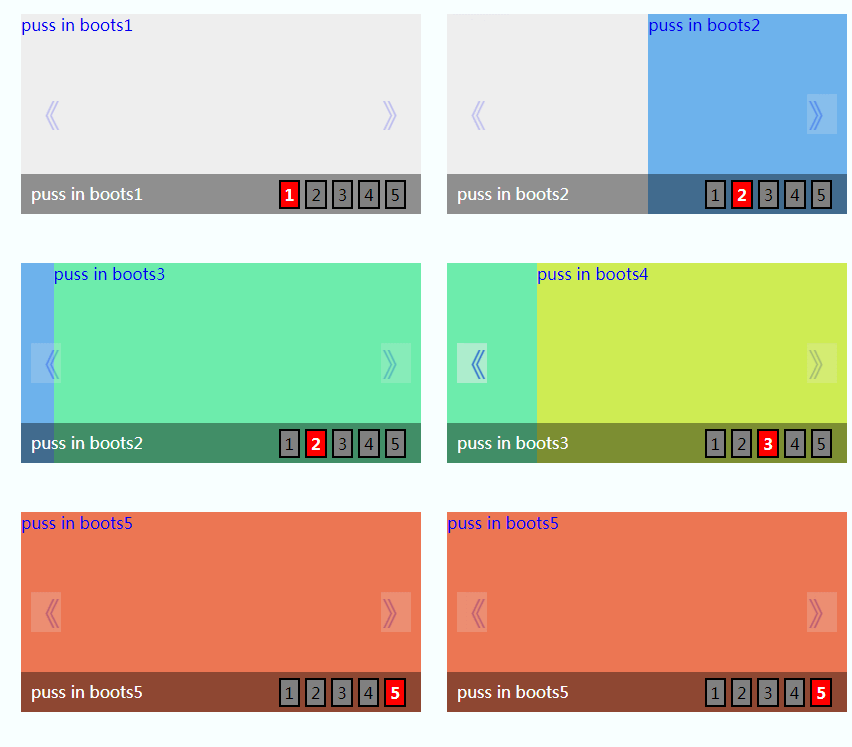
-----------------------------------------html-------------------------------------------------
<div id="wrapper"><!-- 最外层部分 -->

            <div id="banner"><!-- 轮播部分 -->

                <ul class="imgList"><!-- 图片部分 -->

                  <li><a href="#">puss in boots1</a></li>

                  <li><a href="#">puss in boots2</a></li>

                  <li><a href="#">puss in boots3</a></li>

                  <li><a href="#">puss in boots4</a></li>

                  <li><a href="#">puss in boots5</a></li>

                </ul>

                <a href="javascript:void(0);" width="20px" height="40px" id="prev">《</a>

                <a href="javascript:void(0);" width="20px" height="40px" id="next">》</a>

                <div class="bg"></div> <!-- 图片底部背景层部分-->

                <ul class="infoList"><!-- 图片左下角文字信息部分 -->

                    <li class="infoOn">puss in boots1</li>

                    <li>puss in boots2</li>

                    <li>puss in boots3</li>

                    <li>puss in boots4</li>

                    <li>puss in boots5</li>

                </ul>

                <ul class="indexList"><!-- 图片右下角序号部分 -->

                    <li class="indexOn">1</li>

                    <li>2</li>

                    <li>3</li>

                    <li>4</li>

                    <li>5</li>

                </ul>

            </div>

        </div>
-------------------------------------------css-----------------------------------------
  body,div,ul,li,a,img{margin: 0;padding: 0;}

    ul,li{list-style: none;}

    a{text-decoration: none;}

    #wrapper{position: relative;margin: 30px auto;width: 400px;height: 200px;}

    #banner{position:relative;width: 400px;height: 200px;overflow: hidden;}

    .imgList{position:relative;width:2000px;height:200px;z-index: 10;overflow: hidden;}

    .imgList li{float:left;width:400px;height:200px;display: inline;}

    .imgList li:nth-child(1){background: #eee}

    .imgList li:nth-child(2){background: #6db2ec}

    .imgList li:nth-child(3){background: #6decac}

    .imgList li:nth-child(4){background: #ceec53}

    .imgList li:nth-child(5){background: #ec7653}

    #prev,

    #next{position: absolute;top:80px;z-index: 20;cursor: pointer;opacity: 0.2;filter:alpha(opacity=20);background: #eee;font-size: 30px}

    #prev{left: 10px;}

    #next{right: 10px;}

    #prev:hover,

    #next:hover{opacity: 0.5;filter:alpha(opacity=50);}

    .bg{position: absolute;bottom: 0;width: 400px;height: 40px;z-index:20;opacity: 0.4;filter:alpha(opacity=40);background: black;}

    .infoList{position: absolute;left: 10px;bottom: 10px;z-index: 30;}

    .infoList li{display: none;}

    .infoList .infoOn{display: inline;color: white;}

    .indexList{position: absolute;right: 10px;bottom: 5px;z-index: 30;}

    .indexList li{float: left;margin-right: 5px;padding: 2px 4px;border: 2px solid black;background: grey;cursor: pointer;}

    .indexList .indexOn{background: red;font-weight: bold;color: white;}
-----------------------------------------------js----------------------------------------------
var curNum={

                curIndex:0,//当前index

                imgLen:$(".imgList li").length  //图片总数

            }

            // 定时器自动变换2.5秒每次

            var autoChange = setInterval(function(){

                if(curNum.curIndex < curNum.imgLen-1){

                    curNum.curIndex ++;

                }else{

                    curNum.curIndex = 0;

                }

                //调用变换处理函数

                changeTo(curNum.curIndex);

            },2500);

            //左箭头滑入滑出事件处理

            $("#prev").hover(function(){

                //滑入清除定时器

                clearInterval(autoChange);

            },function(){

                //滑出则重置定时器

                autoChangeAgain();

            });

            //左箭头点击处理

            $("#prev").click(function(){

                //根据curIndex进行上一个图片处理

                curNum.curIndex = (curNum.curIndex > 0) ? (--curNum.curIndex) : (curNum.imgLen - 1);

                changeTo(curNum.curIndex);

            });

            //右箭头滑入滑出事件处理

            $("#next").hover(function(){

                //滑入清除定时器

                clearInterval(autoChange);

            },function(){

                //滑出则重置定时器

                autoChangeAgain();

            });

            //右箭头点击处理

            $("#next").click(function(){

                curNum.curIndex = (curNum.curIndex < curNum.imgLen - 1) ? (++curNum.curIndex) : 0;

                changeTo(curNum.curIndex);

            });

            //清除定时器时候的重置定时器--封装

            function autoChangeAgain(){

                    autoChange = setInterval(function(){

                    if(curNum.curIndex < curNum.imgLen-1){

                        curNum.curIndex ++;

                    }else{

                        curNum.curIndex = 0;

                    }

                //调用变换处理函数

                    changeTo(curNum.curIndex);

                },2500);

            }

            function changeTo(num){

                var goLeft = num *  400;

                $(".imgList").animate({left: "-" + goLeft + "px"},500);

                $(".infoList").find("li").removeClass("infoOn").eq(num).addClass("infoOn");

                $(".indexList").find("li").removeClass("indexOn").eq(num).addClass("indexOn");

            }

            //对右下角按钮index进行事件绑定处理等

            $(".indexList").find("li").each(function(item){

                $(this).hover(function(){

                    clearInterval(autoChange);

                    changeTo(item);

                    curIndex = item;

                },function(){

                    autoChangeAgain();

                });

            });
参考:https://www.cnblogs.com/czh-520
轮播图(jQuery)的更多相关文章
- 最最最简单的轮播图(JQuery)
html: <!DOCTYPE html> <html lang="en"> <head> <meta charset="UTF ...
- 轮播图jQuery
<!DOCTYPE html> <html lang="en"> <head> <meta charset="UTF-8&quo ...
- jquery一个比较好的轮播图jQuery.kinMaxShow介绍
kinMaxShow API 可选参数以及详解 kinMaxShow 主参数详解 参数名称 默认值 简单释义 height 500 [整型 (单位:像素)]焦点图高度,必须设置 缺省则启用默认高度 5 ...
- Jquery 轮播图简易框架
=====================基本结构===================== <div class="carousel" style="width: ...
- 【jQuery】百分比自适应屏幕轮播图特效
<!DOCTYPE html> <html lang="en"> <head> <meta charset="UTF-8&quo ...
- jQuery淡入淡出效果轮播图
用JavaScript做了平滑切换的焦点轮播图之后,用jQuery写了个简单的淡入淡出的轮播图,代码没有做优化,html结构稍微有一些调整,图片部分用ul替换了之前用的div. html结构如下: & ...
- jquery手写焦点轮播图-------解决最后一张无缝跳转第一张的问题
<!DOCTYPE html> <html lang="en"> <head> <meta charset="UTF-8&quo ...
- jQuery制作焦点图(轮播图)
焦点图(轮播图) 案例 <!DOCTYPE html PUBLIC "-//W3C//DTD XHTML 1.0 Transitional//EN" "http:/ ...
- jQuery插件slides实现无缝轮播图特效
初始化插件: slides是一款基于jQuery无缝轮播图插件,支持图内元素动画,可以自定义动画类型 1 2 3 4 5 6 7 8 9 10 $(".slideInner").s ...
随机推荐
- HDU 1846 Brave Game (巴什博弈)
题目链接:http://acm.hdu.edu.cn/showproblem.php?pid=1846 十年前读大学的时候,中国每年都要从国外引进一些电影大片,其中有一部电影就叫<勇敢者的游戏& ...
- CentOS7 zabbix服务 简单安装文档
1. 简介 zabbix是一个基于WEB界面的提供分布式系统监视以及网络监视功能的企业级的开源解决方案. zabbix能监视各种网络参数,保证服务器系统的安全运营:并提供灵活的通知机制以让系统管理员快 ...
- [资讯] NFC有什么作用。小米手机3NFC解读
在近几年的智能手机市场,NFC成了Android高端手机产品的标准配置,无论是Android还是Windows Phone阵营,有越来越多的厂商也开始为自己的产品加入NFC功能.而小米最新的旗舰产品— ...
- error C2504: “XXXXXXX”: 未定义基类
今天犯到了一个低级错误,记下来加深印象. 造成这一现象主要的原因是头文件相互包含,文件构成一个环形结构,从而编译时循环包含出错 如: AA.h中包含BB.h BB.h中包含CC.h CC.h中包含AA ...
- JOBDU 题目1131:合唱队形
时间限制:1 秒 内存限制:32 兆 特殊判题:否 提交:4546 解决:1445 题目描述: N位同学站成一排,音乐老师要请其中的(N-K)位同学出列,使得剩下的K位同学不交换位置就能排成合唱队形. ...
- JVM优化-JVM参数配置
配置方式: java [options] MainClass [arguments] options - JVM启动参数. 配置多个参数的时候,参数之间使用空格分隔. 参数命名: 常见为 -参数名 参 ...
- java常用代码段整理(持续更新)
FileWriter指定编码格式 FileWriter 默认是用(ISO-8859-1 or US-ASCII)西方编码的,总之不是UTF-8的,而FileWriter类有getEncoding方法, ...
- rabbitmq队列的exclusive,durability,auto-delete属性以及消息可靠传输设计
非集群下,简单的说:- 如果是excl,则设置durability没有意义,因为不管服务器挂了还是客户端主动/被动断开了,队列都会自动删除.- auto-delete,其实可简单的认为是同理,即使非e ...
- devexpress 之 ChartControl
\}5#~mV#cr(/k1yIZ7.Lg
- centos7 update network time
yum install -y ntp crontab -e */5 * * * * /usr/bin/ntpdate ntp.api.bz ### ntp.api.bz 是一组NTP集群服务器,之 ...