
轮播图(jQuery)
效果图:
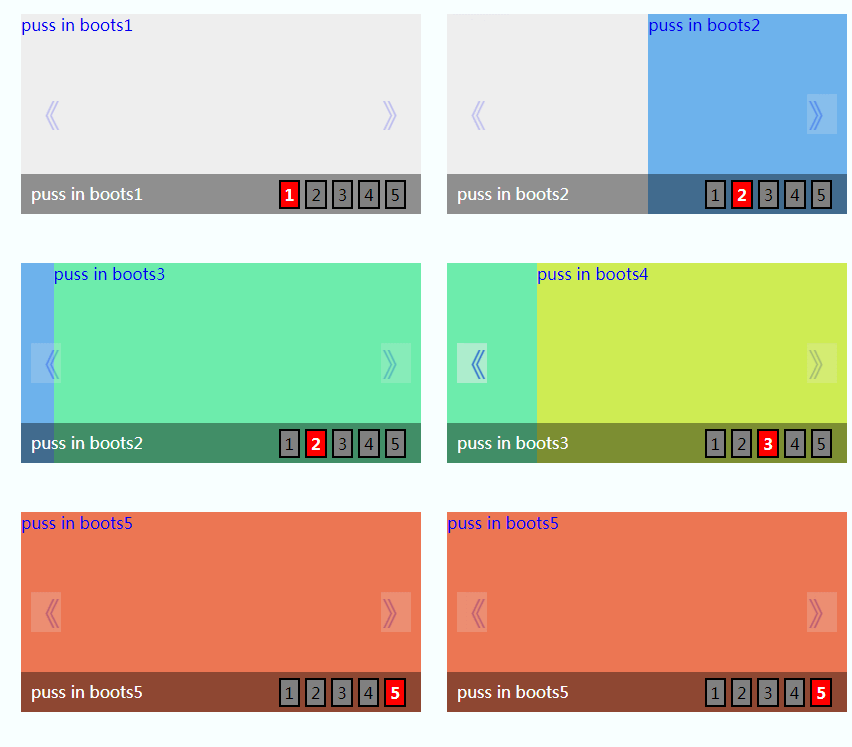
-----------------------------------------html-------------------------------------------------
<div id="wrapper"><!-- 最外层部分 -->

            <div id="banner"><!-- 轮播部分 -->

                <ul class="imgList"><!-- 图片部分 -->

                  <li><a href="#">puss in boots1</a></li>

                  <li><a href="#">puss in boots2</a></li>

                  <li><a href="#">puss in boots3</a></li>

                  <li><a href="#">puss in boots4</a></li>

                  <li><a href="#">puss in boots5</a></li>

                </ul>

                <a href="javascript:void(0);" width="20px" height="40px" id="prev">《</a>

                <a href="javascript:void(0);" width="20px" height="40px" id="next">》</a>

                <div class="bg"></div> <!-- 图片底部背景层部分-->

                <ul class="infoList"><!-- 图片左下角文字信息部分 -->

                    <li class="infoOn">puss in boots1</li>

                    <li>puss in boots2</li>

                    <li>puss in boots3</li>

                    <li>puss in boots4</li>

                    <li>puss in boots5</li>

                </ul>

                <ul class="indexList"><!-- 图片右下角序号部分 -->

                    <li class="indexOn">1</li>

                    <li>2</li>

                    <li>3</li>

                    <li>4</li>

                    <li>5</li>

                </ul>

            </div>

        </div>
-------------------------------------------css-----------------------------------------
  body,div,ul,li,a,img{margin: 0;padding: 0;}

    ul,li{list-style: none;}

    a{text-decoration: none;}

    #wrapper{position: relative;margin: 30px auto;width: 400px;height: 200px;}

    #banner{position:relative;width: 400px;height: 200px;overflow: hidden;}

    .imgList{position:relative;width:2000px;height:200px;z-index: 10;overflow: hidden;}

    .imgList li{float:left;width:400px;height:200px;display: inline;}

    .imgList li:nth-child(1){background: #eee}

    .imgList li:nth-child(2){background: #6db2ec}

    .imgList li:nth-child(3){background: #6decac}

    .imgList li:nth-child(4){background: #ceec53}

    .imgList li:nth-child(5){background: #ec7653}

    #prev,

    #next{position: absolute;top:80px;z-index: 20;cursor: pointer;opacity: 0.2;filter:alpha(opacity=20);background: #eee;font-size: 30px}

    #prev{left: 10px;}

    #next{right: 10px;}

    #prev:hover,

    #next:hover{opacity: 0.5;filter:alpha(opacity=50);}

    .bg{position: absolute;bottom: 0;width: 400px;height: 40px;z-index:20;opacity: 0.4;filter:alpha(opacity=40);background: black;}

    .infoList{position: absolute;left: 10px;bottom: 10px;z-index: 30;}

    .infoList li{display: none;}

    .infoList .infoOn{display: inline;color: white;}

    .indexList{position: absolute;right: 10px;bottom: 5px;z-index: 30;}

    .indexList li{float: left;margin-right: 5px;padding: 2px 4px;border: 2px solid black;background: grey;cursor: pointer;}

    .indexList .indexOn{background: red;font-weight: bold;color: white;}
-----------------------------------------------js----------------------------------------------
var curNum={

                curIndex:0,//当前index

                imgLen:$(".imgList li").length  //图片总数

            }

            // 定时器自动变换2.5秒每次

            var autoChange = setInterval(function(){

                if(curNum.curIndex < curNum.imgLen-1){

                    curNum.curIndex ++;

                }else{

                    curNum.curIndex = 0;

                }

                //调用变换处理函数

                changeTo(curNum.curIndex);

            },2500);

            //左箭头滑入滑出事件处理

            $("#prev").hover(function(){

                //滑入清除定时器

                clearInterval(autoChange);

            },function(){

                //滑出则重置定时器

                autoChangeAgain();

            });

            //左箭头点击处理

            $("#prev").click(function(){

                //根据curIndex进行上一个图片处理

                curNum.curIndex = (curNum.curIndex > 0) ? (--curNum.curIndex) : (curNum.imgLen - 1);

                changeTo(curNum.curIndex);

            });

            //右箭头滑入滑出事件处理

            $("#next").hover(function(){

                //滑入清除定时器

                clearInterval(autoChange);

            },function(){

                //滑出则重置定时器

                autoChangeAgain();

            });

            //右箭头点击处理

            $("#next").click(function(){

                curNum.curIndex = (curNum.curIndex < curNum.imgLen - 1) ? (++curNum.curIndex) : 0;

                changeTo(curNum.curIndex);

            });

            //清除定时器时候的重置定时器--封装

            function autoChangeAgain(){

                    autoChange = setInterval(function(){

                    if(curNum.curIndex < curNum.imgLen-1){

                        curNum.curIndex ++;

                    }else{

                        curNum.curIndex = 0;

                    }

                //调用变换处理函数

                    changeTo(curNum.curIndex);

                },2500);

            }

            function changeTo(num){

                var goLeft = num *  400;

                $(".imgList").animate({left: "-" + goLeft + "px"},500);

                $(".infoList").find("li").removeClass("infoOn").eq(num).addClass("infoOn");

                $(".indexList").find("li").removeClass("indexOn").eq(num).addClass("indexOn");

            }

            //对右下角按钮index进行事件绑定处理等

            $(".indexList").find("li").each(function(item){

                $(this).hover(function(){

                    clearInterval(autoChange);

                    changeTo(item);

                    curIndex = item;

                },function(){

                    autoChangeAgain();

                });

            });
参考:https://www.cnblogs.com/czh-520
轮播图(jQuery)的更多相关文章
- 最最最简单的轮播图(JQuery)
html: <!DOCTYPE html> <html lang="en"> <head> <meta charset="UTF ...
- 轮播图jQuery
<!DOCTYPE html> <html lang="en"> <head> <meta charset="UTF-8&quo ...
- jquery一个比较好的轮播图jQuery.kinMaxShow介绍
kinMaxShow API 可选参数以及详解 kinMaxShow 主参数详解 参数名称 默认值 简单释义 height 500 [整型 (单位:像素)]焦点图高度,必须设置 缺省则启用默认高度 5 ...
- Jquery 轮播图简易框架
=====================基本结构===================== <div class="carousel" style="width: ...
- 【jQuery】百分比自适应屏幕轮播图特效
<!DOCTYPE html> <html lang="en"> <head> <meta charset="UTF-8&quo ...
- jQuery淡入淡出效果轮播图
用JavaScript做了平滑切换的焦点轮播图之后,用jQuery写了个简单的淡入淡出的轮播图,代码没有做优化,html结构稍微有一些调整,图片部分用ul替换了之前用的div. html结构如下: & ...
- jquery手写焦点轮播图-------解决最后一张无缝跳转第一张的问题
<!DOCTYPE html> <html lang="en"> <head> <meta charset="UTF-8&quo ...
- jQuery制作焦点图(轮播图)
焦点图(轮播图) 案例 <!DOCTYPE html PUBLIC "-//W3C//DTD XHTML 1.0 Transitional//EN" "http:/ ...
- jQuery插件slides实现无缝轮播图特效
初始化插件: slides是一款基于jQuery无缝轮播图插件,支持图内元素动画,可以自定义动画类型 1 2 3 4 5 6 7 8 9 10 $(".slideInner").s ...
随机推荐
- win10自带虚拟机Hyper V联网
在控制面板里打开程序和功能 打开启用或关闭windows 功能 勾选Hyper-V 在windows 管理工具打开Hyper-V 管理器 打开虚拟交换机管理器 ...
- vue 加载更多2
<template lang="html"> <div class="yo-scroll" :class="{'down':(sta ...
- MySQL底层索引剖析
1:Mysql索引是什么 mysql索引: 是一种帮助mysql高效的获取数据的数据结构,这些数据结构以某种方式引用数据,这种结构就是索引.可简单理解为排好序的快速查找数据结构.如果要查“mysql” ...
- MyEclipse与Eclipse配置清单
MyEclipse与Eclipse配置清单 1.编码设置 workspace -> 设置全局编码utf-8 修改JSP编码(Encoding)为UTF-82.Java配置 格式 ...
- Eclipse Luna在线安装Maven时报错:Java heap space
问题描述: 在线安装Maven插件时发生了:Java heap space 问题截图:
- pxc集群进入非主模式怎么让最后的节点允许提供服务
这种情况一般是,集群其他节点意外宕机而最后一个节点无法自我仲裁,而进入非主模式. 该模式拒绝任何SQL的执行: ERROR 1047 (08S01): WSREP has not yet prepar ...
- 做了 3 年企业级 SaaS,我收获的 10 点心得(转)
关于中国企业级服务的总结不少,本土派和海外派都有出色的文章出来,VC 和创业者站在各自角度也有很多不错的总结.本文基于 Ping++ 近三年的创业历程而来,有弯路,有教训,有醒悟,也有心得.盛景 B2 ...
- oracle_sqlplus命令行乱码问题解决
在linux以及unix中,sqlplus的上下左右.回退无法使用,会出现乱码情况. 而rlwrap这个软件就是用来解决这个的. 首先下载rlwrap包:https://linux.linuxidc. ...
- MSF基础应用
实践目标 掌握metasploit的基本应用方式. 具体需要完成(1)ms08_067;(2)ms11_050:(3)Adobe(4)成功应用任何一个辅助模块. 报告 虚拟机:可以找我拷贝(我一般都在 ...
- 变参标准函数的重新封装,如printf
方法一: #include <stdio.h> #include <stdarg.h> void my_trace(const char *cmd, ...) { printf ...