
centos6.5虚拟机快照技术
一、查看现有磁盘镜像格式与转换
查看磁盘格式
[root@localhost ~]# qemu-img info /var/lib/libvirt/images/centos7.img

image: /var/lib/libvirt/images/centos7.img

file format: raw

virtual size: .0G ( bytes)

disk size: .0G
安装电源服务
# yum install acpid -y
关闭虚拟机
#virsh shutdown centos7
转换磁盘格式
# qemu-img convert -f raw -O qcow2 /var/lib/libvirt/images/centos7.img /var/lib/libvirt/images/centos7.qcow2
-f-------源镜像的格式
-O-----目标镜像的格式
查看转换后的磁盘大小
[root@localhost ~]# du -sh /var/lib/libvirt/images/centos7.qcow2

.4G    /var/lib/libvirt/images/centos7.qcow2
查看转换后的磁盘格式
[root@localhost ~]# qemu-img info /var/lib/libvirt/images/centos7.qcow2

image: /var/lib/libvirt/images/centos7.qcow2

file format: qcow2

virtual size: .0G ( bytes)

disk size: .4G

cluster_size:
二、修改虚拟机配置文件
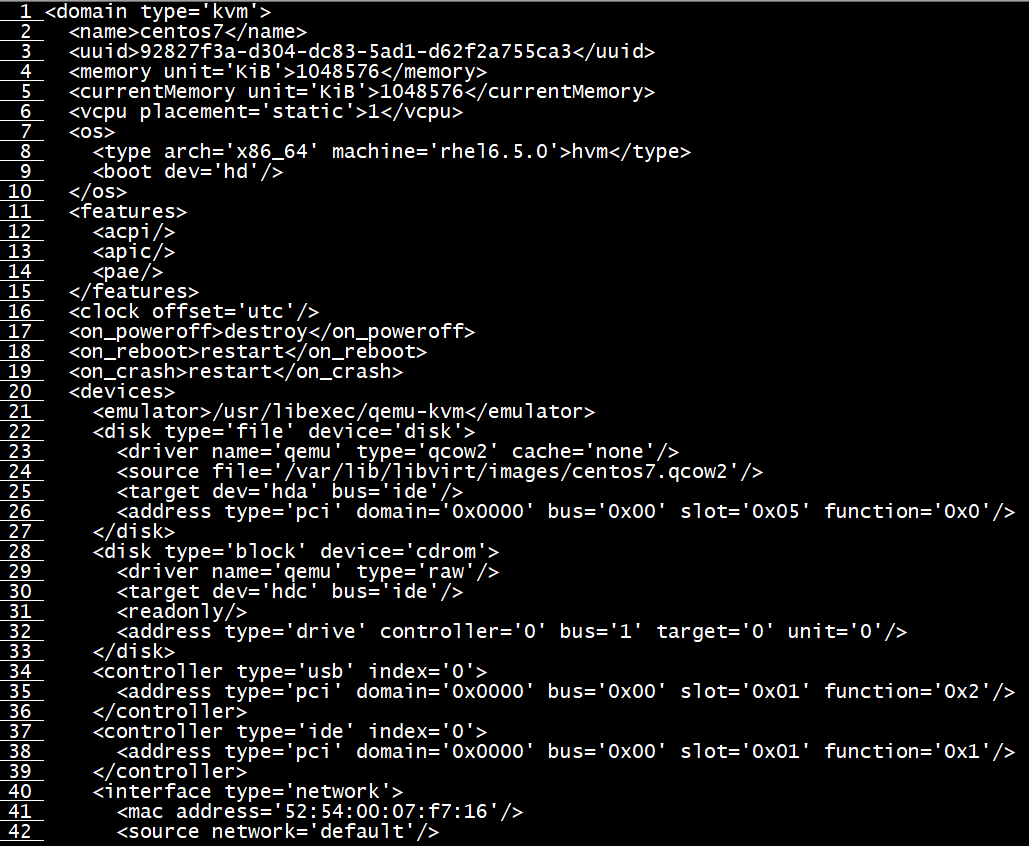
修改磁盘格式
# virsh edit centos7
 <disk type='file' device='disk'>

      <driver name='qemu' type='qcow2' cache='none'/>

      <source file='/var/lib/libvirt/images/centos7.qcow2'/>

      <target dev='hda' bus='ide'/>

      <address type='pci' domain='0x0000' bus='0x00' slot='0x05' function='0x0'/>

    </disk>

    <disk type='block' device='cdrom'>

      <driver name='qemu' type='raw'/>

      <target dev='hdc' bus='ide'/>

      <readonly/>

      <address type='drive' controller='' bus='' target='' unit=''/>

    </disk>
三、对虚拟机进行快照管理
创建centos7虚拟机快照
注意:需要修改磁盘格式
[root@localhost ~]# virsh snapshot-create-as centos7 centos7_snaphshot

Domain snapshot centos7_snaphshot created

[root@localhost ~]#
查看虚拟机镜像快照的版本
# virsh snapshot-list centos7

查看当前虚拟机镜像快照的版本
可以看到为当前最新的快照版本
[root@localhost ~]# virsh snapshot-current centos7

<domainsnapshot>

  <name>centos7_snaphshot</name>

  <state>shutoff</state>

  <creationTime>1547653724</creationTime>

  <memory snapshot='no'/>

  <disks>

    <disk name='hda' snapshot='internal'/>

    <disk name='hdc' snapshot='no'/>

  </disks>

  <domain type='kvm'>

    <name>centos7</name>

    <uuid>92827f3a-d304-dc83-5ad1-d62f2a755ca3</uuid>

    <memory unit='KiB'></memory>

    <currentMemory unit='KiB'></currentMemory>

    <vcpu placement='static'></vcpu>

    <os>

      <type arch='x86_64' machine='rhel6.5.0'>hvm</type>

      <boot dev='hd'/>

    </os>

    <features>

      <acpi/>

      <apic/>

      <pae/>

    </features>

    <clock offset='utc'/>

    <on_poweroff>destroy</on_poweroff>

    <on_reboot>restart</on_reboot>

    <on_crash>restart</on_crash>

    <devices>

      <emulator>/usr/libexec/qemu-kvm</emulator>

      <disk type='file' device='disk'>

        <driver name='qemu' type='qcow2' cache='none'/>

        <source file='/var/lib/libvirt/images/centos7.qcow2'/>

        <target dev='hda' bus='ide'/>

        <address type='pci' domain='0x0000' bus='0x00' slot='0x05' function='0x0'/>

      </disk>

      <disk type='block' device='cdrom'>

        <driver name='qemu' type='raw'/>

        <target dev='hdc' bus='ide'/>

        <readonly/>

        <address type='drive' controller='' bus='' target='' unit=''/>

      </disk>

      <controller type='ide' index=''>

        <address type='pci' domain='0x0000' bus='0x00' slot='0x01' function='0x1'/>

      </controller>

      <controller type='usb' index=''/>

      <interface type='network'>

        <mac address='52:54:00:07:f7:16'/>

        <source network='default'/>

        <model type='virtio'/>

        <address type='pci' domain='0x0000' bus='0x00' slot='0x03' function='0x0'/>

      </interface>

      <serial type='pty'>

        <target port=''/>

      </serial>

      <console type='pty'>

        <target type='serial' port=''/>

      </console>

      <input type='mouse' bus='ps2'/>

      <graphics type='vnc' port='-1' autoport='yes' keymap='en-us'/>

      <sound model='ich6'>

        <address type='pci' domain='0x0000' bus='0x00' slot='0x04' function='0x0'/>

      </sound>

      <video>

        <model type='cirrus' vram='' heads=''/>

        <address type='pci' domain='0x0000' bus='0x00' slot='0x02' function='0x0'/>

      </video>

      <memballoon model='virtio'>

        <address type='pci' domain='0x0000' bus='0x00' slot='0x06' function='0x0'/>

      </memballoon>

    </devices>

  </domain>

</domainsnapshot>
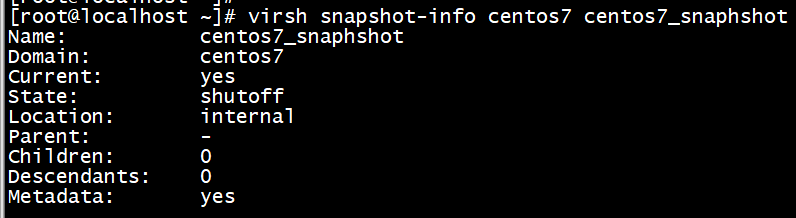
查看快照
# virsh snapshot-info centos7 centos7_snaphshot
四、恢复虚拟机快照
1、恢复虚拟机快照必须关闭虚拟机
查看虚拟机是否是关闭状态
# virsh domstate centos7

确认需要恢复的快照时间,恢复到centos7_snaphshot
# virsh snapshot-list centos7

3、执行恢复并确认恢复版本
# virsh snapshot-revert centos7 centos7_snaphshot

查看当前虚拟机镜像快照的版本
[root@localhost ~]# virsh snapshot-current centos7

<domainsnapshot>

  <name>centos7_snaphshot</name>

  <state>shutoff</state>

  <creationTime></creationTime>

  <memory snapshot='no'/>

  <disks>

    <disk name='hda' snapshot='internal'/>

    <disk name='hdc' snapshot='no'/>

  </disks>

  <domain type='kvm'>

    <name>centos7</name>

    <uuid>92827f3a-d304-dc83-5ad1-d62f2a755ca3</uuid>

    <memory unit='KiB'></memory>

    <currentMemory unit='KiB'></currentMemory>

    <vcpu placement='static'></vcpu>

    <os>

      <type arch='x86_64' machine='rhel6.5.0'>hvm</type>

      <boot dev='hd'/>

    </os>
五、 删除虚拟机快照
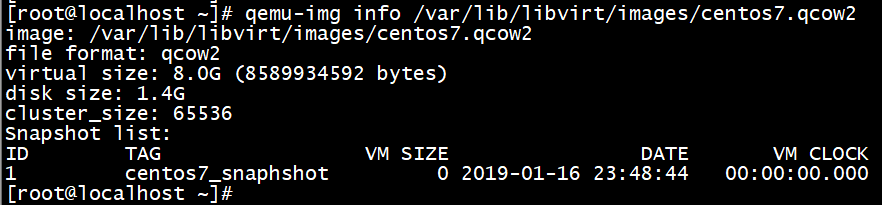
1、查看虚拟机快照
# qemu-img info /var/lib/libvirt/images/centos7.qcow2
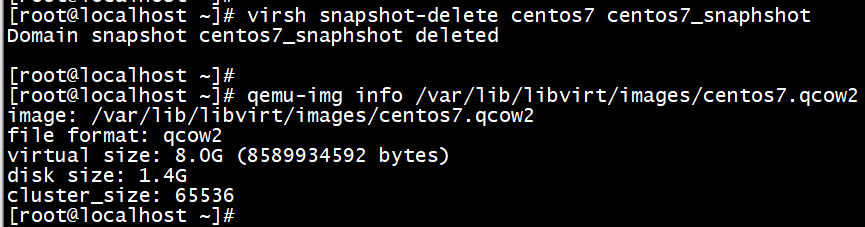
2、删除快照
# virsh snapshot-delete centos7 centos7_snaphshot

# virsh snapshot-delete centos7 centos7_snaphshot
centos6.5虚拟机快照技术的更多相关文章
- vmware vSphere克隆与快照技术
通过Web vCenter我们可以很容易的对虚拟机进行管理,通过克隆技术或创建模板,我们可以迅速的创建虚拟机,我们也可以通过快照技术去捕获虚拟机的一些状态,比如说虚拟机的内存.设置或者虚拟磁盘的情况等 ...
- KVM虚拟机快照链创建,合并,删除及回滚研究
1 QEMU,KVM,libvirt关系 QEMU QEMU提供了一个开源的服务器全虚拟化解决方案,它可以使你在特定平台的物理机上模拟出其它平台的处理器,比如在X86 CPU上虚拟出Power的CPU ...
- 再谈 COW、ROW 快照技术
目录 目录 前言 快照与备份的区别 快照技术 增量快照之 COW 增量快照之 row 前言 在经过了一段时间的实践之后,再次回顾 COW/ROW 快照技术的实现原理,温故而知新. 快照与备份的区别 传 ...
- Redhat6.x下如何制作虚拟机快照和镜像封装
一.虚拟机快照 1.确认你的物理机上的vg还有足够的剩余空间 [root@hacker ~]# vgs VG #PV #LV #SN Attr VSize VFree vg_ ...
- centos6.6 虚拟机集群搭建
1.centosos6.6下载 windows 64位: thunder://QUFodHRwOi8vbGludXguemh1YW5neGl0b25nLmNvbTo4MDgvMjAxNTAxL0Nlb ...
- 分布式存储 CentOS6.5虚拟机环境搭建FastDFS-5.0.5集群(转载-2)
原文:http://www.cnblogs.com/PurpleDream/p/4510279.html 分布式存储 CentOS6.5虚拟机环境搭建FastDFS-5.0.5集群 前言: ...
- vmware克隆Centos6.7虚拟机网卡无法启动问题
快速处理办法: cat /etc/sysconfig/network-scripts/ifcfg-eth0 sed -i '/UUID/d' /etc/sysconfig/network-script ...
- kvm+libvirt虚拟机快照浅析[转]
浅析snapshots, blockcommit,blockpull 作者:Kashyap Chamarthy <kchamart#redhat.com> Date: Tue, 23 Oc ...
- centos6.5虚拟机无法访问外网解决办法
安装了centos6.5虚拟机,使用的是桥接方式.把所有的配置已经写到/etc/sysconfig/network-scripts/ifcfg-eth0中后,发现内网可以ping通,外网却无法访问. ...
随机推荐
- 浅谈log4j-3-不同输出样式
public static void main(String[] args) { Logger logger=Logger.getLogger(Appendable.class); //设置输出等级 ...
- LNMP环境包安装IonCube教程
ioncube是业内优秀的php加密解密解决方案.和zend guard相比,ioncube具有如下优势: 1. 安全:zend guard的版本不是非常安全,网络上有破解使用zend,下面我们来看I ...
- Go Example--打点器
package main import ( "time" "fmt" ) func main() { // 定时器 是当你想要在未来某一刻执行一次时使用的 - ...
- 【liunx】时间处理函数
一.脚本示例 [mylinuxaccount@linux01 ~]$ date +%Y%m%d 20171224 [mylinuxaccount@linux01 ~]$ date +%F 2017-1 ...
- day20kafka
Storm上游数据源之Kakfa PS:什么是kafka,为什么要学习它? http://blog.csdn.net/zcf_0923/article/details/70859535http://b ...
- vue全家桶+Koa2开发笔记(3)--mongodb
1. 安装 momgodb brew install mongodb安装成功后执行 which mongod启动:mongod 2. 下载可视化操作数据库的软件 https://robomongo.o ...
- mysql数据库优化方法大数据量查询轻松解决
1.对查询进行优化,应尽量避免全表扫描,首先应考虑在 where 及 order by 涉及的列上建立索引. 2.应尽量避免在 where 子句中对字段进行 null 值判断,否则将导致引擎放弃使用索 ...
- Linux之chgrp
命令功能: 在lunix系统里,文件或目录的权限的掌控以拥有者及所诉群组来管理.可以使用chgrp指令取变更文件与目录所属群组,这种方式采用群组名称或群组识别码都可以.Chgrp命令就是change ...
- console call的fallback console 兼容
(function() { var noop = function noop() {}; var methods = [ 'assert', 'clear', 'count', 'debug', 'd ...
- CEF中弹出窗口的处理
CEF开发如果不想在弹出窗口中打开网页,即想要在当前窗体加载目标Url, 就需要重写OnBeforePopup,它是属于CefLifeSpanHandler类中的. /*--cef(optional_ ...