
[nginx] 从源码编译安装NGINX
nginx通过rpm包进行的安装和配置:
[web][nginx] 初识nginx -- 使用nginx搭建https DPI解码测试环境
现在,要通过源码进行安装。
参考:https://nginx.org/en/docs/configure.html
1. 下载PCRE-8.41 https://ftp.pcre.org/pub/pcre/ 并解压。
2. 安装 zlib
yum install zlib-devel
3. configure
root@D128 ~/S/nginx-1.13.# ./configure --prefix=/root/BUILD --with-pcre=/root/Src/pcre-8.41/
root@D128 ~/S/nginx-1.13.9# make
4. 安装
root@D128 ~/S/nginx-1.13.# make install
安装完了,在这里
root@D128 ~/BUILD# ls

client_body_temp/  conf/  fastcgi_temp/  html/  logs/  proxy_temp/  sbin/  scgi_temp/  uwsgi_temp/
5. 启动,
执行这个程序,就会用默认配置启动了。
/root/BUILD/sbin/nginx
但是,关掉iptables,selinux之后,依然报错
// :: [error] #: * "/root/BUILD/html/index.html" is forbidden (: Permission denied), client: 127.0.0.1, server: localhost, request: "GET / HTTP/1.1", host: "127.0.0.1"

// :: [error] #: * "/root/BUILD/html/index.html" is forbidden (: Permission denied), client: 127.0.0.1, server: localhost, request: "GET / HTTP/1.1", host: "127.0.0.1"
原来是因为我放在了 /root/目录下,root的目录权限导致了这个问题。
root@D128 /# chmod root/
6 GDB
默认编译文件objs/Makefile就是-g的,所以默认就能gdb
https://www.ibm.com/developerworks/cn/linux/l-cn-gdbmp/
(gdb) set follow-fork-mode child
在fork后的子进程中设置断点:
(gdb) b ngx_daemon.c:

Breakpoint  at 0x42f014: file src/os/unix/ngx_daemon.c, line .
nginx的进程启动大流程: (配置文件的初始化在第一次fork之前进行。)
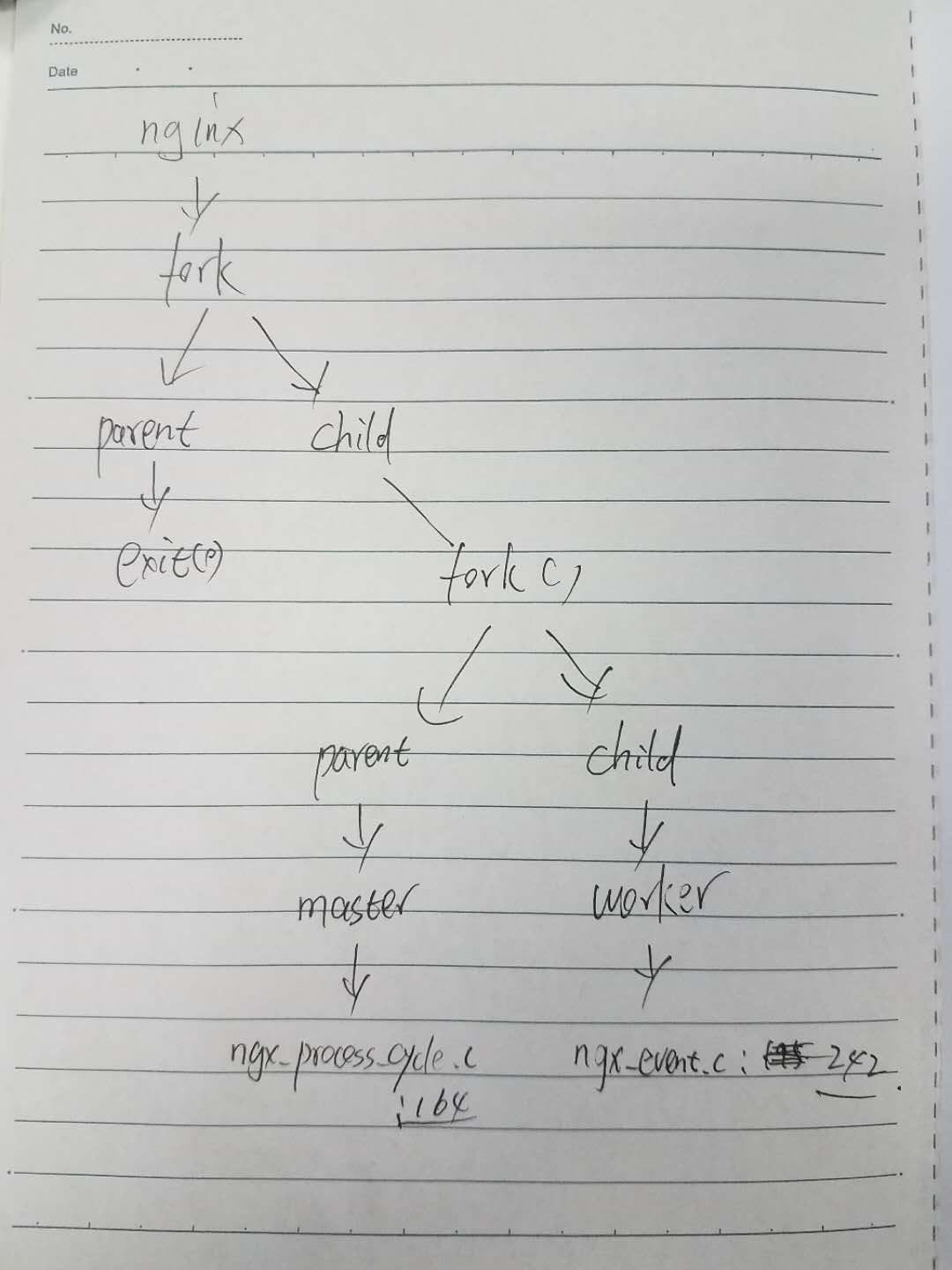
7. loction
http://nginx.org/en/docs/http/ngx_http_core_module.html#location
今天重点研究的侧重点是location与pcre的问题,用来提升7层LB的性能。
现在,要搞清楚下面两个函数的调用契机和逻辑
ngx_http_core_find_config_phase
ngx_http_core_find_location 调用了 PCRE (ngx_http_regex_exec -> pcre_exec)
ngx_http_core_location
ngx_http_core_regex_location 调用了PCRE (ngx_http_regex_compile)
从如下代码中可以发现,该ngx_http_core_location函数用于做location关键字的配置
src/http/ngx_http_core_module.c: line 273
      { ngx_string("location"),

        NGX_HTTP_SRV_CONF|NGX_HTTP_LOC_CONF|NGX_CONF_BLOCK|NGX_CONF_TAKE12,

        ngx_http_core_location,

        NGX_HTTP_SRV_CONF_OFFSET,

        ,

        NULL },
[nginx] 从源码编译安装NGINX的更多相关文章
- CentOS7 源码编译安装Nginx
源码编译安装nginx 1.下载nginx源码包(这里以nginx-1.18.0为例) wget http://nginx.org/download/nginx-1.18.0.tar.gz 2 ...
- 源码编译安装nginx及设置开机启动项
1.上传nginx文档:解压到/data目录下,并安装依赖包tar xf nginx-1.20.1.tar.gz -C /data/cd /data/nginx-1.20.1/ && ...
- Linux系统 - 源码编译安装Nginx
什么是Nginx? Nginx ("engine x") 是一个高性能的 HTTP 和 反向代理 服务器,也是一个 IMAP/POP3/SMTP 代理服务器,在高连接并发的情况下N ...
- Centos7通过yum跟源码编译安装Nginx
源码编译安装 http://nginx.org/en/download.html 到官网下载,然后用XFTP上传到root目录 把文件解压出来 tar -zxvf nginx-1.16.0.tar.g ...
- Ubuntu 16.04源码编译安装nginx 1.10.0
一.下载相关的依赖库 pcre 下载地址 http://120.52.73.43/jaist.dl.sourceforge.net/project/pcre/pcre/8.38/pcre-8.38.t ...
- 源码编译安装nginx
安装依赖软件 1.安装编译工具gcc gcc是一个开源编译器集合,用于处理各种各样的语言:C.C++.Java.Ada等,在linux世界中是最通用的编译器,支持大量处理器:x86.AMD64.Pow ...
- Centos6.5源码编译安装nginx
1.安装pcre下载地址:http://jaist.dl.sourceforge.net/project/pcre/pcre/8.38/pcre-8.38.tar.gz #tar -axvf pcre ...
- CentOS 7 源码编译安装 Nginx
这里安装的是nginx 1.14版本 1.下载源码 #下载 wget http://nginx.org/download/nginx-1.14.0.tar.gz #解压 tar -xzf nginx- ...
- CentOS中源码编译安装Nginx
1.从官网通过wget命令将Nginx源码包下载到Linux上 Nginx下载页面:http://nginx.org/en/download.html 2.在Linux上安装需要依赖的环境 yum ...
随机推荐
- sql in not in 案例用 exists not exists 代替
from AppStoke B WHERE B.Opencode=A.Code) in用extist代替 select distinct * from Stoke where Code not in ...
- InstallShield:卸载时文字叠加,文字乱码
问题: InstallShield2010打包的程序.如果程序正在运行,卸载程序,提示关闭程序,然后消息界面出现文字叠加. 定位问题: 新建Installshield项目,依次修改SetupType, ...
- 根据IP获取国家
国外的还算比较权威的IP地址库,而且免费,每天调用次数不超过1000免费.超过另收费. public string Ip2Country(string ip) { try { string url = ...
- Active Directory Authentication in ASP.NET MVC 5 with Forms Authentication and Group-Based Authorization
I know that blog post title is sure a mouth-full, but it describes the whole problem I was trying to ...
- CentOS 添加 Oracle YUM 源
最新文章:Virson's Blog 文章来自:Oracle 官方 YUM 源 Introduction The Oracle public yum server offers a free and ...
- 牛客网_Go语言相关练习_选择题(3)
题目来源于牛客网 一.选择题 Go语言自带垃圾回收机制. 如果是值传递的话子函数对map修改不会影响父函数中的map,如果是地址传递则会影响. go语言编译器会自动在以标识符.数字字面量.字母字面量. ...
- 小程序url传参如何写变量
<navigator url="../../pages/newsDetail/newsDetail?id={{news.id}}"> <view class=&q ...
- golang net/http 包
https://studygolang.com/articles/9467 https://www.jianshu.com/p/be3d9cdc680b 客户端: 用来发送请求, 并处理返回结果. 涉 ...
- 设计模式-结构型模式,python桥接模式
桥接模式 桥接(Bridge)是用于把抽象化与实现化解耦,使得二者可以独立变化.这种类型的设计模式属于结构型模式,它通过提供抽象化和实现化之间的桥接结构,来实现二者的解耦. 这种模式涉及到一个作为桥接 ...
- [JS] Topic - Object.create vs new
故事背景 Ref: 你不知道的javascript之Object.create 和new区别 var Base = function () {} (1) var o1 = new Base(); (2 ...