
[nginx] 从源码编译安装NGINX
nginx通过rpm包进行的安装和配置:
[web][nginx] 初识nginx -- 使用nginx搭建https DPI解码测试环境
现在,要通过源码进行安装。
参考:https://nginx.org/en/docs/configure.html
1. 下载PCRE-8.41 https://ftp.pcre.org/pub/pcre/ 并解压。
2. 安装 zlib
yum install zlib-devel
3. configure
root@D128 ~/S/nginx-1.13.# ./configure --prefix=/root/BUILD --with-pcre=/root/Src/pcre-8.41/
root@D128 ~/S/nginx-1.13.9# make
4. 安装
root@D128 ~/S/nginx-1.13.# make install
安装完了,在这里
root@D128 ~/BUILD# ls

client_body_temp/  conf/  fastcgi_temp/  html/  logs/  proxy_temp/  sbin/  scgi_temp/  uwsgi_temp/
5. 启动,
执行这个程序,就会用默认配置启动了。
/root/BUILD/sbin/nginx
但是,关掉iptables,selinux之后,依然报错
// :: [error] #: * "/root/BUILD/html/index.html" is forbidden (: Permission denied), client: 127.0.0.1, server: localhost, request: "GET / HTTP/1.1", host: "127.0.0.1"

// :: [error] #: * "/root/BUILD/html/index.html" is forbidden (: Permission denied), client: 127.0.0.1, server: localhost, request: "GET / HTTP/1.1", host: "127.0.0.1"
原来是因为我放在了 /root/目录下,root的目录权限导致了这个问题。
root@D128 /# chmod root/
6 GDB
默认编译文件objs/Makefile就是-g的,所以默认就能gdb
https://www.ibm.com/developerworks/cn/linux/l-cn-gdbmp/
(gdb) set follow-fork-mode child
在fork后的子进程中设置断点:
(gdb) b ngx_daemon.c:

Breakpoint  at 0x42f014: file src/os/unix/ngx_daemon.c, line .
nginx的进程启动大流程: (配置文件的初始化在第一次fork之前进行。)
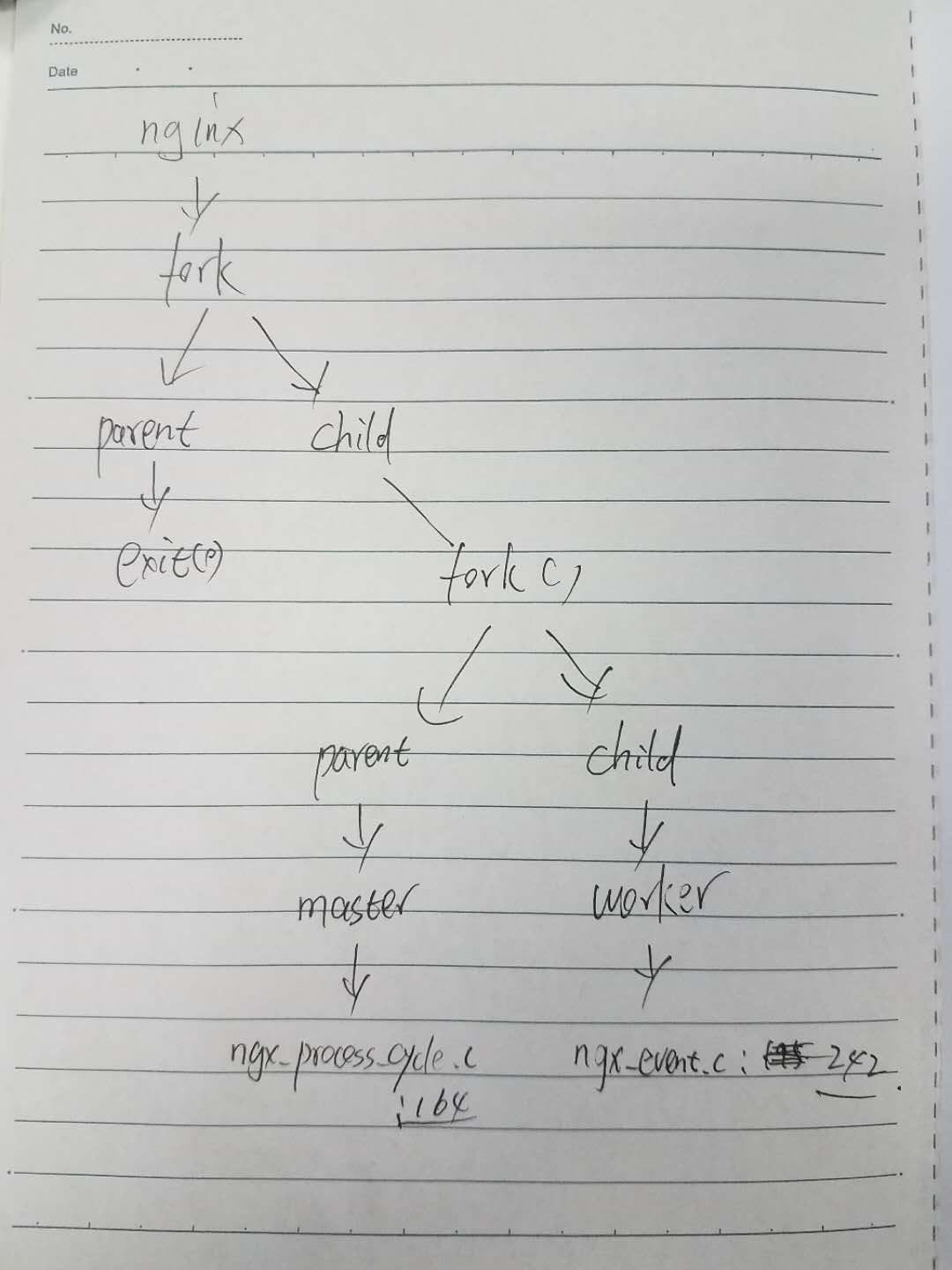
7. loction
http://nginx.org/en/docs/http/ngx_http_core_module.html#location
今天重点研究的侧重点是location与pcre的问题,用来提升7层LB的性能。
现在,要搞清楚下面两个函数的调用契机和逻辑
ngx_http_core_find_config_phase
ngx_http_core_find_location 调用了 PCRE (ngx_http_regex_exec -> pcre_exec)
ngx_http_core_location
ngx_http_core_regex_location 调用了PCRE (ngx_http_regex_compile)
从如下代码中可以发现,该ngx_http_core_location函数用于做location关键字的配置
src/http/ngx_http_core_module.c: line 273
      { ngx_string("location"),

        NGX_HTTP_SRV_CONF|NGX_HTTP_LOC_CONF|NGX_CONF_BLOCK|NGX_CONF_TAKE12,

        ngx_http_core_location,

        NGX_HTTP_SRV_CONF_OFFSET,

        ,

        NULL },
[nginx] 从源码编译安装NGINX的更多相关文章
- CentOS7 源码编译安装Nginx
源码编译安装nginx 1.下载nginx源码包(这里以nginx-1.18.0为例) wget http://nginx.org/download/nginx-1.18.0.tar.gz 2 ...
- 源码编译安装nginx及设置开机启动项
1.上传nginx文档:解压到/data目录下,并安装依赖包tar xf nginx-1.20.1.tar.gz -C /data/cd /data/nginx-1.20.1/ && ...
- Linux系统 - 源码编译安装Nginx
什么是Nginx? Nginx ("engine x") 是一个高性能的 HTTP 和 反向代理 服务器,也是一个 IMAP/POP3/SMTP 代理服务器,在高连接并发的情况下N ...
- Centos7通过yum跟源码编译安装Nginx
源码编译安装 http://nginx.org/en/download.html 到官网下载,然后用XFTP上传到root目录 把文件解压出来 tar -zxvf nginx-1.16.0.tar.g ...
- Ubuntu 16.04源码编译安装nginx 1.10.0
一.下载相关的依赖库 pcre 下载地址 http://120.52.73.43/jaist.dl.sourceforge.net/project/pcre/pcre/8.38/pcre-8.38.t ...
- 源码编译安装nginx
安装依赖软件 1.安装编译工具gcc gcc是一个开源编译器集合,用于处理各种各样的语言:C.C++.Java.Ada等,在linux世界中是最通用的编译器,支持大量处理器:x86.AMD64.Pow ...
- Centos6.5源码编译安装nginx
1.安装pcre下载地址:http://jaist.dl.sourceforge.net/project/pcre/pcre/8.38/pcre-8.38.tar.gz #tar -axvf pcre ...
- CentOS 7 源码编译安装 Nginx
这里安装的是nginx 1.14版本 1.下载源码 #下载 wget http://nginx.org/download/nginx-1.14.0.tar.gz #解压 tar -xzf nginx- ...
- CentOS中源码编译安装Nginx
1.从官网通过wget命令将Nginx源码包下载到Linux上 Nginx下载页面:http://nginx.org/en/download.html 2.在Linux上安装需要依赖的环境 yum ...
随机推荐
- Basic SAP Data Types
Basic SAP Data Types 6 out of 11 rated this helpful - Rate this topic The parameter types that the M ...
- cuda和显卡驱动版本
TensorFlow安装时需要cuda+对应的显卡驱动.这里给出英伟达官方的cuda和驱动的对应: 地址在这里 然后在这里可下载最新的显卡驱动(英伟达公版的驱动,程序员友好型) 最后说一下我的Tens ...
- nginx下wordpress 固定链接问题
情况是这样的, 我的wordpress并不是放在网站的根目录的,而是放在/blog目录下的,然后在wordpress中设置固定链接的时候,每次都出错,用了网上几个方法都不行,后来在http://cod ...
- Java知多少(81)框架窗口基础
窗口是GUI编程的基础,小应用程序或图形界面的应用程序的可视组件都放在窗口中,在GUI中,窗口是用户屏幕的一部分,起着在屏幕中一个小屏幕的作用.有以下三种窗口: Applet窗口:Applet类管理这 ...
- Docker入门学习总结
1. 什么是Docker Docker是一种虚拟化技术,其在容器的基础上进一步封装了文件系统.网络互联.进程隔离等等,从而极大地简化了容器的创建和维护.Docker使用 Google 公司推出的 Go ...
- file类型input框设置上传相同文件,并都可以触发change事件。
在使用file类型input框是,删除了第一次上传到文件,再次上传相同文件,无法触发change事件,所以在删除的js上添加如下js代码: document.getElementById('fileU ...
- Mybatis 的 xml 文件语法错误,启动项目时控制台一直循环解析但是不打印错误
重写SqlSessionFactoryBean的buildSqlSessionFactory方法: eg: package com.slp; import java.io.IOException; i ...
- Django之ORM版学员管理系统
班级表 表结构 class Class(models.Model): id = models.AutoField(primary_key=True) # 主键 cname = models.CharF ...
- JavaScript----特效代码
1.不同时间段显示不同问候语 <Script Language="JavaScript"> <!-- var text=""; day = n ...
- Men and women can't be 'just friends
Men and women can't be 'just friends' Can heterosexual men and women ever be "just friends" ...