
C#使用HttpWebRequest与HttpWebResponse模拟用户登录
模拟艺龙旅游网登录
想模拟登录,首先整理一下流程
1.通过360浏览器(IE,火狐等等)F12开发人员工具抓到相关数据
2.获取验证码(拿到cookie),登录时也需要使用
3.登录
-------------------------------
F12调出开发人员工具,输入用户名,密码登录,看我们抓到了什么信息。
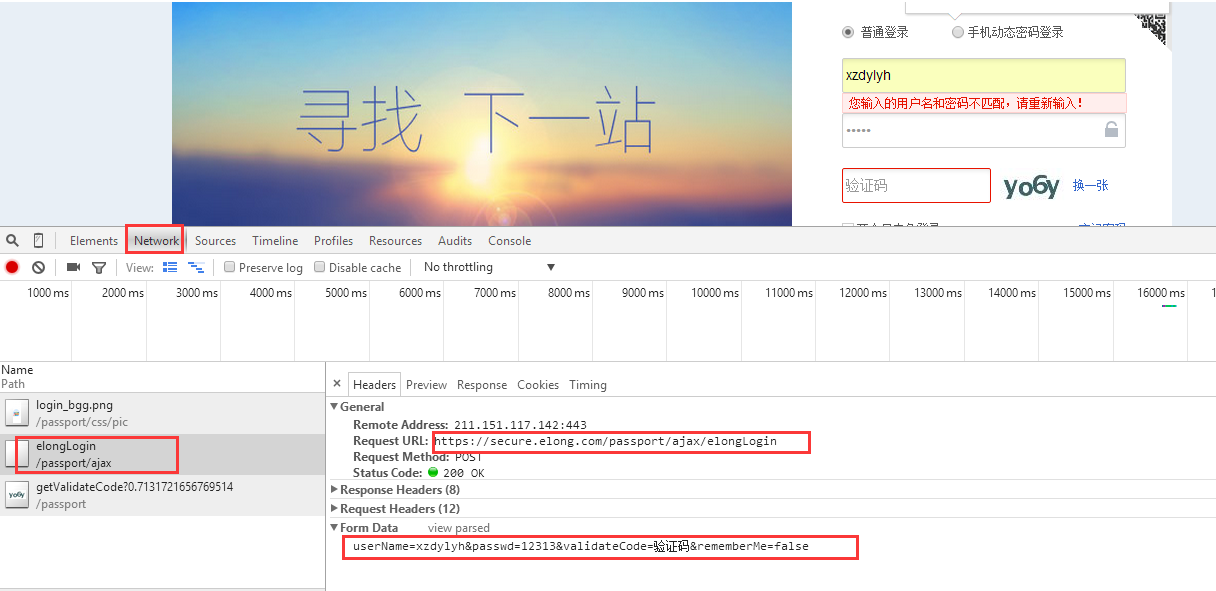
Form Data:这个是我们要POST传输的数据:
userName=xzdylyh&passwd=12313&validateCode=验证码&rememberMe=false
其它一些重要信息在Request Headers中
*****************************************************************
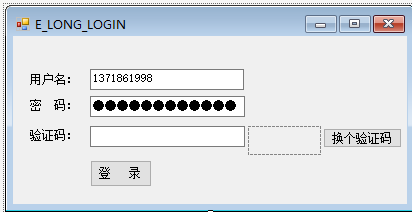
我使用C# 设计的winform界面
using System;

using System.Collections.Generic;

using System.Linq;

using System.Text;

using System.Threading.Tasks;

using System.Web;

using System.Net;

using System.IO;

using System.Data;

namespace HTTPHELPER

{

    public  class ELOGN_LOGIN

    {

       public static CookieContainer container = null; //存储验证码cookie

        #region 登录

        public string  requestM(string uName,string passwd,string vaildate)

        {

            HttpWebRequest request = null;

            HttpWebResponse response = null;

            try

            {

                request = (HttpWebRequest)HttpWebRequest.Create("https://secure.elong.com/passport/ajax/elongLogin");

                request.Method = "Post";

                request.ContentType = "application/x-www-form-urlencoded; charset=UTF-8";

                request.UserAgent = "Mozilla/5.0 (Windows NT 10.0; WOW64) AppleWebKit/537.36 (KHTML, like Gecko) Chrome/45.0.2454.101 Safari/537.36";

                request.AllowAutoRedirect = true;

                request.CookieContainer = container;//获取验证码时候获取到的cookie会附加在这个容器里面

                request.KeepAlive = true;//建立持久性连接

                //整数据

                string postData = string.Format("userName={0}&passwd={1}&validateCode={2}&rememberMe=true", uName, passwd, vaildate);

                ASCIIEncoding encoding = new ASCIIEncoding();

                byte[] bytepostData = encoding.GetBytes(postData);

                request.ContentLength = bytepostData.Length;

                //发送数据  using结束代码段释放

                using (Stream requestStm = request.GetRequestStream())

                {

                    requestStm.Write(bytepostData, , bytepostData.Length);

                }

                //响应

                response = (HttpWebResponse)request.GetResponse();

                string text = string.Empty;

                using (Stream responseStm = response.GetResponseStream())

                {

                    StreamReader redStm = new StreamReader(responseStm, Encoding.UTF8);

                    text = redStm.ReadToEnd();

                }

               return text;

            }

            catch (Exception ex)

            {

                var msg = ex.Message;

                return msg;

            }

        }

        #endregion

        #region 获取验证码

        public Stream getCodeStream(string codeUrl)

        {

            //验证码请求

           HttpWebRequest request = (HttpWebRequest)WebRequest.Create(codeUrl);

            request.Method = "GET";

            request.ContentType = "application/x-www-form-urlencoded";

            request.UserAgent = "Mozilla/5.0 (Windows NT 6.1; WOW64; rv:5.0.1) Gecko/20100101 Firefox/5.0.1";

            request.Accept = "image/webp,*/*;q=0.8";

            request.CookieContainer = new CookieContainer();//!Very Important.!!!

            container = request.CookieContainer;

            var c = request.CookieContainer.GetCookies(request.RequestUri);

            HttpWebResponse  response = (HttpWebResponse)request.GetResponse();

            response.Cookies = container.GetCookies(request.RequestUri);

          Stream stream = response.GetResponseStream();

          return stream;

        }

    }

        #endregion

}
using System;

using System.Collections.Generic;

using System.ComponentModel;

using System.Data;

using System.Drawing;

using System.Linq;

using System.Text;

using System.Threading.Tasks;

using System.Windows.Forms;

using System.IO;

using HTTPHELPER;

namespace WindowsFormsApplication8

{

    public partial class ELONG_LOGIN_FORM : Form

    {

        public ELONG_LOGIN_FORM()

        {

            InitializeComponent();

        }

        private void button1_Click(object sender, EventArgs e)

        {

            ELOGN_LOGIN elongLogin = new ELOGN_LOGIN();

            var rmsg = elongLogin.requestM(txtuserName.Text,txtPassword.Text,txtVaildata.Text);

            MessageBox.Show(rmsg);

        }

        private void ELONG_LOGIN_FORM_Load(object sender, EventArgs e)

        {

            ReflshPicImage();//更新验证码

        }

        //更新验证码

        public void ReflshPicImage()

        {

            string codeUrl = "https://secure.elong.com/passport/getValidateCode";

            ELOGN_LOGIN agent = new ELOGN_LOGIN();

            Stream stmImage = agent.getCodeStream(codeUrl);

            picValidate.Image = Image.FromStream(stmImage);

        }

        private void btnReValidate_Click(object sender, EventArgs e)

        {

            ReflshPicImage();//更新验证码

        }

        private void picValidate_Click(object sender, EventArgs e)

        {

            ReflshPicImage();//更新验证码

        }

    }

}
最后执行效果,登录的session已经成功返回。

C#使用HttpWebRequest与HttpWebResponse模拟用户登录的更多相关文章
- C# 利用 HttpWebRequest 和 HttpWebResponse 模拟登录有验证码的网站
原文:C# 利用 HttpWebRequest 和 HttpWebResponse 模拟登录有验证码的网站 我们经常会碰到需要程序模拟登录一个网站,那如果网站需要填写验证码的要怎样模拟登录呢?这篇文章 ...
- 运用String类实现一个模拟用户登录程序
package Test; import java.util.Scanner; // 模拟用户登录程序 // 思路: // 1.用两个String类分别接收用户名和密码 // 2.判断输入的用户名和密 ...
- java.net.URL 模拟用户登录网页并维持session
java.net.URL 模拟用户登录网页并维持session 半成品,并非完全有用 import java.io.BufferedReader; import java.io.InputStream ...
- python 初学习 模拟用户登录
#!/usr/bin/env python#coding:utf-8''' 2017年8月19日 模拟用户登录,userfile 文件保存字典 用户名,和密码 sorryname 文件保存字典 登录过 ...
- python3.0 模拟用户登录,三次错误锁定
# -*- coding:utf-8 -*- #需求模拟用户登录,超过三次错误锁定不允许登陆 count = 0 #realname passwd Real_Username = &quo ...
- xpath技术解析xml以及案例模拟用户登录效果
问题:当使用dom4j查询比较深的层次结构的节点(标签,属性,文本),比较麻烦!!! xpath就在此情况下产生了--主要是用于快速获取所需的[节点对象]. 在dom4j中如何使用xPath技术 1) ...
- jdbc封装模拟用户登录
dao层 接口 package com.qu.dao; public interface ILoginDAO { /** * 模拟用户登录 * 验证用户名 密码是否正确 * select * from ...
- scrapy模拟用户登录
scrapy框架编写模拟用户登录的三种方式: 方式一:携带cookie登录,携带cookie一般请求的url为登录后的页面,获取cookie信息应在登录后的页面获取,cookie参数应转成字典形式 # ...
- java.net.URL 模拟用户登录网页并维持session【转】
java.net.URL 模拟用户登录网页并维持session 半成品,并非完全有用 import java.io.BufferedReader; import java.io.InputStream ...
随机推荐
- <转>记dynamic的一个小坑 -- RuntimeBinderException:“object”未包含“xxx”的定义
→转载地址← 创建一个控制台程序和一个类库, 在控制台创建一个匿名对象,然后再在类库中访问它,代码如下: namespace ConsoleApplication1 { class Program { ...
- {django模型层(二)多表操作}一 创建模型 二 添加表记录 三 基于对象的跨表查询 四 基于双下划线的跨表查询 五 聚合查询、分组查询、F查询和Q查询
Django基础五之django模型层(二)多表操作 本节目录 一 创建模型 二 添加表记录 三 基于对象的跨表查询 四 基于双下划线的跨表查询 五 聚合查询.分组查询.F查询和Q查询 六 xxx 七 ...
- 1.7Oob成员变量和局部变量疑难区分
import java.util.Scanner; public class booleann { private float fWidth; private float fHeight; void ...
- malloc函数 链表
https://baike.baidu.com/item/malloc函数 malloc的全称是memory allocation,中文叫动态内存分配,用于申请一块连续的指定大小的内存块区域以void ...
- json解析出来数据为空解决方法
从APP端或从其他页面post,get过来的数据一般因为数组形式.因为数组形式不易传输,所以一般都会转json后再发送.本以为发送方json_encode(),接收方json_decode(),就解决 ...
- Scaleform Gfx的Demo
转载:http://www.xuebuyuan.com/2167614.html 新建一个Demo工程时,编译之前有一些VS的配置是必须的,在Debug和Release下,工程必须包括: $(GFXS ...
- django2.0内置分页
#导入分页器from django.core.paginator import Paginator 1视图逻辑 #读取数据库 res = Product.objects.all() #建立分页器对象 ...
- u-boot 编译,启动流程分析,移植
分析u-boot-1.1.6 的启动流程 移植u-boot 2012.04版本到JZ2440开发板 源码百度云链接:https://pan.baidu.com/s/10VnxfDWBqJVGY3SCY ...
- sql分页语句 速度比较快
select * from ( select *,ROW_NUMBER() over (order by createtime) as rank from taskInfo )
- JavaScript 数组(Array)对象
1.Array相关的属性和方法 Array对象属性 constructor 返回对创建此对象的数组函数的引用: length 设置或返回数组中元素的数目: prototype 使您有能力向对象添加属性 ...