
iOS webview加载时序和缓存问题总结
iOS webView的加载时序
UIWebView加载顺序:
- (BOOL)webView:(UIWebView *)webView shouldStartLoadWithRequest:(NSURLRequest *)request navigationType:(UIWebViewNavigationType)navigationType {

   NSLog(@"开始请求webview:%@",request.URL.relativeString);

   return YES;

}

 - (void)webViewDidStartLoad:(UIWebView *)webView {

       NSLog(@"开始加载webview");
}

- (void)webViewDidFinishLoad:(UIWebView *)webView {

      NSLog(@"结束加载webview");
}

- (void)webView:(UIWebView *)webView didFailLoadWithError:(nonnull NSError *)error {

     NSLog(@"webView加载失败");

 }
加载的结果:
-- ::00.535 H5页面调试[:] 开始请求webview:http://xxxx/index1.html

-- ::00.537 H5页面调试[:] 开始加载webview

-----------------显示开始加载html CSS js 和图片资源等(JS引擎单线程顺序执行)---------------

-- ::01.069 H5页面调试[:] 结束加载webview
WKWebView加载时序:
- (void)webView:(WKWebView *)webView decidePolicyForNavigationAction:(WKNavigationAction *)navigationAction decisionHandler:(void (^)(WKNavigationActionPolicy))decisionHandler {

    NSLog(@"webview开始请求");

    decisionHandler(WKNavigationActionPolicyAllow);

}

- (void)webView:(WKWebView *)webView didStartProvisionalNavigation:(WKNavigation *)navigation {

    NSLog(@"webView开始加载");

}

- (void)webView:(WKWebView *)webView decidePolicyForNavigationResponse:(WKNavigationResponse *)navigationResponse decisionHandler:(void (^)(WKNavigationResponsePolicy))decisionHandler {

    NSLog(@"webview开始收到响应");

    decisionHandler(WKNavigationResponsePolicyAllow);

}

-----------------显示开始加载html CSS js 和图片资源等(JS引擎单线程顺序执行)---------------

- (void)webView:(WKWebView *)webView didCommitNavigation:(WKNavigation *)navigation {

    NSLog(@"");

}

- (void)webView:(WKWebView *)webView didFinishNavigation:(WKNavigation *)navigation {

    NSLog(@"webview结束加载内容");

}

- (void)webView:(WKWebView *)webView didFailProvisionalNavigation:(WKNavigation *)navigation withError:(NSError *)error{

    NSLog(@"webview加载失败");

}

- (void)webView:(WKWebView *)webView didReceiveServerRedirectForProvisionalNavigation:(WKNavigation *)navigation{

    NSLog(@"开始重定向的函数");

}

- (void)webView:(WKWebView *)webView didReceiveAuthenticationChallenge:(NSURLAuthenticationChallenge *)challenge completionHandler:(void (^)(NSURLSessionAuthChallengeDisposition, NSURLCredential *))completionHandler

{

    NSLog(@"");

    completionHandler(NSURLSessionAuthChallengePerformDefaultHandling, nil);

}
iOS webView加载html5缓存
1.加载html5的过程
每次加载一个HTML5页面,都会有较多的请求。除了HTML主URL自身的请求外,HTML外部引用的JS、CSS、字体文件、图片都是一个独立的HTTP请求,每一个请求都串行的(可能有连接复用)。
2.设置清除html5页面缓存
html5端设置meta标签:
<meta http-equiv="Pragma" content="no-cache" /><meta http-equiv="Cache-Control" content="no-cache" /><meta http-equiv="Expires" content="0" />
ios:设置加载的网络请求不采用本地缓存和远程缓存

PS:设置上面的只是紧紧可以保证html文件每次从服务器中获取,不从缓存文件中拿,而对于外联CSS JS图片等文件仍旧是从缓存中获取的;
3.设置css JS文件不从缓存中读取
通过添加版本号的和随机数的方法,保证每次加载JS CSS连接都是最新的,通常的做法是添加一个版本号,在每次更新了JS CSS时给版本号+1;保证没有更新时采用缓存文件
有更新可以从服务中获取;
解决方法
1、随机数法

方法一:

  document.write( " <script src='test.js?rnd= " + Math.random() + " '></s " + " cript> " )

方法二:

var js = document.createElement( " script " )

js.src = " test.js " + Math.random()

document.body.appendChild(js)

这样采用随机数的话, js文件将永远得不到缓存,每次都必须重新从服务器加载,即使没有任何更改。

大家如果经常上国外网站的话,可以看到他们通常采用这样的方式来解决:

<script src="test.js?ver=113"></script>

其中 ver=113 的 113就是版本号

这样真正做到了应该缓存的时候缓存静态文件,当版本有更新的时候从获取最新的版本,并更新缓存。

对于图像 <img src="test.jps?ver=版本号"> 来有效利用和更新缓存.
4.iOS清除缓存文件
- (void)removeWebCache{

    if ([[UIDevice currentDevice].systemVersion floatValue] >= 9.0) {

        NSSet *websiteDataTypes= [NSSet setWithArray:@[

                                                       WKWebsiteDataTypeDiskCache,

                                                       //WKWebsiteDataTypeOfflineWebApplication

                                                       WKWebsiteDataTypeMemoryCache,

                                                       //WKWebsiteDataTypeLocal

                                                       WKWebsiteDataTypeCookies,

                                                       //WKWebsiteDataTypeSessionStorage,

                                                       //WKWebsiteDataTypeIndexedDBDatabases,

                                                       //WKWebsiteDataTypeWebSQLDatabases

                                                       ]];

        // All kinds of data

        //NSSet *websiteDataTypes = [WKWebsiteDataStore allWebsiteDataTypes];

        NSDate *dateFrom = [NSDate dateWithTimeIntervalSince1970:];

        [[WKWebsiteDataStore defaultDataStore] removeDataOfTypes:websiteDataTypes modifiedSince:dateFrom completionHandler:^{

        }];

        [[NSURLCache sharedURLCache] removeAllCachedResponses];

    } else {

        //先删除cookie

        NSHTTPCookie *cookie;

        NSHTTPCookieStorage *storage = [NSHTTPCookieStorage sharedHTTPCookieStorage];

        for (cookie in [storage cookies])

        {

            [storage deleteCookie:cookie];

        }

        NSString *libraryDir = [NSSearchPathForDirectoriesInDomains(NSLibraryDirectory, NSUserDomainMask, YES) objectAtIndex:];

        NSString *bundleId  =  [[[NSBundle mainBundle] infoDictionary]

                                objectForKey:@"CFBundleIdentifier"];

        NSString *webkitFolderInLib = [NSString stringWithFormat:@"%@/WebKit",libraryDir];

        NSString *webKitFolderInCaches = [NSString

                                          stringWithFormat:@"%@/Caches/%@/WebKit",libraryDir,bundleId];

        NSString *webKitFolderInCachesfs = [NSString

                                            stringWithFormat:@"%@/Caches/%@/fsCachedData",libraryDir,bundleId];

        NSError *error;

        /* iOS8.0 WebView Cache的存放路径 */

        [[NSFileManager defaultManager] removeItemAtPath:webKitFolderInCaches error:&error];

        [[NSFileManager defaultManager] removeItemAtPath:webkitFolderInLib error:nil];

        /* iOS7.0 WebView Cache的存放路径 */

        [[NSFileManager defaultManager] removeItemAtPath:webKitFolderInCachesfs error:&error];

        NSString *cookiesFolderPath = [libraryDir stringByAppendingString:@"/Cookies"];

        [[NSFileManager defaultManager] removeItemAtPath:cookiesFolderPath error:&error];

        [[NSURLCache sharedURLCache] removeAllCachedResponses];

    }

}
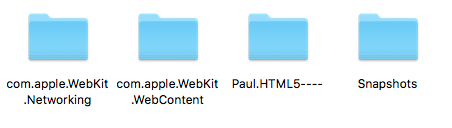
关于保存在沙盒中的缓存文件如下图:

5.针对UIWebView出现的内存泄漏方法(网上)
   - (void)webViewDidFinishLoad:(UIWebView *)webView

    {
       //防止内存泄漏

        [[NSUserDefaults standardUserDefaults] setInteger:0 forKey:@"WebKitCacheModelPreferenceKey"];
        //本地webkit硬盘图片的缓存;

        [[NSUserDefaults standardUserDefaults] setBool:NO forKey:@"WebKitDiskImageCacheEnabled"];//自己添加的,原文没有提到。
        //静止webkit离线缓存

        [[NSUserDefaults standardUserDefaults] setBool:NO forKey:@"WebKitOfflineWebApplicationCacheEnabled"];//自己添加的,,原文没有提到。

        [[NSUserDefaults standardUserDefaults] synchronize];

    }

    - (void)dealloc

    {

        [webView loadHTMLString:@"" baseURL:nil];

        [webView stopLoading];

        [webView removeFromSuperview];

        webView = nil;

        [[NSURLCache sharedURLCache] removeAllCachedResponses];

        [[NSURLCache sharedURLCache] setDiskCapacity:0];

        [[NSURLCache sharedURLCache] setMemoryCapacity:0];

        NSLog(@"释放了webview");

    }
    - (BOOL)application:(UIApplication *)application didFinishLaunchingWithOptions:(NSDictionary *)launchOptions{

          int cacheSizeMemory = 4*1024*1024; // 4MB int

          cacheSizeDisk = 32*1024*1024; // 32MB

          NSURLCache *sharedCache = [[NSURLCache alloc] initWithMemoryCapacity:cacheSizeMemory diskCapacity:cacheSizeDisk diskPath:@"nsurlcache"];

          [NSURLCache setSharedURLCache:sharedCache];

    }

    - (void)applicationDidReceiveMemoryWarning:(UIApplication *)application {

          [[NSURLCache sharedURLCache] removeAllCachedResponses];

    }
PS:经测试好像没什么卵用,先放在这里反正写了也没什么坏处
确定
1.如果没有CDN缓存影响;每次杀死APP后重新进入,第一次加载webview,都会加载全部的数据资源(外联js,外联css,图片等)退出去后,如果在没有更新js,css内容时,默认只会加载html内容,PS:html中的内容 在每次加载webView中都会从服务器中更新一下;
2.如果js css后面都添加了版本号,那么在每次更新版本号时,或者说资源链接变化时,webView一定会重新加载新的内容;如下图
<script type="text/javascript" src="index1.js?v=1.0.0"></script>
疑问?
1.经测试发现,JS CSS没有加版本号,更新JS CSS的内容有时候也会及时从服务器中更新获取,大多数时候又不会更新;不知道是不是跟web服务器的缓存策略有关,还是文件超期了?还是CDN缓存有关?
iOS webview加载时序和缓存问题总结的更多相关文章
- iOS WebView 加载本地资源(图片,文件等)
https://www.cnblogs.com/dhui69/p/5596917.html iOS WebView 加载本地资源(图片,文件等) NSString *path = [[NSBundle ...
- iOS webview加载html自定义选项框选词
项目要求:webview加载html网址,内容为英文文本,需要获取文本上的单词 这个是最终效果图: 思路是先实现自定义的选项框(不带系统选项)再获取到滑选的单词: 实现的步骤: 首先是替换掉系统长按出 ...
- ios webview 加载含有中文的URL网页显示白屏
1. ios中的webview加载的URL不可以含有中文,解决办法说将中文字符转码, 如下: - (NSString *)URLEncodeString { NSCharacterSet *set = ...
- 【iOS】WebView加载HTML图片大小自适应与文章自动换行
在很多App中都会使用到webview,尤其是在加载新闻内容等文章形式的数据时.因为图文混编以及不同字体格式的显示,在iOS进行编辑 和显示都是一大问题(当然,iOS中也可以用CoreText进行绘制 ...
- iOS网络加载图片缓存策略之ASIDownloadCache缓存优化
iOS网络加载图片缓存策略之ASIDownloadCache缓存优化 在我们实际工程中,很多情况需要从网络上加载图片,然后将图片在imageview中显示出来,但每次都要从网络上请求,会严重影响用 ...
- iOS中webView加载URL需要处理特殊字符
今天在项目中遇到webView加载URL时,因为URL中有特殊字符,导致页面无法加载,而且在- (BOOL)webView:(UIWebView )webView shouldStartLoadWit ...
- iOS使用webView加载HTML网页链接简单展示
//网页视图 _webView = [[UIWebView alloc]initWithFrame:CGRectMake(0, 64, mWidth, mHeight-64)]; _webView.d ...
- WebView加载HTML图片大小自适应与文章自动换行
http://www.brighttj.com/ios/ios-webview-load-html-image-adaptive.html 在很多App中都会使用到webview,尤其是在加载新闻内容 ...
- Android WebView加载本地html并实现Java与JS交互
最近做的一个项目中,用到自定义地图,将自定义地图转换成html页面,现在需要做的是如何将本地的html加载到android中,并可以实现交互. 相关讲解: 其实webview加载资源的速度并不慢,但是 ...
随机推荐
- yum安装包另存
yum install --downloadonly --downloaddir=/tmp <package-name> 1.yum已安装的列表 yum list installed
- 修改BlackLowKey皮肤样式,增加占屏比
页面定制CSS代码 #home { margin: 0 auto; width: 100%; } #sideBar { min-height: 200px; padding: 0 5px 0 5px; ...
- EXT3.3.1在IE9 IE10click事件 失效怎么解决
各位Ext君有福了. var treePanel = new Ext.tree.TreePanel({ id:'treePanel_'+(menuIndex++),//让菜单id可控 title: t ...
- Kaggle Titanic补充篇
1.关于年龄Age 除了利用平均数来填充,还可以利用正态分布得到一些随机数来填充,首先得到已知年龄的平均数mean和方差std,然后生成[ mean-std, mean+std ]之间的随机数,然后 ...
- Linux 文件系统扩展属性【转】
转自:https://blog.csdn.net/ganggexiongqi/article/details/7661024 扩展属性(xattrs)提供了一个机制用来将<键/值>对永久地 ...
- ubuntu cron 及 crontab 自动执行任务
Add the below line (with tweaks) to the end of /etc/crontab: 30 23 * * * root shutdown -h now At 23: ...
- CrossUI SPA Builder ---- feathers API框架
CrossUI SPA Builder: http://www.crossui.com/ 国产? 龙博(JSLINB)AJAX框架? CrossUI SPA Builderenables de ...
- eclipse指定项目编译级别
指定项目编译级别Eclipse→Preferences→Java→Compiler→Compiler compliance level:1.6或其他 或者,
- linux windows 传输文件
其中两种方式,当然,只是我自己试验的两个,其实还有别的方法,但是我也懒得实践了. 1 pscp c:\abc.sql root@192.168.1.1:/home/person/hww 2 Lrz ...
- activit流程引擎启动流程报错
代码如下: 目录结构 ProcessEngine processEngine = ProcessEngines.getDefaultProcessEngine(); @Test public void ...