
如何使用PowerDesigner设计数据库关系模式

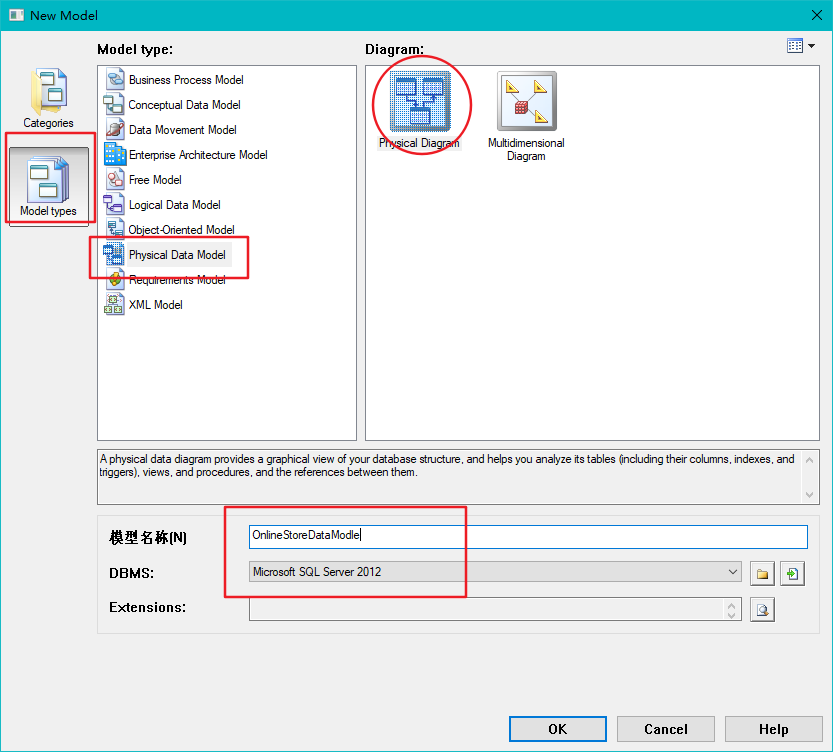


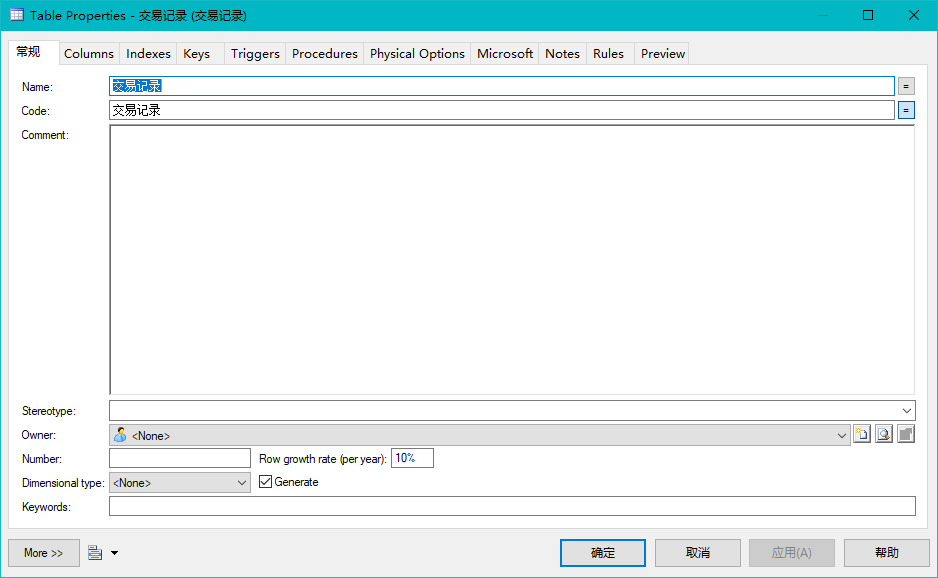
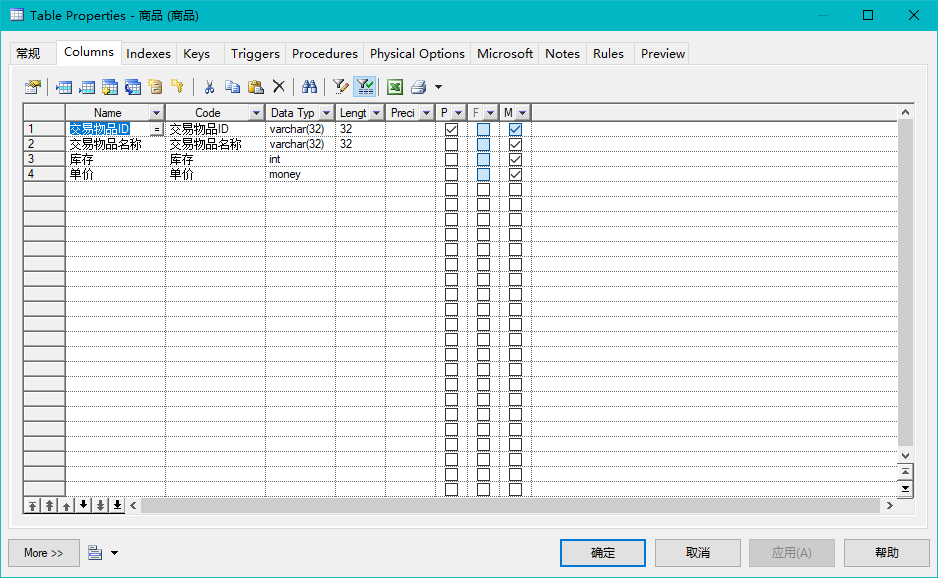

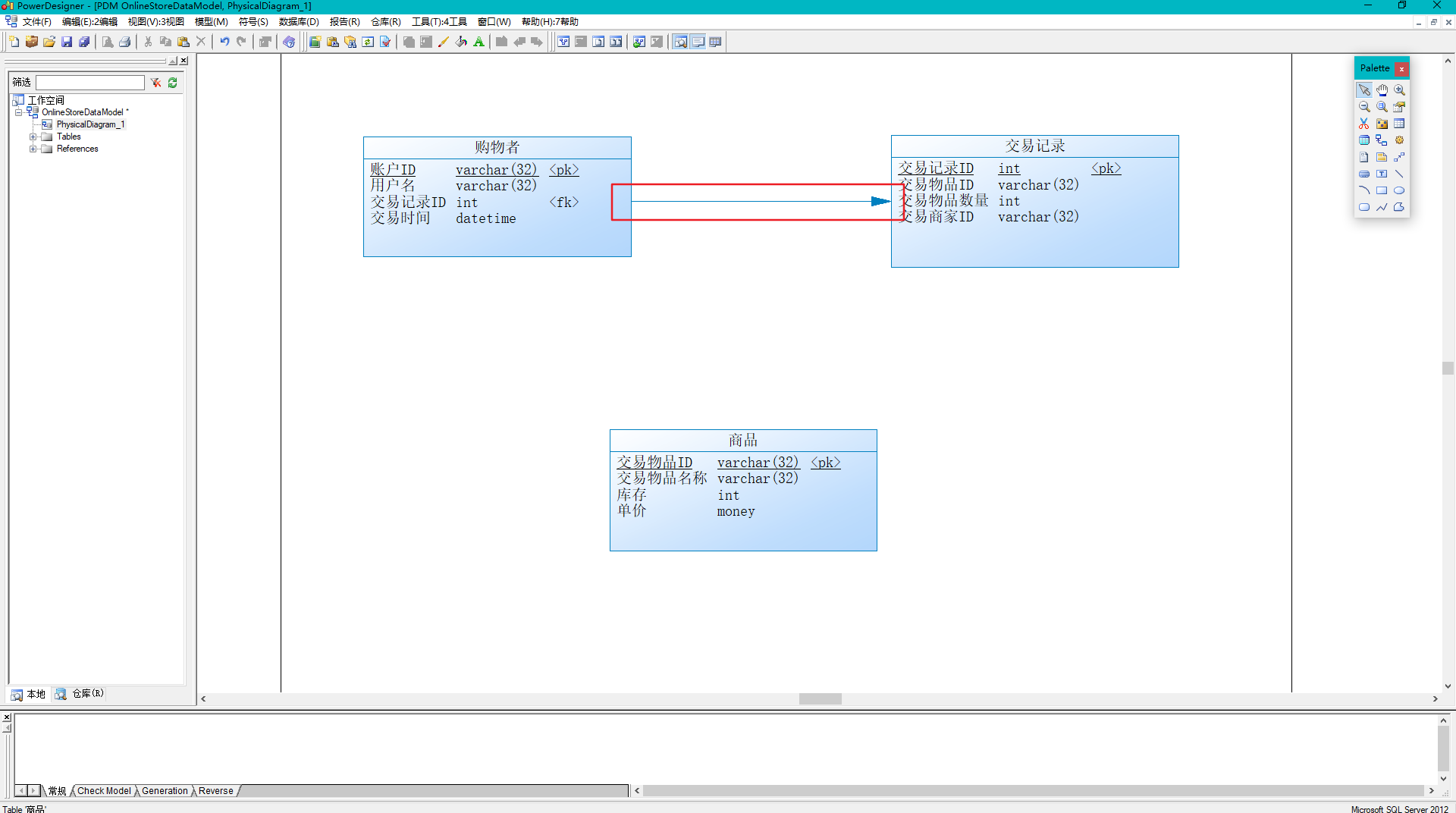


 /*==============================================================*/
 /* DBMS name:      Microsoft SQL Server 2012                    */
 /* Created on:     2018/11/25 13:42:24                          */
 /*==============================================================*/

 use "zuoye"

    from sys.sysreferences r join sys.sysobjects o on (o.id = r.constid and o.type = 'F')
    where r.fkeyid = object_id('借书者') and o.name = 'FK_借书者_FK_2_借书记录')
 alter table 借书者
    drop constraint FK_借书者_FK_2_借书记录
 go

    from sys.sysreferences r join sys.sysobjects o on (o.id = r.constid and o.type = 'F')
    where r.fkeyid = object_id('图书') and o.name = 'FK_图书_FK_1_借书记录')
 alter table 图书
    drop constraint FK_图书_FK_1_借书记录
 go

             from  sysobjects
            where  id = object_id('借书者')
             and   type = 'U')
    drop table 借书者
 go

             from  sysobjects
            where  id = object_id('借书记录')
             and   type = 'U')
    drop table 借书记录
 go

             from  sysobjects
            where  id = object_id('图书')
             and   type = 'U')
    drop table 图书
 go

 /*==============================================================*/
 /* Table: 借书者                                                   */
 /*==============================================================*/
 create table 借书者 (
    借书者编号                int                  not null,
    图书编号                 int                  null,
    借书者姓名                )          not null,
    借书数量                 int                  null,
    constraint PK_借书者 primary key (借书者编号)
 )
 go

 /*==============================================================*/
 /* Table: 借书记录                                                  */
 /*==============================================================*/
 create table 借书记录 (
    图书编号                 int                  not null,
    借书者编号                int                  null,
    期望归还时间               datetime             null,
    借书时间                 datetime             null,
    还书时间                 datetime             null,
    constraint PK_借书记录 primary key (图书编号)
 )
 go

 /*==============================================================*/
 /* Table: 图书                                                    */
 /*==============================================================*/
 create table 图书 (
    图书编号                 int                  not null,
    书名                   )          null,
    作者                   )          null,
    出版社                  )          null,
    出版日期                 datetime             null,
    库存                   int                  null,
    价格                   money                null,
    constraint PK_图书 primary key (图书编号)
 )
 go

 alter table 借书者
    add constraint FK_借书者_FK_2_借书记录 foreign key (图书编号)
       references 借书记录 (图书编号)
 go

 alter table 图书
    add constraint FK_图书_FK_1_借书记录 foreign key (图书编号)
       references 借书记录 (图书编号)
 go
 /*==============================================================*/
 /* DBMS name:      Microsoft SQL Server 2012                    */
 /* Created on:     2018/11/26 7:17:16                           */
 /*==============================================================*/

    from sys.sysreferences r join sys.sysobjects o on (o.id = r.constid and o.type = 'F')
    where r.fkeyid = object_id('交易记录') and o.name = 'FK_交易记录_REFERENCE_商品')
 alter table 交易记录
    drop constraint FK_交易记录_REFERENCE_商品
 go

    from sys.sysreferences r join sys.sysobjects o on (o.id = r.constid and o.type = 'F')
    where r.fkeyid = object_id('购物者') and o.name = 'FK_购物者_REFERENCE_交易记录')
 alter table 购物者
    drop constraint FK_购物者_REFERENCE_交易记录
 go

             from  sysobjects
            where  id = object_id('交易记录')
             and   type = 'U')
    drop table 交易记录
 go

             from  sysobjects
            where  id = object_id('商品')
             and   type = 'U')
    drop table 商品
 go

             from  sysobjects
            where  id = object_id('购物者')
             and   type = 'U')
    drop table 购物者
 go

 /*==============================================================*/
 /* Table: 交易记录                                                  */
 /*==============================================================*/
 create table 交易记录 (
    交易记录ID               int                  not null,
    交易物品ID               )          not null,
    交易物品数量               int                  not null,
    交易商家ID               )          not null,
    constraint PK_交易记录 primary key (交易记录ID)
 )
 go

 /*==============================================================*/
 /* Table: 商品                                                    */
 /*==============================================================*/
 create table 商品 (
    交易物品ID               )          not null,
    交易物品名称               )          not null,
    库存                   int                  not null,
    单价                   money                not null,
    constraint PK_商品 primary key (交易物品ID)
 )
 go

 /*==============================================================*/
 /* Table: 购物者                                                   */
 /*==============================================================*/
 create table 购物者 (
    账户ID                 )          not null,
    用户名                  )          not null,
    交易记录ID               int                  not null,
    交易时间                 datetime             not null,
    constraint PK_购物者 primary key (账户ID)
 )
 go

 alter table 交易记录
    add constraint FK_交易记录_REFERENCE_商品 foreign key (交易物品ID)
       references 商品 (交易物品ID)
 go

 alter table 购物者
    add constraint FK_购物者_REFERENCE_交易记录 foreign key (交易记录ID)
       references 交易记录 (交易记录ID)
 go
如何使用PowerDesigner设计数据库关系模式的更多相关文章
- 采用PowerDesigner 设计数据库
PowerDesigner设计数据库的教程网上都有,最好的是我一位同学写的,地址: 点击这里 我的大致流程如下: 首先要以管理员的身份打开PowerDesigner,如果没这么做,将导致后面无法创建S ...
- PowerDesigner 设计数据库中常用脚本
PowerDesigner 设计数据库中常用脚本 数据库设计 物理模型设置 Name转Comment脚本 '********************************************** ...
- 新手学习数据库(一)用Powerdesigner设计数据库
说明: 一.学会用开发语言进行数据库编程,其关键是在于学会sql语言,开发语言只不过给程序员提供了一个操作数据库的接口罢了. 二. 本人也是初学者,采用的数据库设计软件是powerdesigner.利 ...
- ER 和 数据库关系模式
http://lianghuanyue123.blog.163.com/blog/static/130423244201162011850600/ 我们眼下所接触的数据库基本上是关系数据库,关系数据库 ...
- 使用POWERDESIGNER设计数据库的20条技巧(转)
1.PowerDesigner使用MySQL的auto_increment ◇问题描述: PD怎样能使主键id使用MySQL的auto_increment呢? ◇解决方法: 打开table prope ...
- 利用PowerDesigner设计数据库
PowerDesigner非常强大, 可以利用它完成数据库的设计. 1.下载地址:http://pan.baidu.com/s/1DsLrg 2.表设计: 建立概念数据模型(Conceptual Da ...
- 使用PowerDesigner设计数据库
1.快捷键CTRL+N 创建 New Model 选择如下图,并设置 Model name 单击OK 2.使用工具添加实体 双击Entity_1,填上如下图信息 切换选项卡,添加属性信息 其中 M ...
- SQL2008R2 不支持用该后端版本设计数据库关系图或表
向下不兼容. 要么安装SQL2012,要么把SQL2012数据库通过脚本转成2008
- PowerDesigner设计Name和Comment 替换
这两天在用powerdesigner设计数据库.一直以为name就是注释名字来着.后来生成sql语句 怎么就没有注释信息那. 后来看了半天才知道自己范2了. 通过各种信息查找.大多都是改databas ...
随机推荐
- oracle 回退表空间清理
1.查看已有表空间,找到回退表空间 SELECT * FROM DBA_TABLESPACES WHERE CONTENTS='UNDO' 2.创建新的回退表空间 create undo tables ...
- linux 内核是什么?
一:linux系统如何构成的?User space:User Applications and GNU C library (glibc)kernel space:System Call interf ...
- art 校准时设备端操作
(1)准备所需文件art.ko 和 nart.out (2)配置设备的IP地址(例如:192.168.2.122),使之能与本地PC通信 (3)上传文件到设备 cd /tmp tftp -g -r ...
- pytorch实现花朵数据集读取
import os from PIL import Image from torch.utils import data import numpy as np from torchvision imp ...
- UITableView滑动性能优化扩展
一点UITableView滑动性能优化扩展 影响UITableView的滑动,有哪些因素呢? 关于这一点,人眼能识别的帧率是60左右,这也就是为什么,电脑屏幕的最佳帧率是60Hz. 屏幕一秒钟会刷 ...
- 【docker】将容器中数据拷贝到主机
参考:http://blog.csdn.net/yangzhenping/article/details/43667785 docker cp <containerId>:/file/pa ...
- hdu3436 splaytree树模拟队列+离散化缩点
数据较大,需要先把每个top不会操作到的段缩成一个点,记录其开始和结束的位置,和top能操作到的点一起建立一颗伸展树模拟 然后就是普通的队列模拟操作 /* 不会被top操作到的区间就缩点 通过spla ...
- python 全栈开发,Day8(文件操作)
一.文件操作流程 文件以什么编码存储的,就以什么编码打开 参数: 1.文件路径 2.编码方式,encode 3.执行动作(打开方式):只读,只写,追加,读写,写读... 打开一个已经存在的文件 f = ...
- 《转》 java.lang.OutOfMemoryError - 关于java的内存溢出
java.lang.OutOfMemoryError: PermGen space PermGen space的全称是Permanent Generation space 是指内存的永久保存区域, 该 ...
- [转] equals和==的区别小结
==: == 比较的是变量(栈)内存中存放的对象的(堆)内存地址,用来判断两个对象的地址是否相同,即是否是指相同一个对象.比较的是真正意义上的指针操作. 1.比较的是操作符两端的操作数是否是同一个对象 ...