
centos7 mysql数据库安装和配置(转, 未验证)
一、系统环境
yum update升级以后的系统版本为
[root@yl-web yl]# cat /etc/redhat-release

CentOS Linux release 7.1.1503 (Core)
二、mysql安装
一般网上给出的资料都是
#yum install mysql

#yum install mysql-server

#yum install mysql-devel
安装mysql和mysql-devel都成功,但是安装mysql-server失败,如下:

[root@yl-web yl]# yum install mysql-server

Loaded plugins: fastestmirror

Loading mirror speeds from cached hostfile

 * base: mirrors.sina.cn

 * extras: mirrors.sina.cn

 * updates: mirrors.sina.cn

No package mysql-server available.

Error: Nothing to do
查资料发现是CentOS 7 版本将MySQL数据库软件从默认的程序列表中移除,用mariadb代替了。
有两种解决办法:
1、方法一:安装mariadb
MariaDB数据库管理系统是MySQL的一个分支,主要由开源社区在维护,采用GPL授权许可。开发这个分支的原因之一是:甲骨文公司收购了MySQL后,有将MySQL闭源的潜在风险,因此社区采用分支的方式来避开这个风险。MariaDB的目的是完全兼容MySQL,包括API和命令行,使之能轻松成为MySQL的代替品。
安装mariadb,大小59 M。
[root@yl-web yl]# yum install mariadb-server mariadb
mariadb数据库的相关命令是:
systemctl start mariadb #启动MariaDB
systemctl stop mariadb #停止MariaDB
systemctl restart mariadb #重启MariaDB
systemctl enable mariadb #设置开机启动
所以先启动数据库
[root@yl-web yl]# systemctl start mariadb
然后就可以正常使用mysql了
[root@yl-web yl]# mysql -u root -p

Enter password:

Welcome to the MariaDB monitor.  Commands end with ; or \g.

Your MariaDB connection id is 3

Server version: 5.5.41-MariaDB MariaDB Server

Copyright (c) 2000, 2014, Oracle, MariaDB Corporation Ab and others.

Type 'help;' or '\h' for help. Type '\c' to clear the current input statement.

MariaDB [(none)]> show databases;

+--------------------+

| Database           |

+--------------------+

| information_schema |

| mysql              |

| performance_schema |

| test               |

+--------------------+

4 rows in set (0.00 sec)

MariaDB [(none)]>
安装mariadb后显示的也是 MariaDB [(none)]> ,可能看起来有点不习惯。下面是第二种方法。
2、方法二:官网下载安装mysql-server
# wget http://dev.mysql.com/get/mysql-community-release-el7-5.noarch.rpm

# rpm -ivh mysql-community-release-el7-5.noarch.rpm

# yum install mysql-community-server
安装成功后重启mysql服务。
# service mysqld restart
初次安装mysql,root账户没有密码。
[root@yl-web yl]# mysql -u root

Welcome to the MySQL monitor.  Commands end with ; or \g.

Your MySQL connection id is 3

Server version: 5.6.26 MySQL Community Server (GPL)

Copyright (c) 2000, 2015, Oracle and/or its affiliates. All rights reserved.

Oracle is a registered trademark of Oracle Corporation and/or its

affiliates. Other names may be trademarks of their respective

owners.

Type 'help;' or '\h' for help. Type '\c' to clear the current input statement.

mysql> show databases;

+--------------------+

| Database           |

+--------------------+

| information_schema |

| mysql              |

| performance_schema |

| test               |

+--------------------+

4 rows in set (0.01 sec)

mysql>
设置密码
mysql> set password for 'root'@'localhost' =password('password');

Query OK, 0 rows affected (0.00 sec)

mysql>
不需要重启数据库即可生效。
在mysql安装过程中如下内容:
Installed:
  mysql-community-client.x86_64 0:5.6.26-2.el7                mysql-community-devel.x86_64 0:5.6.26-2.el7
  mysql-community-libs.x86_64 0:5.6.26-2.el7                  mysql-community-server.x86_64 0:5.6.26-2.el7

Dependency Installed:
  mysql-community-common.x86_64 0:5.6.26-2.el7

Replaced:
  mariadb.x86_64 1:5.5.41-2.el7_0          mariadb-devel.x86_64 1:5.5.41-2.el7_0   mariadb-libs.x86_64 1:5.5.41-2.el7_0
  mariadb-server.x86_64 1:5.5.41-2.el7_0
所以安装完以后mariadb自动就被替换了,将不再生效。
[root@yl-web yl]# rpm -qa |grep mariadb

[root@yl-web yl]#
三、配置mysql
1、编码
mysql配置文件为/etc/my.cnf
最后加上编码配置
[mysql]

default-character-set =utf8
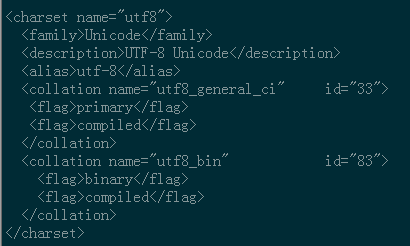
这里的字符编码必须和/usr/share/mysql/charsets/Index.xml中一致。
2、远程连接设置
把在所有数据库的所有表的所有权限赋值给位于所有IP地址的root用户。
mysql> grant all privileges on *.* to root@'%'identified by 'password';
如果是新用户而不是root,则要先新建用户
mysql>create user 'username'@'%' identified by 'password';
此时就可以进行远程连接了。
本文作者starof,因知识本身在变化,作者也在不断学习成长,文章内容也不定时更新,为避免误导读者,方便追根溯源,请诸位转载注明出处:http://www.cnblogs.com/starof/p/4680083.html有问题欢迎与我讨论,共同进步。
centos7 mysql数据库安装和配置(转, 未验证)的更多相关文章
- centos7 mysql数据库安装和配置
一.系统环境 yum update升级以后的系统版本为 [root@yl-web yl]# cat /etc/redhat-release CentOS Linux release 7.1.1503 ...
- Mysql数据库安装和配置
http://blog.csdn.net/pipisorry/article/details/46773507 Mysql数据库安装和配置.mysql语法.特殊符号及正则表达式的使用.MySQL备份与 ...
- 菜鸟的《Linux程序设计》学习——MySQL数据库安装、配置及基本操作
1. MySQL数据库: 在涉及到一些大型的Web系统或者嵌入式软件的开发时,都少不了用数据库来管理数据.在Windows操作系统下,使用过各种各样的数据库,如:sqlServer.Oracle.My ...
- 阿里云 centos7.X mysql数据库安装、配置
前言 1024阿里云搞活动,ecs云服务新用户促销活动,活动连接就不贴了,买了之后暂时不知道要做啥,想着先安装mysql数据库. 步骤 root用户登录进来 1.配置mysql的yum源,yum lo ...
- MySQL数据库安装,配置My.ini文件
最近在做项目开发时用到了MySql数据库,在看了一些有关MySql的文章后,很快就上手使用了.在使用的过程中还是出现了一些问题,因为使用的是绿色免安装版的MySql所以在配置的时候出现了一些问题,该篇 ...
- MySQL数据库安装与配置详解(图文)
接下来看一下如何安装mysql数据库. 由于有更详细的教程资源,因此参考别人的文章以整理.安装教程参考自博客园文章http://www.cnblogs.com/sshoub/p/4321640.htm ...
- centos7 mysql的安装与配置
用yum直接安装,不用更改配置 1. #yum install mysql #yum install mysql-server #yum install mysql-devel yum运行报错的化有可 ...
- CentOS7 MySql数据库安装配置(单实例)
一. 安装mysql-server 官网下载安装 # wget http://dev.mysql.com/get/mysql-community-release-el7-5.noarch.rpm # ...
- MySQL数据库安装与配置详解
转载提示:在原文http://www.cnblogs.com/sshoub/p/4321640.html基础上修改. 目录 一.概述 二.MySQL安装 三.安装成功验证 四.NavicatforMy ...
随机推荐
- ORACLE分页查询SQL语法——高效的分页
--1:无ORDER BY排序的写法.(效率最高)--(经过测试,此方法成本最低,只嵌套一层,速度最快!即使查询的数据量再大,也几乎不受影响,速度依然!) SELECT * FROM (SELECT ...
- 简易图书管理系统(主要是jsp的练习)
1:首先设计用户表和图书表,设计的字段和类型如下图所示 1.1:用户表user 1.2:图书表book 2:第二写实体类user.java和book.java package com.bie.po; ...
- CentOS安装redis-audit 但执行时出错未解决 记录一下安装过程
网上很多安装过程都太老了,测试很多方法终于成功了,但执行时还是出错,哪位熟悉的可以告知一下. yum install -y ruby rubygems ruby-devel git gcc gem s ...
- Kylin的简介与安装部署
一.Kylin的概述 官方网址:http://kylin.apache.org/cn/ Apache Kylin™是一个开源的分布式分析引擎,提供Hadoop/Spark之上的SQL查询接口及多维分析 ...
- 关于SSH不能连接及报错的问题总结
前言 此文不涉及到因网络.防火墙设备而导致的SSH不能访问.运维常见问题,这里不做过多的讲解,主要讲讲出了大家所知道的,还有其他什么原因会导致SSH无法访问呢?好了,那么,如果想知道的话,那就继续往下 ...
- UVA 11624-Fire!【双BFS】
<题目链接> 题目大意: 你的任务是帮助J走出一个大火蔓延的迷宫.J每分钟可以超上下左右四个方向移动,而所有着火的格子每一分钟都会往四个方向蔓延一格.迷宫中有一些障碍,J和火都无法进入.当 ...
- pandas学习(创建数据,基本操作)
pandas学习(一) Pandas基本数据结构 Series类型数据 Dataframe类型 基本操作 Pandas基本数据结构 两种常用数据结构: Series 一维数组,与Numpy中的一维ar ...
- 【Java并发核心三】CountDownLatch、CyclicBarrier及Phaser
个人感觉,看书学习还是需要“不求甚解”,因为一旦太过于计较小的得失,就容易钻牛角尖,学习进度也慢.我们完全可以先学一个大概,等到真正用到的时候再把那些细节丰富起来,就更有针对性. 所以,针对java并 ...
- Java设计模式从精通到入门一 责任链模式
一直都想对设计模式有一个深刻的认识,这样对于阅读源码的时候就不会那么吃力了.于是有了想要记录下设计模式的笔记.打算从自己不怎么熟悉的设计模式开始写,里面穿插着一点自己的想法,希望自己写完后,会又一 ...
- 洛谷.4115.Qtree4/BZOJ.1095.[ZJOI2007]Hide捉迷藏(动态点分治 Heap)
题目链接 洛谷 SPOJ BZOJ1095(简化版) 将每次Solve的重心root连起来,会形成一个深度为logn的树,就叫它点分树吧.. 我们对每个root维护两个东西: 它管辖的子树中所有白点到 ...