
Openssl s_server命令
一、简介
s_server是openssl提供的一个SSL服务程序。使用此程序前,需要生成各种证书。本命令可以用来测试ssl客户端,比如各种浏览器的https协议支持
二、语法
openssl s_server [-accept port] [-context id] [-verify depth] [-Verify depth] [-crl_check] [-crl_check_all] [-cert filename] [-certform DER|PEM] [-key filename] [-keyform DER|PEM] [-pass arg] [-dcert filename] [-dcertform DER|PEM ] [-dkey keyfile] [-dkeyform DER|PEM ] [-dpass arg] [-dhparam filename] [-name_curve arg][-nbio] [-nbio_test] [-crlf] [-debug] [-msg] [-state] [-CApath directory] [-CAfile filename] [-nocert] [-cipher cipherlist] [-quiet] [-no_tmp_rsa] [-ssl2] [-ssl3] [-tls1_1] [-tls1_2] [-tls1] [-dtls1] [-timeout] [-mtu] [-chain] [-no_ssl2][-no_ssl3] [-no_tls1] [-no_tls1_1] [-no_tls1_2] [-no_dhe] [-no_ecdhe][-bugs] [-hack] [-www] [-WWW] [-HTTP][-engine id] [-tlsextdebug] [-no_ticket] [-id_prefix arg] [-rand file(s)]
选项
 -accept arg   - port to accept on (default is )

 -context arg  - set session ID context

 -verify arg   - turn on peer certificate verification

 -Verify arg   - turn on peer certificate verification, must have a cert.

 -cert arg     - certificate file to use

                 (default is server.pem)

 -crl_check    - check the peer certificate has not been revoked by its CA.

                 The CRL(s) are appended to the certificate file

 -crl_check_all - check the peer certificate has not been revoked by its CA

                 or any other CRL in the CA chain. CRL(s) are appened to the

                 the certificate file.

 -certform arg - certificate format (PEM or DER) PEM default

 -key arg      - Private Key file to use, in cert file if

                 not specified (default is server.pem)

 -keyform arg  - key format (PEM, DER or ENGINE) PEM default

 -pass arg     - private key file pass phrase source

 -dcert arg    - second certificate file to use (usually for DSA)

 -dcertform x  - second certificate format (PEM or DER) PEM default

 -dkey arg     - second private key file to use (usually for DSA)

 -dkeyform arg - second key format (PEM, DER or ENGINE) PEM default

 -dpass arg    - second private key file pass phrase source

 -dhparam arg  - DH parameter file to use, in cert file if not specified

                 or a default set of parameters is used

 -named_curve arg  - Elliptic curve name to use for ephemeral ECDH keys.

                 Use "openssl ecparam -list_curves" for all names

                 (default is nistp256).

 -nbio         - Run with non-blocking IO

 -nbio_test    - test with the non-blocking test bio

 -crlf         - convert LF from terminal into CRLF

 -debug        - Print more output

 -msg          - Show protocol messages

 -state        - Print the SSL states

 -CApath arg   - PEM format directory of CA's

 -CAfile arg   - PEM format file of CA's

 -trusted_first - Use trusted CA's first when building the trust chain

 -nocert       - Don't use any certificates (Anon-DH)

 -cipher arg   - play with 'openssl ciphers' to see what goes here

 -serverpref   - Use server's cipher preferences

 -quiet        - No server output

 -no_tmp_rsa   - Do not generate a tmp RSA key

 -psk_hint arg - PSK identity hint to use

 -psk arg      - PSK in hex (without 0x)

 -ssl2         - Just talk SSLv2

 -ssl3         - Just talk SSLv3

 -tls1_2       - Just talk TLSv1.

 -tls1_1       - Just talk TLSv1.

 -tls1         - Just talk TLSv1

 -dtls1        - Just talk DTLSv1

 -timeout      - Enable timeouts

 -mtu          - Set link layer MTU

 -chain        - Read a certificate chain

 -no_ssl2      - Just disable SSLv2

 -no_ssl3      - Just disable SSLv3

 -no_tls1      - Just disable TLSv1

 -no_tls1_1    - Just disable TLSv1.

 -no_tls1_2    - Just disable TLSv1.

 -no_dhe       - Disable ephemeral DH

 -no_ecdhe     - Disable ephemeral ECDH

 -bugs         - Turn on SSL bug compatibility

 -www          - Respond to a 'GET /' with a status page

 -WWW          - Respond to a 'GET /<path> HTTP/1.0' with file ./<path>

 -HTTP         - Respond to a 'GET /<path> HTTP/1.0' with file ./<path>

                 with the assumption it contains a complete HTTP response.

 -engine id    - Initialise and use the specified engine

 -id_prefix arg - Generate SSL/TLS session IDs prefixed by 'arg'

 -rand file:file:...

 -servername host - servername for HostName TLS extension

 -servername_fatal - on mismatch send fatal alert (default warning alert)

 -cert2 arg    - certificate file to use for servername

                 (default is server2.pem)

 -key2 arg     - Private Key file to use for servername, in cert file if

                 not specified (default is server2.pem)

 -tlsextdebug  - hex dump of all TLS extensions received

 -no_ticket    - disable use of RFC4507bis session tickets

 -legacy_renegotiation - enable use of legacy renegotiation (dangerous)

 -nextprotoneg arg - set the advertised protocols for the NPN extension (comma-separated list)

 -use_srtp profiles - Offer SRTP key management with a colon-separated profile list

 -keymatexport label   - Export keying material using label

 -keymatexportlen len  - Export len bytes of keying material (default )
三、实例
1、启动s_server服务(站点证书及私钥,证书链,协议版本,算法组合)
openssl s_server -accept 2009 -key serverprikey.pem -cert server.pem -ssl3 -cipher EXP-KRB5-RC4-MD5 -chain -debug -msg
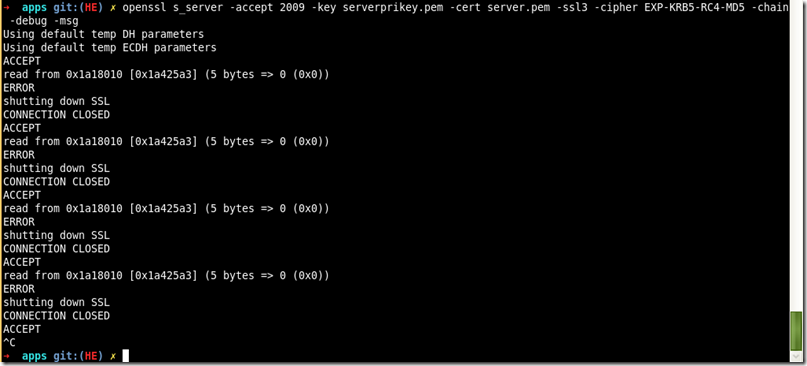
参考:http://blog.csdn.net/as3luyuan123/article/details/16850727 http://www.tuicool.com/articles/6ny6Fv
Openssl s_server命令的更多相关文章
- OpenSSL s_server / s_client 应用实例
netkiller openssl tls 目录[-] 12.6. s_server / s_client 12.6.1. SSL POP3 / SMTP / IMAP 12.6.2. server ...
- openssl常用命令行汇总
openssl常用命令行汇总 随机数 openssl rand -out rand.dat -base64 32 摘要 直接做摘要 openssl dgst -sha1 -out dgst.dat p ...
- (转)openssl 命令: openssl req 命令详解
openssl req命令主要的功能有,生成证书请求文件, 查看验证证书请求文件,还有就是生成自签名证书.本文就主要记录一下open ...
- Openssl asn1parse命令
一.简介 asn1parse命令是一种用来诊断ASN.1结构的工具,也能用于从ASN1.1数据中提取数据 二.语法 openssl asn1parse [-inform PEM|DER] [-in f ...
- Openssl pkcs7命令
一.简介 pkcs7命令用于处理DER或者PEM格式的pkcs#7文件. 二.语法 openssl pkcs7 [-inform PEM|DER] [-outform PEM|DER] [-in ...
- Openssl crl2pkcs7命令
一.简介 crl2pkcs命令用来根据CRL或证书来生成pkcs#7消息. 二.语法 openssl crl2pkcs7 [-inform PEM|DER ] [-outform PEM|DER ...
- Openssl verify命令
一.简介 verify命令对证书的有效性进行验证,verify 指令会沿着证书链一直向上验证,直到一个自签名的CA 二.语法 openssl verify [-CApath directory] [- ...
- Openssl rsa命令
一.简介 Rsa命令用于处理RSA密钥.格式转换和打印信息 二.语法 openssl rsa [-inform PEM|NET|DER] [-outform PEM|NET|DER] [-in fil ...
- Openssl pkeyutl命令
一.简介 pkeyutl命令能够测试所支持的密钥算法的性能 二.语法 openssl rsautl [-in file] [-out file] [-sigfile file] [-inkey fil ...
随机推荐
- CentOS部署NetCore - 3. 部署站点
一. CentOS 安装FTP linux 安装 ftp第一步 使用如下命令#rpm -qa |grep vsftpd可以检测出是否安装了vsftpd软件, 如果没有安装,使用YUM命令进行安装. y ...
- (转)Inno Setup入门(十三)——Pascal脚本(2)
本文转载自:http://blog.csdn.net/yushanddddfenghailin/article/details/17250933 事件函数(2) function CheckPassw ...
- StreamTool
public class StreamTool { //从流中读取数据 public static byte[] read(InputStream inStream) throws Exception ...
- bzoj 1023: [SHOI2008]cactus仙人掌图 2125: 最短路 4728: 挪威的森林 静态仙人掌上路径长度的维护系列
%%% http://immortalco.blog.uoj.ac/blog/1955 一个通用的写法是建树,对每个环建一个新点,去掉环上的边,原先环上每个点到新点连边,边权为点到环根的最短/长路长度 ...
- date.js
/** * 此JS文件是格式化JS中日期时间的工具类,其中包含了传入日期对象Date,格式化成想要的格式,<br> * 或者传入字符串格式的时间个,次字符串日期对应的格式可以转换为相应的日 ...
- java web 程序---猜数字游戏
思路:1.第一个是随机产生的数字,告诉我们去猜 cai.jsp 2.第二个是一个form表单,提交按钮后,将连接到验证页面 test1.jsp 3.第三个是比较猜的数和随机数.对了,提示再玩一次,不 ...
- 螺旋填数:读入两个整数m,n,输出一个m行n列的矩阵,这个矩阵是1~m*n这些自然数按照右、下、左、上螺旋填入的结果。
package Day8_06; /*读入两个整数m,n,输出一个m行n列的矩阵,这个矩阵是1~m*n这些自然数按照右.下.左.上螺旋填入的结果. * 例如读入数字4,5,则输出结果为: * 1 2 ...
- 002:MySQL升级以及访问连接
目录 一. 数据库升级 1. 环境说明: 2. 环境举例: 3. 版本升级 4.关于降级问题的说明 二. MySQL的连接登录 1. 几种登录方式 2. 免密码登录 三. MySQL 参数介绍和设置 ...
- node的模块管理
/* *一:从node_modules目录中加载模块; * 向这样的写法: * require("aa.js") * 则node将aa.js文件视为node_modules目录下的 ...
- 通过TortoiseGit来使用Github或Visual Studio Online版本控制管理
一.前言 关于Git源码不再多阐述,它就是一款开源分布式版本控制工具,它在源码管理领土上目前为止,使用者比例很大,越来越多的人使用该工具来管理项目源码,且相当多的开源的项目都移步到Github中,如: ...