
转MQTT压力测试之Tsung的使用
转自:http://www.cnblogs.com/lingyejun/p/7941271.html
nTsung测试工具的基本测试命令为 Tsung -f ~/.tsung/mqtt.xml -l <日志保存路径> start
mqtt.xml具体如下(在/usr/share/doc/tsung/examples路径下可查找到):
官网文档: http://tsung.erlang-projects.org/user_manual/conf-client-server.html
TSUNG在服务器上的安装步骤
Tsung压测时总连接数 = 本机可用IP地址数量×本机可用端口的数量×远程服务器可访问IP地址数量×远程服务器可访问端口数量。

yum install -y gcc gcc-c++ make libX11 xauth

yum install -y cairo-devel pango-devel freetype-devel gd-devel

yum install -y ncurses-devel openssl-devel unixODBC-devel wxWidgets-devel wxGTK3-docs mesa-libGL-devel

wget http://erlang.org/download/otp_src_20.0.tar.gz

wget https://www.cpan.org/modules/by-module/Template/Template-Toolkit-2.26.tar.gz

wget http://tsung.erlang-projects.org/dist/tsung-1.7.0.tar.gz

tar zxf otp_src_20.0.tar.gz

cd otp_src_20.0

./configure --prefix=/usr/local/erlang --without-javac

make -j 2

make install

tar zxf gnuplot-4.4.2.tar.gz

cd gnuplot-4.4.2

./configure

make -j 2

make install

export PATH=$PATH:/usr/local/erlang/bin/

tar zxf tsung-1.7.0.tar.gz

cd tsung-1.7.0

./configure --prefix=/usr/local/tsung
TSUNG的测试脚本
<?xml version="1.0"?>

<!DOCTYPE tsung SYSTEM "/usr/local/tsung/share/tsung/tsung-1.0.dtd">

<tsung loglevel="debug" version="1.0">

    <clients>

        <client host="bogon" maxusers="100000" cpu="1">

      <ip value="192.168.1.152"></ip>

      <ip value="192.168.1.153"></ip>

      <ip value="192.168.1.154"></ip>

      <ip value="192.168.1.155"></ip>

    </client>

    </clients>

    <servers>

        <server host="192.168.1.110" port="61613" type="tcp" />

    </servers>

    <load>

        <user session="mqtt_subscriber" start_time="30" unit="second"></user>

        <arrivalphase phase="1" duration="60" unit="second">

            <users maxnumber="100000" arrivalrate="5000" unit="second"/>

        </arrivalphase>

    </load>

    <sessions>

        <session name="mqtt_publisher" probability="100" type="ts_mqtt">

            <request>

                <mqtt type="connect" clean_start="true" keepalive="10" username="admin" password="password" will_topic="phihome/test" will_qos="0" will_msg="will_msg" will_retain="false"></mqtt>

            </request>

            <for from="1" to="10" incr="1" var="loops">

                <request subst="true">

                    <mqtt type="publish" topic="phihome/test" qos="1" retained="true">test_message</mqtt>

                </request>

            </for>

            <request>

                <mqtt type="disconnect"></mqtt>

            </request>

        </session>

        <session name="mqtt_subscriber" probability="0" type="ts_mqtt">

            <request>

                <mqtt type="connect" clean_start="true" keepalive="10"></mqtt>

            </request>

            <request subst="true">

                <mqtt type="subscribe" topic="test_topic" qos="1"></mqtt>

            </request>

            <request>

                <!-- wait for 60s -->

                <mqtt type="waitForMessages" timeout="60"></mqtt>

            </request>

            <request subst="true">

                <mqtt type="unsubscribe" topic="test_topic"></mqtt>

            </request>

            <request>

                <mqtt type="disconnect"></mqtt>

            </request>

        </session>

    </sessions>

</tsung>
测试结果总览
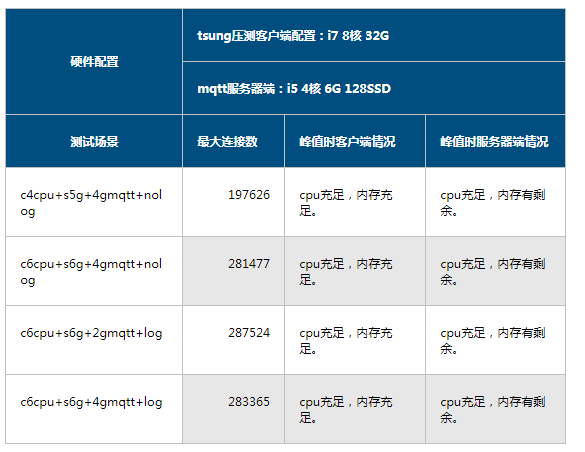
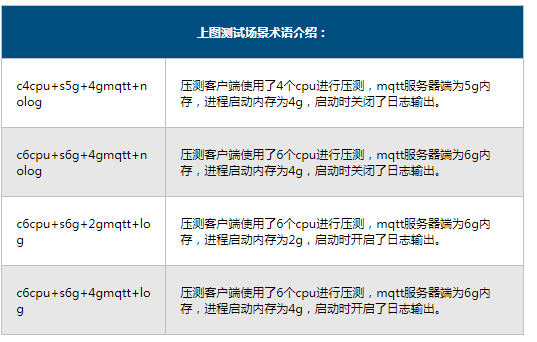
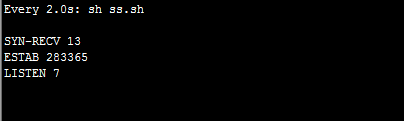
注:单台Tsung压测官网纯净版mosquitto(单台Broker),峰值时连接数为197626,后续有追加了另外一台tsung,一共两台机器一起压。
单台最大峰值时的连接数截图:

两台最大峰值时的连接数截图:
转MQTT压力测试之Tsung的使用的更多相关文章
- MQTT压力测试之Tsung的使用
简介 Tsung 是一个压力测试工具,可以测试包括HTTP, WebDAV, PostgreSQL, MySQL, LDAP, and XMPP/Jabber等服务器.针对 HTTP 测试,Tsung ...
- MQTT压力测试工具之JMeter插件教程
基于Jmeter的MQTT测试插件-上 1. Jmeter插件简介 Apache JMeter是Apache组织开发的基于Java的压力测试工具.下载 用于对软件做压力测试,它最初被设计用于Web应用 ...
- 压力测试之badboy和Jmeter的简单使用方法
文章版权由作者李晓晖和博客园共有,若转载请于明显处标明出处:http://www.cnblogs.com/naaoveGIS/ 1.背景 所谓压力测试是指,通过确定一个系统的瓶颈或者不能接收的性能点, ...
- Android自动化压力测试之Monkey Test (三)
Monkey 是什么? Monkey是Google提供的一个用于稳定性与压力测试的命令行工具. Monkey路径: 路径:/System/framework/monkey.jar 启动脚本路径:/sy ...
- CentOS服务器Http压力测试之ab
ab的全称是Apache Bench,是Apache自带的网络压力测试工具,相比于LR.JMeter,是我所知道的 Http 压力测试工具中最简单.最通用的. ab命令对发出负载的计算机要求很低,不会 ...
- 压力测试之apache benchmark
ab 的全称是 ApacheBench , 是 Apache 附带的一个小工具 , 专门用于 HTTP Server 的 benchmark testing , 可以同时模拟多个并发请求.前段时间看到 ...
- Web性能压力测试之Webbench使用详解
Webbench是知名的网站压力测试工具,它是由Lionbridge公司(http://www.lionbridge.com)开发.Webbench能测试处在相同硬件上,不同服务的性能以及不同硬件上同 ...
- 网站压力测试之ApacheBench
ApacheBench是 Apache 附带的一个小工具,专门用于 HTTP Server 的benchmark testing,可以同时模拟多个并发请求.使用yum安装apache,ab工具在/us ...
- LoadRunner压力测试之Unique Number参数类型、Random Number参数类型浅析
前几天工作需要用LoadRunner进行压力测试,期间对手机号进行参数化设置. 当时选用了<Value>137{Random_quhao}{Unique_weiyi}</Value& ...
随机推荐
- sqlserver获取指定数据库的描述
SELECT 字段名= convert(varchar(100), a.name), 表名= convert(varchar(50), d.name ), 类型= CONVERT(varchar(50 ...
- Redis 3.0版本启动时出现警告的解决办法
原文:http://m.blog.csdn.net/article/details?id=50864933 Redis 3.0.7版本启动时出现警告的解决办法 发表于2016/3/12 12:52:4 ...
- client怎样调用IBinder接口对象
代码: public void funclick(View view){ Intent _intent = new Intent(MainActivity.this,MyService.class); ...
- webshell三剑客[aspxspy、phpspy、jspspy]
ASPSPY:http://www.rootkit.net.cn/article.asp?id=132<已关闭> 下载:ASPXspy2 JSPSPY:http://www.forjj.c ...
- exchange 升级顺序导致的邮件被发不出的问题?
最近在做一个项目POC,准备升级过程目前的2007 环境到exchange 2010,由于客户环境是exchange 2007 sp1 不满足升级的基本条件,我们必须将exchange 2007 sp ...
- C++实现委托机制(一)
1.引言: 如果你接触过C#,你就会觉得C#中的delegate(委托)十分灵巧,它的用法上和C\C++的函数指针很像,但是却又比C\C++的函数指针更加灵活.并且委托可以一对多,也就是可以注册多个函 ...
- Spark学习散点总结
使用Spark 时,通常会有两种模式.一.在交互式编程环境(REPL, a.k.a spark-shell)下实现一些代码,测试一些功能点.二.像MapReduce 那样提前编写好源代码并编译打包(仅 ...
- php内置的http server, 类似于nodejs里面和golang里面的
原文:https://www.sitepoint.com/taking-advantage-of-phps-built-in-server/ ----------------------------- ...
- C++ 相关面试题汇总
多态性与虚函数 (陈维兴教材) (1)所谓多态性就是不同对象在收到相同的消息时,产生不同的动作.直观的说,多态性是指用一个名字定义不同的函数,这些函数执行不同但又类似的操作,从而可以使用相同的方式来调 ...
- 怎样更爽地看PDF杂志
下载了一些PDF的杂志,想着要是全屏双页显示,应该是很爽的,但是,下载了应该foxit reader,还是遇到一些问题: 1.全屏:F11即可 2.全屏后不双页:在选项中,"全屏" ...