
Tutorial 7: Schemas & client libraries
转载自:http://www.django-rest-framework.org/tutorial/7-schemas-and-client-libraries/
Tutorial 7: Schemas & client libraries
A schema is a machine-readable document that describes the available API endpoints, their URLS, and what operations they support.
Schemas can be a useful tool for auto-generated documentation, and can also be used to drive dynamic client libraries that can interact with the API.
Core API
In order to provide schema support REST framework uses Core API.
Core API is a document specification for describing APIs. It is used to provide an internal representation format of the available endpoints and possible interactions that an API exposes. It can either be used server-side, or client-side.
When used server-side, Core API allows an API to support rendering to a wide range of schema or hypermedia formats.
When used client-side, Core API allows for dynamically driven client libraries that can interact with any API that exposes a supported schema or hypermedia format.
Adding a schema
REST framework supports either explicitly defined schema views, or automatically generated schemas. Since we're using viewsets and routers, we can simply use the automatic schema generation.
You'll need to install the coreapi python package in order to include an API schema.
$ pip install coreapiWe can now include a schema for our API, by including an autogenerated schema view in our URL configuration.
from rest_framework.schemas import get_schema_view

schema_view = get_schema_view(title='Pastebin API')

urlpatterns = [

    url(r'^schema/$', schema_view),

    ...

]
If you visit the API root endpoint in a browser you should now see corejson representation become available as an option.
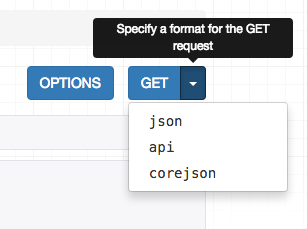
We can also request the schema from the command line, by specifying the desired content type in the Accept header.
$ http http://127.0.0.1:8000/schema/ Accept:application/coreapi+json

HTTP/1.0 200 OK

Allow: GET, HEAD, OPTIONS

Content-Type: application/coreapi+json

{

    "_meta": {

        "title": "Pastebin API"

    },

    "_type": "document",

    ...
The default output style is to use the Core JSON encoding.
Other schema formats, such as Open API (formerly Swagger) are also supported.
Using a command line client
Now that our API is exposing a schema endpoint, we can use a dynamic client library to interact with the API. To demonstrate this, let's use the Core API command line client.
The command line client is available as the coreapi-cli package:
$ pip install coreapi-cliNow check that it is available on the command line...
$ coreapi

Usage: coreapi [OPTIONS] COMMAND [ARGS]...

  Command line client for interacting with CoreAPI services.

  Visit http://www.coreapi.org for more information.

Options:

  --version  Display the package version number.

  --help     Show this message and exit.

Commands:

...
First we'll load the API schema using the command line client.
$ coreapi get http://127.0.0.1:8000/schema/

<Pastebin API "http://127.0.0.1:8000/schema/">

    snippets: {

        highlight(id)

        list()

        read(id)

    }

    users: {

        list()

        read(id)

    }
We haven't authenticated yet, so right now we're only able to see the read only endpoints, in line with how we've set up the permissions on the API.
Let's try listing the existing snippets, using the command line client:
$ coreapi action snippets list

[

    {

        "url": "http://127.0.0.1:8000/snippets/1/",

        "id": 1,

        "highlight": "http://127.0.0.1:8000/snippets/1/highlight/",

        "owner": "lucy",

        "title": "Example",

        "code": "print('hello, world!')",

        "linenos": true,

        "language": "python",

        "style": "friendly"

    },

    ...
Some of the API endpoints require named parameters. For example, to get back the highlight HTML for a particular snippet we need to provide an id.
$ coreapi action snippets highlight --param id=1

<!DOCTYPE html PUBLIC "-//W3C//DTD HTML 4.01//EN" "http://www.w3.org/TR/html4/strict.dtd">

<html>

<head>

  <title>Example</title>

  ...
Authenticating our client
If we want to be able to create, edit and delete snippets, we'll need to authenticate as a valid user. In this case we'll just use basic auth.
Make sure to replace the <username> and <password> below with your actual username and password.
$ coreapi credentials add 127.0.0.1 <username>:<password> --auth basic

Added credentials

127.0.0.1 "Basic <...>"
Now if we fetch the schema again, we should be able to see the full set of available interactions.
$ coreapi reload

Pastebin API "http://127.0.0.1:8000/schema/">

    snippets: {

        create(code, [title], [linenos], [language], [style])

        delete(id)

        highlight(id)

        list()

        partial_update(id, [title], [code], [linenos], [language], [style])

        read(id)

        update(id, code, [title], [linenos], [language], [style])

    }

    users: {

        list()

        read(id)

    }
We're now able to interact with these endpoints. For example, to create a new snippet:
$ coreapi action snippets create --param title="Example" --param code="print('hello, world')"

{

    "url": "http://127.0.0.1:8000/snippets/7/",

    "id": 7,

    "highlight": "http://127.0.0.1:8000/snippets/7/highlight/",

    "owner": "lucy",

    "title": "Example",

    "code": "print('hello, world')",

    "linenos": false,

    "language": "python",

    "style": "friendly"

}
And to delete a snippet:
$ coreapi action snippets delete --param id=7As well as the command line client, developers can also interact with your API using client libraries. The Python client library is the first of these to be available, and a Javascript client library is planned to be released soon.
For more details on customizing schema generation and using Core API client libraries you'll need to refer to the full documentation.
Reviewing our work
With an incredibly small amount of code, we've now got a complete pastebin Web API, which is fully web browsable, includes a schema-driven client library, and comes complete with authentication, per-object permissions, and multiple renderer formats.
We've walked through each step of the design process, and seen how if we need to customize anything we can gradually work our way down to simply using regular Django views.
You can review the final tutorial code on GitHub, or try out a live example in the sandbox.
Onwards and upwards
We've reached the end of our tutorial. If you want to get more involved in the REST framework project, here are a few places you can start:
- Contribute on GitHub by reviewing and submitting issues, and making pull requests.
- Join the REST framework discussion group, and help build the community.
- Follow the author on Twitter and say hi.
Now go build awesome things.
Tutorial 7: Schemas & client libraries的更多相关文章
- Django REST framework 第七章 Schemas & client libraries
模式是一个机器可读文档,描述可用的API端点,URL以及它们支持的操作. 模式对于自动生成文档是一个很有用的工具,也可以用来动态调用可以于API交互的客户端库. Core API 为了提供模式支持,R ...
- 编译pure-ftpd时提示错误Your MySQL client libraries aren't properly installed
如果出现类似configure: error: Your MySQL client libraries aren’t properly installed 的错误,请将mysql目录下的 includ ...
- Attempt to load Oracle client libraries threw BadImageFormatException. This problem will occur when running in 64 bit mode with the 32 bit Oracle client components installed.
System.Data.OracleClient 已经过时了.微软不再支持它. 因此,我建议你为. NET 使用Oracle数据提供程序:ODP.Net. 你可以从以下位置下载: 版本:Release ...
- Good Zookeeper Tutorial with Java client
参考: https://stackoverflow.com/questions/33524537/good-zookeeper-tutorial-with-java-client I was tryi ...
- Kubernetes 的 Client Libraries 的使用
说明 kubernetes 估计会成为 linux 一样的存在,client-go 是它的 go sdk,client-go/examples/ 给出了一些用例,但是数量比较少. api Resour ...
- django-rest-framework快速入门
前言:第一次接触django-rest-framework是在实习的时候.当时也不懂,看到视图用类方法写的感觉很牛逼的样子.因为官网是英文的,这对我的学习还是有一点的阻力的,所以当时也没怎么学.真是太 ...
- django rest framework 详解
Django REST framework 是用于构建Web API 的强大而灵活的工具包. 我们可能想使用REST框架的一些原因: Web浏览API对于开发人员来说是一个巨大的可用性. 认证策略包括 ...
- OData Client Code Generator
转发. [Tutorial & Sample] How to use OData Client Code Generator to generate client-side proxy cla ...
- Awesome Go精选的Go框架,库和软件的精选清单.A curated list of awesome Go frameworks, libraries and software
Awesome Go financial support to Awesome Go A curated list of awesome Go frameworks, libraries a ...
随机推荐
- CF521D Shop 贪心
题意: \(n\)个数,有\(m\)个操作,形如: 1,将\(x_i\)改成\(val_i\) 2,将\(x_i\)加上\(val_i\) 3,将\(x_i\)乘上\(val_i\) 其中第\ ...
- BZOJ2006:[NOI2010]超级钢琴——题解
https://www.lydsy.com/JudgeOnline/problem.php?id=2006 https://www.luogu.org/problemnew/show/P2048#su ...
- elk +redis 环境搭建
这个是最新的elk+redis搭建日志分析平台,今年时间是2015年9月11日. Elk分别为 elasticsearch,logstash, kibana 官网为:https://www.elast ...
- BZOJ 3709&&AGC 018 C——多段排序的微扰法
BZOJ 3709• 有n只怪物,你的初始生命值为z.• 为了打败第i只怪物,你需要消耗cost[i]点生命值,但怪物死后会使你恢复val[i]点生命值.• 任何时候你的生命值都不能小于等于0.• 问 ...
- 【树链剖分换根】P3979 遥远的国度
Description zcwwzdjn在追杀十分sb的zhx,而zhx逃入了一个遥远的国度.当zcwwzdjn准备进入遥远的国度继续追杀时,守护神RapiD阻拦了zcwwzdjn的去路,他需要zcw ...
- 课程14:get和post是神马
http://www.codeschool.cn/lesson/14.html get和post是神马? get和post是http中两种最常用到的请求类型 简单理解get请求 get请求多用于获取信 ...
- Codeforces Round #336 (Div. 2)B 暴力 C dp D 区间dp
B. Hamming Distance Sum time limit per test 2 seconds memory limit per test 256 megabytes input stan ...
- POJ--3461
原题链接:http://poj.org/problem?id=3461 分析:求一个串在另一个串中出现的次数,显然用KMP可以解决. #include<cstdio> #include&l ...
- SSM与SSH的对比
struts与springMVC的对比: 1.核心控制器(前端控制器.预处理控制器):负责接收页面请求和返回数据给页面. 对于使用过mvc框架的人来说这个词应该不会陌生,核心控制器的主要用途是处理所有 ...
- 高并发大容量NoSQL解决方案探索
大数据时代,企业对于DBA也提出更高的需求.同时,NoSQL作为近几年新崛起的一门技术,也受到越来越多的关注.本文将基于个推SRA孟显耀先生所负责的DBA工作,和大数据运维相关经验,分享两大方向内容: ...