
Android——android weight 属性(百度)
LinearLayout 在androidUI布局中使用非常多,它其中有个很方便又很有意思的属性 weight
,这个属性理解起来不是那么简单的,而真正理解了又觉得非常简单!
下面就通过一个例子来说明.
weight代表的含义--- android:layout_width
布局代码是:
<?xml version="1.0" encoding="utf-8"?>
<LinearLayout xmlns:android="http://schemas.android.com/apk/res/android"
android:layout_width="match_parent"
android:layout_height="match_parent"
android:orientation="horizontal" >
<Button
android:layout_width="match_parent"
android:layout_height="wrap_content"
android:layout_weight="1"
android:text="button1" />
<Button
android:layout_width="match_parent"
android:layout_height="wrap_content"
android:layout_weight="5"
android:text="button2" />
</LinearLayout>
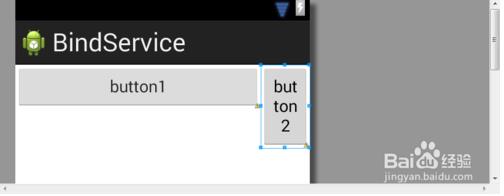
分析:
当android:layout_width="match_parent"的时候,如果设置了weight属性,那么根据它的weight值(可以理解为优先级)来占据空间,而且这个值是越小,占的空间越大,因此此时可以理解为优先级.
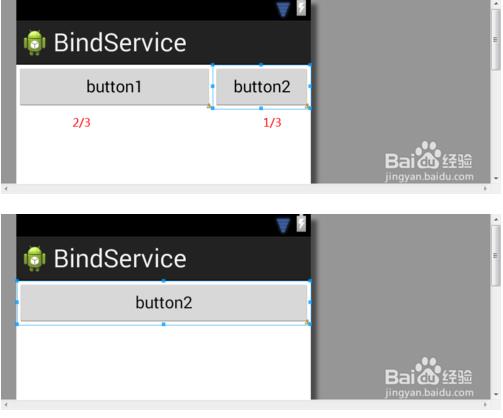
比如:按钮1和按钮2的width属性都是match_parent,如果按钮1的weight= 1 按钮2的为weight = 2 那么按照优先级 按钮1先占据,按钮2后占据. 大小比例为
按钮1 = 2/(1+2) ,按钮2 = 1/(1+2) 如下第一幅图
如果按钮1的weight我们设置为1000,按钮2的weight设置为1 那么 按钮2 几乎全部占据了所有空间!如下图第二幅
weight代表的含义--- android:layout_width
注意!weight的含义将发生根本行的变化!
先看代码
<?xml version="1.0" encoding="utf-8"?>
<LinearLayout xmlns:android="http://schemas.android.com/apk/res/android"
android:layout_width="match_parent"
android:layout_height="match_parent"
android:orientation="horizontal" >
<Button
android:layout_width="wrap_content"
android:layout_height="wrap_content"
android:layout_weight="1"
android:text="button1" />
<Button
android:layout_width="wrap_content"
android:layout_height="wrap_content"
android:layout_weight="1000"
android:text="button2" />
</LinearLayout>
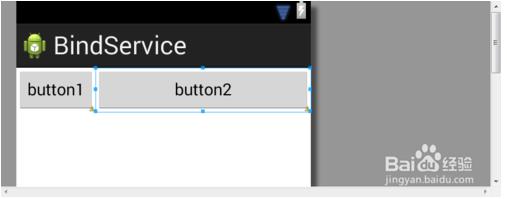
当 android:layout_width="wrap_content"的时候,我们发现即使我们将按钮2设置成: android:layout_weight="1000" 按钮2不但没有像第一种情况下那样消失,反而占据了更多的空间,这是怎么回事儿呢?
分析: 主要的变化来自于我们设置了android:layout_width="wrap_content",也就是说一个控件在宽度上只会包裹它的内容. 如果设置上了权重,意思告诉该控件,要根据weight来尽可能的包裹内容,weight值越小,包裹越小.值越大,包裹越大. 但是再小,控件都要能包裹内容. 因此,不会像第一种情况那样消失!
正确使用weight 属性!
下面是来自SDK的一句话:
In order to improve the layout efficiency when you specify the weight, you should change the width of theEditText to be zero (0dp). Setting the width to zero improves layout performance because using "wrap_content"as the width requires the system to calculate a width that is ultimately irrelevant because the weight value requires another width calculation to fill the remaining space.
它的大致意思就是说: 我们如果在某个方向上使用了weight ,那么我们必须在对应的方向上将width设置为0dp. 它告诉了我们设置为0dp是因为使用weight,系统是采用了另外一套计算占用空间大小的算法的.(the weight value requires another width calculation to fill the remaining space.)
- 2
总结: 要正确使用weight,不要再去纠结
android:layout_width="match_parent"
android:layout_width="wrap_content" 两种情况下该如何设置weight. 因为这样设置根本就是错误的用法.
正确的用法是:
先设置 android:layout_width="0dp" 或者 android:layout_height="0dp"
然后再去调配权重
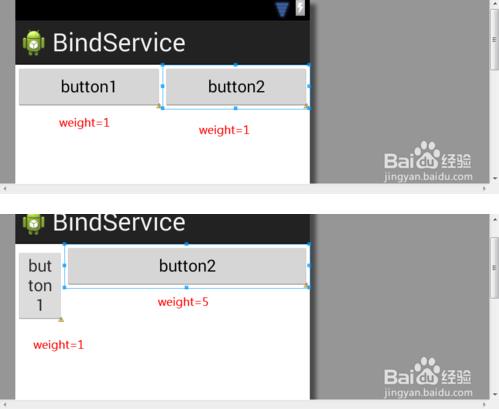
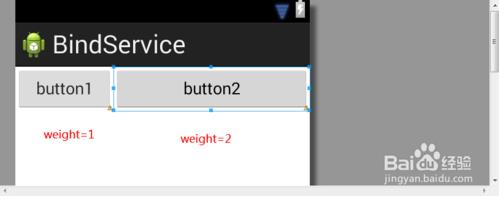
而此时的weight也非常好理解: weight就是比重!比例!请看下图
Android——android weight 属性(百度)的更多相关文章
- Android Hack1 使用weight属性实现视图的居中显示
本文地址:http://www.cnblogs.com/wuyudong/p/5898403.html,转载请注明源地址. 如果要实现如下图所示的将按钮居中显示,并且占据父视图的一半,无论屏幕是否旋转 ...
- Android weight属性详解
android:layout_weight是一个经常会用到的属性,它只在LinearLayout中生效,下面我们就来看一下: 当我们把组件宽度设置都为”match_parent”时: <Butt ...
- android gravity属性 和 weight属性
来看这个布局文件 <?xml version="1.0" encoding="utf-8"?> <LinearLayout xmlns:and ...
- 【转】android gravity属性 和 weight属性
有点忘记这两个属性了,复习一下. 来看这个布局文件 <?xml version="1.0" encoding="utf-8"?> <Linea ...
- Android开发技巧一--weight属性实现视图的居中(半)显示
面试时,一位面试官问到:“如果我想讲按钮居中显示,并且占据其父视图宽度的一半,应该怎么做到呢?”即实现这种效果: 我们使用weightSum属性和layout_weight属性实现这一要求: < ...
- Android之使用weight属性实现控件的按比例分配空间
从今天開始,把看书时候的知识点整理成博客, 这个比較简单,预计有经验的都用过,weight属性 在做Android布局的时候,常常遇到须要几个控件按比例分配空间的情况 比方下图效果 在底部设置两个bu ...
- android: android 布局中的weight 属性
android: weight是线性布局的特有属性,控件的宽度和高度的不同,也会存在差异. 示例1:将宽度设置为包裹类型wrap_content或0dp <?xml version=" ...
- Android控件属性大全(转)
http://blog.csdn.net/pku_android/article/details/7365685 LinearLayout 线性布局 子元素任意: Tab ...
- Android:weight,margin,padding详解实例
weight详解 weight是用来等比例划分区域的属性. 案例代码 <LinearLayout xmlns:android="http://schemas.android.com/a ...
随机推荐
- JS及JQuery对Html内容编码,Html转义
1利用jquery /** JQuery Html Encoding.Decoding * 原理是利用JQuery自带的html()和text()函数可以转义Html字符 * 虚拟一个Div通过赋值和 ...
- JQuery 控制div滚动条保持最下
$("#session_show").animate({ scrollTop: $("#session_show").scrollHeight },1000); ...
- WCF 之 已知类型(KnownType)
已知类型(Known types)允许在服务契约中使用多态的行为,在服务操作中暴露基本类型.将已知类型(known types)相关到基本类型(基类类型)自身;特定操作;整个服务契约采用属性声明或者配 ...
- Python break
break退出循环 用 for 循环或者 while 循环时,如果要在循环体内直接退出循环,可以使用 break 语句. 比如计算1至100的整数和,我们用while来实现: sum = 0 x = ...
- UML学习(二)- 用例图
UML用例图 用例图主要用来图示化系统的主事件流程,它主要用来描述客户的需求,即用户希望系统具备的完成一定功能的动作,通俗地理解用例就是软件的功能模块,所以是设计系统分析阶段的起点,设计人员 ...
- JDBC 利用反射技术将查询结果封装为对象(简单ORM实现)
ORM(Object Relational Mapping)对象关系映射 public class ORMTest { public static void main(String[] args) t ...
- 通用的sql语句
1.插入: INSERT INTO 表名称 VALUES (值1, 值2,....) 我们也可以指定所要插入数据的列: INSERT INTO table_name (列1, 列2,...) VALU ...
- 初学者必知的Python中优雅的用法
转自:http://python.jobbole.com/81393/
- SuperMap iObjects for Spark使用
本文档环境基于ubuntu16.04版本,(转发请注明出处:http://www.cnblogs.com/zhangyongli2011/ 如发现有错,请留言,谢谢) 1. 基础环境搭建 基础环境搭建 ...
- 详解C#泛型(二) 获取C#中方法的执行时间及其代码注入 详解C#泛型(一) 详解C#委托和事件(二) 详解C#特性和反射(四) 记一次.net core调用SOAP接口遇到的问题 C# WebRequest.Create 锚点“#”字符问题 根据内容来产生一个二维码
详解C#泛型(二) 一.自定义泛型方法(Generic Method),将类型参数用作参数列表或返回值的类型: void MyFunc<T>() //声明具有一个类型参数的泛型方法 { ...