
Nginx 服务器开启status页面检测服务状态
一、Nginx status monitor
和apache 中服务器状态一样。输出的内容如:
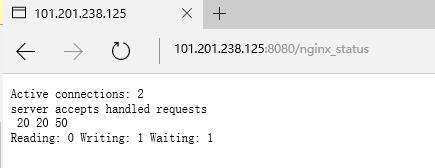
第1列:
- 当前与http建立的连接数,包括等待的客户端连接:2
第2列:
- 接受的客户端连接总数目:20
- 处理的客户端连接总数目:20
- 客户端总的请求数目:50
第3列:
- 当前,nginx读请求连接
- 当前,nginx写响应返回给客户端
- 目前有多少空闲客户端请求连接
二、启用 status 条件
- 检查一下当前nginx的安装配置
[root@elk ~]# nginx -V

nginx version: nginx/1.10.

built by gcc 4.8.  (Red Hat 4.8.-) (GCC)

built with OpenSSL 1.0.1e-fips  Feb

TLS SNI support enabled

configure arguments: --prefix=/etc/nginx --sbin-path=/usr/sbin/nginx --modules-path=/usr/lib64/nginx/modules \
--conf-path=/etc/nginx/nginx.conf --error-log-path=/var/log/nginx/error.log --http-log-path=/var/log/nginx/access.log \
--pid-path=/var/run/nginx.pid --lock-path=/var/run/nginx.lock --http-client-body-temp-path=/var/cache/nginx/client_temp \
--http-proxy-temp-path=/var/cache/nginx/proxy_temp --http-fastcgi-temp-path=/var/cache/nginx/fastcgi_temp \
--http-uwsgi-temp-path=/var/cache/nginx/uwsgi_temp --http-scgi-temp-path=/var/cache/nginx/scgi_temp --user=nginx --group=nginx \
--with-http_ssl_module --with-http_realip_module --with-http_addition_module --with-http_sub_module --with-http_dav_module \
--with-http_flv_module --with-http_mp4_module --with-http_gunzip_module --with-http_gzip_static_module --with-http_random_index_module \
--with-http_secure_link_module --with-http_stub_status_module --with-http_auth_request_module --with-http_xslt_module=dynamic \
--with-http_image_filter_module=dynamic --with-http_geoip_module=dynamic --with-http_perl_module=dynamic \
--add-dynamic-module=njs-1c50334fbea6/nginx --with-threads --with-stream --with-stream_ssl_module --with-http_slice_module --with-mail \
--with-mail_ssl_module --with-file-aio --with-ipv6 --with-http_v2_module --with-cc-opt='-O2 -g -pipe -Wall -Wp,-D_FORTIFY_SOURCE=2
-fexceptions -fstack-protector-strong --param=ssp-buffer-size=4 -grecord-gcc-switches -m64 -mtune=generic'
如果你的环境中可以看到有 --with-http_sub_module 这个模块,就代表可以启用status 。如果没有,可以在编译时加上。
- 现在编辑nginx 的配置文件。我们新建一个配置文件 /etc/nginx/conf.d/status.conf, 内容如下
[root@elk ~]# cat /etc/nginx/conf.d/status.conf

server {

    listen ;

    access_log off;

    server_name localhost;

    root /var/www/html;

    location /nginx_status {

       stub_status on;

       access_log off;

       allow .xxx.xxx.xxx;

       allow 139.59.253.208;

       deny all;

    }

}
对该页面的访问者进行了过滤,并禁用了访问写入log文件。
- 重启nginx后,在网站后面加上/nginx_status 即可。
http://101.201.238.125:8080/nginx_status
三、nginx plus (企业用户)
官方图:
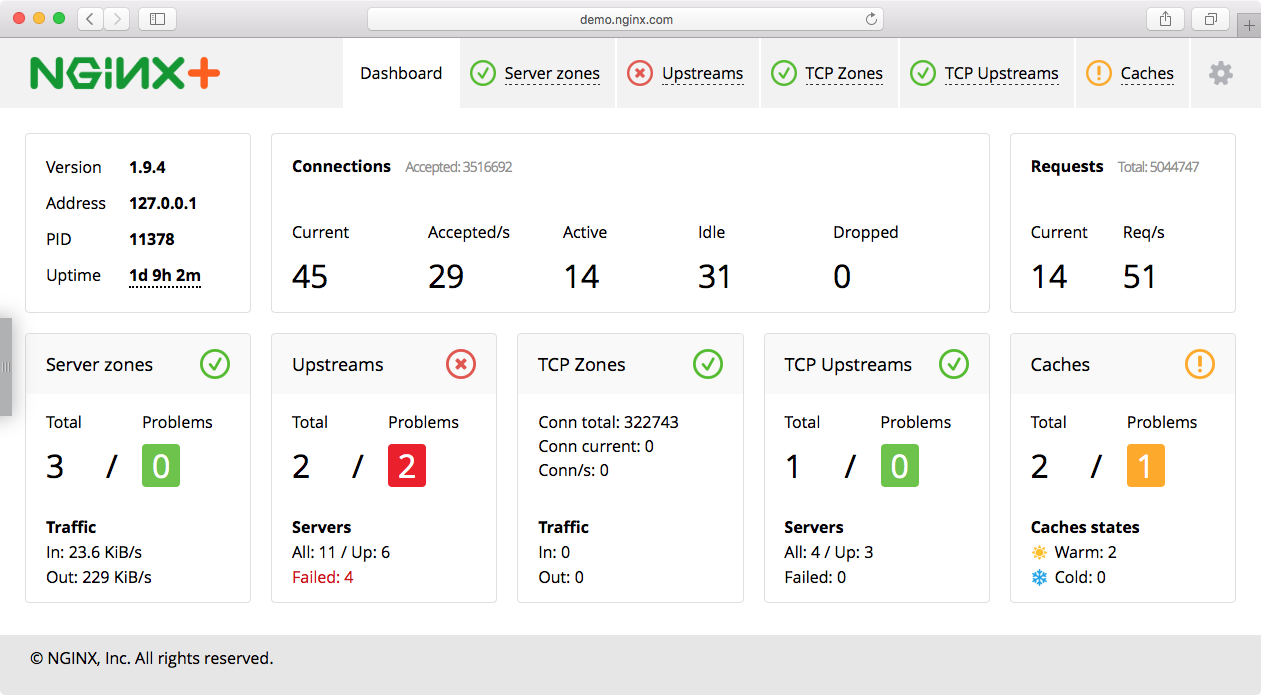
nginx plus 状态检测图,不过是面对企业用户,需要收费的。而且plus 用户还可以设置nginx 减轻DDOS攻击。具体点击这里
参考文章:
https://nginx.org/en/docs/http/ngx_http_stub_status_module.html#stub_status
https://www.nginx.com/blog/mitigating-ddos-attacks-with-nginx-and-nginx-plus/
https://www.nginx.com/products/live-activity-monitoring/
Nginx 服务器开启status页面检测服务状态的更多相关文章
- 全面掌握Nginx配置+快速搭建高可用架构 一 开启status页面检测服务状态
输入命令Nginx -V 打开conf.d/default.conf 配置模块,配置位置在server或者location 配置完成后测试语法正确 nginx -tc /etc/nginx/nginx ...
- Nginx 开启status用以监控状态信息
Nginx 可以通过with-http_stub_status_module模块来监控nginx的一些状态信息.1.通过nginx -V来查看是否有with-http_stub_status_modu ...
- nginx服务器开启缓存、反向代理
一.反向代理配置 1.反向代理服务器配置如下 反向代理就是需要这一行proxy_pass来完成.当我们要访问后端web服务器的时候,我们只需要访问代理服务器就可以了,此时代理服务器就充当后端web服务 ...
- Nginx 之四: Nginx服务器的压缩功能和缓存功能
在Nginx服务器配置文件中可以通过配置Gzip的使用,可以配置在http块,server 块或者location块中设置,Nginx服务器可以通过ngx_http_gzip_module模块.ngx ...
- lunix nginx安装 报错页面 状态码
web服务器软件IIS (windows底下的web服务器软件) Nginx (Linux底下新一代高性能的web服务器) Tengine www.taobao.com 这是淘宝 Apach ...
- nginx服务器状态监控
Nginx开启监控需在编译时加入with-http_stub_status_module,查看当前Nginx编译参数:/usr/local/nginx/sbin/nginx -V 1.以二级目录方式开 ...
- 查看nginx服务器状态
编译安装时使用--with-http_stub_status_module开启状态页面模块 [root@proxy ~]# yum -y install gcc pcre-devel openssl- ...
- 通过浏览器查看nginx服务器状态配置方法
通过浏览器查看nginx服务器状态配置方法 投稿:junjie 字体:[增加 减小] 类型:转载 这篇文章主要介绍了通过浏览器查看nginx服务器状态配置方法,本文讲解开启nginx-status的配 ...
- Httpd服务入门知识-Httpd服务常见配置案例之Apache的工作做状态status页面
Httpd服务入门知识-Httpd服务常见配置案例之Apache的工作做状态status页面 作者:尹正杰 版权声明:原创作品,谢绝转载!否则将追究法律责任. 一.status功能概述 status页 ...
随机推荐
- Slice header 中的frame_num的含义?
Frame_num表示解码的顺序.该图像是参考帧的时候,Frame_num才有意义.非参考帧的frame_num在poc type为2或3时,用于poc值的计算. H264中frame_num定义如下 ...
- c++下使用命名管道实现进程间通信
前面已经使用邮槽实现过进程间通信:http://www.cnblogs.com/jzincnblogs/p/5192654.html ,这里使用命名管道实现进程间通信. 与邮槽不同的是,命名管道在进程 ...
- React状态管理之redux
其实和vue对应的vuex都是差不多的东西,这里稍微提一下(安装Redux略过): import { createStore, combineReducers, applyMiddleware } f ...
- [置顶]
JVM层对jar包字节码加密
github https://github.com/sea-boat/ByteCodeEncrypt 需求 拿到的需求是要对某特定的jar包实现加密保护,jar包需要提供给外部使用,但核心逻辑部分需要 ...
- 如何从github下载项目的源代码,包含git客户端,直接下载,vs下载
有好多小伙伴可能刚刚接触github,还不知道如果和github下载项目,此处写个博客统一的声明.从多种方式下载源代码,加深对git的理解. 首先先解释下git的含义,git是一个源代码的管理工具,通 ...
- 设计模式 - 代理模式(Proxy Pattern)
一.引言 在软件开发过程中,有些对象有时候会由于网络或其他的障碍,以至于不能够或者不能直接访问到这些对象,如果直接访问对象给系统带来不必要的复杂性,这时候可以在客户端和目标对象之间增加一层中间层,让代 ...
- Vmware无法正常打开
VMware的问题 VMware总是搞一些事情,比如隔三差五就打不开了.那么怎么办呢?以前总要把Vm的安装程序重新开始一遍,然后选择修复 但是呢?这样太麻烦了,前几月做web开发的时候接触了Apach ...
- 【剑指offer】之字形打印二叉树,C++实现
原创文章,转载请注明出处! 本题牛客网地址 博客文章索引地址 博客文章中代码的github地址 1.题目 请实现一个函数按照之字形打印二叉树,即第一行按照从左到右的顺序打印,第二层按照从右至左的顺序打 ...
- 【pandas】生日转年龄
数据挖掘比赛中,获得的数据中可能有个人的生日,在数据分析中并不需要生日,而是需要年龄.不同年龄会呈现不同的状态,比如收入.健康.居住条件等,年龄能够很好的把不同样本的差异性进行大范围的划分.下面讲述如 ...
- Linux Mint17.1安装PHPStorm8.0.2
phpstorm是用JAVA开发的,所以在安装之前需要先安装jdk sudo apt-get install default-jdk 从官网上下载phpstorm 的linux版本 http://ww ...