
jest js 测试框架-简单方便人性化
yarn global  add jest-cli

or

npm install -g jest-cli

备注:可以安装为依赖不用全局安装a. 项目初始化
yarn init -y
├── package.json
├── sum.js
├── sun.test.js
└── yarn.lock
b. package.json
{
"name": "jestdemo",
"version": "1.0.0",
"main": "index.js",
"license": "MIT",
"dependencies": {
"jest-cli": "^22.0.4"
},
"scripts": {
"test": "jest "
}
}
c. sum.js(就是一个简单的sum 模块)
module.exports=sum;
function sum(a,b){
return a+b;
}
d. sum.test.js (按照约定 {name}.test.js 格式的是测试文件)
const sum = require("./sum.js");
describe("sum test suit", () => {
test("test sum result", () => {
expect(sum(1, 3)).toBe(4);
})
test("appdemo", () => {
expect(sum(1, 4)).toBeGreaterThan(2);
})
});
e. 运行测试
yarn run test
结果
PASS .\sum.test.js
sum test suit
√ test sum result (7ms)
√ appdemo (2ms)
Test Suites: 1 passed, 1 total
Tests: 2 passed, 2 total
Snapshots: 0 total
Time: 1.443s
Ran all test suites.
Done in 3.46s.
f. 添加代码测试覆盖率
修改package.json
"scripts": {
"test": "jest --watchAll --coverage"
}
界面:
运行,如下图: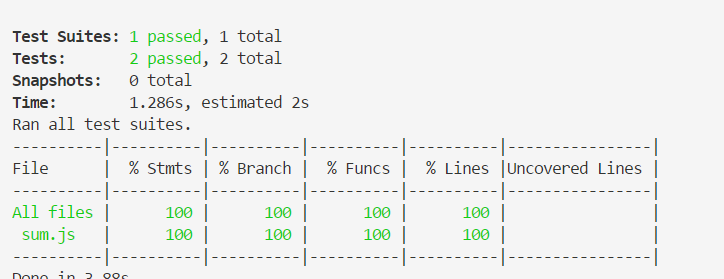

Usage: jest.js [--config=<pathToConfigFile>] [TestPathPattern]
Options:
--help, -h Show help [boolean]
--all The opposite of `onlyChanged`. If
`onlyChanged` is set by default, running jest
with `--all` will force Jest to run all tests
instead of running only tests related to
changed files.
--automock Automock all files by default. [boolean]
--bail, -b Exit the test suite immediately upon the first
failing test. [boolean]
--browser Respect the "browser" field in package.json
when resolving modules. Some packages export
different versions based on whether they are
operating in node.js or a browser. [boolean]
--cache Whether to use the transform cache. Disable
the cache using --no-cache. [boolean]
--cacheDirectory The directory where Jest should store its
cached dependency information. [string]
--changedFilesWithAncestor When used together with `--onlyChanged`, it
runs tests related to the current changes and
the changes made in the last commit. (NOTE:
this only works for hg repos) [boolean]
--ci Whether to run Jest in continuous integration
(CI) mode. This option is on by default in
most popular CI environments. It will prevent
snapshots from being written unless explicitly
requested. [boolean] [default: false]
--clearCache Clears the configured Jest cache directory and
then exits. Default directory can be found by
calling jest --showConfig [boolean]
--clearMocks Automatically clear mock calls and instances
between every test. Equivalent to calling
jest.clearAllMocks() between each test.
[boolean]
--collectCoverage Alias for --coverage. [boolean]
--collectCoverageFrom relative to <rootDir> glob pattern matching
the files that coverage info needs to be
collected from. [string]
--collectCoverageOnlyFrom Explicit list of paths coverage will be
restricted to. [array]
--color Forces test results output color highlighting
(even if stdout is not a TTY). Set to false if
you would like to have no colors. [boolean]
--colors Alias for `--color`. [boolean]
--config, -c The path to a jest config file specifying how
to find and execute tests. If no rootDir is
set in the config, the current directory is
assumed to be the rootDir for the project.
This can also be a JSON encoded value which
Jest will use as configuration. [string]
--coverage Indicates that test coverage information
should be collected and reported in the
output. [boolean]
--coverageDirectory The directory where Jest should output its
coverage files. [string]
--coveragePathIgnorePatterns An array of regexp pattern strings that are
matched against all file paths before
executing the test. If the file pathmatches
any of the patterns, coverage information will
be skipped. [array]
--coverageReporters A list of reporter names that Jest uses when
writing coverage reports. Any istanbul
reporter can be used. [array]
--coverageThreshold A JSON string with which will be used to
configure minimum threshold enforcement for
coverage results [string]
--debug Print debugging info about your jest config.
[boolean]
--detectLeaks **EXPERIMENTAL**: Detect memory leaks in
tests. After executing a test, it will try to
garbage collect the global object used, and
fail if it was leaked
[boolean] [default: false]
--env The test environment used for all tests. This
can point to any file or node module.
Examples: `jsdom`, `node` or
`path/to/my-environment.js` [string]
--expand, -e Use this flag to show full diffs instead of a
patch. [boolean]
--findRelatedTests Find related tests for a list of source files
that were passed in as arguments. Useful for
pre-commit hook integration to run the minimal
amount of tests necessary. [boolean]
--forceExit Force Jest to exit after all tests have
completed running. This is useful when
resources set up by test code cannot be
adequately cleaned up. [boolean]
--globalSetup The path to a module that runs before All
Tests. [string]
--globalTeardown The path to a module that runs after All
Tests. [string]
--globals A JSON string with map of global variables
that need to be available in all test
environments. [string]
--haste A JSON string with map of variables for the
haste module system [string]
--json Prints the test results in JSON. This mode
will send all other test output and user
messages to stderr. [boolean]
--lastCommit Will run all tests affected by file changes in
the last commit made. [boolean]
--listTests Lists all tests Jest will run given the
arguments and exits. Most useful in a CI
system together with `--findRelatedTests` to
determine the tests Jest will run based on
specific files [boolean] [default: false]
--logHeapUsage Logs the heap usage after every test. Useful
to debug memory leaks. Use together with
`--runInBand` and `--expose-gc` in node.
[boolean]
--mapCoverage Maps code coverage reports against original
source code when transformers supply source
maps. [boolean]
--maxWorkers, -w Specifies the maximum number of workers the
worker-pool will spawn for running tests. This
defaults to the number of the cores available
on your machine. (its usually best not to
override this default) [number]
--moduleDirectories An array of directory names to be searched
recursively up from the requiring module's
location. [array]
--moduleFileExtensions An array of file extensions your modules use.
If you require modules without specifying a
file extension, these are the extensions Jest
will look for. [array]
--moduleNameMapper A JSON string with a map from regular
expressions to module names that allow to stub
out resources, like images or styles with a
single module [string]
--modulePathIgnorePatterns An array of regexp pattern strings that are
matched against all module paths before those
paths are to be considered "visible" to the
module loader. [array]
--modulePaths An alternative API to setting the NODE_PATH
env variable, modulePaths is an array of
absolute paths to additional locations to
search when resolving modules. [array]
--noStackTrace Disables stack trace in test results output
[boolean]
--notify Activates notifications for test results.
[boolean]
--onlyChanged, -o Attempts to identify which tests to run based
on which files have changed in the current
repository. Only works if you're running tests
in a git repository at the moment. [boolean]
--onlyFailures, -f Run tests that failed in the previous
execution. [boolean]
--outputFile Write test results to a file when the --json
option is also specified. [string]
--passWithNoTests Will not fail if no tests are found (for
example while using `--testPathPattern`.)
[boolean] [default: false]
--preset A preset that is used as a base for Jest's
configuration. [string]
--projects A list of projects that use Jest to run all
tests of all projects in a single instance of
Jest. [array]
--reporters A list of custom reporters for the test suite.
[array]
--resetMocks Automatically reset mock state between every
test. Equivalent to calling
jest.resetAllMocks() between each test.
[boolean]
--resetModules If enabled, the module registry for every test
file will be reset before running each
individual test. [boolean]
--resolver A JSON string which allows the use of a custom
resolver. [string]
--rootDir The root directory that Jest should scan for
tests and modules within. [string]
--roots A list of paths to directories that Jest
should use to search for files in. [array]
--runInBand, -i Run all tests serially in the current process
(rather than creating a worker pool of child
processes that run tests). This is sometimes
useful for debugging, but such use cases are
pretty rare. [boolean]
--runTestsByPath Used when provided patterns are exact file
paths. This avoids converting them into a
regular expression and matching it against
every single file. [boolean] [default: false]
--setupFiles The paths to modules that run some code to
configure or set up the testing environment
before each test. [array]
--setupTestFrameworkScriptFile The path to a module that runs some code to
configure or set up the testing framework
before each test. [string]
--showConfig Print your jest config and then exits.
[boolean]
--silent Prevent tests from printing messages through
the console. [boolean]
--snapshotSerializers A list of paths to snapshot serializer modules
Jest should use for snapshot testing. [array]
--testEnvironment Alias for --env [string]
--testFailureExitCode Exit code of `jest` command if the test run
failed [string]
--testLocationInResults Add `location` information to the test results
[boolean] [default: false]
--testMatch The glob patterns Jest uses to detect test
files. [array]
--testNamePattern, -t Run only tests with a name that matches the
regex pattern. [string]
--testPathIgnorePatterns An array of regexp pattern strings that are
matched against all test paths before
executing the test. If the test path matches
any of the patterns, it will be skipped.
[array]
--testPathPattern A regexp pattern string that is matched
against all tests paths before executing the
test. [array]
--testRegex The regexp pattern Jest uses to detect test
files. [string]
--testResultsProcessor Allows the use of a custom results processor.
This processor must be a node module that
exports a function expecting as the first
argument the result object [string]
--testRunner Allows to specify a custom test runner. The
default is `jasmine2`. A path to a custom
test runner can be provided:
`<rootDir>/path/to/testRunner.js`. [string]
--testURL This option sets the URL for the jsdom
environment. [string]
--timers Setting this value to fake allows the use of
fake timers for functions such as setTimeout.
[string]
--transform A JSON string which maps from regular
expressions to paths to transformers. [string]
--transformIgnorePatterns An array of regexp pattern strings that are
matched against all source file paths before
transformation. [array]
--unmockedModulePathPatterns An array of regexp pattern strings that are
matched against all modules before the module
loader will automatically return a mock for
them. [array]
--updateSnapshot, -u Use this flag to re-record snapshots. Can be
used together with a test suite pattern or
with `--testNamePattern` to re-record snapshot
for test matching the pattern [boolean]
--useStderr Divert all output to stderr. [boolean]
--verbose Display individual test results with the test
suite hierarchy. [boolean]
--watch Watch files for changes and rerun tests
related to changed files. If you want to
re-run all tests when a file has changed, use
the `--watchAll` option. [boolean]
--watchAll Watch files for changes and rerun all tests.
If you want to re-run only the tests related
to the changed files, use the `--watch`
option. [boolean]
--watchPathIgnorePatterns An array of regexp pattern strings that are
matched against all paths before trigger test
re-run in watch mode. If the test path matches
any of the patterns, it will be skipped.
[array]
--watchman Whether to use watchman for file crawling.
Disable using --no-watchman. [boolean]
Documentation: https://facebook.github.io/jest/
Done in 0.69s.https://facebook.github.io/jest/
https://github.com/rongfengliang/jestdemo
jest js 测试框架-简单方便人性化的更多相关文章
- hapi lab测试框架简单使用
1. 依赖安装 yarn init yarn add lab code 2. 基本模式 const Lab = require('lab'); const Code = require('code') ...
- ava js 测试框架基本试用
随着js 越来越强大,日常使用中关于js 的问题也就越突出了,我们需要关注的点也就不能只像以前那样 只编写简单的功能实现,我们同时也需要关注js 的健壮性,测试就是其中一个比较重要的环节,以下 是av ...
- angular.js测试框架protracotr安装所需的node版本
protractor内代码的语法是基于ES6的,比如:里面用到了展开运算符“...”,node.js 6.0以下是不支持该语法特性. 所以,安装protractor是不会报错,但运行webdriver ...
- angular.js测试框架protracotr自带的webdriver-manager启动问题“Invalid or corrupt jarfile”
按照官网安装完protractor. 升级webdriver-manager,获取selenium-server-standalone库文件以及各种浏览器驱动文件. webdriver-manager ...
- 前端测试框架对比(js单元测试框架对比)
前端测试框架对比(js单元测试框架对比) 本文主要目的在于横评业界主流的几款前端框架,顺带说下相关的一些内容. 测试分类 通常应用会有 单元测试(Unit tests) 和 功能测试(Function ...
- js单元测试框架
js单元测试框架 前端测试框架对比(js单元测试框架对比) 本文主要目的在于横评业界主流的几款前端框架,顺带说下相关的一些内容. 测试分类 通常应用会有 单元测试(Unit tests) 和 功能测试 ...
- 前端测试框架Jest系列教程 -- 简介
写在前面: 随着互联网日新月异的发展,用户对于页面的美观度,流畅度以及各方面的体验有了更高的要求,我们的网页不再是简单的承载文字,图片等简单的信息传递给用户,我们需要的是更加美观的页面展示,更快的浏览 ...
- 前端测试框架Jest系列教程 -- Mock Functions
写在前面: 在写单元测试的时候有一个最重要的步骤就是Mock,我们通常会根据接口来Mock接口的实现,比如你要测试某个class中的某个方法,而这个方法又依赖了外部的一些接口的实现,从单元测试的角度来 ...
- 前端测试框架Jest系列教程 -- Mock Functions(模拟器)
写在前面: 在写单元测试的时候有一个最重要的步骤就是Mock,我们通常会根据接口来Mock接口的实现,比如你要测试某个class中的某个方法,而这个方法又依赖了外部的一些接口的实现,从单元测试的角度来 ...
随机推荐
- 微信小程序------基本组件
今天主要是简单的讲一下小程序当中的一些组件,微信文档上也是有的.但我还是坚持写一下,因为写博客可以再一次得到提高,印象更深刻,虽然很简单,但贵在坚持. 先来看看效果图: 1:进度条(progress) ...
- nyoj202——红黑树
为了看懂这条题我还专门去看了看红黑树,结果大佬告诉我:左旋右旋不会影响中序遍历...... 然后就写了个简单的中序遍历...... #include <bits/stdc++.h> usi ...
- filter-mapping中的dispatcher使用
aaarticlea/png;base64,iVBORw0KGgoAAAANSUhEUgAABGAAAAEJCAIAAABUr8bLAAAgAElEQVR4nO3dX2/bVoL3cb4h+WYnwN
- IOS-github优秀开源项目大全
github优秀开源项目大全-iOS 前言 本文旨在搜集github上优秀的开源项目 本文搜集的项目都是用于iOS开发 本文会持续更新… 完整客户端 ioctocat github的iOS客户端,目前 ...
- day36 爬虫+http请求+高性能
爬虫 参考博客:http://www.cnblogs.com/wupeiqi/articles/5354900.html http://www.cnblogs.com/wupeiqi/articles ...
- bzoj1997
题解: 在圆上面的点能不能不交叉 和那一题差不多 http://www.cnblogs.com/xuanyiming/p/8110597.html 代码: #include<bits/stdc+ ...
- DLL声明导出函数的两种方式
DLL中导出函数的声明有两种方式:一种为在函数声明中加上__declspec(dllexport):另外一种方式是采用模块定义(.def) 文件声明,.def文件为链接器提供了有关被链接程序的导出.属 ...
- VERIFY DATABASE 正在异常终止。 (Microsoft SQL Server,错误: 3169)
1.错误描述 标题: Microsoft SQL Server Management Studio ------------------------------ 备份介质验证失败: [文件: D:\S ...
- Redis的高可用技术方案
引言: redis是广为使用的缓存解决方案,本文将给出基于Sequential的高可用方案,自动进行主从的切换,在master节点down机之后,透明的进行切换. 主从节点的设置方案 设置主节点red ...
- 什么时候应该使用Autorelease Pool
csdn首发:http://blog.csdn.net/guijiewan/article/details/46470285 Objective c使用ARC之后,一般都不需要再手动调用retain, ...