
MqttNet 通讯
MQTT,IBM发明的物联网通讯协议基于tcp ip , 收集传感器上的数据。
下图理解: broker 这里有很多消息,根据主题不同来进行区分,它这里可以保管所有连过来的客户端的数据,然后客户端,通过订阅broker它有的主题进行获取数据。
学习网址:https://github.com/chkr1011/MQTTnet/wiki/Client
broker网址 代理:http://www.mqtt-dashboard.com/

开发(只需客户端):
vs2015
1.添加引用本文MQTTnet2.8.4(管理NuGet程序包)
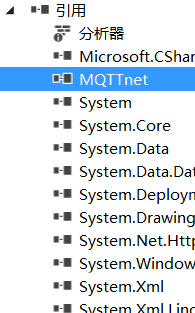
2.界面
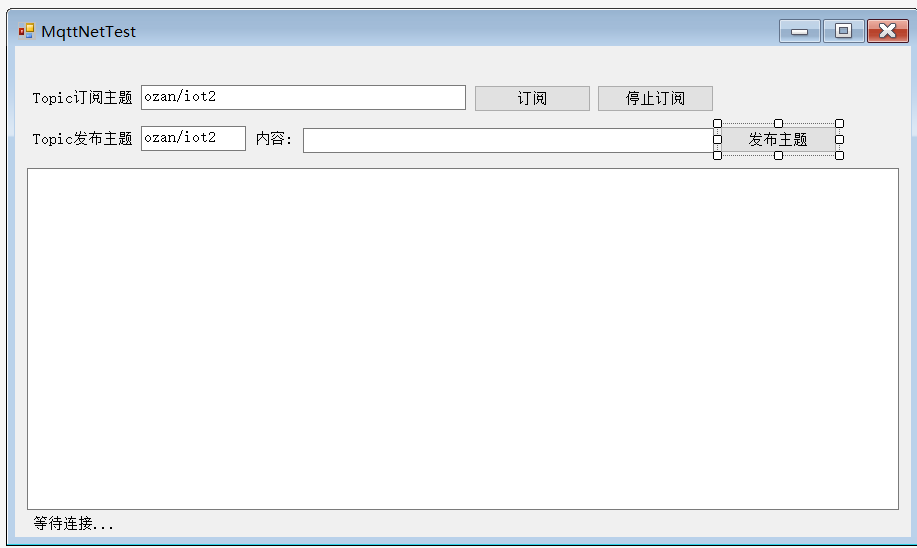
3.代码
using MQTTnet;

using MQTTnet.Client;

using System;

using System.Collections.Generic;

using System.ComponentModel;

using System.Data;

using System.Drawing;

using System.Linq;

using System.Text;

using System.Threading.Tasks;

using System.Windows.Forms;

namespace server

{

    public partial class Form1 : Form

    {

        public Form1()

        {

            InitializeComponent();

        }

        public static IMqttClient mqttClient = null;

        public static IMqttClientOptions options = null;

        private void Form1_Load(object sender, EventArgs e)

        {

            //实例化对象

            var factory = new MqttFactory();

            mqttClient = factory.CreateMqttClient();

            mqttClient.Connected += SubscribeTopic;

            mqttClient.Disconnected += MqttClient_Disconnected;

            mqttClient.ApplicationMessageReceived += Receive;

            //配置参数

            //options = new MqttClientOptionsBuilder()

            //    .WithClientId(Guid.NewGuid().ToString().Substring(0, 5))

            //    .WithTcpServer("broker.hivemq.com")

            //    .WithCredentials("bud", "%spencer%")

            //    .WithTls()

            //    .WithCleanSession()

            //    .Build();

            options = new MqttClientOptionsBuilder().WithWebSocketServer("broker.hivemq.com:8000/mqtt").Build();

            //连接

            Task.Run(async () => { await ConnectMqtt(); });

        }

        public async Task ConnectMqtt()

        {

            try

            {

                MqttClientConnectResult x = await mqttClient.ConnectAsync(options);

            }

            catch (Exception ex)

            {

                Invoke((new Action(() =>

                {

                    textBox2.Text = $"连接到MQTT服务器失败!" + Environment.NewLine + ex.Message + Environment.NewLine;

                })));

            }

        }

        //接收消息

        public async void Receive(object sender, MqttApplicationMessageReceivedEventArgs e)

        {

            try

            {

                Invoke((new Action(() =>

                {

                    //textBox2.AppendText("### RECEIVED APPLICATION MESSAGE 接收消息 ###");

                    textBox2.AppendText($"Topica(主题) = {e.ApplicationMessage.Topic}" + "\t\n");

                    textBox2.AppendText($"Payloada(内容) = {Encoding.UTF8.GetString(e.ApplicationMessage.Payload)}" + "\t\n");

                    //textBox2.AppendText($"+ QoS = {e.ApplicationMessage.QualityOfServiceLevel}");

                    //textBox2.AppendText($"+ Retain = {e.ApplicationMessage.Retain}");

                })));

            }

            catch (Exception ex)

            {

                Invoke((new Action(() =>

                {

                    textBox2.Text = ex.Message;

                })));

            }

        }

        //连接成功

        public async void SubscribeTopic(object sender, EventArgs e)

        {

            Invoke((new Action(() => { label2.Text = "连接成功"; })));

        }

        /// <summary>

        /// 连接失败

        /// </summary>

        /// <param name="sender"></param>

        /// <param name="e"></param>

        public async void MqttClient_Disconnected(object sender, EventArgs e)

        {

            Invoke((new Action(() =>

            {

                textBox2.AppendText("连接失败!" + Environment.NewLine);

            })));

            //重新连接

            await Task.Delay(TimeSpan.FromSeconds());

            try

            {

                await mqttClient.ConnectAsync(options);

                Invoke((new Action(() =>

                {

                    textBox2.AppendText("连接成功!");

                })));

            }

            catch

            {

                Invoke((new Action(() =>

                {

                    textBox2.AppendText("连接失败!");

                })));

            }

        }

        /// <summary>

        /// 订阅消息

        /// </summary>

        /// <param name="sender"></param>

        /// <param name="e"></param>

        private void button1_Click(object sender, EventArgs e)

        {

            string topic = textBox1.Text;

            mqttClient.SubscribeAsync(new TopicFilterBuilder().WithTopic(topic).Build());

            textBox2.AppendText("### 订阅" + topic + "成功 ###\t\n");

        }

        /// <summary>

        /// 释放资源

        /// </summary>

        /// <param name="sender"></param>

        /// <param name="e"></param>

        private void button2_Click(object sender, EventArgs e)

        {

            mqttClient.Dispose();

            textBox2.AppendText("### 断开连接###\t\n");

        }

        /// <summary>

        /// 发布一个主题内容

        /// </summary>

        /// <param name="sender"></param>

        /// <param name="e"></param>

        private void button3_Click(object sender, EventArgs e)

        {

            var message = new MqttApplicationMessageBuilder()

                .WithTopic(textBox3.Text)

                .WithPayload(textBox4.Text)

                .WithExactlyOnceQoS()

                .WithRetainFlag()

                .Build();

             mqttClient.PublishAsync(message);

        }

    }

}
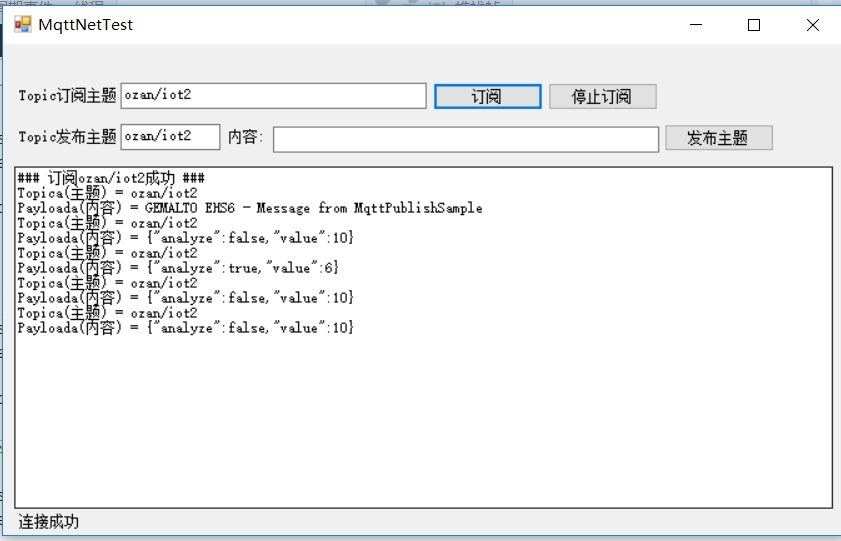
4.运行效果
这些数据就是根据你的主题从http://www.mqtt-dashboard.com/ 代理取来,你也可以发布主题的内容,别人也可以订阅你的主题,取数据。
MqttNet 通讯的更多相关文章
- IOT设备通讯,MQTT物联网协议,MQTTnet
一.IOT设备的特性 硬件能力差(存储能力基本只有几MB,CPU频率低连使用HTTP请求都很奢侈) 系统千差万别(Brillo,mbedOS,RIOT等) 如使用电池供电,电量消耗敏感 如果是小设备, ...
- 快速搭建MQTT服务器(MQTTnet和Apache Apollo)
前言 MQTT协议是IBM开发的一个即时通讯协议,有可能成为物联网的重要组成部分,http://mqtt.org/. MQTT is a machine-to-machine (M2M)/" ...
- 使用 MQTTnet 快速实现 MQTT 通信
1 什么是 MQTT ? MQTT(Message Queuing Telemetry Transport,消息队列遥测传输)是 IBM 开发的一个即时通讯协议,有可能成为物联网的重要组成部分.MQT ...
- MQTT(一)C#使用 MQTTnet 快速实现 MQTT 通信(文末有完整Demo下载)
https://blog.csdn.net/panwen1111/article/details/79245161 目录MQTT(一)C#使用 MQTTnet 快速实现 MQTT 通信(文末有完整De ...
- HTML5笔记:跨域通讯、多线程、本地存储和多图片上传技术
最近做项目在前端我使用了很多新技术,这些技术有bootstrap.angularjs,不过最让我兴奋的还是使用了HTML5的技术,今天我想总结一些HTML5的技术,好记性不如烂笔头,写写文章可以很好的 ...
- (转)利用libcurl和国内著名的两个物联网云端通讯的例程, ubuntu和openwrt下调试成功(四)
1. libcurl 的参考文档如下 CURLOPT_HEADERFUNCTION Pass a pointer to a function that matches the following pr ...
- (转)linux下和云端通讯的例程, ubuntu和openwrt下实验成功(二)
前言: 上节用纯linux的函数实现了和云端通讯, 本节开始利用传说中的神器libcurl 话说一个网络程序员对书法十分感兴趣,退休后决定在这方面有所建树. 于是花重金购买了上等的文房四宝. 一 ...
- (转)linux下和云端通讯的例程, ubuntu和openwrt实验成功(一)
一. HTTP请求的数据流总结#上传数据, yeelink的数据流如下POST /v1.0/device/4420/sensor/9089/datapoints HTTP/1.1Host: api. ...
- 用SignalR 2.0开发客服系统[系列1:实现群发通讯]
前言 交流群:195866844 先说一下我为什么会写这个博客吧,(首先说一下,我是一个小菜鸟,讲的不好请指导 - -,) 前段时间公司的项目涉及到在B/S上使用即时通讯,(其实就是做一个B/S的客 ...
随机推荐
- spring boot☞Swagger2文档构建及单元测试
首先,回顾并详细说明一下在快速入门中使用的@Controller.@RestController.@RequestMapping注解.如果您对Spring MVC不熟悉并且还没有尝试过快速入门案例,建 ...
- es-文档版本号,操作类型,分片选择
一.版本号: 在es中每个文档都有一个版本号,默认情况下,版本号都是随着每次对该文档的修改或者删除自增的,当然你也可以自己指定.有了这个文档号,我们可以像mysql 乐观锁一样,用来进行控制字我们文档 ...
- 32 取一个整数a从右端开始的4-7位
题目:取一个整数a从右端开始的4-7位 public class _032FetchDigit { public static void main(String[] args) { fetchDigi ...
- JS 观察者模式
Events = function() { var listen, log, obj, one, remove, trigger, __this; obj = {}; __this = this; l ...
- Matlab图像处理教程
虽然典型算法的开发是基于理论支持的,但这些算法的实现几乎总是要求参数估计,并常常进行算法修正与候选求解方案的比较. MATLAB由LINPACK和EISPACK项目开发,最初用于矩阵处理.今天,MAT ...
- config的配置文件
- 所有中心对称五字母域名生成,扫了一下,com的基本上都被注册了。。。
public static void main(String[] args) { String[] letter = new String[]{"i","m", ...
- 【转】UI自动化测试框架之Selenium关键字驱动
原网址:https://my.oschina.net/hellotest/blog/531932#comment-list 摘要: 自动化测试框架demo,用关键字的形式将测试逻辑封装在数据文件中,测 ...
- spring boot 错误:Check your ViewResolver setup
Whitelabel Error Page This application has no explicit mapping for /error, so you are seeing this as ...
- Qt学习(二):项目学习
1. 概述 Qt做UI设计后,通常会生成Form Files文件夹下的ui文件.Generated File文件夹下的ui_xxx等头文件和源文件.Header Files文件夹下的头文件.Sourc ...