
EFCore扩展Select方法(根据实体定制查询语句)
EFCore扩展Select方法(根据实体定制查询语句)
通常用操作数据库的时候查询返回的字段是跟 我们的定义的实体是不一致的,所以往往针对UI或者接口层创建大量的Model, 而且需要手动对应字段,非常繁琐。 本文将通过表达式树解决这些重复的过程。
先贴上实现代码
Queryable 类中 的扩展方法 Select<TSource, TResult>(this IQueryable<TSource> source, Expression<Func<TSource, TResult>> selector) 需要参数 Expression<Func<TSource, TResult>> selector 只要构造相应的表达式树即可实现自定义映射
    using System.Collections;

    using System.ComponentModel.DataAnnotations.Schema;

    using System.Linq.Expressions;

    using System.Reflection;

    using static System.Linq.Expressions.Expression;

    public static class QueryableExtentions

    {

        public static IQueryable<TTarget> Select<TTarget>(this IQueryable<object> query)

        {

            return Queryable.Select(query, GetLamda<object, TTarget>(query.GetType().GetGenericArguments()[]));

        }

        public static IQueryable<TTarget> Select<TSource, TTarget>(this IQueryable<TSource> query)

        {

            return Queryable.Select(query, GetLamda<TSource, TTarget>());

        }

        public static Expression<Func<TSource, TTarget>> GetLamda<TSource, TTarget>(Type type = null)

        {

            var sourceType = typeof(TSource);

            var targetType = typeof(TTarget);

            var parameter = Parameter(sourceType);

            Expression propertyParameter;

            if (type != null)

            {

                propertyParameter = Convert(parameter, type);

                sourceType = type;

            }

            else

                propertyParameter = parameter;

            return Lambda<Func<TSource, TTarget>>(GetExpression(propertyParameter, sourceType, targetType), parameter);

        }

        public static MemberInitExpression GetExpression(Expression parameter, Type sourceType, Type targetType)

        {

            var memberBindings = new List<MemberBinding>();

            foreach (var targetItem in targetType.GetProperties().Where(x => x.CanWrite))

            {

                var fromEntityAttr = targetItem.GetCustomAttribute<FromEntityAttribute>();

                if (fromEntityAttr != null)

                {

                    var property = GetFromEntityExpression(parameter, sourceType, fromEntityAttr);

                    if (property != null)

                        memberBindings.Add(Bind(targetItem, property));

                    continue;

                }

                var sourceItem = sourceType.GetProperty(targetItem.Name);

                if (sourceItem == null)//当没有对应的属性时,查找 实体名+属性

                {

                    var complexSourceItemProperty = GetCombinationExpression(parameter, sourceType, targetItem);

                    if (complexSourceItemProperty != null)

                        memberBindings.Add(Bind(targetItem, complexSourceItemProperty));

                    continue;

                }

                //判断实体的读写权限

                if (sourceItem == null || !sourceItem.CanRead)

                    continue;

                //标注NotMapped特性的属性忽略转换

                if (sourceItem.GetCustomAttribute<NotMappedAttribute>() != null)

                    continue;

                var sourceProperty = Property(parameter, sourceItem);

                //当非值类型且类型不相同时

                if (!sourceItem.PropertyType.IsValueType && sourceItem.PropertyType != targetItem.PropertyType && targetItem.PropertyType != targetType)

                {

                    //判断都是(非泛型、非数组)class

                    if (sourceItem.PropertyType.IsClass && targetItem.PropertyType.IsClass

                        && !sourceItem.PropertyType.IsArray && !targetItem.PropertyType.IsArray

                        && !sourceItem.PropertyType.IsGenericType && !targetItem.PropertyType.IsGenericType)

                    {

                        var expression = GetExpression(sourceProperty, sourceItem.PropertyType, targetItem.PropertyType);

                        memberBindings.Add(Bind(targetItem, expression));

                    }

                    continue;

                }

                if (targetItem.PropertyType != sourceItem.PropertyType)

                    continue;

                memberBindings.Add(Bind(targetItem, sourceProperty));

            }

            return MemberInit(New(targetType), memberBindings);

        }

        /// <summary>

        /// 根据FromEntityAttribute 的值获取属性对应的路径

        /// </summary>

        /// <param name="sourceProperty"></param>

        /// <param name="sourceType"></param>

        /// <param name="fromEntityAttribute"></param>

        /// <returns></returns>

        private static Expression GetFromEntityExpression(Expression sourceProperty, Type sourceType, FromEntityAttribute fromEntityAttribute)

        {

            var findType = sourceType;

            var resultProperty = sourceProperty;

            var tableNames = fromEntityAttribute.EntityNames;

            if (tableNames == null)

            {

                var columnProperty = findType.GetProperty(fromEntityAttribute.EntityColuum);

                if (columnProperty == null)

                    return null;

                else

                    return Property(resultProperty, columnProperty);

            }

            for (int i = tableNames.Length - ; i >= ; i--)

            {

                var tableProperty = findType.GetProperty(tableNames[i]);

                if (tableProperty == null)

                    return null;

                findType = tableProperty.PropertyType;

                resultProperty = Property(resultProperty, tableProperty);

            }

            var property = findType.GetProperty(fromEntityAttribute.EntityColuum);

            if (property == null)

                return null;

            else

                return Property(resultProperty, property);

        }

        /// <summary>

        /// 根据组合字段获取其属性路径

        /// </summary>

        /// <param name="sourceProperty"></param>

        /// <param name="sourcePropertys"></param>

        /// <param name="targetItem"></param>

        /// <returns></returns>

        private static Expression GetCombinationExpression(Expression sourceProperty, Type sourceType, PropertyInfo targetItem)

        {

            foreach (var item in sourceType.GetProperties().Where(x => x.CanRead))

            {

                if (targetItem.Name.StartsWith(item.Name))

                {

                    if (item != null && item.CanRead && item.PropertyType.IsClass && !item.PropertyType.IsGenericType)

                    {

                        var rightName = targetItem.Name.Substring(item.Name.Length);

                        var complexSourceItem = item.PropertyType.GetProperty(rightName);

                        if (complexSourceItem != null && complexSourceItem.CanRead)

                            return Property(Property(sourceProperty, item), complexSourceItem);

                    }

                }

            }

            return null;

        }

    }

    /// <summary>

    /// 用于标注字段 来自哪个表的的哪一列(仅限于有关联的表中)

    /// </summary>

    public class FromEntityAttribute : Attribute

    {

        /// <summary>

        /// 类名(表名)

        /// </summary>

        public string[] EntityNames { get; }

        /// <summary>

        /// 字段(列名)

        /// </summary>

        public string EntityColuum { get; }

        /// <summary>

        /// 列名 + 该列的表名 + 该列的表的上一级表名

        /// </summary>

        /// <param name="entityColuum"></param>

        /// <param name="entityNames"></param>

        public FromEntityAttribute(string entityColuum, params string[] entityNames)

        {

            EntityNames = entityNames;

            EntityColuum = entityColuum;

        }

    }
调用方法如下,先构造测试类
    public partial class User

    {

        public int Id { get; set; }

        [Required]

        [StringLength()]

        public string Name { get; set; }

        public int RoleId { get; set; }

        [ForeignKey(nameof(RoleId))]

        public virtual Role Role { get; set; }

    }

    public partial class Role

    {

        public int Id { get; set; }

        public string Name { get; set; }

        public int DepartmentId { get; set; }

        [ForeignKey(nameof(DepartmentId))]

        public virtual Department Department  { get; set; }

    }

    public partial class Department

    {

        public int Id { get; set; }

        [Required]

        [StringLength()]

        public string Name { get; set; }

    }
如上所以构造了,用户表,角色表,和部门表。 查询某个用户 的角色名和部门名 则需要关联 角色表和部门表
    public partial class UserModel

    {

        public string Name { get; set; }

        public string RoleName { get; set; }

        //[FromEntity("Name","Role")]

        //public string RoleName1 { get; set; }

        [FromEntity("Name", "Department", "Role")]

        public string DepartmentName { get; set; }

        //public virtual RoleModel Role { get; set; }

        //[FromEntity("Department", "Role")]

        //public virtual Department Department { get; set; }

    }
查询代码如下
static void Main(string[] args)

        {

            using (var context = new TestContext())

            {

                var list = context.User.Select<UserModel>().ToList();

            }

            Console.WriteLine($"------------结束--------------------");

            Console.ReadLine();

        }
生成的sql语句 如下图
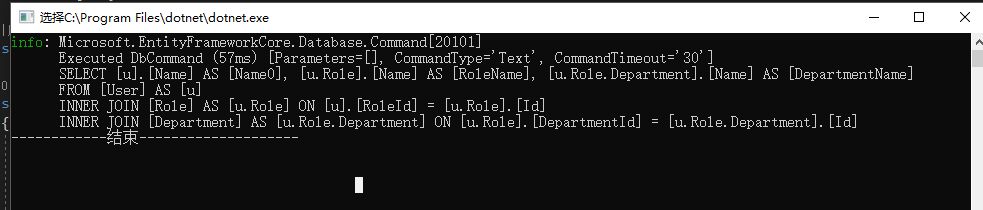
实体中的 DepartmentName 由于通过用户表关联角色表,再通过角色表关联 部门表得到故 需要通过特性标注
当然结果实体也可以多级关联
    public partial class UserModel

    {

        public string Name { get; set; }

        public string RoleName { get; set; }

        [FromEntity("Name","Role")]

        public string RoleName1 { get; set; }

        [FromEntity("Name", "Department", "Role")]

        public string DepartmentName { get; set; }

        public virtual RoleModel Role { get; set; }

        [FromEntity("Department", "Role")]

        public virtual Department Department { get; set; }

    }

    public partial class RoleModel

    {

        public string Name { get; set; }

        public string DepartmentName { get; set; }

        public virtual DepartmentModel Department  { get; set; }

    }

    public partial class DepartmentModel

    {

        public string Name { get; set; }

    }
生成的查询语句如下图
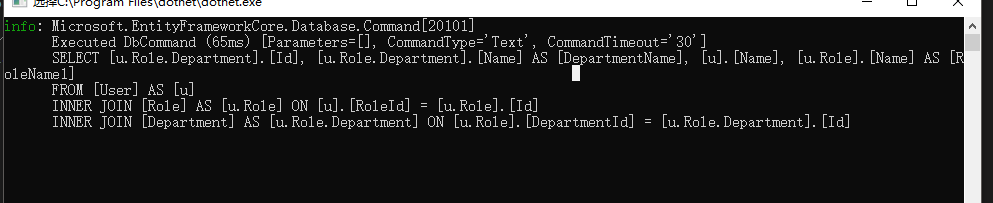
总结 此方案用在接口,精确查询字段,需要强类型视图的地方相对比较方便
作者:costyuan
GitHub地址:https://github.com/bieyuan/EFCoreSelectExtentions
地址:https://www.cnblogs.com/castyuan/p/10186619.html
本文版权归作者和博客园共有,欢迎转载,但未经作者同意必须保留此段声明,且在文章页面明显位置给出原文连接,否则保留追究法律责任的权利。
如果文中有什么错误,欢迎指出,谢谢!
EFCore扩展Select方法(根据实体定制查询语句)的更多相关文章
- EFCore扩展Update方法(实现 Update User SET Id=Id+1)
EFCore扩展Update方法(实现 Update User SET Id = Id + 1) 源码地址(github) 前言 EFCore在操作更新的时候往往需要先查询一遍数据,再去更新相应的字段 ...
- Java连接MySQL数据库实现用户名密码的验证方法 Java语句中sql查询语句'' ""作用
//方法一,可以验证登录,但方法不实用.package com.swift; import java.sql.Connection; import java.sql.DriverManager; im ...
- 用lambda构建ORM查询语句
本文介绍如何解析lambda表达式来获取一个满足条件的查询语句. 先看个截图 通过设置实体对象Article_Content的查询表达式,就可以获取对应的参数化SQL语句,使用起来很方便,减少了代码 ...
- c# linq查询语句详细使用介绍
本文介绍Linq的使用方法 linq介绍 LINQ只不过是实现IEnumerable和IQueryable接口的类的扩展方法的集合. LINQ可以查询IEnumerable集合或者IQueryable ...
- sql查询语句如何解析成分页查询?
我们公司主要mysql存储数据,因此也封装了比较好用mysql通用方法,然后,我们做大量接口,在处理分页查询接口,没有很好分查询方法.sql查询 语句如何解析成“分页查询”和“总统计”两条语句.可能, ...
- 深入学习MySQL 01 一条查询语句的执行过程
在学习SpringCloud的同时,也在深入学习MySq中,听着<mysql45讲>,看着<高性能MySQL>,本系列文章是本人学习过程的总结,水平有限,仅供参考,若有不对之处 ...
- Thinkphp中的volist标签(查询数据集(select方法)的结果输出)用法简介
参考网址:http://camnpr.com/archives/1515.html 通常volist标签多用于查询数据集(select方法)的结果输出,通常模型的select方法返回的结果是一个二维数 ...
- create table 使用select查询语句创建表的方法分享
转自:http://www.maomao365.com/?p=6642 摘要:下文讲述使用select查询语句建立新的数据表的方法分享 ---1 mysql create table `新数据表名` ...
- 解析oracle对select加锁的方法以及锁的查询 转
转自 https://www.jb51.net/article/37587.htm 本篇文章是对oracle对select加锁的方法以及锁的查询进行了详细的分析介绍,需要的朋友参考下 解析oracle ...
随机推荐
- linux下软件的种类和对应的安装及卸载的方式
转: 一个Linux应用程序的软件包中可以包含两种不同的内容: 1)一种就是可执行文件,也就是解开包后就可以直接运行的.在Windows中所 有的软件包都是这种类型.安装完这个程序后,你就可以使用,但 ...
- 1118 Birds in Forest
题意: 思路:并查集模板题. 代码: #include <cstdio> #include <algorithm> using namespace std; ; int fat ...
- 温故而知新(java实现)单例模式的七种写法
第一种(懒汉,线程不安全): Java代码 public class Singleton { private static Singleton instance; private Singleton ...
- Py修行路 python基础 (九)作用域 函数嵌套 闭包
名称空间与作用域 变量,函数 分成三种 #内置名称空间 内置函数, 系统函数内部自定义的. python查看内置函数,命令: import builtins dir(builtins) #全局名称空 ...
- C# winform开发
一处消息死锁分析 最近维护一个工控机上运行的winform程序,我的前任在一个弹出窗口(窗口B)里面调用了ShowDialog方法弹出对话框(窗口C),导致了一个问题是有时关闭窗口C时windows假 ...
- 4.solr学习速成之bean
以bean的形式提交索引,以bean的形式查询出来 package com.liucheng.solr; import java.io.Serializable; import org.apache. ...
- PHP操作Redis(一) PHP连接Redis,含Redis密码验证、指定某一Redis数据库
台服务器上都快开启200个redis实例了,看着就崩溃了.这么做无非就是想让不同类型的数据属于不同的应用程序而彼此分开. 那么,redis有没有什么方法使不同的应用程序数据彼此分开同时又存储在相同的实 ...
- 「小程序JAVA实战」微信开发者工具helloworld(三)
转自:https://idig8.com/2018/08/09/xiaochengxu-chuji-03/ 第一个小程序demo的运行,首选需要去使用开发工具 开发工具下载安装 https://mp. ...
- [原创]20行ruby代码实现依赖注入框架
我需要依赖注入 业余时间开发的娱乐项目 (为了练习使用ruby语言) 遵循SRP原则,业务逻辑拆分由各个service类型提供,假设存在如下几个类型 GameService 封装主要游戏业务逻辑 Us ...
- 2 时间管理和内存管理
时间管理 uC/OS-II的时间管理是通过定时中断来实现的,该定时中断一般为10毫秒或100毫秒发生一次(这个时间片段是OS的作者推荐的,大家可以参考邵贝贝翻译的<嵌入式实时操作系统ucos-I ...