
Angular5+ 自定义表单验证器
Angular5+ 自定义表单验证器
Custom Validators
标签(空格分隔): Angular
首先阐述一下遇到的问题:
- 怎样实现“再次输入密码”的验证(两个controller值相等)(equalTo)
- 怎样反向监听(先输入“再次输入密码”,后输入设置密码)
解决思路:
- 第一个问题,可以通过
[AbstractControl].root.get([targetName])来取得指定的controller,然后比较他们的值。 - 第二个,可以通过
[target].setErrors([errors])来实现。
- 这是一个我的自定义表单验证:
import {AbstractControl, FormGroup, ValidatorFn} from '@angular/forms';

import {G} from '../services/data-store.service';

export class MyValidators {

  private static isEmptyInputValue(value) {

    // we don't check for string here so it also works with arrays

    return value == null || value.length === 0;

  }

  private static isEmptyObject(obj) {

    if (typeof obj === 'object' && typeof obj.length !== 'number') {

      return Object.keys(obj).length === 0;

    }

    return null;

  }

  /**

   * 等于指定controller的值

   * @param targetName 目标的formControlName

   * @returns {(ctrl: FormControl) => {equalTo: {valid: boolean}}}

   */

  static equalTo(targetName: string): ValidatorFn {

    return (control: AbstractControl): {[key: string]: any} | null => {

      const target = control.root.get(targetName);

      if (target === null) {

        return null;

      }

      if (this.isEmptyInputValue(control.value)) {

        return null;

      }

      return target.value === control.value ? null : {'equalto': { valid: false }};

    };

  }

  /**

   * 反向输入监听指定controller是否与当前值相等

   * @param targetName

   */

  static equalFor(targetName: string): ValidatorFn {

    return (control: AbstractControl): {[key: string]: any} | null => {

      const target = control.root.get(targetName);

      if (target === null) {

        return null;

      }

      if (this.isEmptyInputValue(control.value)) {

        return null;

      }

      if (target.value === control.value) {

        const errors = target.errors;

        delete errors['equalto'];

        if (this.isEmptyObject(errors)) {

          target.setErrors(null);

        } else {

          target.setErrors(errors);

        }

        return null;

      }

      target.setErrors({ 'equalto': { valid: false } });

    };

  }

  ...

}
(注:)其中G.REGEX等的是全局变量。
- 然后
FormBuilder来实现:
import { Component, OnInit } from '@angular/core';

import {EventsService} from '../../../services/events.service';

import {FormBuilder, FormGroup, Validators} from '@angular/forms';

import {G} from '../../../services/data-store.service';

import {fade} from '../../../animations/fade.animation';

import {MyValidators} from '../../../directives/my-validators.directive';

@Component({

  selector: 'app-sign-up',

  templateUrl: './sign-up.component.html',

  styleUrls: ['./sign-up.component.scss'],

  animations: [fade]

})

export class SignUpComponent implements OnInit {

  signForm: FormGroup; // 表单组FormGroup

  submitting: boolean; // 是否可以提交

  validations = G.VALIDATIONS;

  constructor(private eventsService: EventsService, private formBuilder: FormBuilder) {

    this.submitting = false;

    //

    this.init();

  }

  ngOnInit() {

    // 设置父组件标题

    this.eventsService.publish('setSign', { title: '注册', subTitle: { name: '立即登录', uri: '/account/sign-in' } });

  }

  // 立即注册

  onSubmit() {

    console.log(this.signForm.getRawValue());

  }

  // 表单初始化

  private init() {

    this.signForm = this.formBuilder.group({

      username: ['', Validators.compose([Validators.required, Validators.maxLength(this.validations.USR_MAX)])],

      password: ['', Validators.compose([

        Validators.required,

        Validators.minLength(this.validations.PASS_MIN),

        Validators.maxLength(this.validations.PASS_MAX),

        MyValidators.equalFor('passwordConfirm')

      ])],

      passwordConfirm: ['', Validators.compose([

        Validators.required,

        Validators.minLength(this.validations.PASS_MIN),

        Validators.maxLength(this.validations.PASS_MAX),

        MyValidators.equalTo('password')

      ])]

    });

  }

}
(注:)其中fade动画效果。
- 然后在html模板中,显示表单验证提示信息:
<form [formGroup]="signForm" (ngSubmit)="onSubmit()" class="sign-form" @fade>

  <!-- 账号 -->

  <div class="input-group username">

    <span class="addon prev"><i class="civ civ-i-usr"></i></span>

    <input type="text"

      name="username"

      class="form-control form-control-left default"

      placeholder="请输入账号"

      formControlName="username"

      autocomplete="off">

    <ul class="errors" *ngIf="signForm.get('username').invalid && (signForm.get('username').dirty || signForm.get('username').touched)">

      <li *ngIf="signForm.get('username').hasError('required')" class="error">

        请输入您的账号!

      </li>

      <li *ngIf="signForm.get('username').hasError('maxlength')" class="error">

        账号不超过{{ validations.USR_MAX }}位!

      </li>

    </ul>

  </div> <!-- /.账号 -->

  <!-- 密码 -->

  <div class="input-group password">

    <span class="addon prev"><i class="civ civ-i-lock"></i></span>

    <input type="password"

      name="password"

      class="form-control form-control-left default"

      placeholder="请输入密码"

      formControlName="password">

    <ul class="errors" *ngIf="signForm.get('password').invalid && (signForm.get('password').dirty || signForm.get('password').touched)">

      <li *ngIf="signForm.get('password').hasError('required')" class="error">

        请输入您的密码!

      </li>

      <li *ngIf="signForm.get('password').hasError('minlength')" class="error">

        请输入至少{{ validations.PASS_MIN }}位数的密码!

      </li>

      <li *ngIf="signForm.get('password').hasError('maxlength')" class="error">

        密码不超过{{ validations.PASS_MAX }}位!

      </li>

    </ul>

  </div> <!-- /.密码 -->

  <!-- 重复密码 -->

  <div class="input-group password-confirm">

    <span class="addon prev"><i class="civ civ-i-lock"></i></span>

    <input type="password"

           name="passwordConfirm"

           class="form-control form-control-left default"

           placeholder="请再次输入密码"

           formControlName="passwordConfirm">

    <ul class="errors" *ngIf="signForm.get('passwordConfirm').invalid && (signForm.get('passwordConfirm').dirty || signForm.get('passwordConfirm').touched)">

      <li *ngIf="signForm.get('passwordConfirm').hasError('required')" class="error">

        请再次输入密码!

      </li>

      <li *ngIf="signForm.get('passwordConfirm').hasError('minlength')" class="error">

        请输入至少{{ validations.PASS_MIN }}位数的密码!

      </li>

      <li *ngIf="signForm.get('passwordConfirm').hasError('maxlength')" class="error">

        密码不超过{{ validations.PASS_MAX }}位!

      </li>

      <li *ngIf="!signForm.get('passwordConfirm').hasError('maxlength') && !signForm.get('passwordConfirm').hasError('minlength') && signForm.get('passwordConfirm').hasError('equalto')" class="error">

        两次密码输入不一致!

      </li>

    </ul>

  </div> <!-- /.重复密码 -->

  <!-- 提交按钮 -->

  <button type="submit"

          class="btn btn-primary btn-block submit"

          [disabled]="submitting || signForm.invalid">立即注册</button>

  <!-- /.提交按钮 -->

</form>
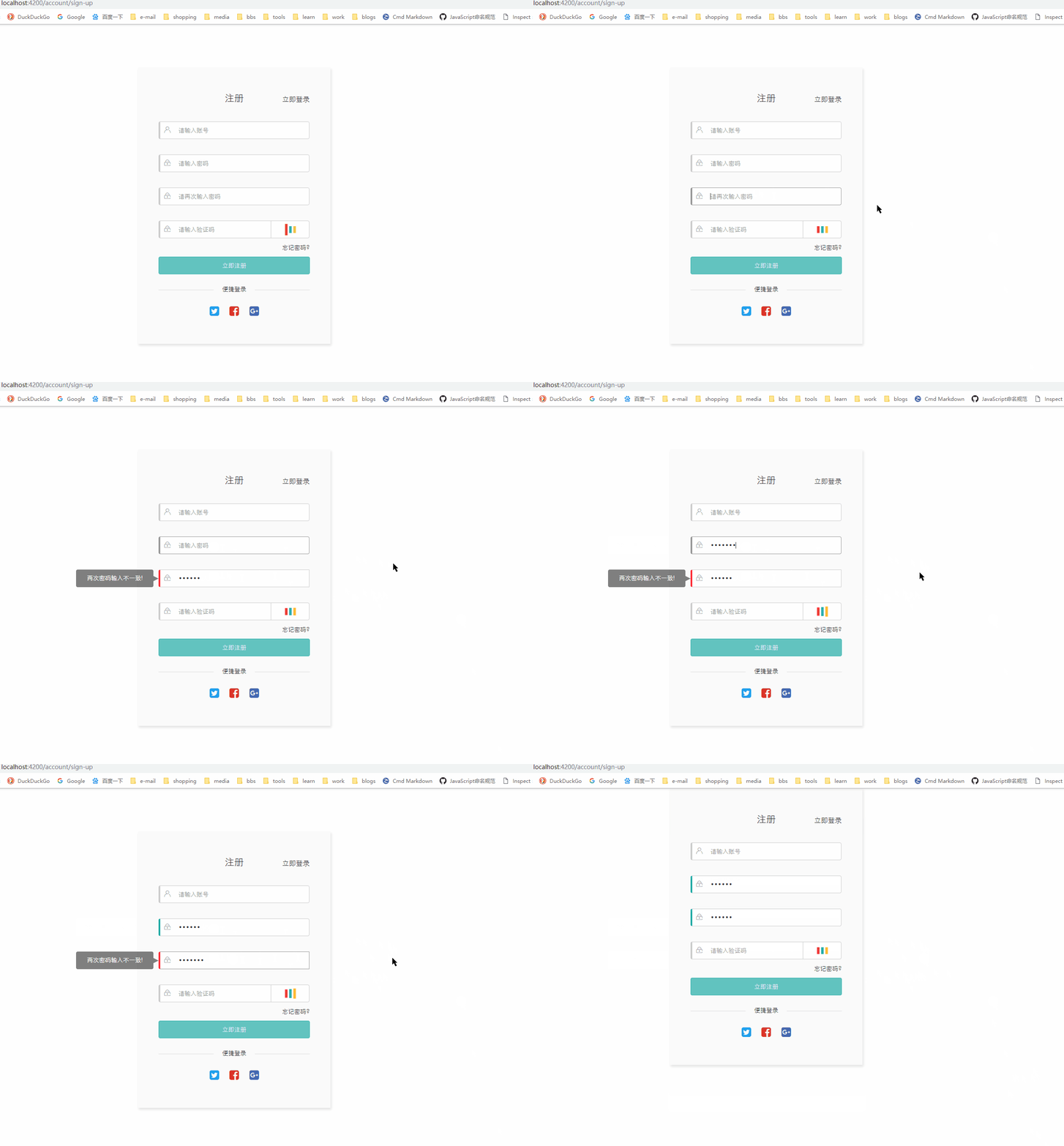
最后,我们可以看到,实现了想要的效果:
(附:)完整的自定义表单验证器:
import {AbstractControl, FormGroup, ValidatorFn} from '@angular/forms';

import {G} from '../services/data-store.service';

export class MyValidators {

  private static isEmptyInputValue(value) {

    // we don't check for string here so it also works with arrays

    return value == null || value.length === 0;

  }

  private static isEmptyObject(obj) {

    if (typeof obj === 'object' && typeof obj.length !== 'number') {

      return Object.keys(obj).length === 0;

    }

    return null;

  }

  /**

   * 等于指定controller的值

   * @param targetName 目标的formControlName

   * @returns {(ctrl: FormControl) => {equalTo: {valid: boolean}}}

   */

  static equalTo(targetName: string): ValidatorFn {

    return (control: AbstractControl): {[key: string]: any} | null => {

      const target = control.root.get(targetName);

      if (target === null) {

        return null;

      }

      if (this.isEmptyInputValue(control.value)) {

        return null;

      }

      return target.value === control.value ? null : {'equalto': { valid: false }};

    };

  }

  /**

   * 反向输入监听指定controller是否与当前值相等

   * @param targetName

   */

  static equalFor(targetName: string): ValidatorFn {

    return (control: AbstractControl): {[key: string]: any} | null => {

      const target = control.root.get(targetName);

      if (target === null) {

        return null;

      }

      if (this.isEmptyInputValue(control.value)) {

        return null;

      }

      if (target.value === control.value) {

        const errors = target.errors;

        delete errors['equalto'];

        if (this.isEmptyObject(errors)) {

          target.setErrors(null);

        } else {

          target.setErrors(errors);

        }

        return null;

      }

      target.setErrors({ 'equalto': { valid: false } });

    };

  }

  /**

   * 验证手机号

   * @returns {(ctrl: FormControl) => {mobile: {valid: boolean}}}

   */

  static get mobile() {

    return (control: AbstractControl) => {

      if (this.isEmptyInputValue(control.value)) {

        return null;

      }

      const valid = G.REGEX.MOBILE.test(control.value);

      return valid ? null : {

        'mobile': {

          valid: false

        }

      };

    };

  }

  /**

   * 验证身份证

   * @returns {(ctrl: FormControl) => {idCard: {valid: boolean}}}

   */

  static get idCard() {

    return (control: AbstractControl) => {

      if (this.isEmptyInputValue(control.value)) {

        return null;

      }

      const valid = G.REGEX.ID_CARD.test(control.value);

      return valid ? null : {

        'idcard': {

          valid: false

        }

      };

    };

  }

  /**

   * 验证汉字

   * @returns {(ctrl: FormControl) => {cn: {valid: boolean}}}

   */

  static get cn() {

    return (control: AbstractControl) => {

      if (this.isEmptyInputValue(control.value)) {

        return null;

      }

      const valid = G.REGEX.CN.test(control.value);

      return valid ? null : {

        'cn': {

          valid: false

        }

      };

    };

  }

  /**

   * 指定个数数字

   * @param {number} length

   * @returns {(ctrl: FormControl) => (null | {number: {valid: boolean}})}

   */

  static number(length: number = 6) {

    return (control: AbstractControl) => {

      if (this.isEmptyInputValue(control.value)) {

        return null;

      }

      const valid = new RegExp(`^\\d{${length}}$`).test(control.value);

      return valid ? null : {

        'number': {

          valid: false

        }

      };

    };

  }

  /**

   * 强密码(必须包含数字字母)

   * @returns {(ctrl: FormControl) => (null | {number: {valid: boolean}})}

   */

  static get strictPass() {

    return (control: AbstractControl) => {

      if (this.isEmptyInputValue(control.value)) {

        return null;

      }

      const valid = G.REGEX.STRICT_PASS.test(control.value);

      return valid ? null : {

        'strictpass': {

          valid: false

        }

      };

    };

  }

}
Angular5+ 自定义表单验证器的更多相关文章
- 五十四:WTForms表单验证之自定义表单验证器
如果想要对表单中的某个字段进行自定义验证,则需要对这个字段进行单独的验证1.定义一个方法,命名规则为:validate_字段名(self, filed)2.在方法中,使用filed.data获取字段的 ...
- AngularJS自定义表单验证器
<!doctype html> <html ng-app="myApp"> <head> <script src="G:\\So ...
- layui 自定义表单验证的几个实例
*注:使用本方法请先引入layui依赖的layu.js和layui.css 1.html <input type="text" name="costbudget&q ...
- Angular自定义表单验证
前端表单验证 为年龄输入框添加了两个验证,并分情况填写了提示语 <form nz-form [formGroup]="validateForm"> <nz-for ...
- jquery.validate.js使用之自定义表单验证规则
jquery.validate.js使用之自定义表单验证规则,下面列出了一些常用的验证法规则 jquery.validate.js演示查看 jquery validate强大的jquery表单验证插件 ...
- angular4 自定义表单验证Validator
表单的验证条件有时候满足不了需求就可以自定义验证 唯一要求返回是ValidatorFn export interface ValidatorFn{ (c:AbstractControl):Valida ...
- element自定义表单验证
element-ui框架下修改密码弹窗进行表单验证. 除了基础校验,密码不为空,长度不小于6字符,需求中还需校验密码由数字和字母组合. 处理代码如下: <el-dialog :visible.s ...
- ElementUI使用问题记录:设置路由+iconfont图标+自定义表单验证
一.关于导航怎么设置路由 1.在el-menu这个标签的属性中添加 router ,官方文档的解释是:启用vue-router 这种模式 2.在el-menu-item标签中的index属性直接书写路 ...
- 自定义表单验证--jquery validator addMethod的使用
原文地址:jquery validator addMethod 方法的使用作者:蜡笔小玄 jQuery.validate是一款非常不错的表单验证工具,简单易上手,而且能达到很好的体验效果,虽然说在项目 ...
随机推荐
- POJ_1456 Supermarket 【并查集/贪心】
一.题面 POJ1456 二.分析 1.贪心策略:先保证从利润最大的开始判断,然后开一个标记时间是否能访问的数组,时间尽量从最大的时间开始选择,这样能够保证后面时间小的还能够卖. 2.并查集:并查集直 ...
- C++ GUI Qt4编程(05)-2.2GoToCell
1. 使用Qt设计师创建GoToCell对话框. 2. gotocelldialog.cpp #include <QRegExp> #include "gotocelldialo ...
- poj3190
一.题意:有n头牛,每头牛需要占用一个时间段的时间来挤奶,且必须有机器.问最少需要多少个机器 二.思路:区间贪心.把尽量多的牛放在一个棚子里,这样就可以使得用到的棚子数最少.只要任意两头牛的挤奶时间不 ...
- PIE SDK屏幕坐标和地图坐标转换
1. 功能简介 屏幕坐标和地图坐标转换,就是字面意思,将电脑屏幕的坐标转换为带有空间信息的地图坐标,主要运用PIE SDK地图控件的ToMapPoint()方法,而地图坐标转换为设备坐标(屏幕),用的 ...
- fixed
之前我们见的fixed就是固定在低端.后来我遇到一个问题 如果 这样写: div{ position: fixed; left: 0; bottom: 0; } 内容吧div撑开,有多少算多少 di ...
- C++ Memory System Part2: 自定义new和delete
在第一部分中,我们介绍了new / delete的具体用法和背后的实现细节,这次我们将构建我们自己的小型工具集,可以使用我们自定义的allocator类来创建任意类型的实例(或者实例数组),我们需要做 ...
- 8086实时时钟实验(一)——《x86汇编语言:从实模式到保护模式》05
1.代码清单 ;代码清单9-1 ;文件名:c09_1.asm ;文件说明:用户程序 ;创建日期:2011-4-16 22:03 ;=================================== ...
- 10、选择框:ion-select
!重点 multiple="true" 控制 选择框是 多选还是单选.true为 多选类似 checkbox. /* ---html----*/ <ion-content p ...
- Excle 导入DataSet
using System.Data.OleDb;using System.Data; public void ReadExcelFiless() { //strin ...
- linq之Capacity(转载)
出处:博客园 作者:mumuliang 连接:http://www.cnblogs.com/mumuliang/p/3914425.html Capacity 在.NET中List的容量应该只是受到硬 ...